Practical exercises. Tantor DBA 1-18: PostgreSQL Administration 18 |

Practical exercises. Tantor DBA 1-18: PostgreSQL Administration 18 |
Table of contents
chapter |
page |
3 |
|
32 |
|
37 |
|
44 |
|
51 |
|
55 |
|
61 |
|
79 |
|
90 |
|
118 |
|
121 |
|
129 |
|
145 |
|
154 |
|
185 |
|
202 |
|
202 |
|
205 |
|
209 |
|
218 |
|
229 |
|
233 |
|
237 |
|
Copyright
The textbook, practical assignments, and presentations (hereinafter referred to as documents) are intended for educational purposes.
The documents are protected by copyright and intellectual property laws.
You may copy and print documents for personal use for self-study, as well as for training at training centers and educational institutions authorized by Tantor Labs LLC. Training centers and educational institutions authorized by Tantor Labs LLC may create training courses based on the documents and use the documents in their curricula with the written permission of Tantor Labs LLC.
You may not use the documents for paid training of employees or other persons without the permission of Tantor Labs LLC. You may not license or commercially use the documents in whole or in part without the permission of Tantor Labs LLC.
When using information from documents (text, images, commands) for non-commercial purposes (presentations, reports, articles, books), please keep a link to the documents.
The text of the documents cannot be changed in any way.
The information contained in these documents is subject to change without notice, and we do not guarantee its accuracy. If you discover any errors or copyright infringements, please notify us.
Disclaimer for content, products and services of third parties:
Tantor Labs LLC and its affiliates assume no liability and expressly disclaim any warranties of any kind, including loss of income, arising from the direct or indirect, special, or incidental use of this document. Tantor Labs LLC and its affiliates are not responsible for any losses, costs, or damages arising from the use of the information contained in this document or the use of third-party links, products, or services.
Copyright © 2026, Tantor Labs LLC
Author : Oleg Ivanov
! |
Created: 14 June
2026 |
Part 1. Creating a cluster
1) Open a terminal with root privileges:
astra@tantor :~$ sudo bash
2) See how many processor cores are available in the virtual machine (the result may differ from the example values):
root@tantor:/home/astra# cat /proc/cpuinfo | grep cores
CPU cores: 2
CPU cores: 2
The number of rows per processor. If you run the command without " | grep cores ", you'll see that detailed data is displayed for each processor core.
How much RAM is available:
root @ tantor :/ home / astra # cat / proc / meminfo | grep Meme
MemTotal: 2981796 kB
MemFree: 1403776 kB
MemAvailable: 2250896 kB
Postgres software is installed in the /opt/tantor/db directory
Directory with cluster files: /var/lib/postgresql
These directories may have separate mount points, but in our operating system, these directories are mounted under the root "/" . Check how much free space is left:
root@tantor:/home/astra# df -HT | grep /$
/dev/sda1 ext4 50G 17G 31G 35% /
31 GB free.
For industrial use, it is recommended to have 4 cores.
RAM: at least 4 GB.
Free space on the storage system ("disk"): 40 GB.
4) Download installer :
root@tantor:/home/astra# wget public.tantorlabs.ru/db_installer.sh
https://public.tantorlabs.ru/db_installer.sh
Resolving public.tantorlabs.ru (public.tantorlabs.ru)... 84.201.157.208
Connecting to public.tantorlabs.ru (public.tantorlabs.ru)|84.201.157.208|:443... connected.
HTTP request sent, awaiting response... 200 OK
Length: 18312 (18K) [application/octet-stream]
Saving to: 'db_installer.sh'
db_installer.sh 100%[=====>] 17.88K --.-KB/s in 0s
'db_installer.sh' saved [23047/23047]
5) Check the execution permissions for the installation script:
root@tantor:/home/astra# ls -al db_installer.sh
-rw-r--r-- 1 root root 18353 db_installer.sh
6) If there are no permissions to execute the file, then grant execution rights:
root@tantor:/home/astra# chmod +x db_installer.sh
7) Check the installer version and review the parameters:
root@tantor:/home/astra# ./db_installer.sh --help
====================
Usage: db_installer.sh [OPTIONS]
Installer version: July 25, 2014
This script will perform installation of the Tantor DB on current host.
If the Tantor DB is already installed, no actions will be taken.
Available options:
--help Show this help message.
---------------------------------------
--edition= Set edition (be, se, se-1c, certified, certified-2 ).
"se" is default.
--major-version= Set major version (14, 15, 16, 17)
--maintenance-version= Set maintenance version (15.2.4).
By default latest version will be installed.
--do-initdb After installation run initdb with checksums.
--package= Set specific package (all, client, libpq5).
"all" is default.
--data-dir Set data directory to which the cluster are going
to be installed. Default is:
" /var/lib/postgresql/tantor-$EDITION-$MAJOR_VERSION/data ".
--------------------------------------
--from-file= Install package from local file (rpm, deb)
May be used with --do-initdb option
====================
Example for commercial use
====================
export NEXUS_USER="user_name"
export NEXUS_USER_PASSWORD="user_password"
export NEXUS_URL="nexus.tantorlabs.ru"
./db_installer.sh \
--do-initdb \
--major-version=15 \
--edition=se
====================
Example for evaluation use (without login and password)
Only for Basic Edition
====================
export NEXUS_URL="nexus-public.tantorlabs.ru"
./db_installer.sh \
--do-initdb \
--major-version=15 \
--edition=be
====================
Examples how to install from file
====================
./db_installer.sh \
--from-file=./packages/tantor-be-server-15_15.4.1.jammy_amd64.deb
./db_installer.sh \
--do-initdb \ --from-file=/tmp/tantor-be-server-15_15.4.1.jammy_amd64.deb
When creating a cluster, the installer enables the calculation of checksums for data blocks .
8 ) Verify that the path to the executable files has been added to the postgres user profile file . Switch to the postgres user , which is created by the installer to run cluster instances. The " - " parameter forces the profile files of the user you are switching to to be executed.
root@tantor:/home/astra# su - postgres
postgres@tantor:~$ cat .bash_profile
export PGDATA=/var/lib/postgresql/tantor-se-18/data
#export LC_MESSAGES=ru_RU.utf8
#unset LANGUAGE
export PATH=/opt/tantor/db/18/bin:$PATH
9) Perform this step only if the PGDATA environment variable is missing in the . bash_profile file .
If the variable is missing, add the path to the cluster files to the environment variable so you don't have to specify it with the "-D" parameter each time you run the utilities. Enter the command on one line, using two angle brackets:
postgres @ tantor :~$
echo "export PGDATA=/var/lib/postgresql/tantor-se-18/data" >> .bash_profile
Please check that you have successfully and correctly added PGDATA to the end of the profile file.
postgres@tantor:~$ cat .bash_profile
#export LC_MESSAGES=ru_RU.utf8
#unset LANGUAGE
export PATH=/opt/tantor/db/18/bin:$PATH
export PGDATA=/var/lib/postgresql/tantor-se-18/data
Re-read the profile file that you changed:
postgres@tantor:~$ source .bash_profile
Part 2. Creating a cluster using the initdb utility
1) Stop the instance. Use the pg_ctl utility :
postgres@tantor:~$ pg_ctl stop
waiting for server to shut down.... done
server stopped
You could use the command to manage services started by the systemd infrastructure : sudo systemctl stop tantor - se - server -18 , but there is no guarantee that after the prompt returns all processes are stopped.
/usr/lib/systemd/system/tantor-se-server-18.service using a text editor you are familiar with ( kate or mcedit ) , or, if you are not familiar, use the cat command and find the lines that indicate the utilities that are called when starting, stopping, or updating (reloading) the service:
postgres@tantor:~$
cat /usr/lib/systemd/system/tantor-se-server-18.service | grep /opt
ExecStartPre=/opt/tantor/db/18/bin/ postgresql-check-db-dir ${PGDATA}
ExecStart=/opt/tantor/db/18/bin/ pg_ctl start -D ${PGDATA} -s -w -t ${PGSTARTTIMEOUT}
ExecStop=/opt/tantor/db/18/bin/ pg_ctl stop -D ${PGDATA} -s -m fast
ExecReload=/opt/tantor/db/18/bin/ pg_ctl reload -D ${PGDATA} -s
When launched by command systemctl first checks that the PGDATA directory is "similar" to the cluster directory using the postgresql -check-db-dir utility , and then uses pg_ctl start .
The pg_ctl utility is used to start, stop, and reload the configuration . Reloading is not a restart, but a reloading of the instance's configuration files .
Default stop mode - fast .
If an instance was started using pg_ctl rather than systemd , systemctl will not stop the instance. However, pg_ctl will stop an instance started by any means. Therefore, it is recommended to stop an instance using pg_ctl .
It's best to start an instance via systemctl . When starting an instance via a network connection (connecting via SSH) using the pg_ctl utility, the instance will be forcibly terminated after the network connection is closed, since KillUserProcesses = yes by default, but this value can be changed in /etc/systemd/logind.conf . Also , when starting via pg_ctl , you 'll need to configure the message log output to a file so that diagnostic messages are output to a file rather than to the terminal.
3) Run the stop instance command again. If the instance is running, it will stop; if it isn't running, the utility will notify you:
postgres@tantor:~$ pg_ctl stop
pg_ctl: PID file "/var/lib/postgresql/tantor-se-18/data/postmaster.pid" does not exist
Is the server running?
4) Save the cluster directory. To do this, run three commands:
postgres@tantor:~$ mkdir $PGDATA/../data.SAVE
mv $PGDATA/* $PGDATA/../data.SAVE
chmod 750 $PGDATA/../data.SAVE
5) Create a new cluster. To create a cluster, use the initdb utility . The utility is passed parameters and also responds to environment variables, particularly those related to localization. Run the utility without parameters (with default values):
postgres@tantor:~$ initdb
The files belonging to this database system will be owned by user "postgres".
This user must also own the server process.
The database cluster will be initialized with locale "en_US.UTF-8" .
The default database encoding has accordingly been set to "UTF8".
The default text search configuration will be set to "english".
Data page checksums are enabled.
fixing permissions on existing directory /var/lib/postgresql/tantor-se-18/data ... ok
creating subdirectories...ok
selecting dynamic shared memory implementation ... posix
selecting default max_connections ... 100
selecting default shared_buffers ... 128MB
selecting default time zone ... Europe/Moscow
creating configuration files...ok
running bootstrap script...ok
performing post-bootstrap initialization ... ok
syncing data to disk... ok
initdb: warning: enabling "trust" authentication for local connections
initdb: hint: You can change this by editing pg_hba.conf or using the option -A, or --auth-local and --auth-host, the next time you run initdb.
Success. You can now start the database server using:
pg_ctl -D /var/lib/postgresql/tantor-se-18/data -l logfile start
6) Read the result. You can use the keyboard shortcuts <Shift+PgUp> <Shift+PgDown> to do this . Please note that starting with PostgreSQL version 18, checksum calculation is enabled by default.
The localization parameters with which the cluster was created are also provided.
7) Use the pg_controldata utility to check that checksum calculation is enabled:
postgres@tantor:~$ pg_controldata
pg_control version number: 1800
Tantor edition: Tantor Special Edition
Commit hash: 198068a9cba07d65
Catalog version number: 642601132
Database system identifier: 7632634307101010267
Database cluster state: shut down
pg_control last modified: Sat 25 Apr 2026 12:59:19 PM MSK
Latest checkpoint location: 0/1797230
Latest checkpoint's REDO location: 0/1797230
Latest checkpoint's REDO WAL file: 0000000100000000000000001
Latest checkpoint's TimeLineID: 1
Latest checkpoint's PrevTimeLineID: 1
Latest checkpoint's full_page_writes: on
Latest checkpoint's NextXID: 753
Latest checkpoint's NextOID: 13603
Latest checkpoint's NextMultiXactId: 1
Latest checkpoint's NextMultiOffset: 0
Latest checkpoint's oldestXID: 745
Latest checkpoint's oldestXID's DB: 1
Latest checkpoint's oldestActiveXID: 0
Latest checkpoint's oldestMultiXid: 1
Latest checkpoint's oldestMulti's DB: 1
Latest checkpoint's oldestCommitTsXid:0
Latest checkpoint's newestCommitTsXid:0
Time of latest checkpoint: Sat 25 Apr 2026 12:59:19 PM MSK
Fake LSN counter for unlogged rels: 0/3E8
Minimum recovery ending location: 0/0
Min recovery ending loc's timeline: 0
Backup start location: 0/0
Backup end location: 0/0
End-of-backup record required: no
wal_level setting: replica
wal_log_hints setting: off
max_connections setting: 100
max_worker_processes setting: 8
max_wal_senders setting: 10
max_prepared_xacts setting: 0
max_locks_per_xact setting: 64
track_commit_timestamp setting: off
Maximum data alignment: 8
Database block size: 8192
Blocks per segment of large relation: 131072
WAL block size: 8192
Bytes per WAL segment: 16777216
Maximum length of identifiers: 64
Maximum columns in an index: 32
Maximum size of a TOAST chunk: 1996
Size of a large-object chunk: 2048
Date/time storage type: 64-bit integers
Float8 argument passing: by value
Data page checksum version: 1
Default char data signedness: signed
Mock authentication nonce: 62a6a85f1cb9bc10a4857...
Init Tantor edition: Tantor Special Edition
Init commit hash : 198068 a 9 cba 07 d 65
8) Find the information in the results that the cluster instance was not started or shut down correctly. This is the line:
Database cluster state: shut down
9) Look at the parameters of the pg_checksum utility :
postgres@tantor:~$ pg_checksums --help
pg_checksums enables, disables, or verifies data checksums in a PostgreSQL database cluster.
Usage:
pg_checksums [OPTION]... [DATADIR]
Options:
[-D, --pgdata=]DATADIR data directory
-c, --check check data checksums (default)
-d, --disable disable data checksums
-e, --enable enable data checksums
-f, --filenode=FILENODE check only relation with specified filenode
-N, --no-sync do not wait for changes to be written safely to disk
-P, --progress show progress information
-v, --verbose output verbose messages
-V, --version output version information, then exit
-?, --help show this help, then exit
If no data directory (DATADIR) is specified, the environment variable PGDATA
is used.
The utility can enable or disable checksum calculation on a cluster.
-c option checks blocks in existing data files against the checksums stored in their blocks.
10) Check the integrity of cluster data files:
postgres@tantor:~$ pg_checksums -c
Checksum operation completed
Files scanned: 950
Blocks scanned: 2890
Bad checksums: 0
Data checksum version : 1
This command can be used to check for corrupted blocks in cluster files. The drawback of this utility is that the instance must be stopped.
11) Start the cluster instance:
postgres@tantor:~$ pg_ctl start
waiting for server to start....
LOG: Tantor Special Edition 18.3.0 198068a9 on x86_64-pc-linux-gnu, compiled by gcc (Astra 12.2.0-14.astra3) 12.2.0, 64-bit
LOG: listening on IPv4 address " 127.0.0.1 ", port 5432
LOG: listening on Unix socket "/var/run/postgresql/ .s.PGSQL.5432 "
LOG: database system was shut down at 13:25:56 MSK
LOG: database system is ready to accept connections
done
server started
The instance uses port 5432 (the numbers are in the file name) for Unix sockets and the same port on the local network interface.
12) The instance can also be started with the command sudo systemctl start tantor-se-server-18 . It is preferable to use systemctl . When started with the pg_ctl start command , which we used, messages are printed to err or output stream , by default directed to the terminal of the postgres operating system user , unless the logging_collector = on configuration parameter is set .
Check it out This :
postgres@tantor:~$ psql -qc "\dconfig log_destination"
List of configuration parameters
Parameter | Value
-----------------+--------
log_destination | std err
(1 row)
When running with systemd, the parameter value is the same ( log_destination=stderr ), but the error output stream is directed to the operating system log or the syslog process (the text file /var/log/syslog, where all messages from operating system processes are collected). In production use, large volumes of text may be transferred to the log, so it is better to use the logger message collection process (enabled by the logging_collector= on configuration parameter ), which operates asynchronously and does not cause process delays. Configuring the message log is covered in a separate chapter of the course.
Part 3. Single-user mode
1) Let's look at using single-user mode. This mode is used in rare cases of cluster file corruption.
Stop the cluster instance:
postgres@tantor:~$ pg_ctl stop
waiting for server to shut down.... done
server stopped
the utility's stop messages pg_ctl , messages that are usually output to the diagnostic log will be displayed on the screen .
2) Start one process that will accept our commands in one session:
postgres@tantor:~$ postgres --single
PostgreSQL stand-alone backend 18.3
3) A prompt will appear. SELECT -type commands do not return the result in the usual format, but with diagnostic data. Also, commands do not necessarily need to be terminated and sent for execution with the ";" character .
Issue the SELECT command:
backend> select tantor_version()
1: tantor_version (typeid = 25, len = -1, typmod = -1, byval = f)
----
1: tantor_version = " Tantor Special Edition 18.3.0 " (typeid = 25, len = -1, typmod = -1, byval = f)
----
4) Give team reindex system :
backend> reindex system
The command will rebuild indexes on system catalog tables.
5) To exit the session, press <Ctrl+D> on the keyboard. psql commands (those beginning with a backslash, such as the psql exit command "\q") and their synonyms (quit, exit , which are synonyms for \q) do not work, since we are not working in the psql utility .
Disconnect from the cluster by typing <Ctrl+D> :
backend> <Ctrl+D> LOG: checkpoint starting: shutdown immediate
LOG: checkpoint complete: wrote 145 buffers (0.9%); 0 WAL file(s) added, 0 removed, 1 recycled; write=0.007 s, sync=0.070 s, total=0.086 s; sync files=283, longest=0.012 s, average=0.001 s; distance=5719 kB, estimate=5719 kB; lsn=0/208C110, redo lsn=0/208C110
postgres@tantor:~$
Note: If you accidentally typed <Ctrl+z> instead of <Ctrl+D> (EOF), you suspended the process and sent it to the background. You can return the process to foreground mode and exit gracefully using the fg postgres command . Example :
postgres@tantor:~$ postgres --single
PostgreSQL stand-alone backend 18.3
backend> ^Z
[1]+ Stopped postgres --single
postgres@tantor:~$ fg postgres
postgres --single
<ENTER>
backend> <Ctrl+D>
LOG: checkpoint starting: shutdown immediate
"shutdown immediate" message refers to the checkpoint properties, not the instance shutdown mode. Stopping an instance in immediate mode (using pg_ctl stop -m immediate) does not perform a checkpoint.
Text in checkpoint messages (after LOG: checkpoint starting : ) means:
shutdown : A checkpoint is caused by stopping the instance.
immediate : Execute the checkpoint at maximum speed, ignoring the value of the checkpoint_completion_target parameter.
force : perform a checkpoint even if nothing has been written to the WAL since the previous checkpoint (there was no activity in the cluster), this happens if the instance is stopped ( shutdown ) or at the end of recovery ( end-of-recovery ).
wait : Wait for the checkpoint to complete before returning control to the process that called the checkpoint (without wait , the process will run the checkpoint and continue running).
end-of-recovery : checkpoint at the end of log rolling (WAL recovery).
xlog : checkpoint caused by reaching max_wal_size ("by size").
time : the checkpoint was triggered by reaching checkpoint_timeout ("by time").
6) Run the instance as root :
postgres@tantor:~$ sudo systemctl start tantor-se-server-18
7) Stop the instance. Regardless of how it was started, it can be stopped using the pg_ctl utility :
postgres@tantor:~$ pg_ctl stop
waiting for server to shut down.... done
server stopped
Part 4. Passing parameters to an instance on the command line
1) Let's look at how to pass configuration parameters to launch an instance on the command line. We'll set the work_mem parameter to 8 megabytes. Some configuration parameters can only be set by passing them on the command line.
Run the following command:
postgres @ tantor :~$ pg _ ctl start - o "-- work _ mem =8 MB " - l logfile .log
waiting for server to start.... done
server started
2) Check that the parameter is installed:
postgres@tantor:~$ psql -q
postgres=# show work_mem;
work_mem
----------
8MB
(1 row)
Part 5. Localization
1) After creating the cluster, let's check whether the sorting works satisfactorily:
postgres=# SELECT n FROM unnest(ARRAY[' a ', ' e ', ' e ', ' F ', ' i ', ' E ', ' E ']) n ORDER BY n;
n
---
A
e
E
yo
Yo
AND
I
(7 rows)
postgres=# SELECT n FROM unnest(ARRAY[' a ', ' e ', ' e ', ' F ', ' i ', ' E ', ' E ']) n ORDER BY n COLLATE "ru-x- icu ";
n
---
A
e
E
yo
Yo
AND
I
(7 rows)
2) Let's see what types of sorting the operating system supported when creating the cluster:
postgres=# select collname from pg_collation where collname like '%ru%RU%';
collname
-------------
ru_RU
ru_RU.cp1251ru_RU.iso88595ru_RU.utf8
ru_RUru_RUru-RU-x-icu(7 rows)
When upgrading Linux , the version of localization libraries ( glibc or ICU ) may change . PostgreSQL issues a warning in this case:
WARNING: database "template1" has a collation version mismatch
DETAIL: The database was created using collation version 2.42, but the operating system provides version 2.43.
HINT: Rebuild all objects in this database that use the default collation and run ALTER DATABASE postgres REFRESH COLLATION VERSION, or build PostgreSQL with the right library version.
When changing versions, collation rules may change (for example, the letters "ё" and "е " will be considered the same letter), which can lead to duplicates in unique indexes. To eliminate the warnings, run the following commands on the cluster databases:
postgres=# alter database template1 refresh collation version;
NOTICE: changing version from 2.42 to 2.43
ALTER DATABASE
All objects (indexes) affected by the changes will need to
be rebuilt .
Part 6. Single-byte encodings
The commands given below in this section do not need to be executed, but can be viewed:
1) postgres=# select collname from pg_collation where collname like '%ru%RU%';
collname
----------------
ru_RU
ru_RU.cp1251
ru_RU.iso88595
ru_RU.utf8
ru_RU
ru_RU
ru-RU-x-icu
(7 rows)
2) Creating a database with a different collation type:
postgres=# create database lab01iso88595 LOCALE_PROVIDER =libc LC_COLLATE = ' ru_RU.iso88595 ';
ERROR: encoding "UTF8" does not match locale "ru_RU.iso88595"
DETAIL: The chosen LC_COLLATE setting requires encoding "ISO_8859_5".
The error indicates that the sorting is related to the encoding.
When creating a database, you can use any locale provider ( builtin , libc , icu ), not just the one used when creating the cluster.
3) Specify the encoding and locale provider:
postgres=# create database lab01iso88595 LOCALE_PROVIDER=libc LC_COLLATE = 'ru_RU.iso88595' ENCODING='ISO_8859_5';
ERROR: encoding "ISO_8859_5" does not match locale "en_US.UTF-8"
DETAIL: The chosen LC_CTYPE setting requires encoding "UTF8".
The error indicates that ctype is also related to encoding.
4) Let's try more :
postgres=# create database lab01iso88595 LOCALE_PROVIDER=libc LC_COLLATE = 'ru_RU.iso88595' LC_CTYPE='ru_RU.iso88595';
ERROR: encoding "UTF8" does not match locale "ru_RU.iso88595"
DETAIL: The chosen LC_CTYPE setting requires encoding "ISO_8859_5".
The selected ctype requires specifying the encoding for the database being created.
5) Let us indicate All four parameter :
postgres=# create database lab01iso88595 LOCALE_PROVIDER=libc LC_COLLATE = 'ru_RU.iso88595' LC_CTYPE='ru_RU.iso88595' ENCODING='ISO_8859_5';
ERROR: new encoding (ISO_8859_5) is incompatible with the encoding of the template database (UTF8)
HINT: Use the same encoding as in the template database, or use template0 as template.
The error indicates that the template1 database cannot be used, the only template that can be used is template0 .
6) Let us indicate Name template :
postgres=# create database lab01iso88595 LOCALE_PROVIDER=libc LC_COLLATE = 'ru_RU.iso88595' LC_CTYPE='ru_RU.iso88595' ENCODING='ISO_8859_5' TEMPLATE= template0;
CREATE DATABASE
When creating a database with a non-default encoding for the cluster, it was necessary to specify all four parameters and the provider if it was different from the cluster provider.
7) Let's connect to the new database and check that the collation works correctly with single-byte encoding. We'll set it explicitly , but it's not necessary, since the collation value is used by default for this database:
postgres=# \c lab01iso88595 \\
SELECT n FROM unnest(ARRAY[' a ', ' e ', ' e ', ' F ', ' i ', ' E ', ' E ']) n ORDER BY n COLLATE " ru_RU.iso88595 " ;
\c postgres \\
drop database lab01iso88595;
You are now connected to database "lab01iso88595" as user "postgres".
n
---
A
e
E
yo
Yo
AND
I
(7 rows)
You are now connected to database "postgres" as user "postgres".
DROP DATABASE
Works correctly, just like with UTF-8 encoding.
8) The builtin localization provider , although it works faster and does not require REFRESH COLLATION and rebuilding indexes when updating the operating system localization libraries, but it incorrectly sorts the letters ё , Ё in all three of its locales ( C , C . UTF -8 , PG _ UNICODE _ FAST ):
postgres=# create database lab01builtin LOCALE_PROVIDER=builtin BUILTIN_LOCALE='PG_UNICODE_FAST' TEMPLATE=template0;
\c lab01builtin \\
SELECT n FROM unnest(ARRAY[' a ', ' e ', ' yo ', ' Zh ', ' i ', ' yo ',' e ']) n ORDER BY n;
\c postgres \\
drop database lab01builtin;
CREATE DATABASE
You are now connected to database "lab01builtin" as user "postgres".
n
---
Yo
E
AND
A
e
I
yo
(7 rows)
You are now connected to database "postgres" as user "postgres".
DROP DATABASE
Part 7. Using Management Utilities
Let's take a look at command-line utilities that act as wrappers for SQL commands. You might find them convenient to use.
1) Review the parameters of the database creation utility. Linux command-line utilities typically have a parameter (switch) named --help or -h with a brief description of the parameters. Exit psql and run the command as the postgres user :
postgres=# \q
postgres @tantor:~$ createdb --help
There are strategies for creating a database: wal_log and file_copy.
Create a database named lab01database :
postgres@tantor:~$ createdb lab01database
No error was issued, which means the database was created.
2) View the list of cluster databases and their default tablespaces using the oid2name utility. Verify that the lab01database database is listed:
postgres@tantor:~$ oid2name
All databases:
Oid Database Name Tablespace
----------------------------------
16552 lab01database pg_default
5 postgres pg_default
4 template0 pg_default
1 template1 pg_default
3) Create a user named lab01user , with the same password and with attributes that allow connecting to the cluster databases, and the superuser attribute:
postgres@tantor:~$ createuser lab01user --login --superuser -P
Enter password for new role: lab01user
Enter it again: lab01user
postgres@tantor:~$
When you enter a password, it is not printed on the screen.
4) Run the cluster data export utility in global object export mode. Global objects are shared objects across all databases in the cluster. By default, the utility outputs generated commands to stdout (the terminal screen).
postgres@tantor:~$ pg_dumpall -g
--
-- PostgreSQL database cluster dump
--
SET default_transaction_read_only = off;
SET client_encoding = 'UTF8';
SET standard_conforming_strings = on;
--
-- Roles
--
CREATE ROLE lab01user;
ALTER ROLE lab01user WITH SUPERUSER INHERIT CREATEROLE CREATEDB LOGIN NOREPLICATION NOBYPASSRLS PASSWORD 'SCRAM-SHA-256$4096:..';
CREATE ROLE postgres;
ALTER ROLE postgres WITH SUPERUSER INHERIT CREATEROLE CREATEDB LOGIN REPLICATION BYPASSRLS;
The commands issued will include a command to recreate the user that was just created.
5) Vacuum all databases and freeze rows:
postgres@tantor:~$ vacuumdb -a -F
vacuumdb: vacuuming database "lab01database"
vacuumdb: vacuuming database "postgres"
vacuumdb: vacuuming database "template1"
6) Verify that the cluster is running and accepting connections
postgres@tantor:~$ pg_isready
/var/run/postgresql:5432 - accepting connections
Part 8. Configuring the psql terminal client
1) Verify that you are in the postgres user's terminal by looking at the command line terminal prompt:
postgres @tantor:~$
2) Launch psql and exit the utility's interactive mode. To exit, you can use the \q command, the <Ctrl+D> key combination , quit , or exit .
postgres@tantor:~$ psql -q
postgres=# \q
postgres@tantor:~$
psql and terminal prompts are different. This is useful to avoid entering SQL commands in the operating system terminal, and vice versa.
3) Look at the contents of the .psqlrc file :
postgres @ tantor :~$ cat ~/. psqlrc
\setenv PAGER ' less -XS'
\setenv PSQL_EDITOR '/usr/bin/ mcedit '
\pset pager off
postgres@tantor:~$
When editing procedures, functions, and views in psql , the mcedit editor will be used . The less utility will be used for paginated output . However, paginated output is disabled because it is inconvenient.
To add lines to the end of a file, you can use the command:
echo "\set ON_ERROR_ROLLBACK interactive" > > ~/.psqlrc
Setting ON _ ERROR _ ROLLBACK The interactive option is convenient because when working in interactive mode, psql implicitly creates a savepoint before each command. If the command fails, the savepoint will be rolled back and the transaction will not fail. Savepoints slow down the session, so this option should only be set for interactive mode.
4) Graphical editors can be used. AstraLinux comes with the kate graphical editor installed by default . However, if you use the su utility to switch the terminal to a different operating system user, the graphical editor will not start. In this case, you can use the commands below instead of su . The commands in this section are for reference only and do not need to be executed.
postgres@tantor:~$ exit
logout
root@tantor:/home/astra# exit
exit
astra@tantor :~$ ssh -X postgres@localhost
The authenticity of host 'localhost (::1)' can't be established.
EC25519 key fingerprint is SHA256:12VsUcC5hw5I1zr015AJ8C+xsN0m5h+IlU2M/xdNg6o.
Are you sure you want to continue connecting (yes/no/[fingerprint])? yes
Warning: Permanently added 'localhost' ( EC25519 ) to the list of known hosts.
postgres@localhost's password: postgres
/usr/bin/xauth: file /var/lib/postgresql/.Xauthority does not exist
postgres@tantor:~$ export PSQL_EDITOR=kate
postgres@tantor:~$ pg_ctl stop
postgres@tantor:~$ sudo systemctl start tantor-se-server-18
postgres@tantor:~$ kate
postgres@tantor:~$ exit
Can be removed from ~/.psqlrc line \setenv PSQL_EDITOR /usr/bin/mcedit
SSH , do not start the instance using the pg_ctl start utility , as the instance will stop after the SSH connection is closed . This is because the parent process that started the postgres process is stopped because, by default, KillUserProcesses = yes , but this value can be changed in /etc/systemd/logind.conf . When connected via SSH , start the instance with the command sudo systemctl start tantor-se-server-18.
5) Run psql and enable pagination :
postgres@tantor:~$ psql -q
postgres=# \pset pager on
psql command help by typing the command \? and scroll down to the Query subsection by pressing the <Enter> key on your keyboard Buffer :
postgres=# \?
...
Query Buffer
\e [FILE] [LINE] edit the query buffer (or file) with external editor
\ef [FUNCNAME [LINE]] edit function definition with external editor
\ev [VIEWNAME [LINE]] edit view definition with external editor
\p show the contents of the query buffer
\r reset (clear) the query buffer
\s [FILE] display history or save it to file
\w FILE write query buffer to file
You can use the keys z to scroll up, b to scroll down, and q to quit. You can also scroll the terminal buffer with <Shift+PgUp> <Shift+PgDn>.
7) If you prefer to read the tooltip in Russian, set the LC_MESSAGES environment variable to set the language for utility messages. This can be done at the terminal level; the setting will remain in effect until you close the terminal.
Press <Ctrl+D> on your keyboard (or type \q and then <Enter>). <Ctrl+D> is convenient because it's universal and faster to type.
Dial command :
postgres@tantor:~$ export LC_MESSAGES=ru_RU.utf8
unset language
8) This step is optional. If you want Russian-language messages to be permanent, enter the following commands:
postgres@tantor:~$ cp .bash_profile .bash_profile.OLD
echo "export LC_MESSAGES=ru_RU. utf8 " > > ~/.bash_profile
echo " unset LANGUAGE " > > ~ / .bash_profile
9) If you type one ">" instead of two " > > " symbols , the file contents will be erased. The double symbol adds a line to the end of the file. There may be a file in the home directory .profile. This file is inconvenient because if there is a file in the home directory .bash_profile or .bash_login , then the .profile file does not work.
Run psql and repeat the \? command . The command history is saved, and you can select commands from the history by typing the up or down arrow keys on your keyboard, and press <Enter> to repeat them.
postgres@tantor:~$ psql -q
postgres=# \?
Request buffer
\e [FILE] [LINE] edit the query buffer (or file) in an external editor
\ef [ FUNCTION [LINE]] edit function definition in external editor
\ev [ VIEW NAME [LINE]] edit view definition in external editor
\p print the contents of the query buffer
\r clear the request buffer
\s [FILE] display history or save it to a file
\w FILE write the request buffer to a file
: q
If you want to stop displaying the hint, press the " q " key.
10) Read the highlighted text. The \p \r commands are often forgotten or unknown, but they are useful.
How does psql interact with the editor program? When you type the commands \e \ef \ev , the editor is launched, and psql passes it the text you want to edit and the path to a temporary file, which you usually don't see. In the example below, the file name is displayed on the first line of the image as /tmp/psql/edit.6652.sql
Next, you edit the text using the editor's tools and click "Save" and "Close." The editor saves the text to a file, and psql receives a notification that the editor is closed. Behind the scenes, psql opens the file and loads it into the buffer, just as if you had typed the file's contents.
Note: If you don't include a semicolon or a newline at the end of a command you've typed or are editing while in the editor, or if you don't include one while already in psql , the command won't be executed, and you'll continue filling the buffer. This can make it difficult to use the \e \ef commands. And \ev , encouraging the use of graphical tools such as pgAdmin.
11) Call the view creation editor with the command \ev Type the command as shown below, press F2 (save) and F10 (exit). You can choose your preferred editor if desired. In the kate editor, which can be used in AstraLinux, the keyboard shortcuts are: <Ctrl+S> to save, <Ctrl+Q> to exit.
postgres=# \ev
CREATE VIEW
12) Team \p Look at the last command. The command was obtained by psql from the editor.
After sending commands for execution:
postgres=# \p
CREATE VIEW lab01view AS
SELECT now();
13) You can also look at the definition of a view or subroutine (routines, which include procedures and functions):
\sf[+] FUNCTION_NAME show function definition
\sv[+] PRESENT_NAME show view definition
Type :
\sv l<TAB><ENTER>
Where <TAB> is the tab key, <ENTER> is also a key on the keyboard.
After pressing the <TAB> key, psql will complete the view name. If there are many views starting with "l" (or none at all), it will not complete the view name. In this case, pressing the <TAB> key a second time will display a list of candidates. You can type a few more characters, press <TAB> again, and then execute what you've typed by pressing <ENTER>.
postgres=# \sv lab01view
CREATE OR REPLACE VIEW public.lab01view AS
SELECT now() AS now
postgres=#
Note that there is no semicolon at the end of the command. It also won't appear when you open the editor. After " now ", you need to insert ; and a carriage return.
psql's most obscure functionality - interacting with the editor. The rest of the information is much simpler.
Part 9. Using the psql terminal client
1) Run the commands:
postgres=# begin transaction;
BEGIN
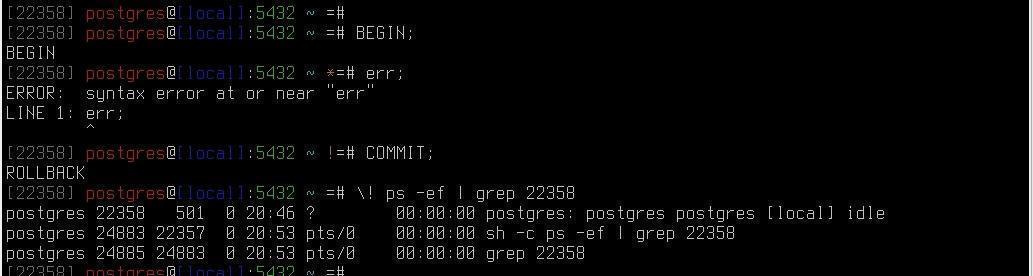
2) We started transaction . Note that the prompt has changed - an asterisk has appeared. In psql , with the default prompt, you can see whether there is an open transaction so you can decide whether to commit it.
Next, we type a command in several lines.
Type SELECT :
postgres = * # select
3) Note that the prompt has changed again: a dash has appeared instead of the equals symbol. Continue typing the command and end it with a semicolon:
postgres - * # tantor_version();
tantor_version
-------------------------------
Tantor Special Edition 18.3.0
(1 row)
4) Note that the prompt has changed again: the dash has been replaced by the equals symbol. This means there is no unfinished command in the buffer, and you will be typing the first line of the command.
Type the erroneous command and send it for execution with a semicolon:
postgres= * # ffff;
ERROR: syntax error at or near "ffff"
LINE 1: ffff;
A syntax error occurred. Note that the asterisk, which denotes an open transaction, has been replaced by an exclamation point. This means the transaction is still open, but it has entered a failed state, and in this state, a transaction cannot commit, only rollback. Transactions enter a failed state infrequently, only after certain errors considered so serious that the accumulated statements in the transaction cannot be committed. For example, access serialization errors. What's dangerous about the "ffff" command ? The server process receives it and sees that it's something completely out of the ordinary; a programmer couldn't have written such a command. The server process expects the commands to come from an application written and tested by the programmer. Therefore, it believes the transaction needs to be put into a failed state.
5) Let's check that if we send the correct command for execution, type :
postgres=!# select 1;
ERROR: current transaction is aborted, commands ignored until end of transaction block
An error is thrown that the command failed, and any commands will be ignored by the server process until the client "voluntarily" completes the transaction.
6) We complete the transaction using one of the two transaction completion commands:
postgres= ! # commit;
ROLLBACK
Please note that a transaction placed in a failed state cannot commit; it can only be rolled back completely or to a savepoint, if one was set. The server process returns "transaction completed by rolling back" in response to the COMMIT command.
There's an ON_ERROR_ROLLBACK parameter that prevents the loss of the results of executed commands. This parameter forces psql to set a savepoint after each command, which is undesirable because it increases the transaction counter (xid) usage. If you set it, it's best to set it to INTERACTIVE , so savepoints will be set when you're working interactively in psql .
7) Install this parameter :
postgres=# \set ON_ERROR_ROLLBACK INTERACTIVE
8) Repeat the commands from the previous example:
postgres=# begin;
BEGIN
postgres=*# select 1;
?column?
----------
1
(1 line )
postgres=*# ffff;
ERROR: syntax error at or near "ffff"
LINE 1: ffff;
^
postgres=*# commit ;
COMMIT
The transaction was closed by commit, not rollback.
9) Let's look at how psql processes its commands - what it sends to the server process to produce a nice result. Let's look at the roles in the cluster. In English, this would be "describe user," abbreviated from the first letters of the word "du." Let's add a backslash, the common preface for all psql commands . Without the backslash, it's an SQL command and is sent to the server process for execution as text. To send a command for execution, use a semicolon ";" - otherwise, how will psql know you've finished typing the command?
Type:
postgres=# \du
List of roles
Role Name | Attributes
-----------+---------------------------------------
lab01user | Superuser, Creates roles, Creates database
postgres | Superuser, Create Roles, Create Databases, Replication, Skip RLS
10) Set the psql parameter, which will show which command psql itself generates and sends for execution:
postgres=# \set ECHO_HIDDEN on
11) Repeat command :
postgres=# \du
********* REQUEST *********
SELECT r.rolname, r.rolsuper, r.rolinherit,
r.rolcreaterole, r.rolcreatedb, r.rolcanlogin,
r.rolconnlimit, r.rolvaliduntil
, r.rolreplication
, r.rolbypassrls
FROM pg_catalog.pg_roles r
WHERE r.rolname !~ '^pg_'
ORDER BY 1;
****************************
List of roles
Role Name | Attributes
-----------+----------------------------------------
lab01user | Superuser, Creates roles, Creates database
postgres | Superuser, Create Roles, Create Databases, Replication, Skip RLS
12) Copy and paste the command text. You can use the keyboard shortcuts <Ctrl+Shift+c> <Ctrl+Shift+v> to do this.
postgres =# SELECT r . rolname , r . rolsuper , r . rolinherit , r . rolcreaterole , r . rolcreatedb , r . rolcanlogin , r . rolconnlimit , r . rolvaliduntil , r . rolreplication , r . rolbypassrls
FROM pg_catalog.pg_roles r
WHERE r.rolname !~ '^pg_'
ORDER BY 1 \gx
-[ RECORD 1 ]--+----------
rolname | lab01user
rolsuper | t
rolinherit | t
rolcreaterole | t
rolcreatedb | t
rolcanlogin | t
rolconnlimit | -1
rolvaliduntil |
rolreplication | f
rolbypassrls | f
-[ RECORD 2 ]--+----------
rolname | postgres
rolsuper | t
rolinherit | t
rolcreaterole | t
rolcreatedb | t
rolcanlogin | t
rolconnlimit | -1
rolvaliduntil |
rolreplication | t
rolbypassrls | t
You can see what information psql receives and compare it with how it displays it: psql The INHERIT and LOGIN attributes weren't displayed . Why? Because these are the default values when creating a user with the CREATE USER command . Default values aren't displayed. Their inverse values will be displayed: "Not inherited, Login denied." This feature isn't intuitive, so we'll cover it in detail.
13) Use the \? command to view help for the \connect command (a shortened version of the \с command )
Compound:
\c[connect] {[ DB |- USER |- SERVER |- PORT |-] | conninfo}
connect to another database
(current: "postgres")
\conninfo information about the current connection
14) Try different connection combinations. The tab key allows you to end a parameter, since psql has access to the list of database and user names in the current connection. The purpose of this connection sequence is to remember the order of the \c command parameters: database user host port . If you want to keep a parameter the same, replace it with a dash. <TAB><ENTER> - tab and carriage return (new line) keys on the keyboard.
postgres=# \c la <TAB><ENTER>
You are connected to the database "lab01database" as user "postgres".
lab01database=# \c - la <TAB><ENTER>
You are connected to the database "lab01database" as user "lab01user".
lab01database=# \c - - localhost
You are now connected to the database "lab01database" as user "lab01user" (server "localhost": address "127.0.0.1", port "5432").
lab01database=# \c - - - 5432
You are connected to the database "lab01database" as user "lab01user".
lab01database=# \c postgres p <TAB><ENTER>
You are connected to the database "postgres" as user "postgres".
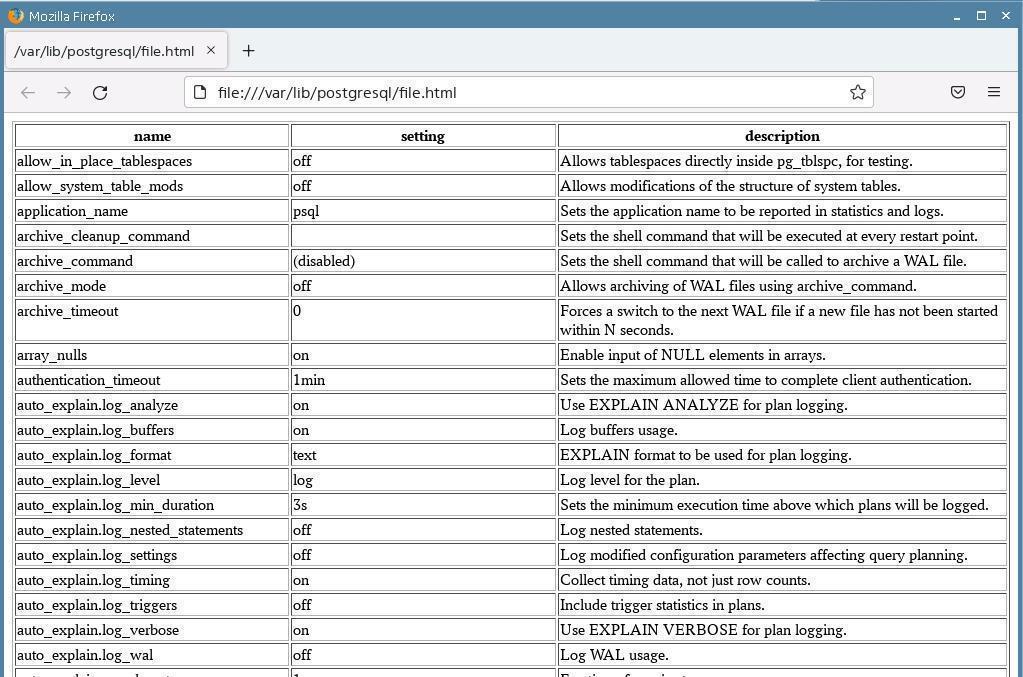
15) Let's see how to get the sample result in the format of a web page and view it in a browser. Open a new terminal window ( astra operating system user ).
16) Run psql and make sure you run it in the astra user's terminal :
astra @ tantor : ~ $ psql -q
17) Set the HTML output format :
postgres =# \ pset format html
18) Redirect the output to a file called file.html :
postgres=# \o file.html
19) Issue any command whose result is difficult to read in the terminal (the command line does not fit the width of the terminal window):
postgres=# show all;
20) Disable output to file:
postgres=# \o
21) Launch a browser window while exiting psql :
postgres=# \! xdg-open file.html
22) Wait for the browser window to open. Close psql :
postgres=# \q
23) Close the terminal window:
astra@tantor :~$ <CTRL+d>
24) Close the browser window and return to the psql window . Let's see what other output formats are available. Type V psql :
postgres=# \pset format aaa
\pset: allowed formats are aligned, asciidoc, csv, html, latex, latex-longtable, troff-ms, unaligned, wrapped
25) Select the aligned format , it is used by default:
postgres=# \pset format aligned
Output format is aligned.
26) Run the command:
postgres=# show all;
zzbq on your keyboard. and see the effect.
z - next page, b - previous, q - finish output and return prompt.
27) Complete command :
postgres=# \pset format wrapped
Output format is wrapped.
28) Complete command :
postgres=# show all;
Press the zzb h keys on your keyboard . Read the description of the available keys. Practice scrolling through the results.
29) Compare the differences. Perhaps the wrapped format (word wrapping) will be more convenient than aligned .
30) Let's check how to execute operating system commands without exiting psql . The Linux command "pwd" displays the current directory.
Run the "pwd" or "ls" command (lists files) without exiting psql:
postgres =# \! pwd
/ var / lib / postgresql
31) Set a color prompt that will display the server process number (pid) in gray:
\set PROMPT1 ' %[%033[0;90m%] [%p] %[%033[0m%] %[%033[0;31m%] %n %[%033[0m%] @ %[%033[0;34m%] %m %[%033[0m%] : %[%033[0;32m%] %> %[%033[0m%] %[%033[0;36m%] %~ %[%033[0m%] %[%033[0;33m%]%[%033[5m%] %x %[%033[0m%] %[%033[0m%] %R%# '
\set PROMPT2 ' %[%033[0;90m%] [%l] %[%033[0m%] %[%033[0;31m%] %n %[%033[0m%] @ %[%033[0;34m%] %m %[%033[0m%] : %[%033[0;32m%] %> %[%033[0m%] %[%033[0;36m%] %~ %[%033[0m%] %[%033[0;33m%]%[%033[5m%] %x %[%033[0m%] %[%033[0m%] %R%# '
* and ! symbols to attract attention.
Help on what the symbols mean if you want to create your own prompt:
%p server process number
%n role. (can be changed during a session using the SET SESSION AUTHORIZATION command; )
%m host name or [local] if the connection is made via a Unix socket
%> instance port number
%/ database name
%~ The name of the database. If this is the default database, ~ is displayed instead of the name.
%# for the superuser - the # symbol , for other roles - the >%l symbol , the line number in the input buffer.
%R for PROMPT1 displays = if the session is in an inactive branch of a conditional block @ in single-line input mode ^ if the session is disconnected from the database - !
for PROMPT2 if the command is not completed -
if there is an unclosed comment *
if there is an unclosed quotation mark, then '
If there is an unterminated double quote, then "
If there is a started but unfinished $line$ (usually when typing functions), then $
if there is a left parenthesis and the right parenthesis is not entered, then (
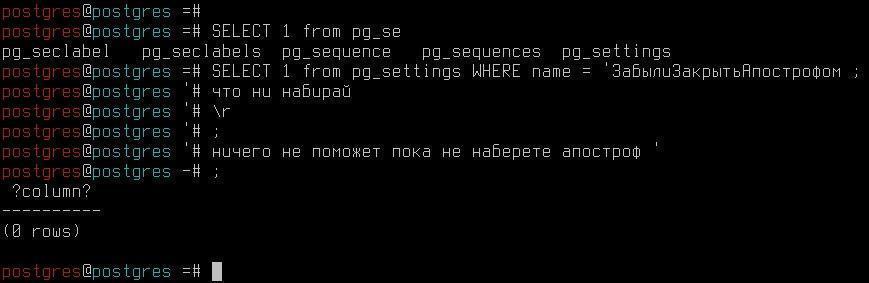
Symbols that it displays PROMPT2 are important because if you forget to type the closing apostrophe, pressing the key <ENTER> or ; or \r , there will be no reaction until you type an apostrophe:
If you need to display the role and base:
\set PROMPT1 '%[%033[0;31m%] %n %[%033[0m%] @ %[%033[0;36m%] %/ %[%033[0m%] %[%033[0;33m%]%[%033[5m%] %x %[%033[0m%] %[%033[0m%] %R%# '
\set PROMPT2 '%[%033[0;31m%] %n %[%033[0m%] @ %[%033[0;36m%] %/ %[%033[0m%] %[%033[0;33m%]%[%033[5m%] %x %[%033[0m%] %[%033[0m%] %R%# '
32) Look at how the query result is displayed:
postgres @ postgres =# select usename, usesysid, usesuper from pg_user;
usename | usesysid | usesuper
----------+----------+----------
postgres | 10 | t
(1 row)
33) Set the line drawing style to unicode characters :
postgres @ postgres =# \pset linestyle unicode
Line style is unicode .
Let's repeat the request (press the up arrow on the keyboard twice and then the <ENTER> key)
postgres @ postgres =# select usename, usesysid, usesuper from pg_user;
usename │ usesysid │ usesuper
──────────┼──────────┼──────────
postgres │ 10 │ t
(1 row)
34) Change the border display style :
postgres @ postgres =# \ pset border 0
Border style is 0.
35) Repeat your request:
postgres @ postgres =# select usename, usesysid, usesuper from pg_user;
usename usesysid usesuper
──────── ──────── ────────
Postgres 10
(1 row)
The display has become more compact.
36) Change the border display style:
postgres @ postgres =# \pset border 2
Border style is 2.
postgres @ postgres =# select usename, usesysid, usesuper from pg_user;
┌──────────┬──────────┬───────────┐
│ usename │ usesysid │ usesuper │
├──────────┼──────────┼────────────┤
│ postgres │ 10 │ t │
└──────────┴───────────┴───────────┘
(1 row )
You can choose the most convenient style for displaying query results. To make it permanent, you can edit the ~/.psqlrc file and add the commands described above.
Part 10. Restoring a saved cluster
In step 4 of part 2, we saved the existing cluster before creating a new one. Let's restore the cluster. Make sure the terminal is open as the postgres user .
1) Stop the instance:
postgres @ tantor :~$ pg _ ctl stop
2) Execute commands :
postgres@tantor:~$ mkdir $PGDATA/../data.afterLAB1
mv $PGDATA/* $PGDATA/../data.afterLAB1
mv $PGDATA/../data.SAVE/* $PGDATA
3) Launch copy :
postgres@tantor:~$ sudo systemctl start tantor-se-server-18
4) Check performance instance :
postgres@tantor:~$ psql -qc "select datname from pg_database;"
datname
-----------
postgres
template1
template0
(3 rows)
Part 1. Transaction in psql
1) Let's create table :
postgres=# create table a(id integer);
CREATE TABLE
4) Let's see what happened:
postgres=# \dt a
List of tables
Schema | Name | Type | Owner
--------+------+-------+----------
public | a | table | postgres
5) Open the transaction:
postgres=# begin ;
BEGIN
6) Insert the first line. Note that you can use tabs to add keywords and even complex constructions.
postgres= * # insert into a values (1);
INSERT 0 1
Note the appearance of an asterisk in the line - this means that a transaction is in progress.
7) Let's try to view the first row of the table in the second terminal. Open a second terminal and run psql in it :
astra @ tantor :~$ sudo su - postgres
postgres@tantor:~$ psql -q
postgres=#
9) Contact To table :
postgres=# select * from a;
ID
----
(0 lines)
We don't see the first line yet. Only the committed data is visible. There is no "dirty read."
10) In the first terminal we will record the transaction.
postgres=*# commit ;
COMMIT
11) In the second terminal, let's look at the table again.
postgres=# select * from a;
ID
----
1
(1 line)
The recorded changes became visible.
Part 2. List of background processes
1) Let's see where the PGDATA directory is located , where the DB cluster files are located.
postgres=# show data_directory;
data_directory
---------------------------------------
/var/lib/postgresql/tantor-se-18/data
(1 row)
2) Go out from psql :
postgres=# \q
3) To view the list of processes, use the ps utility :
postgres@tantor:~$ cat /var/lib/postgresql/tantor-se-18/data/postmaster.pid
12179
/var/lib/postgresql/tantor-se-18/data
1777122902
5432
/var/run/postgresql
localhost
1464138 55
ready
4) Let's take number process (pid, process id) postmaster, it V first line :
postgres@tantor:~$ ps -o command --ppid 12179
COMMAND
postgres: logger
postgres: io worker 0
postgres: io worker 1
postgres: io worker 2
postgres: checkpointer
postgres: background writer
postgres: walwriter
postgres: autovacuum launcher
postgres: autoprewarm leader
postgres: logical replication launcher
postgres : postgres postgres [ local ] idle
The colors indicate background processes, the rest are server processes servicing sessions.
The list of processes can also be seen through the pg_stat_activity view.
5) Run in terminal with psql:
postgres=# select pid, backend_type, backend_start FROM pg_stat_activity;
pid | backend_type | backend_start
-------+------------------------------+--------------------------------
12200 | client backend | 2026-04-25 16:16:16.836795+03
12188 | autovacuum launcher | 2026-04-25 16:15:02.106041+03
12190 | logical replication launcher | 2026-04-25 16:15:02.107414+03
12181 | io worker | 2026-04-25 16:15:02.092927+03
12182 | io worker | 2026-04-25 16:15:02.093814+03
12183 | io worker | 2026-04-25 16:15:02.094654+03
12184 | checkpointer | 2026-04-25 16:15:02.09533+03
12185 | background writer | 2026-04-25 16:15:02.095476+03
12187 | walwriter | 2026-04-25 16:15:02.104866+03
(8 lines )
Part 3. Buffer Cache, EXPLAIN Command
1) Add rows to table "a":
postgres=# insert into a select id from generate_series(1,10000) AS id;
INSERT 0 10000
2) In the second terminal, reboot the server:
postgres@tantor:~$ sudo systemctl restart tantor-se-server-18
3) In the first terminal, reconnect:
postgres=# \c
You are now connected to database "postgres" as user "postgres".
You are connected to the database "postgres" as user "postgres".
4) Use the EXPLAIN command to see where the information comes from:
postgres=# explain (analyze) select * from a;
QUERY PLAN
-----------------------------------------
Seq Scan on a (cost=0.00..145.0 1 rows=10001 width=4) (actual time=0.035..1.952 rows=10001 .1 loops=1)
Buffers: shared read=45
Planning:
Buffers: shared hit=16 read=6 dirtied=3
Planning Time: 0.428 ms
Execution Time: 2.948 ms
(6 lines)
Note the Buffers line . This information was retrieved from disk or the operating system's page cache . After Planning , this line reflects the blocks that were read to create the command execution plan.
5) Execute team more once :
postgres=# explain (analyze) select * from a;
QUERY PLAN
----------------------------------
Seq Scan on a (cost=0.00..145.00 rows=10000 width=4) (actual time=0.016..1.383 rows=10000 loops=1)
Buffers: shared hit=45
Planning Time: 0.063 ms
Execution Time: 2.355 ms
(4 lines)
The result changed. Now blocks were read from the buffer cache.
Part 4. Pre-Record Log. Where is it stored?
In the first terminal, run the command:
postgres@tantor:~$ ls -l /var/lib/postgresql/tantor-se-18/data/pg_wal
total 16392
-rw------- 1 postgres postgres 16777216 Apr 25 16:36 0000000100000000000000001
drwx------ 2 postgres postgres 4096 Apr 23 16:02 archive_status
drwx------ 2 postgres postgres 4096 Apr 23 16:02 summaries
Files magazine pre-recordings are located V directories pg_wal segments 16 megabytes each .
Part 5. Checkpoint
1) The checkpoint is performed periodically, let's look at the second terminal to see what interval is set.
postgres=# show checkpoint_timeout;
checkpoint_timeout
--------------------
5 min
(1 raw )
2) The checkpoint can be started manually.
postgres=# checkpoint ;
CHECKPOINT
Part 6. Disaster Recovery
1) Add new lines in the second terminal:
postgres=# insert into a select id from generate_series(1,10000) AS id;
INSERT 0 10000
2) Force stop the instance. Determine the PID of the postmaster process:
postgres@tantor:~$ cat /var/lib/postgresql/tantor-se-18/data/postmaster.pid
12563
/var/lib/postgresql/tantor-se-18/data
1713849023
5432
/var/run/postgresql
*
1048641 24
ready
postgres@tantor:~$ kill -QUIT 12563
3) Let's launch copy servers .
postgres@tantor:~$ sudo systemctl start tantor-se-server-18
Restoration is underway.
4) In the second window, let's see if the inserted lines have been saved.
postgres=# \c
You are connected to the database "postgres" as user "postgres".
postgres=# select count(*) from a;
count
-------
20001
(1 line )
5) Delete the table :
postgres=# drop table a;
DROP TABLE
postgres=# \dt
Tables No .
Part 1. Inserting, updating, and deleting a row
1) Run psql :
postgres @ tantor :~$ psql - q
postgres=#
2) Let's create arbitrary table :
postgres=# create table a(id integer);
CREATE TABLE
3) Let's see what happened:
postgres=# \dt a
List of tables
Schema | Name | Type | Owner
--------+------+-------+----------
public | a | table | postgres
4) Insert the first row into the table:
postgres=# insert into a values(100);
INSERT 0 1
5) Let's see what the transaction number xmin is:
postgres=# select xmin, xmax, * from a;
xmin | xmax | id
------+------+-----
777 | 0 | 100
(1 line)
The result is 777 - this is the transaction number in which the first version of the row was created.
6) Let's start the transaction:
postgres=# begin ;
BEGIN
7) Update the first line.
postgres=*# update a set id = 200;
UPDATE 1
8) Let's look at the result in the same transaction:
postgres=*# select xmin, xmax, * from a;
xmin | xmax | id
------+------+-----
779 | 0 | 200
(1 line)
9) Ensure that the transaction sees its changes.
What will happen if I access it in another session, will
the id be equal to 100 or 200?
10) Run psql :
postgres@tantor:~$ psql -q
postgres=# select xmin, xmax, * from a;
xmin | xmax | id
------+------+-----
777 | 779 | 100
(1 line)
Note that xmax has changed - this means that a second version of the row already exists, but it has not yet been committed.
11) In the first terminal we record the transaction:
postgres=*# commit ;
COMMIT
12) In the second terminal we now see the second line:
postgres=# select xmin, xmax, * from a;
xmin | xmax | id
------+------+-----
779 | 0 | 200
(1 line)
13) Now let's see what deletion looks like. Let's open a transaction in the first terminal:
postgres=# begin;
BEGIN
14) Delete line :
postgres=*# delete from a;
DELETE 1
postgres=*# select xmin, xmax, * from a;
xmin | xmax | id
------+------+----
(0 rows)
The first transaction does not see the row, the row is deleted, but the deletion is not yet committed.
15) In second terminal :
postgres=# select xmin, xmax, * from a;
xmin | xmax | id
------+------+-----
779 | 781 | 200
(1 line)
The line is still visible, but xmax has changed again.
16) In the first terminal we record the transaction:
postgres=*# commit;
COMMIT
17) In the second terminal we now see that the line has been deleted:
postgres=# select xmin, xmax, * from a;
xmin | xmax | id
------+------+----
(0 rows)
Part 2. Row Version Visibility at Different Transaction Isolation Levels
1) Open the first transaction and insert the line:
postgres=# begin;
BEGIN
2) Let's look at the insulation level:
postgres=*# show transaction_isolation;
transaction_isolation
-----------------------
read committed
(1 line )
postgres=*# insert into a values(100);
INSERT 0 1
postgres=*# select xmin, xmax, * from a;
xmin | xmax | id
------+------+-----
1571 | 0 | 100
(1 line)
3) Let's start the second transaction in the second terminal and refer to the table:
postgres=# begin;
BEGIN
postgres=*# select xmin, xmax, * from a;
xmin | xmax | id
------+------+----
(0 lines )
4) Let's see level isolation :
postgres=*# SHOW transaction_isolation;
transaction_isolation
-----------------------
read committed
(1 row)
5) While the new row isn't visible yet, let's commit the first transaction:
postgres=*# commit;
COMMIT
6) In the second window, we will again refer to the table. What shall we see ?
postgres=*# select xmin, xmax, * from a;
xmin | xmax | id
------+------+-----
1571 | 0 | 100
(1 line )
7) Let's fix it the second transaction :
postgres=*# commit;
COMMIT
The changes became visible. This is the anomaly of non-repeatable reading.
Now in the first window we will start a transaction at the repeatable read level.
8) Insert more one line :
postgres=# BEGIN ISOLATION LEVEL REPEATABLE READ;
BEGIN
postgres=*# insert into a values (200);
INSERT 0 1
postgres=*# select xmin, xmax, * from a;
xmin | xmax | id
------+------+-----
1571 | 0 | 100
1572 | 0 | 200
(2 lines)
9) In the second transaction, we will access the table in a new transaction at the same level.
postgres=# BEGIN ISOLATION LEVEL REPEATABLE READ;
BEGIN
postgres=*# select xmin, xmax, * from a;
xmin | xmax | id
------+------+-----
1571 | 0 | 100
(1 line)
10) Now we commit the first transaction:
postgres=*# commit;
COMMIT
11) Let's look at the second transaction again:
postgres=*# select xmin, xmax, * from a;
xmin | xmax | id
-----+------+-----
1571 | 0 | 100
(1 line)
Changes are not visible. At this level, transaction operators work with only one snapshot of the data.
12) Let's commit the second transaction:
postgres=*# commit;
COMMIT
Part 3. Transaction state by CLOG
1) Let's open the first transaction and look at the state after insertion:
postgres=# begin;
BEGIN
postgres=*# INSERT INTO a VALUES(300);
INSERT 0 1
postgres=*# Select xmin, xmax, * from a;
xmin | xmax | id
------+------+-----
1571 | 0 | 100
1572 | 0 | 200
1573 | 0 | 300
(3 lines)
2) We see the insertion of the third line. Let's take a look status transactions :
postgres=*# SELECT pg_xact_status( '1573' );
pg_xact_status
----------------
in progress
(1 line )
3) Let's commit the transaction and check the status:
postgres=*# commit;
COMMIT
postgres=# SELECT pg_xact_status( '1573' );
pg_xact_status
----------------
committed
(1 line )
CLOG behaves when a transaction is rolled back:
postgres=# begin;
BEGIN
postgres=*# INSERT INTO a VALUES(400);
INSERT 0 1
postgres=*# select xmin, xmax, * from a;
xmin | xmax | id
------+------+-----
1571 | 0 | 100
1572 | 0 | 200
1573 | 0 | 300
1574 | 0 | 400
(4 lines )
postgres=*# SELECT pg_xact_status( '1574' );
pg_xact_status
----------------
in progress
(1 line )
postgres=*# ROLLBACK;
ROLLBACK
postgres=# SELECT pg_xact_status( '1574' );
pg_xact_status
----------------
aborted
(1 line )
postgres=*# Select xmin, xmax, * from a;
xmin | xmax | id
------+------+-----
1571 | 0 | 100
1572 | 0 | 200
1573 | 0 | 300
(3 lines )
Part 4. Table Locks
1) In the first transaction, insert a new row and look at the locks using pg_locks . To do this, we need the PID of the service process:
postgres=# SELECT pg_backend_pid();
pg_backend_pid
----------------
12193
(1 line)
2) Open the transaction and refer to the table:
postgres=# begin;
BEGIN
postgres=*# UPDATE a SET id = id + 1;
UPDATE 3
postgres=*# SELECT locktype, transactionid, mode, relation::regclass as obj FROM pg_locks where pid = 12193 ;
locktype | transactionid | mode | obj
---------------+--------------+------------------+----------
relation | | AccessShareLock | pg_locks
relation | | RowExclusiveLock | a
virtualxid | | ExclusiveLock |
transactionid | 1577 | ExclusiveLock |
(4 lines)
A table-level lock called RowExclusiveLock has been added. - is imposed in case of updating rows.
3) In the second window, we will build an index on the table, first looking at the process PID .
postgres=# SELECT pg_backend_pid();
pg_backend_pid
----------------
17210
(1 line )
postgres=# CREATE INDEX ON a (id);
4) The transaction is stuck. Let's look at what's happening in the second process in the first terminal.
postgres=*# SELECT locktype, transactionid, mode, relation::regclass as obj FROM pg_locks where pid = 17210 ;
locktype | transactionid | mode | obj
------------+--------------+---------------+-----
virtualxid | | ExclusiveLock |
relation | | ShareLock | a
(2 lines )
Appeared blocking ShareLock , she Not compatible With RowExclusiveLock , arose blocking situation .
5) Let's fix it first transaction :
postgres=*# commit;
COMMIT
6) The command in the second window is immediately triggered:
CREATE INDEX
Part 5. Row locking
1) Let's start the first transaction:
postgres=# begin;
BEGIN
postgres=*# UPDATE a SET id = id + 1 WHERE id=101;
UPDATE 1
2) Let's begin the second transaction :
postgres=# begin;
BEGIN
postgres=*# UPDATE a SET id = id + 1 WHERE id=101;
The transaction is stuck and a lock has been triggered.
3) Let's commit the first transaction:
postgres=*# commit;
COMMIT
The second one comes into play immediately.
UPDATE 0
postgres=*# commit;
COMMIT
Please note that the update did not occur, there is no such row version to update now.
4) In the first terminal, let's look at the table:
postgres=# Select xmin, xmax, * from a;
xmin | xmax | id
------+------+-----
1577 | 0 | 201
1577 | 0 | 301
1579 | 1580 | 102
(3 lines )
5) Delete table :
postgres=# DROP TABLE a;
DROP TABLE
Part 1. Regular table cleaning
1) Run psql:
postgres@tantor:~$ psql -q
postgres=#
2) Let's create arbitrary table :
postgres=# CREATE TABLE a (id integer primary key generated always as identity, t char(2000)) WITH (autovacuum_enabled = off);
CREATE TABLE
postgres=# INSERT INTO a(t) SELECT to_char(generate_series(1,10000),'9999');
INSERT 0 10000
3) Let's see what happened:
postgres=# \da
Table "public.a"
Column | Type | Collation | Nullable | Default
--------+-----------------+-----------+----------+------------------------------
id | integer | | not null | generated always as identity
t | character(2000) | | |
Indexes:
"a_pkey" PRIMARY KEY, btree (id)
Please note: a primary key and index have been created.
4) Find out the size of the table and index in bytes:
postgres=# SELECT pg_table_size('a');
pg_table_size
---------------
20512768
(1 line )
postgres=# SELECT pg_table_size(' a_pkey ');
pg_table_size
---------------
245760
(1 line)
5) Update 50% of the rows:
postgres=# UPDATE a set t= t || 'a' where id > 5000;
UPDATE 5000
6) Let's see dimensions objects :
postgres=# SELECT pg_table_size('a');
pg_table_size
---------------
30752768
(1 line )
postgres=# SELECT pg_table_size('a_pkey');
pg_table_size
---------------
360448
(1 line)
7) They have also increased. Let's clear the table and index:
postgres=# VACUUM a;
VACUUM
postgres=# SELECT pg_table_size('a') ; SELECT pg_table_size('a_pkey');
pg_table_size
---------------
30760960
(1 line )
pg_table_size
---------------
360448
(1 line)
8) The size remains the same. More once let's update lines :
postgres=# UPDATE a set t= t || 'a' where id > 5000;
UPDATE 5000
postgres=# SELECT pg_table_size('a'); SELECT pg_table_size('a_pkey');
pg_table_size
---------------
30760960
(1 line )
pg_table_size
---------------
360448
(1 line)
Again, the size didn't change. This happened because the cleared space was used.
9) For example, let's assume that a cleaning cycle is missed:
postgres=# UPDATE a set t= t || 'a' where id > 5000;
UPDATE 5000
postgres=# UPDATE a set t= t || 'a' where id > 5000;
UPDATE 5000
postgres=# SELECT pg_table_size('a');
SELECT pg_table_size('a_pkey');
pg_table_size
---------------
51249152
(1 line )
pg_table_size
---------------
466944
(1 line)
10) The size of objects has increased again:
postgres=# VACUUM a;
VACUUM
postgres=# SELECT pg_table_size('a'); SELECT pg_table_size('a_pkey');
pg_table_size
---------------
51249152
(1 line )
pg_table_size
---------------
466944
(1 line)
Even after cleaning, the size does not decrease.
Part 2. Table Analysis
1) Since several update cycles have occurred, let's see how current the statistics remain. First, let's look at the system catalog:
postgres=# SELECT reltuples FROM pg_class WHERE relname='a';
reltuples
-----------
8333
(1 line)
We found that our table contains 8333 rows.
2) Now let's turn to To table :
postgres=# SELECT count(*) FROM a;
count
-------
10000
(1 line)
3) It turns out there are more lines. Statistics are always approximate. Let's call the second phase of the analysis:
postgres=# ANALYZE a;
ANALYZE
4) Now the statistics have become more accurate:
postgres=# SELECT reltuples FROM pg_class WHERE relname='a';
reltuples
-----------
10000
(1 line)
Part 3. Rebuilding the index
1) Let's see what size the objects are:
postgres=# SELECT pg_table_size('a'); SELECT pg_table_size('a_pkey');
pg_table_size
---------------
51249152
(1 line )
pg_table_size
---------------
466944
(1 line)
2) Currently, the table has only one index. Let's rebuild it. his :
postgres=# REINDEX TABLE a;
REINDEX
postgres=# SELECT pg_table_size('a'); SELECT pg_table_size('a_pkey');
pg_table_size
---------------
51249152
(1 line )
pg_table_size
---------------
245760
(1 line)
3) The index size has decreased, the table size has remained unchanged.
Part 4. Complete cleaning
postgres=# VACUUM FULL a;
VACUUM
1) Let's see size objects :
postgres=# SELECT pg_table_size('a');
SELECT pg_table_size('a_pkey');
pg_table_size
---------------
20488192
(1 line )
pg_table_size
---------------
245760
(1 line)
The table size has been reduced.
2) Delete the table:
postgres=# DROP TABLE a;
DROP TABLE
The task is completed.
Part 5. HypoPG Expansion
1) Install the hypopg extension :
postgres=# CREATE EXTENSION hypopg;
CREATE EXTENSION
2) Create a table with test data:
postgres=# CREATE TABLE hypo AS SELECT id, 'line ' || id AS val FROM generate_series(1,10000) id;
SELECT 10000
3) The execution plan for selecting a single row is a sequential scan ( Seq Scan ). There are no index access methods, since there are no indexes:
postgres=# EXPLAIN SELECT * FROM hypo WHERE id = 1;
QUERY PLAN
------------------------------------------
Seq Scan on hypo (cost=0.00..165.60 rows= 41 width=36)
Filter: (id = 1)
(2 lines)
Why is the expected number of rows 41 and not 1? There are no statistics.
4) Collect statistics:
postgres=# vacuum analyze hypo;
VACUUM
postgres=# EXPLAIN SELECT * FROM hypo WHERE id = 1;
QUERY PLAN
------------------------------------------
Seq Scan on hypo (cost=0.00..180.00 rows= 1 width=13)
Filter: (id = 1)
(2 lines)
Expected number of rows 1.
The task is to optimize the execution of this query. We assume that an index on the id column will speed up the query. We need to verify that the planner will use the index. If the planner doesn't use the index, then the assumption is incorrect and the index shouldn't be created. Creating an index is labor-intensive and time-consuming, and it takes up space. Before creating the index, we want to test the hypothesis that the planner will use it when executing the query being optimized.
5) To test the hypothesis, create a hypothetical index:
postgres=# SELECT * FROM hypopg_create_index('CREATE INDEX hypo_idx ON hypo (id)');
indexrelid | indexname
------------+----------------------
13495 | <13495>btree_hypo_id
(1 line )
The name of the hypothetical index is generated automatically, this is normal.
No actual index is created, the command is executed instantly.
6) Look at the list of hypothetical indices:
postgres=# SELECT * FROM hypopg_list_indexes;
indexrelid | index_name | schema_name | table_name | am_name
------------+----------------------+-------------+------------+---------
13495 | <13495>btree_hypo_id | public | hypo | btree
(1 line)
What is the implementation plan now?
7) Perform command :
postgres=# EXPLAIN SELECT * FROM hypo WHERE id = 1;
QUERY PLAN
---------------------------------
Index Scan using "<13495>btree_hypo_id" on hypo (cost=0.04..8.05 rows=1 width=13)
Index Cond: (id = 1)
(2 lines)
The plan shows that the index will be used.
There is no real index, so the actual execution plan uses a table scan:
postgres=# EXPLAIN ( analyze ) SELECT * FROM hypo WHERE id = 1;
QUERY PLAN
-----------------------------------
Seq Scan on hypo (cost=0.00..180.00 rows=1 width=13) (actual time=0.025..0.875 rows=1 loops=1)
Filter: (id = 1)
Rows Removed by Filter: 9999
Planning Time: 0.077 ms
Execution Time: 1.074 ms
(5 lines )
8) Create real index :
postgres=# CREATE UNIQUE INDEX hypo_id ON hypo(id);
CREATE INDEX
The implementation plan remains the same:
postgres=# EXPLAIN SELECT * FROM hypo WHERE id = 1;
QUERY PLAN
-----------------------------------------------
Index Scan using "<13495>btree_hypo_id" on hypo (cost=0.04..8.05 rows=1 width=13)
Index Cond: (id = 1)
(2 lines)
9) Remove side effects:
postgres=# SELECT hypopg_reset() ;
hypopg_reset
--------------
(1 line)
The planner started using the created index:
postgres=# EXPLAIN SELECT * FROM hypo WHERE id = 1;
QUERY PLAN
-------------------------------------------
Index Scan using hypo_id on hypo (cost=0.29..8.30 rows=1 width=13)
Index Cond: (id = 1)
(2 lines)
The extension allows you to hide real indexes from the planner:
postgres=# SELECT hypopg_hide_index('hypo_id'::regclass);
hypopg_hide_index
-------------------
t
(1 line )
Hiding is only effective within a session and does not affect the operation of other sessions.
Hypothetical indices also exist only within a session.
The hypothetical indices disappear:
postgres=# SELECT * FROM hypopg_list_indexes;
indexrelid | index_name | schema_name | table_name | am_name
------------+------------+------------ +-------------+----------
(0 lines)
The execution plan will use sequential scanning:
postgres=# EXPLAIN SELECT * FROM hypo WHERE id = 1;
QUERY PLAN
-------------------------------------------------------
Seq Scan on hypo (cost=0.00..180.00 rows=1 width=13)
Filter: (id = 1)
(2 lines)
There is a view with a list of indexes hidden in this session:
postgres=# SELECT * FROM hypopg_hidden_indexes;
indexrelid | index_name | schema_name | table_name | am_name | is_hypo
------------+------------+------------ +------------+----------+---------
17402 | hypo_id | public | hypo | btree | f
(1 line)
10) Make sure that hidden indexes and hypothetical indexes exist only within a session:
postgres=# SELECT * FROM hypopg_create_index('CREATE INDEX hypo_idx ON hypo (id)');
indexrelid | indexname
------------+----------------------
13495 | <13495>btree_hypo_id
(1 line )
postgres=# SELECT * FROM hypopg_list_indexes;
indexrelid | index_name | schema_name | table_name | am_name
------------+--------------------- +-------------+------------+---------
13495 | <13495>btree_hypo_id | public | hypo | btree
(1 line )
postgres=# \q
postgres@tantor:~$ psql -q
11) Type "help" to get help:
postgres=# SELECT * FROM hypopg_list_indexes;
indexrelid | index_name | schema_name | table_name | am_name
------------+------------+------------ +-------------+----------
(0 lines )
postgres=# SELECT * FROM hypopg_hidden_indexes;
indexrelid | index_name | schema_name | table_name | am_name | is_hypo
------------+------------+------------ +------------+----------+---------
(0 lines)
Part 1. Creating objects for queries
1) Run psql :
postgres @ tantor :~$ psql - q
2) Create a table and view:
postgres=# CREATE TABLE test (col1 integer, col2 integer, name text);
INSERT INTO test VALUES (1,2,'test1');
INSERT INTO test VALUES (3,4,'test2');
CREATE VIEW v_table AS SELECT * FROM test;
SELECT col1, col2 FROM v_table WHERE name='test1'::text ;
CREATE TABLE
INSERT 0 1
INSERT 0 1
CREATE VIEW
postgres=#
col1 | col2
------+------
1 | 2
(1 line )
Part 2. Sequential reading of table blocks ( Seq Scan )
1) Using the Explain command, we will look at the query execution plan:
postgres=# EXPLAIN SELECT col1, col2 FROM v_table WHERE name='test1'::text ;
QUERY PLAN
-----------------------------------------------------
Seq Scan on test (cost=0.00..25.00 rows=6 width=8)
Filter: (name = 'test1'::text)
(2 lines )
We see that a sequential read of the test table was used . That is, the view was expanded, and the data was retrieved directly from the table.
2) Apply the parameters analyze and buffers . These show that the request was actually executed and how many pages were affected.
postgres=# EXPLAIN( analyze, buffers, costs off, timing off)
SELECT col1, col2 FROM v_table WHERE name='test1'::text ;
QUERY PLAN
------------------------------------------
Seq Scan on test (actual rows=1 loops=1)
Filter: (name = 'test1'::text)
Rows Removed by Filter: 1
Buffers: shared read=1
Planning Time: 0.063 ms
Execution Time: 9.569 ms
(6 lines )
Part 3. Returning data by index
1) Create an index on column col1 :
postgres=# CREATE INDEX ON test (col1);
CREATE INDEX
postgres=# \d test
Table "public.test"
Column | Type | Rule sorting |
---------+---------+--------------------+
col1 | integer | |
col2 | integer | |
name | text | |
Indexes :
"test_col1_idx" btree (col1)
2) You can make sure that the index name is generated automatically,
let's add information To table :
postgres=# INSERT INTO test(col1, col2)
SELECT generate_series(3,1003), generate_series(4,1004);
INSERT 0 1001
3) Let's see what happens if we select a small number of rows. That is, the case where we have high selectivity and low cardinality:
postgres=# EXPLAIN( analyze, buffers, costs off, timing off )
SELECT col1, col2 FROM test WHERE col1<20;
QUERY PLAN
-------------------------------------
Index Scan using test_col1_idx on test (actual rows=19 loops=1)
Index Cond: (col1 < 20)
Buffers: shared hit=3
Planning:
Buffers: shared hit=17
Planning Time: 0.179 ms
Execution Time: 0.117 ms
(7 lines)
We made sure that index access is used.
Part 4. Low selectivity
Now let's select a large number of lines:
postgres=# SELECT count(*) FROM test;
count
-------
1003
(1 line )
Total lines 1003
postgres=# EXPLAIN ( analyze, buffers, costs off, timing off )
SELECT col1, col2 FROM test WHERE col1>20;
QUERY PLAN
-------------------------------------------
Seq Scan on test ( actual rows=983 loops=1)
Filter: (col1 > 20)
Rows Removed by Filter: 20
Buffers: shared hit=5
Planning:
Buffers: shared hit=3
Planning Time: 0.157 ms
Execution Time: 0.201 ms
(8 lines)
983 rows were selected, which means low selectivity and high cardinality.
We have seen that in this case index access becomes expensive, and PostgreSQL switches to sequential access.
Part 5. Using statistics
For example, when filling the test table, the third column was empty. Let's see what percentage of the data will have a NULL value.
Let's recollect the statistics:
postgres=# ANALYZE test;
ANALYZE
postgres=# SELECT stanulfrac FROM pg_statistic WHERE starelid = 'test'::regclass AND staattnum = 3;
stanullfrac
-------------
0.9981884
(1 row)
NULL value in more than 99% of rows.
Part 6. pg_stat_statements View
1) Install extensions:
postgres=# create extension pg_stat_statements;
create extension pg_store_plans;
\x \dx pg_stat_statements \x
CREATE EXTENSION
CREATE EXTENSION
Expanded display is on.
List of installed extensions
-[ RECORD 1 ]---+-------
Name | pg_stat_statements
Version | 1.12
Default version | 1.12
Schema | public
Description | track planning and execution statistics of all SQL statements executed
Expanded display is off .
2) Let's see what columns are in the view.
postgres=# \d pg_stat_statements
View "public.pg_stat_statements"
Column | Type |
------------------------+------------------+
userid | oid |
dbid | oid |
toplevel | boolean |
queryid | bigint |
query | text |
plans | bigint |
total_plan_time | double precision |
min_plan_time | double precision |
max_plan_time | double precision |
mean_plan_time | double precision |
stddev_plan_time | double precision |
calls | bigint |
total_exec_time | double precision |
min_exec_time | double precision |
max_exec_time | double precision |
mean_exec_time | double precision |
stddev_exec_time | double precision |
rows | bigint |
shared_blks_hit | bigint |
shared_blks_read | bigint |
shared_blks_dirtied | bigint |
shared_blks_written | bigint |
local_blks_hit | bigint |
local_blks_read | bigint |
local_blks_dirtied | bigint |
local_blks_written | bigint |
temp_blks_read | bigint |
temp_blks_written | bigint |
blk_read_time | double precision |
blk_write_time | double precision |
temp_blk_read_time | double precision |
temp_blk_write_time | double precision |
wal_records | bigint |
wal_fpi | bigint |
wal_bytes | numeric |
...
stats_since | timestamp with time zone
minmax_stats_since | timestamp with time zone
3) Reset the statistics collected by the extension:
postgres=# SELECT pg_stat_statements_reset();
pg_stat_statements_reset
--------------------------
(1 line )
4) Let's turn To table test :
postgres=# EXPLAIN (analyze) SELECT col1, col2 FROM test WHERE col1>20;
QUERY PLAN
---------------------------------------
Seq Scan on test (cost=0.00..17.54 rows=984 width=8) (actual time=0.022..0.132 rows=983 loops=1)
Filter: (col1 > 20)
Rows Removed by Filter: 20
Planning Time: 0.190 ms
Execution Time: 0.234 ms
(5 lines)
5) Using the pg_stat_statements view , we can see how long the query took to execute and how many pages were used:
postgres=# SELECT queryid, substring(query FOR 100) as query, total_exec_time as ms, shared_blks_hit as blocks from pg_stat_statements WHERE query LIKE '%col1, col2%';
queryid | query | ms | blocks
------------- ---------+ ----------------------------------------- +----------+--------
-3250261183448805182 | EXPLAIN (analyze) +| 0.491265 | 11
| SELECT col1, col2 FROM test WHERE col1>$1 | |
(1 line)
Part 1. Determining the directory with extension files
1) Use the pg_config utility in the command line :
postgres@education:~$ pg_config --sharedir
/opt/tantor/db/18/share/postgresql
2) Add extension to the resulting path :
postgres@education:~$ ls -l /opt/tantor/db/18/share/postgresql/extension/
...
-rw-r--r-- 1 root root 31171 vector--0.8.0.sql
-rw-r--r-- 1 root root 145 vector.control
-rw-r--r-- 1 root root 944 xml2--1.0--1.1.sql
-rw-r--r-- 1 root root 2049 xml2--1.1.sql
-rw-r--r-- 1 root root 182 xml2.control
3) Run psql :
postgres @ tantor :~$ psql - q
postgres=#
4) Let's define the extension path using the pg_config() function :
postgres=# SELECT setting FROM pg_config() where name = 'SHAREDIR';
setting
------------------------------------
/opt/tantor/db/18/share/postgresql
(1 row)
Part 2. Viewing installed extensions
postgres =# \ dx
List of installed extensions
Name | Version | Default ver| Schema | Description
--------------------+---------+------------+------------+
hypopg | 1.4.2 | 1.4.2 | public | Hypothetical indexes for PostgreSQL
pg_stat_statements | 1.12 | 1.12 | public | track planning and execution statistics of all SQL statements executed
pg_store_plans | 1.10.1 | 1.10.1 | public | track plan statistics of all SQL statements executed
plpgsql | 1.0 | 1.0 | pg_catalog | PL/pgSQL procedural language
(4 rows)
Part 3. Viewing available extensions
pg_available_extensions extension :
postgres=# SELECT * from pg_available_extensions;
name |default_version|installed_ver| comment
------------------+---------------+------------+---------
...
pg_columnar | 11.1-12 | | Hydra Columnar extension
pgrowlocks | 1.2 | | show row-level locking information
pg_ivm | 1.13 | | incremental view maintenance on PostgreSQL
pg_freespace | 1.3 | | examine the free space map (FSM)
plperl | 1.0 | | PL/Perl procedural language
pg_store_plans | 1.10.1 | | track plan statistics of all SQL statements executed
pg_buffercache | 1.6 | | examine the shared buffer cache
jsonb_plpython3u | 1.0 | | transform between jsonb and plpython3u
pgaudit | 18.0 | | provides auditing functionality
pltcl | 1.0 | | PL/Tcl procedural language
plperlu | 1.0 | | PL/PerlU untrusted procedural language
pg_throttle | 1.1.0 | | throttle resources usage
( 96 rows)
96 extensions available in the example .
Part 4. Installing and removing custom updates
1) Install the pg_surgery extension :
postgres=# CREATE EXTENSION pg_surgery ;
CREATE EXTENSION
postgres=# \dx
List of installed extensions
Name | Version | Default ver| Schema | Description
--------------------+---------+------------+-----------+---------------
hypopg | 1.4.2 | 1.4.2 | public | Hypothetical indexes for PostgreSQL
pg_stat_statements | 1.12 | 1.12 | public | track planning and execution statistics of all SQL statements executed
pg_store_plans | 1.10.1 | 1.10.1 | public | track plan statistics of all SQL statements executed
pg_surgery | 1.0 | 1.0 | public | extension to perform surgery on a damaged relation
plpgsql | 1.0 | 1.0 | pg_catalog | PL/pgSQL procedural language
(5 rows )
2) Let's look at the contents of the extension:
postgres=# \dx+ pg_surgery
Objects in the "pg_surgery" extension
Description of the object
---------------------------------------
function heap_force_freeze(regclass,tid[])
function heap_force_kill(regclass,tid[])
(2 lines )
3) Delete extension :
postgres=# DROP EXTENSION pg_surgery;
DROP EXTENSION
Part 5. Viewing available extension versions. Updating to the latest version
1) Let's use the representation pg_available_extension_versions :
postgres=# SELECT name, version FROM pg_available_extension_versions WHERE name = 'pg_stat_kcache';
name | version
----------------+---------
pg_stat_kcache | 2.1.2
pg_stat_kcache | 2.2.2
pg_stat_kcache | 2.1.1
pg_stat_kcache | 2.2.0
pg_stat_kcache | 2.2.1
pg_stat_kcache | 2.1.0
pg_stat_kcache | 2.3.0
pg_stat_kcache | 2.2.3
pg_stat_kcache | 2.1.3
(9 rows)
2) Let's install version 2.2.2:
postgres=# CREATE EXTENSION pg_stat_kcache VERSION '2.2.2';
ERROR: required extension "pg_stat_statements" is not installed
HINT: Use CREATE EXTENSION ... CASCADE to install required extensions too.
postgres=# CREATE EXTENSION pg_stat_kcache VERSION '2.2.2' cascade;
NOTICE: installing required extension "pg_stat_statements"
postgres=# show shared_preload_libraries ;
shared_preload_libraries
--------------------------
pg_stat_statements , pg_qualstats, pg_store_plans, pg_prewarm, pg_stat_kcache
(1 row )
The result may differ from the one shown. To load libraries, they must be specified in the configuration parameter.
If libraries pg_stat_statements , pg_stat_kcache are not loaded, then run the commands in this section. If loaded , then go to To to the next one point .
postgres=#
alter system set shared_preload_libraries =
pg_stat_statements, pg_stat_kcache ;
ALTER SYSTEM
A space after the comma is required .
Changing this parameter requires restarting the instance. Stop the instance using the pg_ctl utility and restart it as a service:
postgres=# \q
postgres@tantor:~$ pg_ctl stop
waiting for server to shut down.... done
server stopped
postgres@tantor:~$ sudo systemctl start tantor-se-server-18
postgres@tantor:~$ psql -q
postgres=# CREATE EXTENSION pg_stat_kcache VERSION '2.2.2' cascade;
NOTICE: installing required extension "pg_stat_statements"
CREATE EXTENSION
3 ) Check that extensions pg_stat_kcache And pg_stat_statements are set :
postgres=# \dx pg_stat*
List of installed extensions
Name | Version | Schema | Description
--------------------+---------+--------+-----------------
pg_stat_kcache | 2.2.2 | public | Kernel statistics gathering
pg_stat_statements | 1.12 | public | track planning and execution statistics
of all SQL statements executed
(2 rows)
4) Let's see if the pg_stat_kcache extension can be updated to version 2.3.0. Let 's use pg_extension_update_paths function :
postgres=# SELECT * FROM pg_extension_update_paths('pg_stat_kcache') where source = '2.2.2' and target='2.3.0';
source | target | path
--------+--------+---------------------
2.2.2 | 2.3.0 | 2.2.2--2.2.3--2.3.0
(1 row)
5) Update extension :
postgres=# ALTER EXTENSION pg_stat_kcache UPDATE TO "2.2.3";
ALTER EXTENSION
postgres=# ALTER EXTENSION pg_stat_kcache UPDATE;
ALTER EXTENSION
It would have been possible to execute only the last command, the result would have been the same.
6) Let's delete it extension :
postgres=# DROP EXTENSION pg_stat_kcache;
DROP EXTENSION
Part 6. External Data Wrappers
1) Let's see what external data wrappers (FDW) there are:
postgres=# SELECT * FROM pg_available_extensions
WHERE name LIKE '%fdw%';
name | default_version | installed_version | comment
-------------+-----------------+-------------------+--------------
file_fdw | 1.0 | | foreign-data wrapper for flat file access
postgres_fdw | 1.2 | | foreign-data wrapper for remote PostgreSQL servers
(2 lines )
2) Install the extension:
postgres=# CREATE EXTENSION postgres_fdw;
CREATE EXTENSION
postgres=# \dx postgres_fdw
List of installed extensions
Name | Version | Scheme | Description
--------------+--------+---------------------
postgres_fdw | 1.2 | public | foreign-data wrapper for remote PostgreSQL servers
(1 line)
3) Let's see what databases there are:
postgres =# \ l
List of databases
Owner | Encoding | Locale Provider | LC_COLLATE | LC_CTYPE | Permissions
-----------+----------+-----------+------------------+-------------+-------------+------------------
postgres | postgres | UTF 8 | libc | ru _ RU . UTF -8 | ru _ RU . UTF -8 |
template 0 | postgres | UTF 8 | libc | ru _ RU . UTF -8 | ru _ RU . UTF -8 | = c / postgres +
| | | | | | postgres = CTc / postgres
template 1 | postgres | UTF 8 | libc | ru _ RU . UTF -8 | ru _ RU . UTF -8 | = c / postgres +
| | | | | | postgres=CTc/postgres
test_db | postgres | UTF8 | libc | ru_RU.UTF-8 | ru_RU.UTF-8 |
(4 lines)
If there is no test_db database , create it and test tables:
postgres=# create database test_db;
CREATE DATABASE
postgres=# \! pgbench -i -d test_db
dropping old tables...
NOTICE: table "pgbench_accounts" does not exist, skipping
NOTICE: table "pgbench_branches" does not exist, skipping
NOTICE: table "pgbench_history" does not exist, skipping
NOTICE: table "pgbench_tellers" does not exist, skipping
creating tables...
generating data (client-side)...
vacuuming...
creating primary keys...
done in 0.25 s (drop tables 0.00 s, create tables 0.00 s, client-side generate 0.14 s, vacuum 0.05 s, primary keys 0.05 s).
4) Let's connect and retrieve information from the test_db database. First, let's create a remote server object:
postgres=# CREATE SERVER test FOREIGN DATA WRAPPER postgres_fdw OPTIONS (host 'localhost', port '5432', dbname 'test_db');
CREATE SERVER
postgres=# \des
List of third-party servers
Name | Owner | Third-Party Data Wrapper
------+----------+--------------------------
test | postgres | postgres_fdw
(1 line )
5) After this, create a user to log in as. There can be several user mappings:
postgres=# CREATE USER MAPPING FOR postgres SERVER test OPTIONS ( user 'postgres', password 'postgres' );
CREATE USER MAPPING
postgres=# \deu
User Mapping List
Server | Username
--------+------------------
test | postgres
(1 line)
6) Definitions of external tables (data is not copied or transferred) can be imported:
postgres=# IMPORT FOREIGN SCHEMA
public LIMIT TO (pgbench_tellers) FROM SERVER test INTO public;
IMPORT FOREIGN SCHEMA
postgres=# \det
List of foreign tables
Schema | Table | Server
--------+-----------------+--------
public | pgbench_tellers | test
(1 row )
7) We access this table as a regular table:
postgres=# SELECT * FROM pgbench_tellers limit 2;
tid | bid | tbalance | filler
-----+-----+----------+--------
1 | 1 | 0 |
2 | 1 | 0 |
(2 rows)
8) The description of an external table can be obtained in the same way as for a regular table:
postgres=# \d pgbench_tellers
Foreign table "public.pgbench_tellers"
Column | Type | Collation | Nullable | FDW options
----------+--------------+-----------+-----------+-----------
tid | integer | | not null |(column_name 'tid')
bid | integer | | |(column_name 'bid')
tbalance | integer | | |(column_name 'tbalance')
filler | character(84) | | |(column_name 'filler')
Server: test
FDW options: (schema_name 'public', table_name 'pgbench_branches')
9) Let's see where it comes from they come data :
postgres=# EXPLAIN SELECT * FROM pgbench_tellers;
QUERY PLAN
---------------------------------------
Foreign Scan on pgbench_tellers (cost=100.00..157.74 rows= 217 width=352)
(1 row)
postgres=# EXPLAIN analyze SELECT * FROM pgbench_tellers;
QUERY PLAN
---------------------------------------
Foreign Scan on pgbench_tellers (cost=100.00..157.74 rows= 217 width=352) (actual time=0.415..0.428 rows= 10.00 loops=1)
Planning Time: 0.043 ms
Execution Time: 0.980 ms
(3 rows)
10) Delete the created objects:
postgres=# DROP FOREIGN TABLE pgbench_tellers ;
DROP FOREIGN TABLE
postgres=# DROP USER MAPPING FOR postgres server test;
Drop User Mapping
postgres=# DROP SERVER test;
DROP SERVER
postgres=# DROP EXTENSION postgres_fdw;
DROP EXTENSION
Part 1. Configuration Parameters Overview
1) How many configuration options are there?
postgres=# select count(*) from pg_settings;
count
-------
462
(1 line)
2) How many parameters are there that are not related to libraries and applications? Complete request :
postgres=# select count(name) from pg_settings where name not like '% . %';
count
-------
429
(1 line)
Parameters with a period in their name refer to extensions, libraries, and applications (customized options, non-system parameters, user settings), and there can be any number of them. Loaded modules can register their configuration parameters.
To load libraries, you need to specify them in the configuration parameter. Run commands :
postgres=#
alter system set shared_preload_libraries =
pg_stat_statements, pg_qualstats, pg_store_plans, pg_prewarm, pg_stat_kcache;
ALTER SYSTEM
A space after commas is required .
Changing this parameter requires restarting the instance. Stop the instance using the pg_ctl utility and restart it as a service:
postgres=# alter system set logging_collector = on;
alter system set log_filename = 'postgresql-%F.log';
alter system set max_wal_size = '512MB';
\q
postgres@tantor:~$ pg_ctl stop
waiting for server to shut down.... done
server stopped
postgres@tantor:~$ sudo systemctl start tantor-se-server-18
postgres@tantor:~$ psql
-q
3) What libraries were loaded ?
postgres=# show shared_ pre load _libraries;
shared_preload_libraries
----------------------------------------
pg_stat_statements, pg_qualstats, pg_store_plans, pg_prewarm, pg_stat_kcache
(1 line)
Five libraries were loaded .
4) How many module (library) and application parameters are there? These parameters have a period in their names . Run request :
postgres=# select distinct split_part(name,' . ', 1), count(name) from pg_settings where name like '% . %' group by split_part(name,' . ', 1) order by 1;
split_part | count
--------------------+-------
pg_prewarm | 2
pg_qualstats | 8 pg_stat_kcache | 3 pg_stat_statements |
8 pg_store_plans | 1 2
(5 rows)
5) What are the maximum values of the parameters? This is interesting to compare the name of the parameter type with its dimension ( how many byte occupies value ). Perform request :
postgres=# select vartype, min_val, max_val, count(name) from pg_settings group by vartype, min_val, max_val order by length(max_val) desc, vartype;
vartype | min_val | max_val | count
---------+-------------+---------------------+-------
bool | | | 122
enum | | | 44
string | | | 68
int64 | 0 | 9223372036854775807 | 1
int64 | 100000 | 9223372036854775807 | 1
int64 | -1 | 9223372036854775807 | 1
int64 | 10000 | 9223372036854775807 | 4
real | -1 | 1.79769e+308 | 3
real | 0 | 1.79769e+308 | 7
int64 | 0 | 2100000000 | 2
integer | 100 | 1073741823 | 2
integer | -1 | 2147483647 | 13
integer | 1 | 2147483647 | 6
integer | -2147483648 | 2147483647 | 1
integer | -1 | 1073741823 | 2
...
To scroll through lines in the terminal, you can use the < Shift >< Pg Up > and < Shift >< Pg Down > keys . The maximum value of the type named int 64 is 9223372036854775807 = 2 to the power of 63 minus 1, which corresponds to the maximum for a 64- bit signed integer type .
Types named integer have a maximum value of 2147483647, which is the maximum for a 32-bit signed integer type.
6) A context indicates whether a parameter's value can be changed, and if so, how . What parameter contexts are there, and how many parameters are in each context?
postgres=# select context , count(name) from pg_settings where name not like '%.%' group by context order by 1;
context | count
-------------------+-------
backend | 2
internal | 20
postmaster | 75
sighup | 106
superuser | 50
superuser-backend | 4
user | 172
(7 rows)
Most context parameters user . Changes to context parameters postmaster will require an instance restart. Context parameters Internal context parameters are read-only (they cannot be changed by SET, ALTER SYSTEM commands , or by setting values in configuration parameter files) and there is no point in specifying them in configuration parameter files. Can the values of context parameters be changed? Internal ? Yes, they can. The method for changing depends on the parameter. For example, the value of the wal_segment_size parameter can be changed using the pg_resetwal utility. parameter data_checksums - utility pg_checksums .
7) Look at what categories of parameters there are:
postgres=# select category, count(*) from pg_settings group by category order by 2 desc;
category | count
------------------------------------------ -----------------------+-------
Customized Options | 34
Query Tuning / Planner Method Configuration | 28
Resource Usage / Memory | 28
Client Connection Defaults/Statement Behavior | 27
Developer Options | 27
Reporting and Logging / What to Log | 22
Preset Options | 20
Query Tuning / Planner Cost Constants | 17
Query Tuning / Other Planner Options | 17
Vacuuming / Automatic Vacuuming | 15
Connections and Authentication / SSL | 15
Write-Ahead Log/Settings | 15
Replication / Standby Servers | 14
Reporting and Logging / Where to Log | 13
Client Connection Defaults / Locale and Formatting | 12
Connections and Authentication / Connection Settings | 11
Resource Usage / I/O | 8
Connections and Authentication / Authentication | 8
Write-Ahead Log/Recovery Target | 8
Statistics / Cumulative Query and Index Statistics | 8
Query Tuning / Genetic Query Optimizer | 7
Reporting and Logging / When to Log | 7
Vacuuming / Freezing | 7
Replication / Sending Servers | 7
Version and Platform Compatibility / Previous PostgreSQL Versions | 7
Write-Ahead Log/Checkpoints | 6
Connections and Authentication / TCP Settings | 5
File Locations | 5
Lock Management | 5
Statistics / Monitoring | 5
Resource Usage / Worker Processes | 5
Vacuuming/Cost-Based Vacuum Delay | 5
Error Handling | 4
Client Connection Defaults / Shared Library Preloading | 4
Replication / Subscribers | 4
Resource Usage/Background Writer | 4
Resource Usage / Disk | 4
Write-Ahead Log/Archiving | 4
Client Connection Defaults / Other Defaults | 4
Write-Ahead Log/Archive Recovery | 3
Write-Ahead Log/Summarization | 2
Reporting and Logging / Process Title | 2
Ungrouped | 2
Write-Ahead Log/Recovery | 2
Version and Platform Compatibility / Other Platforms and Clients | 2
Replication/Primary Server | 2
Resource Usage / Kernel Resources | 1
Vacuuming / Default Behavior | 1
(48 rows)
Category Customized Options - this is parameters extensions And applications .
8) How many parameters are set in the configuration parameter files?
postgres=# select sourcefile, count(*) from pg_settings group by sourcefile;
sourcefile | count
--------------------------------------- --------------------+-------
| 44 5
/var/lib/postgresql/tantor-se-18/data/postgresql.auto.conf | 4
/var/lib/postgresql/tantor-se-18/data/postgresql.conf | 1 3
(3 rows )
The configuration files contain 13 +4=17 parameters, and 445 parameters are unset (meaning they have default values). This result is an example; your values may be different .
9) In the postgresql.conf file , many parameters are commented out and uncommented. Comments provide short, high-quality, and convenient (at-hand) reference information.
What configuration parameters were read from the main parameter file when the instance started?
postgres=# select name, setting, sourceline from pg_settings where sourcefile like ' %l.conf ' order by sourceline ;
name | setting | sourceline
----------------------------+--------------------+-----------
max_connections | 100 | 68
shared_buffers | 16384 | 136
dynamic_shared_memory_type | posix | 161
min_wal_size | 80 | 278
log_timezone | Europe/Moscow | 667
autovacuum_worker_slots | 16 | 709
DateStyle | ISO, MDY | 804
TimeZone | Europe/Moscow | 806
lc_messages | en_US.UTF-8 | 820
lc_monetary | en_US.UTF-8 | 822
lc_numeric | en_US.UTF-8 | 823
lc_time | en_US.UTF-8 | 824
default_text_search_config | pg_catalog.english | 830
( 13 rows )
sourceline - line number from the beginning of the file. The line number is convenient for finding and editing the parameter.
The same information can be viewed in the pg_file_settings view .
10) Execute command :
postgres=# select name, setting, sourceline, applied from pg_file_settings where sourcefile like ' %l.conf ';
name | setting | sourceline | applied
----------------------------+--------------------+------------+---------
max_connections | 100 | 68 | t
shared_buffers | 128MB | 136 | t
dynamic_shared_memory_type | posix | 161 | t
max_wal_size | 1GB | 277 | f
min_wal_size | 80MB | 278 | t
log_timezone | Europe/Moscow | 667 | t
autovacuum_worker_slots | 16 | 709 | t
datestyle | iso, mdy | 804 | t
timezone | Europe/Moscow | 806 | t
lc_messages | en_US.UTF-8 | 820 | t
lc_monetary | en_US.UTF-8 | 822 | t
lc_numeric | en_US.UTF-8 | 823 | t
lc_time | en_US.UTF-8 | 824 | t
default_text_search_config | pg_catalog.english | 830 | t
( 14 rows )
You may not have any discrepancies, or they may be in other parameters.
What could be the reason for the discrepancy between the number of rows in the query from point 9 ( 13 rows ) and in this example ( 14 rows )? The pg_file_settings view contains the max_wal_size parameter . This parameter in the example is set in the postgresql.auto.conf file .
11) Example of file contents:
postgres=# \! cat $PGDATA/postgresql.conf | grep max_wal_size
max_wal_size = 1GB
postgres=# \! cat $PGDATA/postgresql.auto.conf
# Do not edit this file manually!
# It will be overwritten by the ALTER SYSTEM command.
shared_preload_libraries = 'pg_stat_statements, pg_qualstats, pg_store_plans, pg_prewarm, pg_stat_kcache'
logging_collector = 'on'
log_filename = 'postgresql-%F.log'
max_wal_size = '512MB'
IN both files present parameter max_wal_size . The pg_file_settings view displays all uncommented settings from all files. The applied column Line 277 has " f ". This means that this line is overridden by a subsequent line with the same parameter name (or by a line in the postgresql.auto.conf file whose contents override values from postgresql.conf ) . In the example , line 277 is overridden by line 4 from the postgresql.auto.conf file . We did not display the contents of this ( postgresql.auto.conf ) file in our queries ( sourcefile predicate like ' %l.conf ' ).
12) Views often have many columns, and when output line by line, they don't fit in the terminal. You can use extended output mode. Run the following commands:
postgres =# select * from pg_settings where name = ' max_wal_size ' \ gx
-[ RECORD 1 ]---+---------------
name | max_wal_size
setting | 512
unit | MB
category | Write-Ahead Log/Checkpoints
short_desc | Sets the WAL size that triggers a checkpoint.
extra_desc |
context | sighup
vartype | integer
source | configuration file
min_val | 2
max_val | 2147483647
enumvals |
boot_val | 1024
reset_val | 512
sourcefile | /var/lib/postgresql/tantor-se-18/data/postgresql.auto.conf
sourceline | 6
pending_restart | f
In this example, all the details of the parameter are visible: category, short description, context.
The parameter value was applied from line 6 of the postgresql.auto.conf file .
13) Example of outputting values without a predicate (filter):
postgres=# select name, setting, substring(sourcefile, 39) file, sourceline, applied from pg_file_settings where name='max_wal_size';
name | setting | file | sourceline | applied
--------------+---------+----------------------+------------+---------
max_wal_size | 1GB | postgresql.conf | 277 | f
max_wal_size | 512MB | postgresql.auto.conf | 6 | t
(2 lines)
pg_file_settings view displays all lines in configuration parameter files where parameter values are set (uncommented and non-empty lines). For each parameter, there may be multiple lines specifying the parameter's value. This is not an error, but should be avoided (to avoid ambiguity).
When an instance is started (and files are reread if the parameter value can be changed without restarting the instance), the value from the postgresql.auto.conf file is applied. which comes last. This file may also contain repetitions, which appear when editing the file manually, as well as as a result of running utilities (for example, pg_basebackup ), which simply append lines to the end of the file, knowing that the one set to the end of the file will prevail.
If the parameter is missing from the postgresql.auto.conf file , the value closer to the end of the postgresql.conf file is used .
pg_settings view shows one row for each setting, that is, the one that is applied or can be applied.
In the column pending_restart value "t" will appear if the parameter value was changed in the configuration parameter file, the files were reread ( without rereading, the contents of pg_settings do not change ), and after rereading, an instance restart is required (that is, for the parameter context=postmaster ). In all other cases, the value pending_restart= "f" .
Unlike pg_settings view pg_file_settings shows the current contents of the parameter files, and the error column shows whether there were any errors after editing the files that would prevent the instance from starting.
14) There are no errors in these two
configuration parameter files if a query like
select sourcefile, sourceline, error from pg_file_settings where error is not null does not return a single line .
If a query returns a single row, this doesn't mean there's an error in just one row; there could be multiple errors. After fixing the error, you should repeat the query, ensuring that it returns no rows. In many cases, the presence of an error will prevent the instance from starting after it's stopped. A non-empty value in the error column may not indicate an error, for example, the setting message. could not be applied means that the parameter is not applied (an example will be discussed in paragraph 3 of the next part of the practice).
Examples ( you do not need to execute the commands in this section ):
Error in parameter value:
postgres=# \! cat $PGDATA/postgresql.auto.conf | grep max_wal
max_wal_size = '512 m B'
postgres=# select substring(sourcefile, 39) file, sourceline, error from pg_file_settings where error is not null;
file | sourceline | error
----------------------+------------+------------------------------
postgresql.auto.conf | 4 | setting could not be applied
(1 line)
Without fixing the previous error, an error was added to the parameter name:
postgres=# \! cat $PGDATA/postgresql.conf | grep 512MB
max_w o l_size = 512MB
postgres=# select substring(sourcefile, 39) file, sourceline, error from pg_file_settings where error is not null;
file | sourceline | error
-----------------+------------+--------------------------------------
postgresql.conf | 836 | unrecognized configuration parameter
(1 line)
Without fixing the previous errors, an error was added to the line syntax:
postgres=# \! cat $PGDATA/postgresql.conf | grep max_wol
max_wol_size = 512MB
max_wol_size - 512 MB
postgres=# select substring(sourcefile, 39) file, sourceline, error from pg_file_settings where error is not null;
file | sourceline | error
-----------------+------------+--------------
postgresql.conf | 837 | syntax error
(1 line)
If any of the following errors are present, the instance will fail to start after stopping or during a restart:
postgres@tantor:~$ sudo systemctl restart tantor-se-server-18
Job for tantor-se-server-18.service failed because the control process exited with error code.
See "systemctl status tantor-se-server-18.service" and "journalctl -xe" for details.
"Setting could not be applied" errors do not always mean that the instance cannot be started.
Part 2. Configuration parameters with units of measurement
1) Let's see how to change the value of parameters with units of measurement.
Look at the properties of the shared_buffers parameter :
postgres=# select * from pg_settings where name = 'shared_buffers' \gx
-[ RECORD 1 ]---+-------------------
name | shared_buffers
setting | 16384
unit | 8kB
category | Resource Usage/Memory
short_desc | Sets the number of shared memory buffers used by the server.
extra_desc |
context | postmaster
vartype | integer
source | configuration file
min_val | 16
max_val | 1073741823
enumvals |
boot_val | 16384
reset_val | 16384
sourcefile | /var/lib/postgresql/tantor-se-18/data/postgresql.conf
sourceline | 136
pending_restart | f
8Kb blocks . The parameter is an integer .
2) Set the value for this parameter to 12800:
postgres=# alter system set shared_buffers = 12800 ;
ALTER SYSTEM
3) Check what was written to the parameters file:
postgres=# \! sudo -u postgres cat $PGDATA/postgresql.auto.conf
# Do not edit this file manually!
# It will be overwritten by the ALTER SYSTEM command.
logging_collector = 'on'
shared_preload_libraries = 'pg_stat_statements, pg_qualstats, pg_store_plans, pg_prewarm, pg_stat_kcache'
logging_collector = 'on'
log_filename = 'postgresql-%F.log'
max_wal_size = '512MB'
shared_buffers = ' 12800 '
The value was entered without apostrophes, in the file it was set with apostrophes .
4) Check if there are any errors in the parameter value set:
postgres=# select substring(sourcefile,39) file, sourceline, error from pg_file_settings where error is not null;
file | sourceline | error
----------------------+------------+------------------------------
postgresql.auto.conf | 7 | setting could not be applied
(1 line)
The error message indicates that the parameter cannot be applied without restarting the instance. The parameter has a postmaster context , meaning changing the value requires restarting the instance.
4) Restart copy :
postgres=# \q
postgres@tantor:~$ sudo systemctl restart tantor-se-server-18
postgres @ tantor :~$ psql - q
5) Look at the value of the parameter after restarting the instance:
postgres=# show shared_buffers;
shared_buffers
----------------
100MB
(1 line)
The value is returned in megabytes. The value '12800' is set in the parameters file.
12800 * 8192 (8 KB) = 104857600. 104857600 / 1024 / 1024 = 100. 12800 blocks is exactly 100 MB.
6) Without units of measurement, this parameter is measured in blocks.
Let's set the value in megabytes. Run the command:
postgres=# alter system set shared_buffers = 100mb ;
ERROR: trailing junk after numeric literal at or near "100m"
LINE 1: alter system set shared_buffers = 100mb;
^
It doesn't work. Units are case sensitive. Try command :
postgres=# alter system set shared_buffers = 100MB ;
ERROR: trailing junk after numeric literal at or near "100MB"
LINE 1: alter system set shared_buffers = 100MB;
^
Not it works . Put it apostrophes :
postgres=# alter system set shared_buffers = '100MB' ;
ALTER SYSTEM
It worked.
7) Look at what was written to the file when entering a value with a unit of measurement and in apostrophes:
postgres=# \! sudo -u postgres cat $PGDATA/postgresql.auto.conf
# Do not edit this file manually!
# It will be overwritten by the ALTER SYSTEM command.
...
shared_buffer = ' 100 MB '
You've run the command several times to better remember the special feature of entering parameter values with units of measurement: unit case is important and apostrophes are required. Without remembering this, people often try to enter a number for this parameter, intuitively assuming the value is specified in bytes (instead, it's in blocks), and get out of memory errors when restarting the instance.
There may be spaces between the number and the unit of measurement without causing errors.
For example ( to perform Not need to ):
postgres=# alter system set shared_buffers = '100 MB' ;
postgres=# \! sudo -u postgres cat $PGDATA/postgresql.auto.conf
# Do not edit this file manually!
# It will be overwritten by the ALTER SYSTEM command.
...
shared_buffers = '100 MB'
Spaces worsen readability .
8) Remove from postgresql.auto.conf parameter shared_buffers :
postgres=# alter system reset shared_buffers;
ALTER SYSTEM
postgres=# \! sudo -u postgres cat $PGDATA/postgresql.auto.conf
# Do not edit this file manually!
# It will be overwritten by the ALTER SYSTEM command.
shared_preload_libraries = 'pg_stat_statements, pg_qualstats, pg_store_plans, pg_prewarm,
pg_stat_kcache'
logging_collector = 'on'
log_filename = 'postgresql-%F.log'
max_wal_size = ' 512 MB '
All lines with the shared_buffers parameter (even if there were several lines with the parameter, which can happen when editing the file manually) will disappear.
9) Restart copy :
postgres=# \q
postgres@tantor:~$ sudo systemctl restart tantor-se-server-18
postgres @ tantor :~$ psql - q
In this section, we learned how to remove parameters from postgresql.auto.conf.
Part 3. Configuration parameters of the logical type
1) Let's look at the logical type parameter (bool) :
postgres=# select * from pg_settings where name = 'hot_standby_feedback' \gx
-[ RECORD 1 ]---+--------------------------------
name | hot_standby_feedback
setting | off
unit |
category | Replication/Standby Servers
short_desc | Allows feedback from a hot standby to the primary that will avoid query conflicts.
extra_desc |
context | sighup
vartype | bool
source | default
min_val |
max_val |
enumvals |
boot_val | off
reset_val | off
sourcefile |
sourceline |
pending_restart | f
sighup context means that re-reading the configuration files is sufficient to apply the new value.
2) "Turn on" the parameter, that is, set the value to true :
postgres=# alter system set hot_standby_feedback = o ;
ERROR: parameter "hot_standby_feedback" requires a Boolean value
The error means that the value cannot be reduced because there is an ambiguity. quality values allowed o n And o ff:
postgres=# alter system set hot_standby_feedback = on ;
ALTER SYSTEM
The value on is valid for Boolean parameters. Check that other values are also valid:
postgres=# alter system set hot_standby_feedback = 1 ;
ALTER SYSTEM
postgres=# alter system set hot_standby_feedback = '1' ;
ALTER SYSTEM
One is also acceptable:
postgres=# alter system set hot_standby_feedback = tr ;
ALTER SYSTEM
Abbreviations of values are allowed, but only if there is no ambiguity.
The ambiguity was with the abbreviation to one letter " o ".
3) Look at what was written to the parameters file:
postgres=# \! sudo -u postgres cat $PGDATA/postgresql.auto.conf
# Do not edit this file manually!
# It will be overwritten by the ALTER SYSTEM command.
..
hot_standby_feedback = 'tr'
The abbreviated meaning was written in apostrophes.
Abbreviations are difficult to read. For logical parameters, it's better to use the canonical values on and off .
4) Reread the parameter files for the new value to take effect:
postgres=# select pg_reload_conf() ;
pg_reload_conf
----------------
t
(1 line )
postgres=# show hot_standby_feedback;
hot_standby_feedback
----------------------
on
(1 line )
The value has been set correctly.
5) Reset to default value :
postgres=# alter system reset hot_standby_feedback;
ALTER SYSTEM
postgres=# select pg_reload_conf() ;
pg_reload_conf
----------------
t
(1 line )
Part 4. Configuration parameters
"Configuration parameters" (settings) and "Configuration parameters" (config) are similar terms. In this part of the practice, we'll look at "Configuration parameters."
There are three ways to view configuration parameters: the pg_config command-line utility , the pg_config view , and the pg_config() function .
1) See what configuration parameters exist using the pg_config utility :
postgres@tantor:~$ pg_config --help
pg_config provides information about the installed PostgreSQL version.
Usage:
pg_config [PARAMETER]...
Parameters:
--bindir show location of executable files
--docdir show the location of documentation files
--htmldir Show the location of the HTML documentation files
--includedir show the location of header files (.h) for
client interfaces in C
--pkgincludedir show locations of other header files (.h)
--includedir-server Show the location of header files (.h) for the server
--libdir show the location of object code libraries
--pkglibdir show location of dynamically loaded modules
--localedir show location of locale description files
--mandir show location of manual pages
--sharedir show location of platform-independent files
--sysconfdir show the location of system-wide configuration files
--pgxs Show makefile location for extensions
--configure show the "configure" script parameters with which
PostgreSQL was compiled
--cc show what CC value PostgreSQL was compiled with
--cppflags show what CPPFLAGS value PostgreSQL was compiled with
--cflags Show which C flags PostgreSQL was compiled with
--cflags_sl show what CFLAGS_SL value PostgreSQL was compiled with
--ldflags Show what LDFLAGS value PostgreSQL was compiled with
--ldflags_ex show what LDFLAGS_EX value PostgreSQL was compiled with
--ldflags_sl show what LDFLAGS_SL value PostgreSQL was compiled with
--libs Show what LIBS value PostgreSQL was compiled with
--version show PostgreSQL version
-?, --help show this help and exit
When run without arguments, all known values are printed.
These parameters are set when building Tantor Postgres and are not changed. They are the same for all builds. BE, SE, SE1C . Since directory names are long and difficult to remember, the pg_config utility is useful because, given the utility name and the directory type, you can obtain the file system path to the desired directory.
2) Run the utility without parameters; the utility will display the values of all parameters:
postgres@tantor:~$ pg_config
BINDIR = /opt/tantor/db/18/bin
DOCDIR = /opt/tantor/db/18/share/doc/postgresql
HTMLDIR = /opt/tantor/db/18/share/doc/postgresql
INCLUDEDIR = /opt/tantor/db/18/include
PKGINCLUDEDIR = /opt/tantor/db/18/include/postgresql
INCLUDEDIR-SERVER = /opt/tantor/db/18/include/postgresql/server
LIBDIR = /opt/tantor/db/18/lib
PKGLIBDIR = /opt/tantor/db/18/lib/postgresql
LOCALEDIR = /opt/tantor/db/18/share/locale
MANDIR = /opt/tantor/db/18/share/man
SHAREDIR = /opt/tantor/db/18/share/postgresql
SYSCONFDIR = /opt/tantor/db/18/etc/postgresql
PGXS = /opt/tantor/db/18/lib/postgresql/pgxs/src/makefiles/pgxs.mk
CONFIGURE = '--prefix=/opt/tantor/db/18' '--enable-tap-tests' '--enable-nls= en ru ' '--with-python' '--with-perl' '--with-tcl' ' --with-icu ' '--with-libcurl' '--with-lz4' '--with-zstd' '--with-ssl=openssl' '--with-ldap' '--with-pam' '--with-uuid=e2fs' '--with-libxml' '--with-libxslt' '--with-gssapi' '--with-selinux' '--with-systemd' '--with-llvm' 'CFLAGS=-pipe -O2' 'LDFLAGS=-Wl,-z,relro -Wl,-z,now -flto=auto -ffat-lto-objects' 'CPPFLAGS=-Wno-missing-braces -Wformat -Werror=format-security -fstack-protector-strong -U_FORTIFY_SOURCE -D_FORTIFY_SOURCE=2 -DTANTOR_SE' 'CXXFLAGS=-pipe -O2 -D_GLIBCXX_ASSERTIONS' 'LLVM_CONFIG=/usr/bin/llvm-config-13' 'CLANG=/usr/bin/ clang-13 ' 'ZSTD_CFLAGS=-I/usr/local/include/zstd' 'ZSTD_LIBS=-L/usr/local/lib/zstd -lzstd' 'PYTHON=/usr/bin/python3'
CC = gcc
CPPFLAGS = -Wno-missing-braces -Wformat -Werror=format-security -fstack-protector-strong -U_FORTIFY_SOURCE -D_FORTIFY_SOURCE=2 -DTANTOR_SE -D_GNU_SOURCE -I/usr/include/libxml2 -I/usr/local/include/zstd
CFLAGS = -Wall -Wmissing-prototypes -Wpointer-arith -Wdeclaration-after-statement -Werror=vla -Wendif-labels -Wmissing-format-attribute -Wimplicit-fallthrough=3 -Wcast-function-type -Wshadow=compatible-local -Wformat-security -fno-strict-aliasing -fwrapv -fexcess-precision=standard -Wno-format-truncation -Wno-stringop-truncation -pipe -O2
CFLAGS_SL = -fPIC
LDFLAGS = -Wl,-z,relro -Wl,-z,now -flto=auto -ffat-lto-objects -L/usr/local/lib/zstd -Wl,--as-needed -Wl,-rpath,'/opt/tantor/db/18/lib',--enable-new-dtags
LDFLAGS_EX =
LDFLAGS_SL =
LIBS = -lpgcommon -lpgport -lselinux -lzstd -llz4 -lxslt -lxml2 -lpam -lssl -lcrypto -lgssapi_krb5 -lz -lreadline -lm
VERSION = PostgreSQL 18.3
The location of the directory with external libraries (loadable modules, PKGLIBDIR ) is shown by the --pkglibdir parameter .
3) Libraries are loaded when the instance is started using the shared_preload_libraries configuration parameter or, if the library can be loaded not only when the instance is started but also dynamically by the server process, then using the LOAD 'library_name' command ;
See what libraries are available:
postgres@tantor:~$ ls $( pg_config --pkglibdir )
amcheck.so libpqwalreceiver.so pg_trgm.so
auth_delay.so llvmjit.so pg_uuidv7.so
auto_dump.so llvmjit_types.bc pg_variables.so
auto_explain.so lo.so pg_visibility.so
autoinc.so ltree_plpython3.so pg_wait_sampling.so
basebackup_to_shell.so ltree.so pg_walinspect.so
basic_archive.so mchar.so pgxml.so
bitcode moddatetime.so pgxs
bloom.so oauth_base_validator.so plantuner.so
bool_plperl.so online_analyze.so plperl.so
btree_gin.so orafce.so plpgsql.so
btree_gist.so pageinspect.so plpython3.so
citext.so page_repair.so pltcl.so
credcheck.so passwordcheck.so postgres_fdw.so
csn.so pg_archive_bgw.so refint.so
cube.so pgauditlogtofile.so seg.so
cyrillic_and_mic.so pgaudit.so sepgsql.so
dbcopies_decoding.so pg_background.so sslinfo.so
dblink.so pg_buffercache.so tablefunc.so
ddl_deparse.so pg_columnar.so tcn.so
dict_int.so pg_cron.so test_decoding.so
dict_snowball.so pgcrypto.so transp_anon.so
dict_xsyn.so pg_freespacemap.so tsm_system_rows.so
earthdistance.so pg_hint_plan.so tsm_system_time.so
euc2004_sjis2004.so pg_ivm.so unaccent.so
euc_cn_and_mic.so pgl_ddl_deploy.so utf8_and_big5.so
euc_jp_and_sjis.so pgoutput.so utf8_and_cyrillic.so
euc_kr_and_mic.so pg_partman_bgw.so utf8_and_euc2004.so
euc_tw_and_big5.so pg_prewarm.so utf8_and_euc_cn.so
fasttrun.so pgq_lowlevel.so utf8_and_euc_jp.so
file_fdw.so pgq_triggers.so utf8_and_euc_kr.so
fulleq.so pg_qualstats.so utf8_and_euc_tw.so
fuzzystrmatch.so pg_query_id.so utf8_and_gb18030.so
hstore_plperl.so pg_repack.so utf8_and_gbk.so
hstore_plpython3.so pgrowlocks.so utf8_and_iso8859_1.so
hstore.so pg_sample_profile.so utf8_and_iso8859.so
http.so pg_stat_advisor.so utf8_and_johab.so
hypopg.so pg_stat_kcache.so utf8_and_sjis2004.so
insert_username.so pg_stat_statements.so utf8_and_sjis.so
_int.so pgstattuple.so utf8_and_uhc.so
isn.so pg_store_plans.so utf8_and_win.so
jsonb_plperl.so pg_surgery.so uuid-ossp.so
jsonb_plpython3.so pg_tde.so vector.so
latin2_and_win1250.so pg_throttle.so wal2json.so
latin_and_mic.so pg_trace.so zcheck.so
4) Let's check that some shared libraries can be loaded dynamically. Load module pg_hint_plan :
postgres=# show pg_hint_plan.enable_hint;
ERROR: unrecognized configuration parameter "pg_hint_plan.enable_hint"
The server process is unaware of this parameter because the module was not loaded either by the server process or at the instance level. Load the module into the memory of the server process serving the current session:
postgres=# LOAD 'pg_hint_plan';
LOAD
The library has been loaded into the memory of the server process servicing the session in which the command was issued. The module's functionality can be used in this session.
5) In particular, module configuration parameters are now available in the session. When typing, you can use the <TAB> key on your keyboard. Psql will continue typing for you if there are no other options, and when you double-tap the key, it will display a list of possible values.
Type show pg_hint<TAB>.<TAB> :
postgres=# show pg_hint_plan.enable_hint ;
pg_hint_plan.enable_hint
--------------------------
on
(1 line)
6) Let's use another option for viewing configuration parameters:
postgres=# \dconfig pg_hint_plan.*
List of configuration parameters
Parameter | Value
--------------------------------+----------
pg_hint_plan.debug_print | off
pg_hint_plan.enable_hint | on pg_hint_plan.enable_hint_table | off
pg_hint_plan.message_level | log
pg_hint_plan.parse_messages | info
(5 rows)
In version 18 , the pg_hint_plan.hints_anywhere parameter was removed .
When installing extensions, dynamically linked libraries ( *.so ) are copied to the PKGLIBDIR directory if the extension contains shared libraries.
The second useful directory for managing extensions is SHAREDIR . Extension files are copied to this directory and then installed using the CREATE EXTENSION command .
7) Extensions are not a shared cluster object and are installed at the database level.
See which extensions are ready to be installed into your databases:
postgres@tantor:~$ ls $(pg_config --sharedir)/extension | grep .control
amcheck . control
...
zcheck.control
8) The list of the same extensions can be viewed in the pg_available_extensions view :
postgres=# select count(*) from pg_available_extensions;
count
-------
96
There are quite a few extensions supplied with Tantor Postgres SE.
9) Look at the definition of the view:
postgres=# \sv pg_available_extensions
CREATE OR REPLACE VIEW pg_catalog.pg_available_extensions AS
SELECT e.name,
e.default_version,
x.extversion AS installed_version ,
e.comment
FROM pg_available_extensions() e(name, default_version, comment)
LEFT JOIN pg_extension x ON e.name = x.extname
The view uses the function pg_available_extensions(), which reads the contents of *.control files in the SHAREDIR directory .
9) Look at the function definition:
postgres=# \sf pg_available_extensions()
CREATE OR REPLACE FUNCTION pg_catalog.pg_available_extensions(OUT name name, OUT default_version text, OUT comment text)
RETURNS SETOFF record
LANGUAGE internal
STABLE PARALLEL SAFE STRICT COST 10 ROWS 100
AS $function$pg_available_extensions$function$
Team \sv - you can view the texts of the performances.
Team \sf - texts of subroutines, including the system catalog.
Part 5. Services file
If you have difficulty copying a file due to operating system privileges or editing files, you can skip this part of the practice and look at the examples below.
1) Look at which directory the SYSCONFDIR parameter points to . This directory contains the default files.
postgres@tantor:~$ pg_config --sysconfdir
/opt/tantor/db/18/etc/postgresql
2) Create directories:
postgres@tantor:~$ sudo mkdir /opt/tantor/db/18/etc
postgres@tantor:~$ sudo chown postgres:postgres /opt/tantor/db/18/etc
postgres@tantor:~$ mkdir /opt/tantor/db/18/etc/postgresql
3) Copy the example file to this directory ( command one line ):
postgres@tantor:~$ cp $(pg_config --sharedir)/pg_service.conf.sample $(pg_config --sysconfdir)/pg_service.conf
4) Look content file services :
postgres@tantor:~$ cat $(pg_config --sysconfdir)/pg_service.conf
#
# Connection configuration file
#
# A service is a set of named connection parameters. You may specify
# multiple services in this file. Each starts with a service name in
#brackets. Subsequent lines have connection configuration parameters of
# the pattern "param=value" or LDAP URLs starting with "ldap://"
# to look up such parameters. A sample configuration for postgres is
# included in this file. Lines beginning with '#' are comments.
#
# Copy this to your sysconf directory (typically /usr/local/pgsql/etc) and
# rename it pg_service.conf.
#
#
#[postgres]
#dbname=postgres
#user=postgres
5) Edit file /opt/tantor/db/18/etc/postgresql/pg_service.conf :
postgres@tantor:~$ mcedit /opt/tantor/db/18/etc/postgresql/pg_service.conf
6) Insert the following lines into the file:
[ postgres ]
dbname=postgres
user=postgres
host= /var/run/postgresql
port= 5432
Now we have a service definition named "postgres." You can specify multiple services in this file. The host parameter can specify an IP address or hostname. Specifying a directory uses a local connection via a Unix socket.
7) Use the service name to connect to the database. Run command :
postgres@tantor:~$ psql -q service= postgres
postgres=# \conninfo
Connection Information
Parameter | Value
----------------------+---------------------
Database | postgres
Client User | postgres
Socket Directory | /var/run/postgresql
Server Port | 5432
Options |
Protocol Version | 3.0
Password Used | False
GSSAPI Authenticated | false
Backend PID | 20028
SSL Connection | false
Superuser | on
Hot Standby | Off
(12 rows)
If you make a mistake in the services file, for example, specify the port as 5435 , you will get an error:
postgres@tantor:~$ psql -q service = postgres
psql: error: connection to server on socket " /var/run/postgresql/.s.PGSQL. 5435 " failed: No such file or directory
Is the server running locally and accepting connections on that socket?
8) The services file can also be located in the operating system user's home directory ( ~/ . pg_service.conf ). The period at the beginning of the file name is required .
SYSCONFDIR directory is also used for a file named " psqlrc ". When run without the -X parameter After connecting to a database, the psql utility reads and executes commands from " psqlrc " and then from the ~ / .psqlrc file (if these files exist). These files can be used to configure psql session properties .
Part 1. Setting configuration parameters at different levels
The purpose of this section is to learn how to set configuration options at different levels and which levels take precedence.
1) Set a prompt that will show the user and database with which the session was created (the text after \set is entered on one line):
postgres=# \set PROMPT1 '%[%033[0;31m%] %n %[%033[0m%] @ %[%033[0;36m%] %/ %[%033[0m%] %[%033[0;33m%]%[%033[5m%] %x %[%033[0m%] %[%033[0m%] %R%# '
postgres=# \set PROMPT2 '%[%033[0;31m%] %n %[%033[0m%] @ %[%033[0;36m%] %/ %[%033[0m%] %[%033[0;33m%]%[%033[5m%] %x %[%033[0m%] %[%033[0m%] %R%# '
2) Add the following parameter to the end of the postgresql.conf file :
postgres=# \! echo " my.level = ' PGBootCamp ' " >> $PGDATA/postgresql.conf
Be sure to check that you are using two angle brackets >> and not just one, otherwise you will overwrite the contents of the file.
my.level parameter - This is an "application parameter" whose name we came up with ourselves. The name must contain a period, otherwise the instance won't start.
In versions prior to 17, if you do not add a parameter to postgresql.conf and do not re-read the parameters file, then the command ALTER SYSTEM SET my.level = 'P GBootCamp ' ; gave an error:
ERROR : unrecognized configuration parameter " my . level " if, since the instance was started, no shared library has been loaded (using the *_preload_libraries parameters or the LOAD command ) that would register the configuration parameters, or the SET command has not been executed . Starting with version 17, parameters with a dot can be changed using the ALTER SYSTEM command .
3) Check that the line has been added:
postgres =# \! tail - n 2 $ PGDATA / postgresql . conf
# Add settings for extensions here
my.level = 'PGBootCamp'
5) Reread files parameters :
postgres=# select pg_reload_conf();
pg_reload_conf
----------------
t
(1 line )
6) Look at what types (context) of parameters there are:
postgres=# select distinct context from pg_settings;
context
-------------------
postmaster
superuser-backend
user
internal
backend
sighup
superuser
(7 rows )
user -type parameters can be set at all levels. However, there may be nuances. For example, the application_name parameter specifies the client application after a session is created. For the psql utility , this value is psql . Therefore, setting this parameter's value at the cluster, database, role, or database role level is pointless, as setting it at the session level overrides these values. It can be set at the session, transaction, or function level.
The temp_tablespaces parameter can be set at any level, but it has a special feature: when creating a subroutine in the plpgsql language (this language has a "wrapper" function that checks the body of the subroutine at the time of creation), the presence of tablespaces is checked, and if they are not there, the subroutine is not created.
Parameters of type internal do not change.
The postmaster type parameters change with instance restart and can be changed with the ALTER SYSTEM command.
Parameters of the sighup type can be changed with the ALTER SYSTEM command , but require rereading the parameter files.
7) Create objects with the following commands:
drop database IF EXISTS bob;
drop ROLE IF EXISTS bob;
drop database IF EXISTS rob;
drop user IF EXISTS rob;
CREATE USER bob SUPERUSER LOGIN;
CREATE ROLE rob SUPERUSER LOGIN;
CREATE DATABASE bob OWNER bob STRATEGY WAL_LOG;
CREATE DATABASE rob OWNER rob STRATEGY FILE_COPY;
\c bob bob \\
CREATE SCHEMA IF NOT EXISTS bob AUTHORIZATION bob;
CREATE SCHEMA IF NOT EXISTS rob AUTHORIZATION rob;
\dconfig my.level \\
alter system set my.level = 'System';
select pg_reload_conf();
alter database bob set my.level = 'Database';
alter role bob set my.level = 'Role';
alter role bob in database bob set my.level = 'RoleInDatabase';
CREATE OR REPLACE FUNCTION bob.bob()
RETURNS text
LANGUAGE plpgsql
SET my.level TO 'Function'
AS $function$
BEGIN
RAISE NOTICE 'my.level %', current_setting('my.level');
RAISE NOTICE 'search_path %', current_schemas(true);
RETURN current_setting('my.level');
END;
$function$
;
CREATE OR REPLACE FUNCTION bob.bobdef()
RETURNS text
LANGUAGE plpgsql
SECURITY DEFINER
AS $function$
BEGIN
RAISE NOTICE 'my.level %', current_setting('my.level');
RAISE NOTICE 'search_path %', current_schemas(true);
RAISE NOTICE 'current_user %', current_user;
RAISE NOTICE 'session_user %', session_user;
RAISE NOTICE 'user %', user;
RETURN current_setting('my.level');
END;
$function$
;
Using these objects, we will check from which level the configuration parameters will be taken.
The function level overlaps all levels.
The next level, which overrides the others (except the function), is the SET LOCAL transaction level .
The next level is sessions. If you call SECURITY DEFINER functions that operate with the owner's permissions, the caller's session level will override the owner's session values.
If you don't set a value in a session, whose value will be in effect - the owner role ( DEFINER )?
No, the parameter value set at the session level of the function caller will be in effect. If the parameter was set to a "role in the database," it will be set in the session. If it wasn't set, it will be set to the "role." Then, to the "base." This is important to know. For functions and procedures, the value of the search_path parameter is especially important; it will be in effect within the body of the function or procedure. Functions and procedures in PostgreSQL are called subroutines.
The second problem: The default value for search_path="$user" is public.
$user value in the subroutine body for a SECURITY DEFINER is the name of the owning role. Therefore, with the $user value , the search path for subroutines with a DEFINER and INVOKER is different. However, the caller of the subroutine can set search_path in their session without $user. The search path will be different in the subroutine body.
Therefore, with SECURITY DEFINER It's best not to rely on the search path for subroutines; instead, it's always better to set the search path in the subroutine definition . You could use a schema prefix before each object in the subroutine body, but then you'd also need to use the prefix in the bodies of all subroutines it calls, including the system catalog subroutine. Otherwise, the caller could set search_path = myschema, public, pg_catalog and replace any system catalog subroutine with its own in the myschema schema . The caller could also create a temporary table, and it would override any tables, so when creating a SECURITY DEFINER subroutine, remember to include pg_temp. and in the definition of the subroutine always indicate it explicitly and last , for example: search_path = pg_catalog , owner_schema, pg_temp .
Does the text seem difficult to understand? Architectural vulnerabilities are often unclear to software system architects, otherwise they wouldn't allow them. The above example of creating the bobdef() function with the creator's permissions contains a vulnerability. Before calling bobdef() , you can create the function schema.current_setting(text). Before calling bobdef , issue the command set search_path=schema, public, pg_catalog , and bobdef() will call the created function with the permissions of the owner of bobdef.
8) Look at the values that were set by the above set of commands:
postgres=# \drds
List of parameters
Role | Database | Parameters
------+-----+------------------------
bob | bob | my.level=RoleInDatabase
bob | | my.level=Role
| bob | my.level=Database
(3 lines )
If you plan to pay attention to security or change settings at different levels, then it is worth remembering the \drds command .
9) The changes will only take effect when a new session is created. When reconnecting, let's see which session-level parameters are in effect. Let's connect as user rob to the bob database :
bob@ bob =# \c bob Rob
You are connected to database " bob " as user " rob ".
10) The bob() function in the bob schema was created with the parameter set to Function . Regardless of how the function is called and whether it is an INVOKER or DEFINER, its body will be governed by what is set in its definition:
rob @ bob =# SELECT bob.bob() as "my.level";
NOTICE: my.level Function
NOTICE: search_path {pg_catalog, rob ,public}
my.level
----------
Function
(1 line)
The search path in the function body of the user calling it ( rob ), since the function is of type INVOKER .
11) Let's call function DEFINER :
rob @ bob =# SELECT bob.bobdef() as "my.level";
NOTICE: my.level Database
NOTICE: search_path {pg_catalog, bob ,public}
NOTICE: current_user bob
NOTICE: session_user rob
NOTICE: user bob
my.level
----------
Database
(1 line)
Think about why the Database level ?
Asking questions is helpful because it activates memory. While we learn simple rules, they have many combinations. Similar statements are difficult to remember, and simply reading the instructions and following them without thinking is uninteresting.
12) To answer the question, you can check what value is set in the current session:
rob @ bob =# SHOW my.level;
my.level
----------
Database
(1 line)
The Database level is set , so the value from this level is also applied in the function body.
We've answered the previous question, but a new one has arisen. Why is the parameter taken from the database level?
Because we didn't set the parameter values for the user rob (you can see the commands used to configure the settings in step 7) either at the role level or at the role level in the database. We did this for the user bob .
But we also set the parameter at the database level. The database level overrides the cluster level (the " System " value).
13) Change the value in the current session and repeat the function call:
rob @ bob =# SET my.level = ' Session ';
SET
rob@ bob =# SELECT bob.bobdef() as "my.level";
NOTICE: my.level Session
NOTICE: search_path {pg_catalog, bob ,public}
NOTICE: current_user bob
NOTICE: session_user rob
NOTICE: user bob
my.level
----------
Session
(1 line)
The function uses a parameter that is valid in the session.
The search path of the DEFINER function is its owner, due to search_path = ' $user , public' set by default at the cluster level.
current_user function also returns the function's owner to DEFINER . And session_user returns the caller's name. When writing the function's code, it can obtain the name of its calling role and use this knowledge.
14) Let's check function bob.bob() :
rob @ bob =# SELECT bob.bob() as "my.level";
NOTICE: my.level Function
NOTICE: search_path {pg_catalog, rob ,public}
my.level
----------
Function
(1 line)
Nothing has changed for her, she still uses the Function level .
15) What if calling this function changed the value of the Function at the session level and didn't return it? Let's check :
rob @ bob =# SHOW my.level;
my.level
----------
Session
(1 line )
The fact that the parameter in the function body had a different value did not affect the session.
16) Let's check function current_setting :
rob @ bob =# SELECT current_setting('my.level');
current_setting
-----------------
Session
(1 line)
The result is the same.
17) Let's check whether setting a parameter at the transaction level will affect the parameter set at the function level:
rob @ bob =# BEGIN TRANSACTION;
BEGIN
rob@ bob *=# SET LOCAL my.level = ' Transaction ';
SET
rob @ bob *=# SELECT bob.bob() as "my.level";
NOTICE: my.level Function
NOTICE: search_path {pg_catalog,rob,public}
my.level
----------
Function
(1 line)
It won't affect you. The setting set at the function level takes precedence.
18) For functions where there is no setting at their level, it will act:
rob @ bob *=# SELECT bob.bobdef() as "my.level";
NOTICE: my.level Transaction
NOTICE: search_path {pg_catalog,bob,public}
NOTICE: current_user bob
NOTICE: session_user rob
NOTICE: user bob
my.level
-------------
Transaction
(1 line)
19) Let's complete the transaction and check the parameter value:
rob @ bob *=# END;
COMMIT
rob @ bob =# SHOW my.level;
my.level
----------
Session
(1 line)
The value returned to Session, that is, the value that was before the change at the transaction level ( SET LOCAL ).
20) Let's connect as user bob to the postgres database . We haven't changed the parameter at the database level. Where will the value come from?
rob @ bob =# \c postgres bob
You are connected to the database "postgres" as user " bob ".
bob@postgres =# SHOW my.level;
my.level
----------
Role
(1 line)
The value is taken from the value set for the bob role .
postgres database .
21) Remove the parameter setting for the bob role :
bob @ postgres =# ALTER ROLE bob RESET my.level;
ALTER ROLE
If you reconnect, the parameter will be taken from the cluster level, the value is System. We won't check this.
22) Let's connect to the bob database . Where will the parameter be taken from?
bob @ postgres =# \c bob bob
You are now connected to database "bob" as user " bob ".
bob @ bob =# SHOW my.level;
my.level
----------------
RoleInDatabase
(1 line)
The parameter is set for both the database and the role in the database. The more detailed one prevails.
23) Connect to the rob database :
bob @ bob =# \c rob bob
You are now connected to database "rob" as user " bob ".
bob @ rob =# SHOW my.level;
my.level
----------
System
(1 line)
on the rob base , and for the user bob we removed the setting with the value " Role " a little earlier (item 21) .
24) Remove the role setting from the database:
bob @ rob =# ALTER ROLE bob IN DATABASE bob RESET my.level;
ALTER ROLE
bob @ rob =# SHOW my.level;
my.level
----------
System
(1 line)
In this base, even without removing it, it would have been the same.
25) What about bob in the database ? Let's check:
bob @ rob =# \c bob bob
You are now connected to database " bob " as user " bob ".
bob@ bob =# SHOW my.level;
my.level
----------
Database
(1 line)
After removing the parameter at the "role in the database" level, the database level became effective.
26) Let's remove it at the base level and check:
bob @ bob =# ALTER DATABASE bob RESET my.level;
ALTER DATABASE
bob @ bob =# SHOW my.level;
my.level
----------
Database
(1 line)
The previous value remained because we forgot to reconnect.
27) Reconnect :
bob @ bob =# \c bob bob
You are now connected to database " bob " as user " bob ".
bob @ bob =# SHOW my.level;
my.level
----------
System
(1 line)
Now taken from the cluster level.
28) Remove the parameter from the postgresql.auto.conf file :
bob @ bob =# alter system reset my.level;
ALTER SYSTEM
bob @ bob =# select pg_reload_conf();
pg_reload_conf
----------------
t
(1 line )
But we have this parameter set in postgresql.conf and we haven't removed it from there.
29) Let's check that if a transaction is rolled back, the command to set the parameter at the session level is rolled back:
bob @ bob =# begin;
BEGIN
bob @ bob *=# set my.level=' forRollback ';
SET
bob @ bob *=# show my.level;
my.level
-------------
forRollback
(1 line )
bob @ bob *=# rollback;
ROLLBACK
bob @ bob =# show my.level;
my.level
----------
Pgconf
(1 line )
bob @ bob =# end;
WARNING: there is no transaction in progress
COMMIT
end command is equivalent to the commit command , but is rarely used.
30) One might ask: what about cluster-level settings?
Answer: The command to set a cluster-level parameter does not work in a transaction, so it cannot be rolled back. Let's check :
bob @ bob =# begin;
BEGIN
bob @ bob *=# alter system set my.level = 'forRollback';
ERROR: ALTER SYSTEM cannot run inside a transaction block
bob @ bob ! =# end;
ROLLBACK
Why did the server process return the ROLLBACK message in response to the end command ? If the commit command had been issued instead of end , the message would also have been ROLLBACK , since the transaction had entered a failed state, as indicated by the " ! " symbol.
31) Delete the created objects by running the following commands:
\c bob postgres \\
drop schema rob;
\c postgres postgres \\
drop database if rob exists;
drop database if bob exists;
drop user if bob exists;
drop database if rob exists;
drop user if rob exists;
Part 2. Setting the search path in functions and procedures
1) Perform commands :
CREATE USER rob LOGIN;
CREATE OR REPLACE FUNCTION bobdef()
RETURNS text
LANGUAGE plpgsql
SECURITY DEFINER
AS $function$
BEGIN
RAISE NOTICE 'search_path %', current_schemas(true);
RAISE NOTICE 'current_user %', current_user;
RAISE NOTICE 'session_user %', session_user;
RAISE NOTICE 'user %', user;
RETURN now() ;
END;
$function$
;
grant create on schema public to rob;
The commands create an unprivileged user rob with the right to connect to databases and give him the right to create objects in the public schema of the postgres database .
2) Connect to the postgres database as user rob and verify that the bobdef() function is executed as programmed when it was created:
postgres=# \c postgres rob
You are connected to the database "postgres" as user "rob".
postgres=> SELECT bobdef();
NOTICE: search_path {pg_catalog,public}
NOTICE: current_user postgres
NOTICE: session_user rob
NOTICE: user postgres
bobdef
-------------------------------
...44.401115+03
(1 line )
3) Create the following function under the unprivileged user rob :
postgres=>
CREATE OR REPLACE FUNCTION public.now() RETURNS text
LANGUAGE plpgsql
AS $$
BEGIN
RAISE NOTICE 'now() user %', user;
ALTER USER ROB SUPERUSER;
RETURN ' done ';
END;
$$;
4) Change the search path and call the bobdef() function. This function will call the now() function created by the user rob , which will execute with the permissions of the owner of the bobdef() function , i.e., with the permissions of the postgres user :
postgres=> set search_path = public, pg_catalog;
SET
postgres=> SELECT bobdef();
NOTICE: search_path {public,pg_catalog}
NOTICE: current_user postgres
NOTICE: session_user rob
NOTICE: user postgres
NOTICE: now() user postgres
bobdef
--------
done
(1 line)
5) Check the attributes of the user rob after calling the function:
postgres=> \du rob
List of roles
Role Name | Attributes
----------+-------------------
rob | Superuser
For the SECURITY DEFINER routine to be secure, search_path must:
1) be installed at the definition level (not after BEGIN ) of the subroutine;
2) exclude any schemes that can be created or modified by users with a lower privilege level than the owner of such a routine;
3) The pg_temp schema must be specified explicitly at the end of the search path specified in the subroutine definition.
Example of setting a parameter at the subroutine level:
\c postgres postgres
CREATE OR REPLACE FUNCTION bobdef()
RETURNS text
LANGUAGE plpgsql
SECURITY DEFINER
SET search_path = pg_catalog, pg_temp
AS $function$
BEGIN
RAISE NOTICE 'search_path %', current_schemas(true);
RAISE NOTICE 'current_user %', current_user;
RAISE NOTICE 'session_user %', session_user;
RAISE NOTICE 'user %', user;
RETURN now();
END;
$function$
;
This routine is safe.
6) Delete the created objects:
postgres=>
\c postgres postgres \\
drop function if exists public.now();
revoke create on schema public from rob;
drop user rob;
Part 1. Creating a database connection
1) Configure WAL segment storage parameters.
postgres=# alter system set max_slot_wal_keep_size = '128MB';
alter system set max_wal_size = '128MB';
alter system set idle_in_transaction_session_timeout = '100min';
select pg_reload_conf();
select pg_switch_wal();
ALTER SYSTEM
ALTER SYSTEM
ALTER SYSTEM
pg_reload_conf
----------------
t
(1 row)
pg_switch_wal
---------------
7/941FBFF2
(1 line )
PGDATA/pg_wal log directory when working with large amounts of data .
2) See which network address is being listened on:
postgres=# \dconfig list *
List of configuration parameters
Parameter | Value
------------------+-----------
list en_addresses | localhost
(1 line )
Listening is carried out via the local network interface.
3) See which port is listening:
postgres=# \dconfig port
List of configuration parameters
Parameter | Value
-----------+-------
port | 5432
(1 line)
The default port is 5432.
4) Look at the address we connected to:
postgres=# \conninfo
You are connected to database "postgres" as user "postgres" through socket on " /var/run/postgresql ", port "5432".
We connected via a Unix socket .
5) Look at what the file created by the postgres process looks like :
postgres=# \! ls -al /var/run/postgresql
total 4
drwxrwsr-x 2 postgres postgres 80 .
drwxr-xr-x 29 root root 800 ..
srwxrwxrwx 1 postgres postgres 0 .s.PGSQL.5432
-rw------- 1 postgres postgres 80 .s.PGSQL.5432.lock
Two files are created and cannot be deleted.
6) The location of the files is determined by the unix_socket_directories configuration parameter . See meaning this parameter :
postgres=# \dconfig unix_socket*
List of configuration parameters
Parameter | Value
-------------------------+--------------------
unix_socket_directories | /var/run/postgresql
unix_socket_group |
unix_socket_permissions | 0777
(3 rows )
These parameters allow operating system users to connect locally. By default, 0777 allows connections from any user on the operating system running the instance . By default, the group name is empty, and the group for the socket file is the primary group of the user running the instance: postgres .
A full description of the parameters is available in the documentation:
7) If psql messages are displayed in English, then in the operating system terminal window, set the output of utility messages to Russian, so that it is easier to read the help information on the utility parameters:
postgres=# \q
postgres@tantor:~$ locale -a | grep ru
ru_RU
ru_RU.cp1251
ru_RU.iso88595
ru_RU.utf8
Russian
postgres@tantor:~$ export LC_MESSAGES=ru_RU.utf8
8) See what parameters you can use to create a database:
postgres@tantor:~$ createdb --help
createdb creates base PostgreSQL data .
Usage:
createdb [PARAMETER]... [DB_NAME] [DESCRIPTION]
Parameters:
-D, --tablespace=TABLESPACE default tablespace for the database
-e, --echo display commands sent to the server
-E, --encoding=ENCODING database encoding
-l, --locale=LOCAL locale for the database
--lc-collate=LOCAL LC_COLLATE parameter for the database
--lc-ctype=LOCAL LC_CTYPE parameter for the database
--icu-locale=LOCAL ICU locale for the database
--icu-rules=RULES configure ICU sorting rules
--locale-provider={libc|icu}
locale provider for the main database sorting rule
-O, --owner=OWNER user owner of the new database
-S, --strategy=STRATEGY database creation strategy: wal_log or file_copy
-T, --template=TEMPLATE source database to copy
-V, --version show version and exit
-?, --help show this help and exit
Connection parameters:
-h, --host=NAME database server name or socket directory
-p, --port=PORT database server port
-U, --username=NAME username to connect to the server
-w, --no-password do not ask for a password
-W, --password prompt for password
--maintenance-db=DB_NAME change the maintenance database
By default, the database name is taken to be the name of the current user.
-T specifies the name of the database whose clone you want to obtain.
-S allows you to significantly reduce the volume of logs if the template or cloned -T database is large.
--maintenance-db to which of the cluster databases the utility should connect to in order to issue the CREATE DATABASE command .
Part 2: Tablespace Contents
1) Create a directory:
postgres=# \! mkdir $PGDATA/../u01
Check that the postgres user can read and write to this directory:
postgres=# \! ls -al $PGDATA/../u01
total 8
d rwx r-xr-x 2 postgres postgres 4096 .
drwxr-xr-x 6 postgres postgres 4096 ..
2) Create tabular space :
postgres=# CREATE TABLESPACE u01tbs LOCATION '/var/lib/postgresql/tantor-se-18/u01';
CREATE TABLESPACE
rrrrr
3) View the contents of the tablespace directory:
postgres=# \! ls -al $PGDATA/../u01
total 12
drwx------ 3 postgres postgres 4096 .
drwxr-xr-x 6 postgres postgres 4096 ..
drwx------ 2 postgres postgres 4096 PG_18_642601132
A subdirectory named PG_18_642601132 was created . The subdirectory name contains the major version number. postgres . These directories are created and deleted automatically to simplify software upgrades to new major versions.
4) Create a table in the tablespace:
postgres=# drop table if exists t;
NOTICE: table "t" does not exist, skipping
DROP TABLE
postgres=# create table t (id bigserial, t text) TABLESPACE u01tbs;
CREATE TABLE
5) insert 5 million rows into the table:
postgres=# \timing on
Timing is on.
postgres=# INSERT INTO t(t) SELECT encode((floor(random()*1000)::numeric ^ 100::numeric)::text::bytea, 'base64') from generate_series(1.5000000);
INSERT 0 5000000
Time: 43628.969 ms (00:43.629)
5 million rows were inserted.
6) Let's see what files have appeared:
postgres =# \! ls - al $ PGDATA /../ u 01/ PG _18_642601132/5
total 1951712
drwxr-x--- 2 postgres postgres 4096 12:02 .
drwxr-x--- 3 postgres postgres 4096 11:47 ..
-rw-r----- 1 postgres postgres 1073741824 12:03 365769
-rw-r----- 1 postgres postgres 924262400 12:04 365769 .1
-rw-r----- 1 postgres postgres 507904 12:02 365769 _fsm
-rw-r----- 1 postgres postgres 16384 12:04 365769 _vm
-rw-r----- 1 postgres postgres 0 12:01 365773
-rw-r----- 1 postgres postgres 8192 12:01 365774
File With suffix " .1 " This is the second file of the main layer (main fork) .
7) Insert more million lines :
postgres=# INSERT INTO t(t) SELECT encode((floor(random()*1000)::numeric ^ 100::numeric)::text::bytea, 'base64') from generate_series(1,1000000);
INSERT 0 1000000
Time: 8532.242 ms (00:08.532)
8) See what files have appeared in the tablespace directory:
postgres=# \! ls -al $PGDATA/../u01/PG_18_642601132/5
total 2,342,048
drwxr-x--- 2 postgres postgres 4096 12:06 .
drwxr-x--- 3 postgres postgres 4096 11:47 ..
-rw-r----- 1 postgres postgres 1073741824 12:05 365769
-rw-r----- 1 postgres postgres 1073741824 12:06 365769.1
-rw-r----- 1 postgres postgres 250060800 12:06 365769 .2
-rw-r----- 1 postgres postgres 606208 12:06 365769_fsm
-rw-r----- 1 postgres postgres 73728 12:06 365769_vm
-rw-r----- 1 postgres postgres 0 12:01 365773
-rw-r----- 1 postgres postgres 8192 12:01 365774
A file with the suffix " .2 " has been added. This is the third file in the main layer.
9) Use the oid2name utility to view information about the file (the file name is given as an example, yours will be different):
postgres=# \! oid2name -f 365769
From database "postgres":
Filenode Table Name
----------------------
365769 t
Using the oid 2 name utility is useful when you see a file in the file system located in a tablespace directory and want to know which object it belongs to. Which database the file belongs to. For example, you see a large number of files with a 2 GB base layer and suspect that an object has grown excessively (bloat), and you want to find it.
This is also useful when you want to drop a tablespace, but it won't drop because it contains objects in some databases. The drop command won't list the objects:
postgres=# drop tablespace u01tbs;
ERROR: tablespace "u01tbs" is not empty
The list of databases containing objects can be determined by the names of the subdirectories within the tablespace directory containing the files. The subdirectory names are the database oids .
10) View information about the table using the oid2name utility:
postgres=# \! oid2name -tt
From database "postgres":
Filenode Table Name
----------------------
365769 t
This is useful if you want to find the file names of the main table layer.
11) There are more files in the directory.
The same typical problem: there's a file in a directory, and you want to know what object it belongs to. Check out what the utility reports about the remaining files:
postgres =# \! oid 2 name - f 365773
From database "postgres":
Filenode Table Name
--------------------------
365773 pg_toast_365769
postgres=# \! oid2name -f 365774
From database "postgres":
Filenode Table Name
---------------------------------
365774 pg_toast_365769_index
This files TOAST tables And TOAST index . For a table (of a regular heap type), one TOAST table and one index on this TOAST table can be created.
20) The directory contains files of the vm and fsm layers :
postgres=# \! ls $PGDATA/../u01/PG_18_642601132/5
365769 365769.1 365769.2 365769_ fsm 365769_ vm 365773 365774
12) Let's see if these files can be deleted. Files cannot be deleted on a running instance , since access to persistent object file blocks for all layers is performed through the buffer cache. Stop copy :
postgres=# \q
postgres@tantor:~$ pg_ctl stop
waiting for server to shut down.... done
server stopped
postgres@tantor:~$ rm $PGDATA/../u01/PG_18_642601132/5/*_*
postgres@tantor:~$ ls $PGDATA/../u01/PG_18_642601132/5
365769 365769.1 365769.2 365773 365774
_vm and _fsm files have been removed.
13) Launch copy :
postgres@tantor:~$ sudo systemctl start tantor-se-server-18
Once the instance is launched, the files will not appear.
14) Refer to the table:
postgres @ tantor :~$ psql - q
postgres=# select count(*) from t;
count
---------
6,000,000
(1 line)
The team reviewed the entire core layer file pages and returned no errors.
However, the _vm and _fsm files still don't appear. Perhaps they're unnecessary and everything works fine without them? To answer this question, we need to remember what these files are used for.
15) Vacuum the table:
postgres=# vacuum verbose analyze t;
INFO: vacuuming "postgres.public.t"
INFO: finished vacuuming "postgres.public.t": index scans: 0
pages : 0 removed, 292711 remain, 292711 scanned (100.00% of total)
tuples: 0 removed, 6000001 remain, 0 are dead but not yet removable, oldest xmin: 2117
removable cutoff: 2117, which was 0 XIDs old when operation ended
new relminmxid: 250029, which is 732 MXIDs ahead of previous value
frozen: 0 pages from table (0.00% of total) had 0 tuples frozen
index scan not needed: 0 pages from table (0.00% of total) had 0 dead item identifiers removed
avg read rate: 367.632 MB/s, avg write rate: 367.745 MB/s
buffer usage: 292841 hits, 292617 misses, 292707 dirtied
WAL usage: 292712 records, 10 full page images, 19106735 bytes
system usage: CPU: user: 3.40 s, system: 2.04 s, elapsed: 6.21 s
INFO: vacuuming "postgres.pg_toast.pg_toast_365769"
INFO: finished vacuuming "postgres.pg_toast.pg_toast_365769": index scans: 0
pages: 0 removed, 0 remain, 0 scanned (100.00% of total)
tuples: 0 removed, 0 remain, 0 are dead but not yet removable, oldest xmin: 2117
removable cutoff: 2117, which was 0 XIDs old when operation ended
new relfrozenxid: 2117, which is 41 XIDs ahead of previous value
new relminmxid: 250029, which is 732 MXIDs ahead of previous value
frozen: 0 pages from table (100.00% of total) had 0 tuples frozen
index scan not needed: 0 pages from table (100.00% of total) had 0 dead item identifiers removed
avg read rate: 12.480 MB/s, avg write rate: 0.000 MB/s
buffer usage: 19 hits, 1 misses, 0 dirtied
WAL usage: 1 records, 0 full page images, 202 bytes
system usage: CPU: user: 0.00 s, system: 0.00 s, elapsed: 0.00 s
INFO: analyzing "public.t"
INFO: "t": scanned 30000 of 292711 pages, containing 614828 live rows and 0 dead rows; 30000 rows in sample, 5998897 estimated total rows
VACUUM
The _vm and _fsm files appeared . Vacuuming took quite a while because the _vm file was missing and all the table blocks were scanned.
The files of these layers may not exist immediately after the object is created. The fsm file may be created by the server process, which uses this file to find a block with free space to insert rows. The files may be created at any time as soon as the autovacuum process begins processing the object. The autovacuum process begins processing the object after a certain number of rows (set by configuration parameters and table-level parameters) have been inserted, modified, or deleted in the object.
vm and fsm files manually.
Access to persistent object file blocks for all layers is done through a buffer cache in a shared memory area, so we stopped the instance before deleting files .
Part 3. Sequence object file
When the table was created, the first column's type was specified as bigserial . This means that the column's value is populated with a sequence.
1) Look at the table definition:
postgres=# \dt
Table "public.t"
Column | Type | Collation | Nullable | Default
--------+--------+-----------+----------+-------------------------------
id | bigint | | not null | nextval(' t_id_seq '::regclass)
t | text | | |
Tablespace : " u 01 tbs "
2) Look at the definition of sequence:
postgres=# \ds+
List of relationships
Schema | Name | Type | Owner | Storage | Size | Description
--------+----------+-------------------+----------+------------+-------------+-----------
public | t_id_seq | sequence | postgres | constant | 8192 bytes |
(1 line)
A sequence has a size, which means that physically it is a file of one block size .
3) Look at the characteristics of a sequence as an "object" ( relationship , class):
postgres=# select * from pg_class where relname='t_id_seq' \gx
-[ RECORD 1 ]-------+---------
oid | 374239
relname | t_id_seq
relnamespace | 2200
reltype | 0
reloftype | 0
relowner | 10
relam | 0
relfilenode | 374239
reltablespace | 0
relpages | 1
reltuples | 1
relallvisible | 0
reltoastrelid | 0
relhasindex | f
relisshared | f
relpersistence | p
relkind | S
relnatts | 3
relchecks | 0
relhasrules | f
relhastriggers | f
relhassubclass | f
relrowsecurity | f
relforcerowsecurity | f
released | t
relreplident | n
relispartition | f
relrewrite | 0
We get the oid , the file number , and the tablespace oid ( zero signifies the default tablespace for the database). We also see that the sequence physically represents one record ( reltuples ) in one block ( relpages ).
4) Look at the path to the sequence file:
postgres=# SELECT pg_relation_filepath(374239);
pg_relation_filepath
----------------------
base/5/374239
(1 line )
5) The same can be achieved without accessing pg_class for the oid sequence. To do this, you can use type casting:
postgres=# SELECT pg_relation_filepath('t_id_seq' ::text::regclass );
pg_relation_filepath
----------------------
base/5/374239
(1 line )
pg_default tablespace , which is the default tablespace for the postgres database :
postgres=# select dattablespace, datname from pg_database;
dattablespace | datname
---------------+-----------
1663 | postgres
1663 | test_db
1663 | template1
1663 | template0
(4 lines )
postgres=# select oid, spcname from pg_tablespace;
oid | spcname
-------+------------
1663 | pg_default
1664 | pg_global
18651 | u01tbs
(3 lines)
Part 4. Moving a table to another tablespace
Move table t to tablespace pg_default .
In the terminal window, we will check how much space the cluster takes up.
1) In the terminal window, go to the directory /var/lib/postgresql/tantor-se-18 :
postgres@tantor:~$ cd $PGDATA/..
postgres@tantor:~/tantor-se-17$ du -hs
3.2G
In this window, we will press the up arrow and the <ENTER> key on the keyboard while the move command is running.
2) In the psql window , to estimate how much log data will be generated, look at the current LSN:
postgres=# SELECT pg_current_wal_lsn();
pg_current_wal_lsn
--------------------
4/E2BFA2A0
(1 line )
3) In the psql window , enter the move command. For example, use the syntax for moving all tables:
postgres=# \timing on \\
alter table ALL IN TABLESPACE u01tbs SET TABLESPACE pg_default;
ALTER TABLE
Time: 25000.523 ms (00:25.001)
4) This point is optional and can be omitted.
While the command is running, you can switch to a terminal window and run watch -n1 du -hs to see how much space the cluster is taking up while the table files are being migrated:
postgres@tantor:~/tantor-se-17$ watch -n1 du -hs
4.1 G
4.4 G
4.6 G
4.9 G
5.1 G
5.4 G
3.2G
To return to the terminal, type ctrl+c.
The space occupied by the cluster increased by at least 2.2Gb , from 3.2G to 5.4G .
If you didn't have time to complete the commands, you can look at the numbers provided. If you're interested in trying it yourself, you can repeat the commands.
alter table t SET TABLESPACE u01tbs;
alter table t SET TABLESPACE pg_default;
by moving table files repeatedly from one tablespace to another.
During the move, the cluster size increased by at least the size of the table being moved. Log segment file sizes were limited at the outset of the project; otherwise, they would have further increased the space consumed during the move command.
5) Look Current LSN:
postgres=# SELECT pg_current_wal_lsn();
pg_current_wal_lsn
--------------------
5/731A7860
(1 line )
6) Calculate how much data has passed through the logs:
postgres=# select pg_size_pretty(' 5/731A7860 '::pg_lsn - ' 4/E2BFA2A0 '::pg_lsn);
pg_size_pretty
----------------
2310 MB
(1 line )
7) Look size tables :
postgres=# select pg_size_pretty(pg_total_relation_size('t'));
pg_size_pretty
----------------
2287 MB
(1 line )
The entire volume of migrated data passed through the cluster log . If the max_wal_size parameter hadn't set a maximum log size limit at the start of the experiment, an additional space equal to "double the size" of the migrated data ( 4.5 GB ) would have been used, just as when using the pg_repack utility .
Part 5 (optional): Moving a table to a different tablespace using pg_repack
Parts 5-7 are optional . The text of these parts is available for review. The extensions and utilities discussed in them are available in Tantor Postgres SE, but are not available in vanilla PostgreSQL. For vanilla PostgreSQL, they can be compiled and installed from source code.
1) Install extension :
postgres=# create extension pg_repack;
CREATE EXTENSION
2) Launch utility :
postgres@tantor:~$ pg_repack -tt
WARNING: relation "public.t" must have a primary key or not-null unique keys
3) The utility cannot work with tables without a primary key. Add a primary key:
postgres=# ALTER TABLE t ADD CONSTRAINT t_pk PRIMARY KEY (id);
ALTER TABLE
Adding a primary key created a unique index.
u01tbs tablespace :
postgres@tantor:~$ pg_repack -tt -s u01tbs
INFO: repacking table "public.t"
The amount of space that was occupied during operation (2.3G) will not change compared to the move using the ALTER TABLE command - at peak, approximately 5.6Gb is occupied from 3.3Gb.
The index on the table was not moved because we used the " -t " parameter .
5) See how the " -I " parameter works:
postgres@tantor:~$ pg_repack -I t -s u01tbs
INFO: repacking table "public.t"
The storage capacity increased to 5.7 GB.
6) There are more files in the tablespace:
postgres@tantor:~$ ls $PGDATA/../u01/PG_18_642601132/5
374064 374067 374068 374085 374085.1 374085.2 374085_fsm 374088 374089
vm layer file is missing because there was no vacuuming.
7) Perform an analysis (collect statistics for the optimizer) of table t :
postgres=# analyze t;
ANALYZE
The number of files has not changed. The analysis did not create a vm layer file .
7) Perform vacuuming of the table t :
postgres=# vacuum t;
VACUUM
File 374085_vm added .
Section 6 (optional): Using the pgcompacttable utility
Preliminary setup.
1) Grant permission to execute the utility:
postgres@tantor:~$ sudo chmod 755 -R /opt/tantor/db/18/tools/pgcompacttable
2) Install the standard extension required for the utility to work:
postgres@tantor:~$ psql -qc "create extension pgstattuple;"
CREATE EXTENSION
3) Check that the utility starts:
postgres@tantor:~$
/opt/tantor/db/18/tools/pgcompacttable/bin/pgcompacttable --help
Name:
pgcompacttable - PostgreSQL bloat reducing tool.
Usage:
pgcompacttable [OPTION...]
General options:
[-?mV] [(-q | -v LEVEL)]
Connection options:
[-h HOST] [-p PORT] [-U USER] [-W PASSWD] [-P PATH]
Targeting options:
(-a | -d DBNAME...) [-n SCHEMA...] [-t TABLE...] [-N SCHEMA...] [-T
TABLE...]
Examples:
Shows usage manual.
pgcompacttable --man
Compacts all the bloated tables in all the database in the cluster plus their bloated indexes. Prints additional progress information.
pgcompacttable --all --verbose info
Compacts all the bloated tables in the billing database and their
bloated indexes except those that are in the pgq schema.
pgcompacttable --dbname billing --exclude-schema pgq
4) If the utility does not start, install the libraries it uses to run the command:
postgres@tantor:~$ sudo apt-get install libdbi-perl libdbd-pg-perl
Reading package lists Done
Building a dependency tree
Reading status information Ready
The latest version of libdbd-pg-perl (3.7.4-3) is already installed.
The latest version of libdbi-perl package (1.642-1+deb10u2) is already installed.
0 packages updated, 0 new packages installed, 0 packages marked for removal, and 2 packages not updated.
5) Make changes to the table:
postgres=# update t set id = id+6000000;
UPDATE 6,000,000
postgres=# delete from t where id < 11000000;
DELETE 4999999
6) Get the size of the table and its indexes:
postgres=# select pg_size_pretty(pg_total_relation_size('t'));
pg_size_pretty
----------------
4881 MB
(1 line )
7) Look list files tables :
postgres=# \! ls -l --color -w 1 $PGDATA/../u01/PG_18_642601132/5
total 4671504
-rw------- 1 postgres postgres 1073741824 12:13 18797
-rw------- 1 postgres postgres 1073741824 12:13 18797. 1
-rw------- 1 postgres postgres 1073741824 12:13 18797. 2
-rw------- 1 postgres postgres 1073741824 12:13 18797. 3
-rw------- 1 postgres postgres 487276544 12:11 18797. 4
-rw------- 1 postgres postgres 1196032 12:10 18797_fsm
-rw------- 1 postgres postgres 147456 12:11 18797_vm
-rw------- 1 postgres postgres 0 11:51 18800
-rw------- 1 postgres postgres 8192 11:51 18801
The number of files and their total size have increased.
If you run the utility, it may take a long time to run. Since the utility is designed to be used with minimal impact on the instance, you can view the locks it sets in a parallel session while the utility is running and continue with the following steps. If the wait is prolonged, you can restart the instance and truncate the table with the command TRUNCATE .
8) Run the utility with the command with the number of cycles 1 (default 10):
postgres@tantor:~$ /opt/tantor/db/18/tools/pgcompacttable/bin/pgcompacttable -T t -o 1 -E 0
[12:17:56] (postgres) Connecting to database
[12:17:57] (postgres) Postgres backend pid: 15709
[12:17:57] (postgres) Handling tables. Attempt 1
[12:17:57] (postgres:public.demo2) SQL Error: ERROR: only heap AM is supported
[12:17:57] (postgres:public.demo2) Table handling interrupt.
[12:17:57] (postgres:columnar_internal.chunk) Statistics: 22 pages (48 pages including toasts and indexes)
[12:17:57] (postgres:columnar_internal.chunk) Reindex: columnar_internal.chunk_pkey, initial size 18 pages(144.000KB), has been reduced by 61% (88.000KB), duration 0 seconds.
[12:17:57] (postgres:columnar_internal.chunk) Processing results: 22 pages left (34 pages including toasts and indexes), size reduced by 0.000B (112.000KB including toasts and indexes) in total.
[12:17:58] (postgres:public.hypo) Statistics: 55 pages (90 pages including toasts and indexes)
[12:17:58] (postgres:public.perf_columnar) SQL Error: ERROR: only heap AM is supported
[12:17:58] (postgres:public.perf_columnar) Table handling interrupt.
[12:17:58] (postgres:public.perf_row) Statistics: 6312 pages (7691 pages including toasts and indexes), it is expected that ~0.570% (35 pages) can be compacted with the estimated space saving being 286.746KB.
[12:18:09] (postgres:public.t) Statistics: 583770 pages (624835 pages including toasts and indexes), it is expected that ~91.220% (532515 pages) can be compacted with the estimated space saving being 4.063GB.
[12:19:09] (postgres:public.t) Progress: 14%, 75560 pages completed.
[12:20:09] (postgres:public.t) Progress: 31%, 165855 pages completed.
[12:21:09] (postgres:public.t) Progress: 53%, 282255 pages completed.
[12:22:09] (postgres:public.t) Progress: 64%, 341475 pages completed.
[12:23:09] (postgres:public.t) Progress: 82%, 437160 pages completed.
[12:23:59] (postgres:public.t) Reindex: public.t_pk, initial size 40888 pages(319.438MB), has been reduced by 93% (297.992MB), duration 0 seconds.
[12:23:59] (postgres:public.t) Processing results: 48736 pages left (51498 pages including toasts and indexes), size reduced by 4.082GB (4.374GB including toasts and indexes) in total.
[12:23:59] (postgres) Processing complete.
[12:23:59] (postgres) Processing results: size reduced by 4.082GB (4.374GB including toasts and indexes) in total.
[12:23:59] (postgres) Disconnecting from database
[12:23:59] Processing complete: 1 retries to process has been done
[12:23:59] Processing results: size reduced by 4.082GB (4.374GB including toasts and indexes) in total , 4.082GB (4.374GB) postgres.
The utility worked longer than moving the table - 6 minutes, and freed up 4.374GB in both tablespaces (table, index, TOAST, TOAST index).
9) In another terminal window (if you have time), you can see what locks are installed:
postgres=# select locktype, database, relation, mode, granted from pg_locks;
locktype | database | relation | mode | granted
------------+----------+----------+------------------+---------
relation | 5 | 12073 | AccessShareLock | t
virtualxid | | | ExclusiveLock | t
relation | 5 | 18761 | RowExclusiveLock | t
relation | 5 | 18706 | AccessShareLock | t
relation | 5 | 18706 | RowExclusiveLock | t
relation | 5 | 12104 | AccessShareLock | t
virtualxid | | | ExclusiveLock | t
advisory | 5 | | ExclusiveLock | t
advisory | 5 | | ExclusiveLock | t
advisory | 5 | | ExclusiveLock | t
advisory | 5 | | ExclusiveLock | t
advisory | 5 | | ExclusiveLock | t
advisory | 5 | | ExclusiveLock | t
advisory | 5 | | ExclusiveLock | t
advisory | 5 | | ExclusiveLock | t
advisory | 5 | | ExclusiveLock | t
advisory | 5 | | ExclusiveLock | t
advisory | 5 | | ExclusiveLock | t
advisory | 5 | | ExclusiveLock | t
(19 lines )
postgres=# select relname, oid from pg_class where oid in (12073,18761,18706,12104);
relname | oid
-------------+-------
t | 18706
pg_settings | 12104
pg_locks | 12073
(3 lines)
The table has the most restrictive ACCESS SHARE lock . This lock is acquired by the SELECT command . Other locks are service locks and do not affect the table. Every transaction always acquires a lock on its virtual ID ( virtualxid ). Advisory locks are used by the utility itself to prevent it from running concurrently.
10) You can also check whether the amount of space occupied by the cluster is changing. While the utility was running, the space occupied by the cluster barely increased; in fact, it may be gradually freed up. This is one of the utility's main advantages.
postgres @ tantor :~/ tantor - se -17$ du - hs
5.6G
After the utility completed, the following space was freed up:
Let's check the place:
postgres @ tantor :~/ tantor - se -17$ du - hs
1.3G
The place has become available.
11) The distribution of the load on the central processor is reasonable (75% and 20%), the use of the Perl language is not a bottleneck:
postgres@tantor:~$ top
To display the processor load, press the one key < 1 > on the keyboard.
To exit, press the key with the letter < q >.
12) Delete table :
postgres=# drop table t;
DROP TABLE
7 (optional). pg_columnar extension ( column -oriented format)
Section 7a. Installing and Using pg_columnar
1) Install extension pg_columnar:
postgres=# create extension pg_columnar;
CREATE EXTENSION
The extension adds a table access method columnar :
postgres=# SELECT * FROM pg_am WHERE amtype = 't';
oid | amname | amhandler | amtype
-------+----------+------------------------------------+--------
2 | heap | heap_tableam_handler | t
18276 | columnar | columnar_internal.columnar_handler | t
(2 lines)
2) The documentation provides an example of a Python function that generates data. Install language support:
postgres=# create extension plpython 3 u;
CREATE EXTENSION
3) Create a function as in the documentation.
The text of the function and commands for creating tables is given in the documentation:
https://docs.tantorlabs.ru/tdb/ru/17_9/se/hydra.html
CREATE OR REPLACE FUNCTION random_words(n INT4) RETURNS TEXT LANGUAGE plpython 3 u AS $$
import random
t = ''
words = [' zero ', ' one ', ' two ',' three ', ' four ', ' five ',' six ', ' seven ', ' eight ', ' nine ', ' ten ']
for i in range (0,n):
if (i != 0):
t += ' '
r = random.randint(0,len(words)-1)
t += words[r]
return t
$$;
4) Create a regular table that will be used for comparison:
CREATE TABLE perf_row(
id INT8,
ts TIMESTAMPTZ,
customer_id INT8,
vendor_id INT8,
name TEXT,
description TEXT,
value NUMERIC,
quantity INT4
) WITH (fillfactor = 100);
5) Create a table with columnar storage:
CREATE TABLE perf_columnar(LIKE perf_row) USING COLUMNAR ;
6) Using the function, fill the table with data:
INSERT INTO perf_row
SELECT
g, -- id
'2024-01-01'::timestamptz + ('1 minute'::interval * g), -- ts
(random() * 1000000)::INT4, -- customer_id
(random() * 100)::INT4, -- vendor_id
random_words( 5 ), -- name
random_words( 30 ), -- description
(random() * 100000)::INT4/100.0, -- value
(random() * 100)::INT4 -- quantity
FROM generate_series(1.400000) g;
With the selected values, the average number of lines per page is 18:
postgres=# select ( ctid ::text::point)[0]::int block, count((ctid::text::point)[1]::int) from perf_row group by block limit 1;
block | count
-------+-------
1552 | 18
(1 line)
6) Copy the data into a table with a columnar storage format:
INSERT INTO perf_columnar SELECT * FROM perf_row;
7) Compare the space occupied by the two tables:
postgres=# SELECT pg_total_relation_size(' perf_row ')::numeric / pg_total_relation_size(' perf_columnar ');
?column?
--------------------
6.6 730711498048634
(1 line)
The size occupied by a table in columnar format is smaller in 6.6 once.
8) The vacuum command shows the data compression ratio :
postgres=# VACUUM VERBOSE perf_columnar;
postgres=#VACUUM VERBOSE perf_columnar;
INFO: statistics for "perf_columnar":
Storage ID: 10000000004
total file size: 27303936, total data size: 27191296
Compression rate: 6.14x
total row count: 400000, stripe count: 3, average rows per stripe: 133333
chunk count: 320, containing data for dropped columns: 0, zstd compressed: 320
The default compression algorithm is zstd .
9) Evaluate the effectiveness of table selection. Collect statistics for the optimizer on the tables and enable command execution time reporting:
postgres=# VACUUM ANALYZE perf_columnar;
VACUUM
postgres=# VACUUM ANALYZE perf_row;
VACUUM
postgres=# \timing on
Stopwatch included .
10) Execute commands to select data from tables:
postgres=# SELECT vendor_id, SUM(quantity) FROM perf_row GROUP BY vendor_id OFFSET 1000;
vendor_id | sum
-----------+-----
(0 lines )
Time : 105.842 ms
postgres=# SELECT vendor_id, SUM(quantity) FROM perf_columnar GROUP BY vendor_id OFFSET 1000;
vendor_id | sum
-----------+-----
(0 lines )
Time : 113.612 ms
The commands use full scans and don't require an index. Parallelization can be used when selecting from perf_row . A non-parallelized plan is used when using perf_columnar .
11) Compare the speed of query execution:
postgres=# explain (analyze, verbose, buffers) select ts from perf_row
where ts < '2024-01-01 10:00:00'::timestamp with time zone and ts > '2024-01-01 10:00:05'::timestamp with time zone;
QUERY PLAN
---------------------------------
Gather (cost=1000.00..25719.10 rows=1 width=8) (actual time=97.565..100.336 rows=0 loops=1)
Output: ts
Workers Planned: 2
Workers Launched: 2
Buffers: shared hit=12583 read=9636
-> Parallel Seq Scan on public.perf_row (cost=0.00..24719.00 rows=1 width=8) (actual time=38.320..38.32
Output: ts
Filter: ((perf_row.ts < '2024-01-01 10:00:00+03'::timestamp with time zone) AND (perf_row.ts > '202
Rows Removed by Filter: 133333
Buffers: shared hit=12583 read=9636
Worker 0: actual time=0.004..0.007 rows=0 loops=1
Worker 1: actual time=31.721..31.724 rows=0 loops=1
Buffers: shared hit=5808 read=3796
Planning:
Buffers: shared hit=5 dirtied=2
Planning Time: 0.046 ms
Execution Time: 65.014 ms
(16 rows)
Time: 65.390 ms
postgres=# explain (analyze, verbose, buffers) select ts from perf_columnar where ts < '2024-01-01 10:00:00'::timestamp with time zone and ts > '2024-01-01 10:00:05'::timestamp with time zone;
QUERY PLAN
--------------------------------------
Gather (cost=1000.00..1057.72 rows=1 width=8) (actual
time=30.429..39.952 rows=0 loops=1)
Output: ts Workers Planned: 2 Workers Launched: 2 Buffers: shared hit=449 -> Parallel
Custom Scan (ColumnarScan) on public.perf_columnar (cost=0.00..57.62 rows=166667 width=8)
(actual time=0.598..0.602 rows=0 loops=3)
Output: ts
Columnar Projected Columns: ts Columnar Chunk Group Filters: ((ts < '2024-01-01
10:00:00+03'::timestamp with time zone) AND (ts > '2024-01-01 10:00:05+03'::timestamp
with time zone)) Columnar Chunk Groups Removed by Filter: 39 Columnar Vectorized Filter:
((ts < '2024-01-01 10:00:00+03'::timestamp with time zone) AND (ts > '2024-01-01
10:00:05+03'::timestamp with time zone)) Buffers: shared hit=449 Worker 0: actual
time=0.393..0.397 rows=0 loops=1 Buffers: shared hit=142 Worker 1: actual
time=0.339..0.343 rows=0 loops=1 Buffers: shared hit=142
Planning Time: 0.202 ms
Execution Time: 40.108 ms
(21 rows )
Time : 40.667 ms
The acceleration is insignificant - 1.5 times.
12) Disable parallelization and run the query:
postgres=# set parallel_setup_cost = 10000000000000000;
SET
postgres=# explain (analyze, verbose, buffers) select ts from perf_columnar where ts < '2024-01-01 10:00:00'::timestamp with time zone and ts > '2024-01-01 10:00:05'::timestamp with time zone;
QUERY PLAN
--------------------------------------
Custom Scan (ColumnarScan) on public.perf_columnar (cost=0.00..40138.28 rows=400000 width=8) (actual time=0.894..0.898 rows=0 loops=1)
Output: ts
Columnar Projected Columns: ts
Columnar Chunk Group Filters: ((ts < '2024-01-01 10:00:00+03'::timestamp with time zone) AND (ts > '2024-01-01 10:00:05+03'::timestamp with time zone))
Columnar Chunk Groups Removed by Filter: 39
Columnar Vectorized Filter: ((ts < '2024-01-01 10:00:00+03'::timestamp with time zone) AND (ts > '2024-01-01 10:00:05+03'::timestamp with time zone))
Buffers: shared hit=165
Query Identifier: -4015271170621366384
Planning:
Buffers: shared hit=85
Planning Time: 0.198 ms
Execution Time: 0.999 ms
(12 rows)
Time: 1.489 ms
The acceleration is significant - 40 times.
13) Check if the query for a regular table without parallelization will also run faster:
postgres=# explain (analyze, verbose, buffers) select ts from perf_row
where ts < '2024-01-01 10:00:00'::timestamp with time zone and ts > '2024-01-01 10:00:05'::timestamp with time zone;
QUERY PLAN
--------------------------------------
Seq Scan on public.perf_row (cost=0.00..28218.00 rows=1 width=8) (actual time=93.047..93.051 rows=0 loops=1)
Output: ts
Filter: ((perf_row.ts < '2024-01-01 10:00:00+03'::timestamp with time zone) AND (perf_row.ts > '2024-01-01 10:00:05+03'::timestamp with time zone))
Rows Removed by Filter: 400000
Buffers: shared hit=14027 read=8191
Planning Time: 0.051 ms
Execution Time: 93.232 ms
(7 rows )
Time : 93.613 ms
A query on a regular table without parallelization runs 1.5 times slower ( 93.232 ms instead of 65.014 ms ), and the planner correctly used parallel execution. The planner made an error when working with a column-oriented table on a small volume of test data.
12) Delete tables :
drop table if exists perf_row;
drop table if exists perf_columnar;
Section 7b (optional): Comparison of compression algorithms
1) Recreate tables :
drop table if exists perf_row;
create table perf_row
( id int, name varchar(15), number int, time timestamp, text1 varchar(64)
) WITH (fillfactor = 100);
drop table if exists perf_columnar;
create table perf_columnar
( id int, name varchar(15), number int, time timestamp, text1 varchar(64)
) USING COLUMNAR;
2) Fill in table perf_row data :
DO $$
DECLARE
names varchar(10)[7] := '{" Oleg ", " Victoria ", " Alexander ", " Semyon ", " Emil ", " Vadim ", " Angelica "}';
n int;
interv varchar(20);
BEGIN
for i in 0..5e5 loop n:=trunc(random()*1000+1);
interv := n||' days';
insert into perf_row values( i, names[floor((random()*7))+1::int]
, n
, current_timestamp + interval::interval
, md5(i::text)
);
end loop;
END$$;
Time: 42184.515 ms (00:42.185)
3) Collect statistics:
ANALYZE perf_row;
4) Run a reference query on a regular table:
select id,name,number from perf_row where id = 50;
select sum(number), avg(id) from perf_row where id between 777 and 7777777;
id | name | number
----+-------+--------
50 | Semyon | 477
(1 row)
Time: 59.418 ms
sum | avg
-----------+---------------------
250001901 | 250388.500000000000
(1 row)
Time : 78.259 ms
5) Create an index and run the query using the index:
create index i on perf_row(id);
select id,name,number from perf_row where id = 50;
CREATE INDEX
Time: 310.441 ms
id | name | number
----+-------+--------
50 | Semyon | 477
(1 row)
Time: 0.506 ms
6) Fill in data table perf_columnar :
INSERT INTO perf_columnar SELECT * FROM perf_row;
ANALYZE perf_columnar;
INSERT 0 500001
Time: 1080.677 ms (00:01.081)
ANALYZE
Time : 317.866 ms
7) Run queries to evaluate storage efficiency and execution speed of two queries:
SELECT pg_total_relation_size('perf_row')::numeric / pg_total_relation_size('perf_columnar');
?column?
--------------------
4.56 06444053895723
(1 line )
select sum(number), avg(id) from perf_columnar where id between 777 and 7777777;
sum | avg
-----------+---------------------
250001901 | 250388.500000000000
(1 row )
Time : 40.308 ms
The query execution time is slightly faster than the heap table query in point 4: 78.259 ms .
8) By changing the compression algorithm, you can repeat the commands:
TRUNCATE perf_columnar;
select columnar.alter_columnar_table_set('perf_columnar', compression => 'pglz');
INSERT INTO perf_columnar SELECT * FROM perf_row;
SELECT pg_total_relation_size('perf_row')::numeric / pg_total_relation_size('perf_columnar');
select sum(number), avg(id) from perf_columnar where id between 777 and 7777777;
TRUNCATE perf_columnar;
select columnar.alter_columnar_table_set('perf_columnar', compression => 'lz4');
INSERT INTO perf_columnar SELECT * FROM perf_row;
SELECT pg_total_relation_size('perf_row')::numeric / pg_total_relation_size('perf_columnar');
select sum(number), avg(id) from perf_columnar where id between 777 and 7777777;
INSERT 0 500001
Time: 1498.693 ms (00:01.499)
?column?
--------------------
2.73 57293868921776
(1 row)
sum | avg
-----------+---------------------
250157031 | 250388.500000000000
(1 row)
Time: 56.316 ms
INSERT 0 500001
Time: 911.776 ms
?column?
--------------------
2.57 76892430278884
(1 row)
sum | avg
-----------+---------------------
250157031 | 250388.500000000000
(1 row )
Time : 45.744 ms
zstd compression algorithm : size in 4.56 times less; query execution time 40.308 ms .
With compression algorithm pglz : 2.73; and time 56.316 ms .
With lz4 compression algorithm : 2.57; and time 45.744 ms .
The insertion time for lz4 is 911.776 ms , for zstd - 1080.677 ms , for pglz - 1498.693 ms .
zstd compression algorithm , which is used by default, is the most efficient in terms of compression level and table retrieval speed. In terms of insertion speed, lz4 and zstd are comparable.
Section 7c (optional): Extension functionality
1) Let's see that you can delete and change lines. Run commands :
postgres=# delete from perf_columnar where id=0;
DELETE 1
Time: 8.221 ms
postgres=# update perf_columnar set id=0 where id=0;
UPDATE 1
Time: 9.443 ms
Errors No. The Hydra-based pg_columnar extension allows you to delete and update rows .
2) Pseudo-columns CTID , xmin, xmax are present in tables with heap storage format and are absent in tables with columnar format .
xmin - the transaction number ( xid ) that created the row.
ctid - a value of type tid ( Tuple ID , row identifier), which represents the physical address of the row, consists of the data block number and the slot number (entry in the list of pointers in the block header) within the block.
See the description of the tid data type :
postgres=# \dT tid
List of data types
Scheme | Name | Description
------------+-----+------------------------
pg_catalog | tid | ( block , offset ), physical location of tuple
(1 line)
postgres=# \x
Extended output is enabled.
postgres=# \dT + tid
List of data types
-[ RECORD 1 ]--+--------------------
Schema | pg_catalog
Name | tid
Internal name | tid
Size | 6
Elements |
Owner | postgres
Rights access |
Description | (block, offset), physical location of tuple
postgres=# \x
Extended output is disabled.
Dimension tid - Six bytes . Four bytes for the page number, two bytes for the slot number in the block header. Four bytes can address 2^32-2=0xFFFFFFFE blocks, which corresponds to 32 TB (minus 2 bytes) for an 8 KB block, which is the table size limit.
src/include/storage/block.h source file as #define MaxBlockNumber ((BlockNumber) 0xFFFFFFFE).
The table (and other objects) is stored in files up to 2 GB in size, the block number is specified relative to the first block of the first file, block numbering starts from zero : ctid=( 0 ,*) .
\dT + command can be used to find out the physical space occupied by fields of small data types. For example, date, boolean, timestamp, timestamptz, and point .
3) The heap table contains pseudo-columns:
postgres=# select ctid, xmin, xmax, * from perf_row where id=3;
ctid | xmin | xmax | id | name | number | time | text1
-------+------+------+----+----------+--------+----------------------------+-----------
(0,1) | 1006 | 0 | 0 | Angelica | 962 | 2026-12-08 15:39:59.029462 |cfcd20849..
(1 line )
4) B columnar table pseudocolumns xmin, xmax are absent , but ctid is present :
postgres=# select ctid, * from perf_columnar where id=3;
ctid | xmin | xmax | id | name | number | time | text1
-------+------+------+----+----------+--------+----------------------------+-----------
(0,1) | 1006 | 0 | 0 | Angelica | 962 | 2026-12-08 15:39:59.029462 |cfcd20849..
(1 line )
Time: 54.794 ms
postgres=# select xmin, xmax, * from perf_columnar where id=3;
ERROR: MIN / MAX TransactionID or CommandID not supported for ColumnarScan
Time : 0.648 ms
Applications do not use pseudocolumns. Pseudocolumn ctid can be used in diagnosing errors.
5) Let's see what integrity constraints can be used for. Integrity constraints PRIMARY KEY and UNIQUE use an index to quickly check whether the inserted row satisfies the constraint. By default, a unique index is automatically created . PRIMARY KEY differs from UNIQUE. by adding a NOT integrity constraint NULL Columns referenced in the PRIMARY KEY ("key columns"). When an integrity constraint is dropped, the index used by the constraint is dropped. Creating an index can be resource-intensive and time-consuming, so database administrators should be aware of these considerations when dropping or adding integrity constraints.
postgres=# alter table perf_columnar alter column id drop not null;
ALTER TABLE
postgres=# alter table perf_columnar add unique (id) deferrable ;
ERROR: Foreign keys and AFTER ROW triggers are not supported for columnar tables
HINT : Consider an AFTER STATEMENT trigger instead.
Integrity constraints with lazy checking (at transaction commit) are not supported.
postgres=# alter table perf_columnar add unique (id);
ALTER TABLE
postgres=# \d perf_columnar
Table "public.perf_columnar"
Column | Type | Rule sorting | nullable | by default
---------+-----------------------------+-------------------+-------------------+--------------
id | integer |
name | character varying(15) |
number | integer |
time | timestamp without time zone |
text1 | character varying(64) |
Indexes :
" perf_columnar_id_key " UNIQUE CONSTRAINT , btree (id)
Index and integrity constraint names can be specified in the command, but the automatically generated name is intuitive.
postgres=# \d perf_columnar_id_key
Index "public.perf_columnar_id_key"
Column | Type | Key ? | Definition
---------+---------+-----------+-------------
id | integer | yes | id
unique , btree, for tables "public.perf_columnar"
postgres=# alter table perf_columnar drop constraint perf_columnar_id_key;
ALTER TABLE
postgres=# alter table perf_columnar add primary key (id);
ALTER TABLE
postgres=# \d perf_columnar
Table "public.perf_columnar"
Column | Type | Rule sorting | nullable | by default
---------+-----------------------------+-------------------+-------------------+--------------
id | integer | | not null |
name | character varying(15) |
number | integer |
time | timestamp without time zone |
text1 | character varying(64) |
Indexes :
" perf_columnar_pkey " PRIMARY KEY , btree (id)
6) Let's check if it is used whether index :
postgres=# explain select id from perf_columnar where id = 10000;
QUERY PLAN
----------------------------------------
Index Scan using perf_columnar_pkey on perf_columnar (cost=0.42..347.05 rows=1 width=4)
Index Cond: (id = 10000)
(2 rows)
Index is used .
7) Delete primary key :
postgres=# alter table perf_columnar drop constraint perf_columnar_pkey;
ALTER TABLE
postgres=# \d perf_columnar
Table "public.perf_columnar"
Column | Type | Rule sorting | nullable | by default
---------+-----------------------------+------------------- +-------------------+------------
id | integer | | not null |
name | character varying(15) |
number | integer |
time | timestamp without time zone |
text1 | character varying(64) |
When you drop an integrity constraint, the index used by the constraint is dropped. NOT NULL integrity constraint is not deleted because the system catalog does not store whether it existed before the integrity constraint was created or was added when the PRIMARY KEY type integrity constraint was created .
8) You can insert rows into a table. In addition to the INSERT command , you can use the COPY command . Run command :
postgres=# COPY perf_columnar (id) FROM PROGRAM 'echo 500001';
COPY 1
The command successfully inserted one row.
9) View the extension configuration parameters:
postgres=# \dconfig columnar.*
Parameter | Value
---------------------------------+--------
columnar.chunk_group_row_limit | 10000
columnar.column_cache_size | 200MB
columnar compression | zstd
columnar.compression_level | 3
columnar.enable_column_cache | off
columnar.min_parallel_processes | 8
columnar.planner_debug_level | debug3
columnar.stripe_row_limit | 150000
(8 rows)
If the list is empty, it means the extension's functionality hasn't been used in the current session. In this terminal, you can issue a command that activates the extension's functionality. For example:
select id , name from perf _ columnar where id = 3;
10) See what values can be set for the compression algorithm:
postgres=# set columnar.compression TO <TAB><TAB>
DEFAULT lz4 "none" pglz zstd
Three compression algorithms are supported .
11) Expansion creates performance :
postgres=# select * from columnar.options;
regclass | chunk_group_row_limit | stripe_row_limit | compression_level | compression
---------------+-----------------------+----------------- +-------------------+-------------
perf_columnar | 10000 | 150000 | 3 | zstd
(1 row)
Time: 0.481 ms
Table-level parameters can be set using the function:
postgres=# select columnar.alter_columnar_table_set('perf_columnar', compression => 'lz4');
alter_columnar_table_set
--------------------------
(1 row)
postgres=# select * from columnar.options;
regclass | chunk_group_row_limit | stripe_row_limit | compression_level | compression
---------------+-----------------------+----------------- +-------------------+-------------
perf_columnar | 10000 | 150000 | 3 | lz4
(1 row)
12) Delete tables:
postgres=# drop table perf_row;
drop table perf_columnar;
DROP TABLE
DROP TABLE
Part 1. What information is included in the log?
Run psql :
astra@tantor:~$ psql -q
postgres=# SHOW log_line_prefix;
log_line_prefix
------------------------
%m [%p]
(1 row)
Formatting symbols mean:
%m: Message level ( DEBUG5, DEBUG4, INFO, WARNING, ERROR , etc.).
[%p]: PostgreSQL process ID.
[%d]: Database name.
%r: Transaction ID.
%a: Client IP address and port.
Part 2. Server Log Locations
1) Let's look at the path to the magazines:
postgres=# SHOW log_directory;
log_directory
---------------
log
(1 row)
By default, it is set as a subdirectory relative to PGDATA.
What is the log file mask?
postgres=# SHOW log_filename;
log_filename
--------------------------------
postgresql- %F .log
(1 row)
Where where is PGDATA located ?
postgres=# SHOW data_directory;
data_directory
---------------------------------------
/var/lib/postgresql/tantor-se-18/data
(1 row)
On logger ?
postgres=# show
logging_collector;
logging_collector
-------------------
on
(1 line )
If the collector isn't enabled, enable it and set the diagnostic log file name format. We'll also remove the configuration parameters that limit the size of stored WAL files. These parameters were set in previous practices:
postgres =# alter system set logging_collector = on ;
alter system set log_filename = 'postgresql-%F.log';
alter system reset max_slot_wal_keep_size;
alter system reset max_wal_size;
alter system reset idle_in_transaction_session_timeout;
ALTER SYSTEM
postgres=# \q
postgres@tantor:~$ sudo systemctl restart tantor-se-server-18
postgres@tantor:~$ psql -q
2) Let's look at the contents of the diagnostic log directory:
postgres=# \! ls -l $PGDATA/log
total 148228
-rw------- 1 postgres postgres 1115 Jun 25 2025 postgresql-2025-07-25.log
The directory contains one or more diagnostic log files.
3) Let's look at the last 6 lines of the log file:
postgres=# \! tail -n 6 $PGDATA/log/postgresql-*
[33452] LOG: starting Tantor Special Edition 18.3.0
8205c5ba on x86_64-pc-linux-g
nu, compiled by gcc (Astra 12.2.0-14.astra3) 12.2.0, 64-bit
[33452] LOG: listening on IPv4 address "127.0.0.1", port 5432
[33452] LOG: listening on IPv6 address "::1", port 5432
[33452] LOG: listening on Unix socket "/var/run/postgresql/.s.PGSQL.5432"
[33456] LOG: database system was shut down at ...
[33452] LOG: database system is ready to accept connections
Messages may differ from those shown.
Part 3. How information gets into the journal
12) Run the drop table t command twice to get the error:
postgres=# drop table t;
drop table t;
DROP TABLE
ERROR: table "t" does not exist
Let's look at the last 2 lines of the log file (or files, if there are several):
postgres=# \! tail -n 3 $PGDATA/log/postgresql-*
[21445] ERROR: table "t" does not exist
[21445] STATEMENT: drop table t;
Part 4. Adding a CSV file
1) Let's see parameter :
postgres=# SHOW log_destination;
log _ destination
-----------------
stderr
(1 row)
2) Change the parameter and reread the configuration:
postgres=# ALTER SYSTEM SET log_destination = stderr, csvlog ;
ALTER SYSTEM
postgres=# SELECT pg_reload_conf();
pg_reload_conf
----------------
t
(1 row)
3) Let's give the command that causes the error:
postgres =# drop table t
ERROR: table "t" does not exist
4) Added format data csv :
postgres=# \ ! tail -n 10 $PGDATA/log/postgres*.csv
2026-04-26 09:06:55.970
MSK,"postgres","postgres",21445,
"[local]",69ed2417.53c5,1,"DROP TABLE",2026-04-25 23:29:11
MSK,2/20,0,ERROR,42P01,"table ""t"" does not
exist",,,,,,"drop table t;",,,"psql","client
backend",,42417470015691370
46
5) Let's return the parameter to its default value:
postgres=# ALTER SYSTEM RESET log_destination;
SELECT pg_reload_conf();
ALTER SYSTEM
pg_reload_conf
----------------
t
(1 row)
Part 1. Creating a new user
1) Create a user using the create role command :
postgres=# CREATE ROLE user1;
CREATE ROLE
2) Let's see what roles there are in the cluster:
postgres=# \du
List of roles
Role name | Attributes
-----------+ -----------------------------------
postgres | Superuser, Create role, Create DB, Replication, Bypass RLS
user1 | Cannot login
Part 2. Installation attributes
postgres=# ALTER ROLE user1 LOGIN CREATEDB;
ALTER ROLE
postgres=# \du
List of roles
Role name | Attributes
----------+--------------------- -------
postgres | Superuser, Create role, Create DB, Replication, Bypass RLS user1 | Create DB
Part 3. Creating a Role
Let's assume that we need a role that can only connect to the cluster, and a second role that can create a database, but cannot connect to the database.
1) Let's create the second role :
postgres=# CREATE USER user2;
CREATE ROLE
2) Remove the right to create connections, since the create user command sets the LOGIN attribute :
postgres=# ALTER ROLE user1 NOLOGIN;
ALTER ROLE
postgres=# \du
List of roles
Role name | Attributes
-----------+ -----------------------------------
postgres | Superuser, Create role, Create DB, Replication, Bypass RLS
user1 | Create DB, Cannot login
user2 |
3) Let's include user 2 in the user 1 role.
postgres=# GRANT user1 TO user2;
GRANT ROLE
4) Let's check result :
postgres=# \drg
List of role grants
Role name | Member of | Options | Grantor
-- --------+----------+--------------+----------
user2 | user1 | INHERIT, SET | postgres
(1 row)
5) The first role cannot connect:
postgres=# \c - user1
connection to server on socket
"/var/run/postgresql/.s.PGSQL.5432" failed: FATAL: role "user1" is not
allowed
ed to log in
Previous connection kept
6) We enter under the second role:
postgres=# \c - user2
You are now connected to database "postgres" as user "user2".
7) We try to create a database under the second role:
postgres=> CREATE DATABASE dat1;
ERROR: permission denied to create database
8) Switch the role to the first one:
postgres=> SET ROLE user1;
SET
9) Now you can create a database:
postgres=> CREATE DATABASE dat1;
CREATE DATABASE
10) Let's go back To user2 roles :
postgres=> RESET ROLE;
RESET
11) Connect to the dat1 database :
dat1=> \c dat1
You are now connected to database "dat1" as user "user2".
Part 4. Creating a diagram and table
dat1=> CREATE SCHEMA sch1;
CREATE SCHEMA
Let's see who owns the scheme:
dat1=> \dn+
List of schemas
Name | Owner | Access privileges | Description
-------+-------------------+--------------------------------------- +-----------------------
public | pg_database_owner | pg_database_owner=UC/pg_database_owner+| standard public schema
| | =U/pg_database_owner |
sch1 | user2 | |
(2 lines )
dat1=> CREATE TABLE sch1.a1 (id integer PRIMARY KEY GENERATED ALWAYS AS IDENTITY, str text);
CREATE TABLE
Let's look at the table description:
dat1=> \d sch1.a1
Table "sch1.a1"
Column | Type | Sort Rule | Nullability | Default
---------+---------+-------------------+-------------------+------------------------------
id | integer | | not null | generated always as identity
str | text |
Indexes :
"a1_pkey" PRIMARY KEY, btree (id)
Let's look at the table permissions :
dat1=> \d p sch1.a1
Access privileges
Schema | Name | Type | Access privileges | Column privileges | Policies
--------+------+-------+-------------------+-------------------+----------
sch 1 | a 1 | table | | |
(1 row )
Currently, there is no role other than superuser.
Part 5. Granting a table access role
1) Let's create another role:
dat1=> \c - postgres
You are now connected to database "dat1" as user "postgres".
dat1=# CREATE ROLE user3 LOGIN;
CREATE ROLE
2) Let's try to access table a1:
dat1=# \c - user3
You are connected to database "dat1" as user "user3".
dat1=> \dn
List of schemes
Name | Owner
--------+-------------------
public | pg_database_owner
sch1 | user2
(2 rows)
dat1=> SELECT * FROM sch1.a1;
ERROR: permission denied for schema sch1
LINE 1: SELECT * FROM sch1.a1;
^
3) Access denied - no privileges on the schema:
dat1=> \c - postgres
You are now connected to database "dat1" as user "postgres".
dat1=# GRANT USAGE on SCHEMA sch1 TO user3;
GRANT
dat1=# \dn+ sch1
List of schemas
Name | Owner | Access privileges | Description
------+-------+-------------------+--
sch1 | user2 | user2=UC/user2 +|
| | user3=U/user2 |
(1 row)
dat1=# \c - user3
You are now connected to database "dat1" as user "user3".
dat1=> SELECT * FROM sch1.a1;
ERROR: permission denied for table a1
Now the failure is due to lack of privileges on table a1:
dat1=> \c - postgres
You are now connected to database "dat1" as user "postgres".
dat1=> GRANT SELECT, INSERT (str) ON TABLE sch1.a1 to user3;
GRANT
dat1=# \dp sch1.a1
Rights access
Schema | Name | Type | Permissions | Column Permissions | Policies
-------+-----+---------+---------------------+--------------------+--------
sch1 | a1 | table | user2=arwdDxt/user2+| str: +|
| | | user3=r/user2 | user3=a/user2 |
(1 line )
dat1=> \c - user3
You are now connected to database "dat1" as user "user3".
dat1=> SELECT * FROM sch1.a1;
id | str
----+-----
(0 lines)
There is access.
Let's check . insert V column :
dat1=> INSERT INTO sch1.a1 (str) VALUES ('one');
INSERT 0 1
dat1=> SELECT * FROM sch1.a1;
id | str
---+------
1 | one
(1 row)
Let's check the insertion into the first column:
dat1=> INSERT INTO sch1.a1 OVERRIDING SYSTEM VALUE values (2);
ERROR: Cannot access table a1
Insufficient privileges. Deleting rows and objects is also impossible - you must be the owner or superuser:
dat1=> DELETE FROM sch1.a1;
ERROR: Cannot access table a1
dat1=> DROP TABLE sch1.a1;
ERROR: You must be the owner of table a1
Part 6. Deleting created objects
Let's delete the scheme:
dat1=> \c - user2
You are connected to database "dat1" as user "user2".
dat1=> DROP SCHEMA sch1;
ERROR: The schema object sch1 cannot be deleted because other objects depend on it.
DETAILS: table sch1.a1 depends on the object diagram sch1
TIP: To remove dependent objects, use DROP ... CASCADE.
The schema is not empty, a cascade delete can be performed:
dat1=> DROP SCHEMA sch1 CASCADE;
NOTE: The deletion applies to the table object sch1.a1
DROP SCHEME
Let's switch to another database and delete dat1 :
dat1=> \c postgres
You are connected to the database "postgres" as user "user2".
postgres=> DROP DATABASE dat1 (force);
DROP DATABASE
To remove roles, we will use the superuser role:
postgres=> \c - postgres
You are connected to the database "postgres" as user "postgres".
postgres=# DROP ROLE user1, user2, user3;
DROP ROLE
Part 1. Configuration File Locations
1) If the terminal is closed, then run psql under the postgres user :
astra@tantor:~$ sudo su - postgres
postgres@tantor:~$ psql -q
2) Let's look at the location of the configuration file:
postgres=# SHOW hba_file;
hba_file
---------------------------------------
/var/lib/postgresql/tantor-se-18/data/pg_hba.conf
(1 line)
3) You can view the connection rules using the pg_hba_file_rules view :
postgres=# \d pg_hba_file_rules;
View "pg_catalog.pg_hba_file_rules"
Column | Type | Collation | Nullable | Default
-------------+---------+-----------+----------+--------
rule_number | integer | | |
file_name | text | | |
line_number | integer | | |
type | text | | |
database | text[] | | |
user_name | text[] | | |
address | text | | |
netmask | text | | |
auth_method | text | | |
options | text[] | | |
error | text | | |
Part 2. Operating system authentication (peer)
1) In the terminal under the postgres user, look at the contents of the pg_hba.conf file :
postgres @tantor:~$ tail -n 14 $PGDATA/pg_hba.conf
# TYPE DATABASE USER ADDRESS METHOD
# "local" is for Unix domain socket connections only
local all all trust
# IPv4 local connections:
host all all 127.0.0.1/32 trust
# IPv6 local connections:
host all all ::1/128 trust
# Allow replication connections from localhost, by a user with the
# replication privilege.
local replication all trust
host replication all 127.0.0.1/32 trust
host replication all ::1/128 trust
2 ) Add a line to the pg_hba.conf file , editing the directives using the editor:
postgres @tantor:~$ mcedit $PGDATA/pg_hba.conf
local postgres user1 peer map=map1
3) Make sure the line is added before all directives:
postgres @tantor:~$ tail -n 12 $PGDATA/pg_hba.conf
# "local" is for Unix domain socket connections only
local postgres user1 peer map=map1
local all all trust
# IPv4 local connections:
host all all 127.0.0.1/32 trust
# IPv6 local connections:
host all all ::1/128 trust
# Allow replication connections from localhost, by a user with the
# replication privilege.
local replication all trust
host replication all 127.0.0.1/32 trust
host replication all ::1/128 trust
For local connections to the Postgres database When requesting a connection from user 1, the mapping map 1 will be used .
4) Add a line to the pg_ident.conf file . You can use an editor
postgres @tantor:~$ mcedit $PGDATA/pg_ident.conf
or command :
postgres @tantor:~$
echo " map1 astra user1 " > > $PGDATA/pg_ident.conf
5 ) Check that line added :
postgres @tantor:~$ tail -n 3 $PGDATA/pg_ident.conf
# MAPNAME SYSTEM-USERNAME DATABASE-USERNAME
map1 astra user1
The operating system user will be able to create a session with the user1 role.
6) Reread the configuration files :
postgres @tantor:~$ pg_ctl reload
server signaled
7) Create two users user1 and user2:
postgres @tantor:~$ psql -q
postgres=# CREATE USER user1;
CREATE USER user2;
CREATE ROLE
CREATE ROLE
8) Let's see if there are any errors in the configuration files:
postgres=# SELECT
map_number, line_number, map_name, sys_name, pg_username, error FROM pg_ident _file_mappings ;
map_number | line_number | map_name | sys_name | pg_username | error
------------+------------+----------+----------+------------+-------------+--------
1 | 73 | map1 | astra | user1 |
(1 row)
IN column error empty , which means there are no errors No .
postgres=# SELECT rule_number r, type, database, user_name user, auth_method method, address, options, error FROM pg_hba_file_rules;
r | type | database | user | method | address | options | error
---+-------+--------------+---------+---------+-----------+------------+------------
1 | local | {postgres} | {user1} | peer | | {map=map1} |
2 | local | {all} | {all} | trust | | |
3 | host | {all} | {all} | trust | 127.0.0.1 | |
4 | host | {all} | {all} | trust | ::1 | |
5 | local | {replication} | {all} | trust | | |
6 | host | {replication} | {all} | trust | 127.0.0.1 | |
7 | host | {replication} | {all} | trust | ::1 | |
(7 rows )
error column is empty, meaning there are no errors.
9) Open a new terminal. In the opened terminal as the astra user, connect to the postgres database :
astra @tantor : ~ $ psql
-q -U user1 -d postgres
postgres=> select session_user, current_user, user, system_user ;
session_user | current_user | user | system_user
--------------+-------------+-------+------------
user1 | user1 | user1 | peer:astra
(1 row)
The astra operating system user authenticated using the peer method and logged in as user 1 . When authenticating using the trust method, the system_user function will return an empty value.
10) Delete created users :
postgres=> \c - postgres
You are now connected to database "postgres" as user "postgres".
postgres=# DROP user user1, user2;
DROP ROLE
Part 1: Creating a Basic Cluster Backup
1) The pg_basebackup utility won't back up if the directory it's backing up to exists and isn't empty. In the postgres user's terminal, delete the directory:
postgres @ tantor :~$ rm - rf $ HOME / backup
2) We'll be backing up to the same host where the cluster being backed up is located. If there are tablespaces, you'll need to specify their directory mapping. Check that the cluster contains tablespaces:
postgres @ tantor :~$ ls - l $ PGDATA / pg _ tblspc
total 0
lrwxrwxrwx 1 postgres postgres 44 Mar 10 13:41 32913 -> /var/lib/postgresql/tantor-se-18/u01
There is a symbolic link in the directory, which means there is a tablespace.
The table space was created in points 1 and 2 of Part 2 of the practice for Chapter 4b with the commands:
postgres @tantor:~$ mkdir /var/lib/postgresql/tantor-se-18/u01
postgres @tantor:~$ psql -qc "CREATE TABLESPACE u01tbs LOCATION '/var/lib/postgresql/tantor-se-18/u01';"
If the directory and tablespace do not exist, create them using these commands.
u01tbs tablespace :
postgres@tantor:~$ psql -qc "CREATE TABLE t (id bigserial, t text) TABLESPACE u01tbs;"
CREATE TABLE
4) Create backup :
postgres @tantor:~$
pg_basebackup -D $HOME/backup/1 -T $PGDATA/../u01=$HOME/backup/1/u01 -P -c fast
30302/30302 kB (100%), 2/2 tablespaces
5) View the contents of the backup:
postgres@tantor:~$ ls -w 60 $HOME/backup/1
backup_label pg_multixact pg_twophase
backup_manifest pg_notify PG_VERSION
base pg_replslot pg_wal
global pg_serial pg_xact
pg_commit_ts pg_snapshots postgresql.auto.conf
pg_dynshmem pg_stat postgresql.conf
pg_hba.conf pg_stat_tmp u01
pg_ident.conf pg_subtrans
pg_logical pg_tblspc
6) Look at the directory that the tablespace symbolic link points to:
postgres@tantor:~$ ls -l $HOME/backup/1/pg_tblspc
total 0
lrwxrwxrwx 1 postgres postgres 32 32913 -> /var/lib/postgresql/ backup/1 / u01
Everything is correct: if you start another instance using the backup directory as PGDATA , the tablespace directory will be found and used by this path ( /var/lib/postgresql/backup/1/ u01 ), and not by the path from the cluster ( /var/lib/postgresql/tantor-se-18/u01 ) that was backed up.
Part 2. Launching an instance on a cluster replica
1) In the $HOME/backup/1/postgresql.conf file, the port parameter is commented out, which means the default value of 5432 will be used. You need to set a different port value, since port 5432 is occupied by the cluster instance we backed up.
You can use any value above 1023 (unprivileged operating system user processes cannot listen on ports below 1024). The port must not be busy (preferably not busy on any interface).
You can set the port (as well as other parameters) as a command-line parameter passed to the postgres process (including through wrapper utilities, such as pg_ctl ) in postgresql.auto.conf or in postgresql.conf . Choose the most convenient method.
2) Set the port value to 5433 in the main parameters file:
postgres@tantor:~$ echo "port = 5433 " > > $HOME/backup/1/postgresql.conf
3) Launch copy :
postgres@tantor:~$ pg_ctl start -D $HOME/backup/1
Waiting for server to start....
MESSAGE: Passing log output to the log collection process
TIP: From now on, logs will be output to the "log" directory .
ready
the server is running
in the cluster log :
postgres@tantor:~$ tail $HOME/backup/1/log/postgresql-*.log
LOG: Tantor Special Edition 18.3.0 198068a9 on x86_64-pc-linux-gnu, compiled by gcc (Astra 12.2.0-14.astra3) 12.2.0, 64-bit
LOG: listening on IPv4 address " 0.0.0.0 ", port 5433
LOG: listening on IPv6 address " :: ", port 5433
LOG: listening on Unix socket "/var/run/postgresql/.s.PGSQL. 5433 "
LOG: database system was interrupted; last known up at 23:36:29 MSK
LOG: redo starts at 115/A9000028
LOG: consistent recovery state reached at 115/A9000178
LOG: redo done at 115/A9000178 system usage: CPU: user: 0.00 s, system: 0.00 s, elapsed: 0.00 s
LOG: checkpoint starting: end-of-recovery immediate wait
LOG: checkpoint complete: wrote 4 buffers (0.0%); 0 WAL file(s) added, 0 removed, 1 recycled; write=0.003 s, sync=0.001 s, total=0.008 s; sync files=3, longest=0.001 s, average=0.001 s; distance=16384 kB, estimate=16384 kB; lsn=115/AA000028, redo lsn=115/AA000028
4) Read this section, but do not follow it . If you want diagnostic messages to be displayed on the screen, you need to comment out the following in the postgresql.conf file. string with parameter logging_collector = 'on':
postgres@tantor:~$ cat
$HOME/backup/1/postgresql.auto.conf
# Do not edit this file manually!
# It will be overwritten by the ALTER SYSTEM command.
shared_preload_libraries = ' pg_stat_statements, pg_qualstats,
pg_store_plans, pg_prewarm, pg_stat_kcache '
logging_collector = 'on'
log_filename = 'postgresql-%F.log'
or add a line to the configuration file, for example with the command:
postgres@tantor:~$
echo "logging_collector = off" > > $HOME/backup/1/postgresql.auto.conf
Restart the instance and check that the messages are displayed:
postgres@tantor:~$ pg_ctl stop -D $HOME/backup/1
Waiting for server to complete...
ready
the server has stopped
postgres@tantor:~$ pg_ctl start -D $HOME/backup/1
expectation launch servers ....
[20912] MESSAGE : Starting PostgreSQL 18.3 on x86_64-pc-linux-gnu, compiled by gcc (Astra 12.2.0-14.astra3) 12.2.0, 64-bit
[20912] MESSAGE: Port 5433 is open to accept connections on IPv4 address "0.0.0.0"
[20912] MESSAGE: Port 5433 is open to accept connections on IPv6 address "::"
[20912] MESSAGE: Unix socket "/var/run/postgresql/.s.PGSQL.5433" is open to accept connections.
[20915] MESSAGE: The DB system was shut down: MSK
[20912] MESSAGE: The DB system is ready to accept connections
ready
the server is running
5) Connect to the running instance:
postgres@tantor:~$ psql -p 543 3
Since the instance opened in normal mode (read-write, a mode that allows changes), we got a clone of the original cluster.
Part 3. Log Files
1) Look at the name of the current log file in the session to the replica (on port 5433):
postgres=# select pg_walfile_name_offset(pg_current_wal_lsn()), pg_current_wal_lsn();
pg_walfile_name_offset | pg_current_wal_lsn
--------------------------------+--------------------
( 0000000 1 00000 115 000000 AA ,264) | 115 / AA 000108
(1 line)
The time line has not changed and is equal to 1. Why?
Because we started the instance, the startup process rolled back the log records, and to it it looked like a normal instance startup after a crash.
Why emergency?
Because we performed the backup on a running cluster, not on one that was properly stopped. If we had stopped the cluster, we wouldn't have been able to use the pg_basebackup utility . The pg_basebackup utility can't perform backups on a stopped cluster.
2) Switch the log and see what changes to see how the numbers change:
postgres=# select pg_switch_wal();
pg_switch_wal
---------------
115/AA000 122
(1 line )
3) What did the function return? The LSN of the file we switched from, plus one byte. That is, the LSN of the beginning of the unused portion of the log file.
See which file has become current:
postgres=# select pg_walfile_name_offset(pg_current_wal_lsn()), pg_current_wal_lsn();
pg_walfile_name_offset | pg_current_wal_lsn
--------------------------------+--------------------
(0000000100000115000000 AB ,112) | 115/ AB 000070
(1 line)
The value of the last character in the file name has increased by one. The letters and numbers in the log file names are represented in hexadecimal notation.
4) Let's execute the log file switching function several times:
postgres=# select pg_switch_wal();
pg_switch_wal
---------------
115/AB00008A
(1 line )
postgres=# select pg_switch_wal();
pg_switch_wal
---------------
115/ AC 000000
(1 line )
postgres=# select pg_switch_wal();
pg_switch_wal
---------------
115/ AC 000000
(1 line )
5) Why didn't the last calls switch the log? This is described in the documentation ( https://docs.tantorlabs.ru/tdb/ru/18_1/be/functions-admin.html ):
" If there has been no activity since the last write-ahead log file switch, pg_switch_wal does nothing and returns the starting position of the write-ahead log file that is currently in use."
6) When substituting arbitrary values, make sure that the pg_walfile_name_offset function calculates values depending on the timeline and the log file size:
postgres=# select pg_walfile_name_offset(' ABCD / EF 00FFFF');
pg_walfile_name_offset
----------------------------------
(000000010000 ABCD 000000 EF , 65535 )
(1 line)
We looked at how we could guess which log file this LSN is in based on the appearance of the LSN (the blue color of the EF value) without calling functions.
7) Stop the clone instance:
postgres@tantor:~$ pg_ctl stop -D $HOME/backup/1
waiting for server to shut down.... done
server stopped
Part 4. Checking the integrity of the backup
1) pg_basebackup created the backup_manifest file , which can be used to check whether the files in the backup have changed while they were stored. Let's check the copy on which the instance was already running, which therefore became the directory (PGDATA) of the new cluster:
postgres@tantor:~$ pg_verifybackup $HOME/backup/1
pg_verifybackup: error: "pg_stat/pg_stat_statements.stat" is present on disk but not in the manifest
pg_verifybackup: error: "pg_stat/pgstat.stat" is present on disk but not in the manifest
pg_verifybackup: error: "postmaster.opts" is present on disk but not in the manifest
pg_verifybackup: error: "base/5/pg_internal.init" is present on disk but not in the manifest
pg_verifybackup: error: "global/pg_internal.init" is present on disk but not in the manifest
pg_verifybackup: error: "global/pg_store_plans.stat" is present on disk but not in the manifest
pg_verifybackup: error: "postgresql.conf" has size 30440 on disk but size 30428 in the manifest
pg_verifybackup: error: "backup_label.old" is present on disk but not in the manifest
pg_verifybackup: error: "pg_subtrans/000000000001" is present on disk but not in the manifest
pg_verifybackup: error: "u01/PG_18_642601132/5/382539" is present on disk but not in the manifest
pg_verifybackup: error: "u01/PG_18_642601132/5/382539.1" is present on disk but not in the manifest
pg_verifybackup: error: "u01/PG_18_642601132/5/382541" is present on disk but not in the manifest
pg_verifybackup: error: "u01/PG_18_642601132/5/382540" is present on disk but not in the manifest
pg_verifybackup: error: "u01/PG_18_642601132/5/382539_vm" is present on disk but not in the manifest
pg_verifybackup: error: "u01/PG_18_642601132/5/382539_fsm" is present on disk but not in the manifest
pg_verifybackup: error: "backup_label" is present in the manifest but not on disk
pg_waldump: error: could not find file "0000000100000115000000A9": No such file or directory
pg_verifybackup: error: WAL parsing failed for timeline 1
Messages about .stat internal.init pg_subtrans/* files are normal; the files aren't backed up. We updated postgresql.conf to include the port number. The A9 log file disappeared because it wasn't needed by the clone for recovery and wasn't retained by the min_wal_size parameter. The backup_label file was renamed to backup_label.old.
backup_label file is important if present, because its values are used to determine the LSN to start redoing logs, not the data from pg_control. The contents of pg_control were modified by the instance; it is present in the manifest file. Removing it will generate a message, but pg_control is not listed in the list of changed files.
2) Why are there records of all files in the tablespace?
The checksums for these files are in backup_manifest . The files have not been modified and have been verified successfully:
postgres@tantor:~$ cat $HOME/backup/1/backup_manifest | grep pg_tblspc
{ "Path": "pg_tblspc/32913/PG_18_642601132/5/382541", "Size": 8192, "Last-Modified": "11:16:27 GMT", "Checksum-Algorithm": " CRC32C ", "Checksum": "381590e3" },
{ "Path": "pg_tblspc/32913/PG_18_642601132/5/382540", "Size": 0 , "Last-Modified": "11:16:27 GMT", "Checksum-Algorithm": " CRC32C ", "Checksum": " 00000000 " },
The missing file lines appeared because the tablespace directory was placed in the PGDATA/u01 subdirectory during the backup . This is one reason why it's best to place tablespace directories outside the PGDATA directory .
3) Delete the clone directory:
postgres@tantor:~$ rm -rf $HOME/backup
Part 5. Consistent Backup
1) Let's create a backup again and place the u01 tablespace directory outside the main directory:
postgres@tantor:~$
pg_basebackup -D $HOME/backup/1 -T $PGDATA/../u01=$HOME/backup /u01 -P -c fast
4472018/4472018 kB (100%), 2/2 tablespaces
2) Create the standby.signal file. If this file is present (the file's contents are irrelevant), the instance, upon seeing it, will not open the cluster for read/write access (it will switch to "replica mode"):
postgres@tantor:~$ touch $HOME/backup/1/standby.signal
Let's set the parameter so that diagnostic messages are output to the console:
postgres@tantor:~$ echo "logging_collector = off" > > $HOME/backup/1/postgresql.auto.conf
3) Run the instance to obtain a "consistent" copy. Since the backup is offline, it contains the log files needed to make the backup files consistent.
Can launch copy command :
pg_ctl start -D $HOME/backup/1 -o " --port=5433 --recovery_target=immediate --recovery_target_action=shutdown "
Since the instance must shut down after it has reached consistency ( recovery_target_action=shutdown ), you can directly start the instance's main process. If the instance didn't shut down automatically, it would be better to use pg_ctl , since you would need to know what signal to send to the postgres process to stop it gracefully. Let's run copy :
postgres@tantor:~$ postgres -D $HOME/backup/1 --port=5433 --recovery_target=immediate --recovery_target_action=shutdown
LOG: Tantor Special Edition 18.3.0 198068a9 on x86_64-pc-linux-gnu, compiled by gcc (Astra 12.2.0-14.astra3) 12.2.0, 64-bit
LOG: listening on IPv4 address "0.0.0.0", port 5433
LOG: listening on IPv6 address "::", port 5433
LOG: listening on Unix socket "/var/run/postgresql/.s.PGSQL. 5433 "
LOG: database system was interrupted; last known up at
WARNING: specified neither primary_conninfo nor restore_command
HINT: The database server will regularly poll the pg_wal subdirectory to check for files placed there.
LOG: Entering standby mode
LOG: redo starts at 115/BB000028
LOG: consistent recovery state reached at 115/BB000178
LOG: database system is ready to accept read-only connections
LOG: recovery stopping after reaching consistency
LOG: shutdown at recovery target
LOG: shutting down
LOG: database system is shut down
4) Let's check backup :
postgres@tantor:~$ pg_verifybackup $HOME/backup/1
pg_verifybackup: error: "pg_stat/pg_stat_statements.stat" is present on disk but not in the manifest
pg_verifybackup: error: "pg_stat/pgstat.stat" is present on disk but not in the manifest
pg_verifybackup: error: "postmaster.opts" is present on disk but not in the manifest
pg_verifybackup: error: "global/pg_store_plans.stat" is present on disk but not in the manifest
pg_verifybackup: error: "backup_label.old" is present on disk but not in the manifest
pg_verifybackup: error: "backup_label" is present in the manifest but not on disk
errors related to files in the u01 directory . File backup_label has been renamed , which means that when using this backup, the restore will start from the LSN specified in the pg_control file , and not in the backup_label file .
5) Let's check the LSN records in the control file:
postgres@tantor:~$ pg_controldata -D $HOME/backup/1
Database cluster state: shut down in recovery
Latest checkpoint location: 115 / BB 000070
Latest checkpoint's REDO location: 115 / BB 000028
Latest checkpoint's REDO WAL file: 0000000100000 115 000000 BB
Latest checkpoint's TimeLineID: 1
Latest checkpoint's PrevTimeLineID: 1
Latest checkpoint's full_page_writes: on
Latest checkpoint's NextXID: 35739
Latest checkpoint's NextOID: 399126
Latest checkpoint's NextMultiXactId: 502936
Latest checkpoint's NextMultiOffset: 2034077
Latest checkpoint's oldestXID: 723
Latest checkpoint's oldestXID's DB: 1
Latest checkpoint's oldestActiveXID: 35739
Latest checkpoint's oldestMultiXid: 1
Latest checkpoint's oldestMulti's DB: 1
Latest checkpoint's oldestCommitTsXid:0
Latest checkpoint's newestCommitTsXid:0
...
Fake LSN counter for unlogged rels: 0/3E8
Minimum recovery ending location: 115 / BB 000 178
Min recovery ending loc's timeline: 1
Backup start location: 0/0
Backup end location: 0/0
End-of-backup record required: no
wal_level setting: replica
...
If you delete the log file 0000000100000 115 000000 BB, then the instance will not start .
You can't arbitrarily delete files in the PGDATA / pg_wal directory , even if you really want to. This backup cannot be restored to a point earlier than the "Minimum recovery ending location" (either before or after approval ) .
Part 6. Deleting log files
1) Delete the standby.signal file :
postgres@tantor:~$ rm $HOME/backup/1/standby.signal
2) Launch copy :
postgres@tantor:~$ pg_ctl start -D $HOME/backup/1 -o "--port=5433"
LOG: database system was not properly shut down; automatic recovery in progress
LOG: redo starts at 115/BB000028
LOG: redo done at 115/BB000178 system usage: CPU: user: 0.00 s, system: 0.00 s, elapsed: 0.00 s
LOG: checkpoint starting: end-of-recovery immediate wait
LOG: checkpoint complete: wrote 4 buffers (0.0%); 0 WAL file(s) added, 0 removed, 1 recycled; write=0.003 s, sync=0.001 s, total=0.008 s; sync files=3, longest=0.001 s, average=0.001 s; distance=16384 kB, estimate=16384 kB; lsn=115/BC000028, redo lsn=115/BC000028
LOG: database system is ready to accept connections
done
server started
3) Stop the instance gracefully:
postgres@tantor:~$ pg_ctl stop -D $HOME/backup/1
LOG: received fast shutdown request
waiting for server to shut down....
LOG: aborting any active transactions
LOG: background worker "logical replication launcher" (PID 4137) exited with exit code 1
LOG: shutting down
LOG: checkpoint starting: shutdown immediate
LOG: checkpoint complete: wrote 0 buffers (0.0%); 0 WAL file(s) added, 0 removed, 0 recycled; write=0.001 s, sync=0.001 s, total=0.007 s; sync files=0, longest=0.000 s, average=0.000 s; distance=0 kB, estimate=14745 kB; lsn=115/BC000108, redo lsn=115/BC000108
LOG: database system is shut down
done
server stopped
4) Let's see what has changed in the control file after a normal stop, compared to starting in replica mode:
postgres@tantor:~$ pg_controldata -D $HOME/backup/1
Database cluster state: shut down
pg_control last modified: 03:58:27 AM MSK
Latest checkpoint location: 115/BC000108
Latest checkpoint's REDO location: 115/BC000108
L atest checkpoint's REDO WAL file: 0000000100000115000000BC
Latest checkpoint's TimeLineID: 1
Latest checkpoint's PrevTimeLineID: 1
Latest checkpoint's full_page_writes: on
Latest checkpoint's NextXID: 35739
Latest checkpoint's NextOID: 399126
Latest checkpoint's NextMultiXactId: 502936
Latest checkpoint's NextMultiOffset: 2034077
Latest checkpoint's oldestXID: 723
Latest checkpoint's oldestXID's DB: 1
Latest checkpoint's oldestActiveXID: 0
Latest checkpoint's oldestMultiXid: 1
Latest checkpoint's oldestMulti's DB: 1
Latest checkpoint's oldestCommitTsXid:0
Latest checkpoint's newestCommitTsXid:0
Time of latest checkpoint: 03:58:27 AM MSK
Fake LSN counter for unlogged rels: 0/3E8
Minimum recovery ending location: 0/0
Min recovery ending loc's timeline: 0
Backup start location: 0/0
Backup end location: 0/0
End-of-backup record required: no
...
5) Delete all log files ( 0000000100000115000000BC ):
postgres@tantor:~$ rm -r $HOME/backup/1/pg_wal/ *
6) Try it launch copy :
postgres@tantor:~$ pg_ctl start -D $HOME/backup/1 -o "--port=5433"
waiting for server to start......
LOG: database system was shut down at 03:58:27 MSK
LOG: creating missing WAL directory "pg_wal/archive_status"
LOG: invalid checkpoint record
PANIC: could not locate a valid checkpoint record
LOG: startup process (PID 4151) was terminated by signal 6: Aborted
LOG: aborting startup due to startup process failure
LOG: database system is shut down
stopped waiting
pg_ctl: could not start server
Examine the log output.
Without file magazine Latest checkpoint's REDO WAL file 0000000100000115000000BC copy Not started .
manually delete files in the pg_wal directory .
At least one of the files (the current log segment) will be needed when the instance starts.
7) Since the instance was cancelled correctly, with a checkpoint, as indicated by the entry in the control file:
Database cluster state : shut down
which means that there are no records in the WAL file that need to be rolled back, then in this case, you can use the pg_resetwal utility .
Do it commands :
postgres@tantor:~$ pg_resetwal -D $HOME/backup/1
Write-ahead log reset
postgres@tantor:~$ pg_ctl start -D $HOME/backup/1 -o "--port=5433"
postgres@tantor:~$ pg_ctl stop -D $HOME/backup/1
After which the instance will start and you can work with it.
In other cases, the cluster will be damaged and will need to be restored from a backup.
8) Delete the backup directory:
postgres @ tantor :~$ rm - rf $ HOME / backup
Part 7. Creating a log archive using the utility pg_receivewal
1) Open a new terminal window as the postgres user .
Create a directory for the log archive:
postgres @tantor:~$ mkdir $HOME/archivelog
2) Launch pg_receivewal :
postgres@tantor:~$ pg_receivewal -D $HOME/archivelog --slot= arch --synchronous -v
pg_receivewal: error: replication slot "arch" does not exist
pg_receivewal: disconnected; waiting 5 seconds to try again
pg_receivewal: error: replication slot "arch" does not exist
pg_receivewal: disconnected; waiting 5 seconds to try again
Messages will appear indicating that the slot doesn't exist. We'll continue to explore how these messages will change once we create the slot.
3) In the second window, open a terminal, switch to the postgres user , and create a backup by creating and using a slot:
astra@tantor :~$ sudo su - postgres
postgres @tantor:~$ pg_basebackup -D $HOME/backup/1 -T $PGDATA/../u01=$HOME/backup/u01 -P -C --slot=arch
4472018/4472018 kB (100%), 2/2 tablespaces
4) While the backup is being made, the window with the running pg_receivewal utility will display errors indicating that the slot is in use:
pg_receivewal: starting log streaming at 115/BD000000 (timeline 1)
pg_receivewal: error: could not send replication command "START_REPLICATION": ERROR: replication slot "arch" is active for PID 5013
pg_receivewal: disconnected; waiting 5 seconds to try again
One slot can only be used by one replication session .
We ran pg_receivewal ahead of time, but if we had run it after the backup, there would have been no log skipping. Running the utility ahead of time is not necessary. After pg_basebackup detaches from the instance, pg_receivewal will reattach within 5 seconds :
pg_receivewal: starting log streaming at 115/ BD 000000 (timeline 1)
pg_receivewal: finished segment at 115/BE000000 (timeline 1)
pg_receivewal received log file BD .
5) Let's check which log file the recovery will start from:
postgres@tantor:~$ cat $HOME/backup/1/backup_label
START WAL LOCATION: 115/ BD 000028 (file 0000000100000115000000 BD )
CHECKPOINT LOCATION: 115/BD000070
Backup Method: Streamed
BACKUP FROM: primary
START TIME: 07:48:25 MSK
LABEL: pg_basebackup base backup
START TIMELINE: 1
Recovery will start from the BD journal .
6) Let's see what file current :
postgres@tantor:~$ psql -qc "select pg_walfile_name_offset(pg_current_wal_lsn()), pg_current_wal_lsn();"
pg_walfile_name_offset | pg_current_wal_lsn
--------------------------------+--------------------
(0000000100000115000000BE,112) | 115/ BE 000070
(1 line)
Current BE file .
7) Let's see what pg_receivewal receives :
postgres@tantor:~$ ls -al $HOME/archivelog
total 32776
drwxr-xr-x 2 postgres postgres 4096 07:48 .
drwxr-xr-x 10 postgres postgres 4096 08:04 ..
-rw-r----- 1 postgres postgres 16777216 07:48 0000000100000115000000 BD
-rw-r----- 1 postgres postgres 16777216 07:48 0000000100000115000000 BE .partial
It is currently receiving log records and writing to the BE file . The file has a .partial extension . The write is synchronous (block by block: wal_block_size=8KB ), as we specified the --synchronous parameter .
8) Let's check that the .partial file and the current log, where the instance processes write, have the same contents:
postgres@tantor:~$ diff $HOME/archivelog/0000000100000115000000 BE .partial $PGDATA/pg_wal/0000000100000115000000 BE
Since no changes were made by the instance processes at the time the command was executed, there is no difference; the files are the same.
9) Let's look at the replication slot status:
postgres @ tantor :~$ psql - q
postgres=# select * from pg_replication_slots \gx
-[ RECORD 1 ]-------+------------
slot_name | arch
plugin |
slot_type | physical
datoid |
database |
temporary | f
active | t
active_pid | 5018
xmin |
catalog_xmin |
restart_lsn | 115/BE000198
confirmed_flush_lsn |
wal_status | reserved
safe_wal_size | 150994536
two_phase | f
conflicting |
postgres=# select * from pg_stat_replication \gx
-[ RECORD 1 ]----+----------------------------
pid | 5018
usesysid | 10
usename | postgres
application_name | pg_receivewal
client_addr |
client_hostname |
client_port | -1
backend_start | 07:48:43.452192+03
backend_xmin |
state | streaming
sent_lsn | 115/BE000198
write_lsn | 115/BE000198
flush_lsn | 115/BE000198
replay_lsn |
write_lag | 00:00:00.001285
flush_lag | 00:00:00.001285
replay_lag | 00:27:34.008699
sync_priority | 0
sync_state | async
reply_time | 08:16:17.463519+03
Part 8. Synchronous transaction commits and pg_receivewal
1) Specify the application name in the list of clients that can confirm transactions in synchronous mode:
postgres=# alter system set synchronous_standby_names = pg_receivewal ;
select pg_reload_conf();
ALTER SYSTEM
pg_reload_conf
----------------
t
2) Make sure that the status has become sync :
postgres=# select * from pg_stat_replication \gx
-[ RECORD 1 ]----+------------------------------
pid | 5169
usesysid | 10
usename | postgres
application_name | pg_receivewal
client_addr |
client_hostname |
client_port | -1
backend_start | 08:30:00.356885+03
backend_xmin |
state | streaming
sent_lsn | 115/ BE 000 F70
write_lsn | 115/BE000F70
flush_lsn | 115/BE000F70
replay_lsn |
write_lag | 00:00:00.003395
flush_lag | 00:00:00.003395
replay_lag | 00:01:32.059937
sync_priority | 1
sync_state | sync
reply_time | 08:31:32.419514+03
3) If there is no client with the sync status , synchronous_standby_names is not empty, synchronous_commit is not set to local or off , then transactions will hang and, when interrupted with <ctrl+c>, will produce errors like:
postgres=# insert into t (t) values ('aaa');
^C Cancel request sent
WARNING: canceling wait for synchronous replication due to user request
DETAIL: The transaction has already committed locally, but might not have been replicated to the standby .
INSERT 0 1
Sessions will remain suspended until a client appears to confirm the transactions, or the administrator disables the mode using the settings.
4) Remove mode :
postgres=# alter system RESET synchronous_standby_names;
select pg_reload_conf();
ALTER SYSTEM
pg_reload_conf
----------------
t
Section 9. Minimizing Transaction Data Losses
To prevent loss of transaction data, use synchronous commit mode before loss occurs. If the pg_wal directory is large enough , copy the archive files needed to restore the backup to the pg_wal directory . The log files to start the rollforward from are specified in backup_label or, if it doesn't exist (renamed to backup_label.old ), in pg_control (which is viewed by pg_controldata ). If the directory is large enough and filesystem-level links are undesirable, you can use the restore_command parameter (example: ' cp $ HOME / archivelog /% f % p || cp $ HOME / archivelog /% f.partial % p ' ) , but the command will copy log files one by one from the archive directory to pg_wal, which takes time. A detailed example of using restore_command is available in the latest practice guide on using WAL-G.
We assume our primary cluster crashed and disappeared. Thanks to synchronous mode, pg_receivewal received all blocks in the current log. If it was used to commit transactions, then based on the log records (transaction commits) it didn't receive and didn't have time to commit, the clients executing these transactions didn't receive commit confirmations, but received a connection break message (the cluster crashed and disappeared).
Let's not waste time on creating sessions, issuing commands, tracking LSNs, so as not to get distracted, and focus on the main thing.
1) Copy content directories :
postgres@tantor:~$ cp $HOME/archivelog/* $HOME/backup/1/pg_wal
2) Rename the last of the .partial files, removing the extension:
postgres@tantor:~$ mv $HOME/backup/1/pg_wal/0000000100000115000000BE.partial $HOME/backup/1/pg_wal/0000000100000115000000BE
3) Let's launch spare cluster :
postgres@tantor:~$ pg_ctl start -D $HOME/backup/1 -o "--port=5433"
LOG: consistent recovery state reached at 115/BD000178
LOG: invalid record length at 115/ BE 000 F70 : expected at least 26, got 0
LOG: database system is ready to accept connections
which corresponds to the value sent_lsn = 115/ BE 000 F70 that we saw in pg_stat_replication.
4) How do I stop pg_receivewal ? If it wasn't sent to the background, as in our case, then type ctrl+c in its window . If it was sent to the background, you can find the process number and send a SIGINT signal . This is the correct way to terminate pg_receivewal . Example:
postgres@tantor$ kill -s SIGINT 5169
Utility will report in stdout:
pg_receivewal: not renaming "0000000100000115000000BE.partial", segment is not complete
replication slot that was used by the pg_receivewal utility :
postgres@tantor$ psql -c "select pg_drop_replication_slot(' arch ');"
pg_drop_replication_slot
-------------------------- (1 row)
Part 1. Using the pg_dump utility
1) Run the command:
postgres@tantor:~$ pg_dump --schema-only
--schema-only option dumps only object definitions ("object schemas") without data. No other pg_dump options were used, meaning the default options were used:
connecting to the database that psql would connect to ;
output to sdout - to the terminal screen;
The format of the generated dump is plain - a text script.
2) Press the <Shift+PgUp> key combination on your keyboard to view the contents of the dump. The format is called plain . The dump contains comments and SET commands that set session parameters, allowing you to be independent of the database parameters in which the commands from the dump would be executed:
SET statement_timeout = 0;
SET lock_timeout = 0;
SET idle_in_transaction_session_timeout = 0;
SET transaction_timeout = 0;
SET client_encoding = 'UTF8';
SET standard_conforming_strings = on;
SELECT pg_catalog.set_config( 'search_path', '' , false);
SET check_function_bodies = false;
SET xmloption = content;
SET client_min_messages = warning;
SET row_security = off;
Timeout parameters allow you to download large amounts of data without encountering limitations.
row_security parameter allows errors to be reported if the row level security ( " RLS ") policy is triggered. By default, pg_dump will refuse to dump data unless the role has permission to bypass these policies. The BYPASS RLS and SUPERUSER role attributes grant permission to bypass policies . This is necessary to ensure that all rows are dumped and loaded without errors.
check_function_bodies parameter disables checking of subroutine bodies during creation. This check is necessary for developers to detect errors during creation. The utility disables this check to avoid worrying about the unload order and object creation order. This provides flexibility: you can create subroutines before creating tables, functions, and other objects on which they depend.
3) Create a database called dump and a table in that database:
postgres=# CREATE DATABASE dump;
\c dump \\
CREATE TABLE t (id bigserial, t text, b bytea);
INSERT INTO t(t) values (' abc '), (NULL), ('');
\q \\
CREATE DATABASE
You are now connected to database "dump" as user "postgres".
CREATE TABLE
INSERT 0 3
3) In the command line (in another terminal window or after exiting psql ), create the dump1 database and transfer the contents of the dump database into it :
dump=# \q
postgres@tantor:~$ createdb dump1;
postgres@tantor:~$ pg_dump -d dump | psql -d dump1
...
set_config
------------
(1 row)
...
CREATE TABLE
ALTER TABLE
CREATE SEQUENCE
ALTER SEQUENCE
ALTER SEQUENCE
ALTER TABLE
COPY 3
setval
--------
3
(1 line )
psql runs , it displays messages on the terminal screen.
pg_dump utility connected to the dump database and, through a pipe ( " | " ), passed commands to the psql utility , which immediately executed them, connecting to the dump1 database .
Advantages of using a pipe ("conveyor"):
1) no space is needed for a file into which the data would be downloaded;
2) the time is reduced, since the unloading (pg_dump) and loading (psql) processes are running simultaneously .
Part 2. Custom Format and the pg_restore Utility
1) Start the data transfer from the dump1 database to the dump database in the custom format and pre-delete objects before creating them :
postgres@tantor:~$
pg_dump -d dump1 --format=custom | pg_restore -d dump --clean --if-exists
There are no errors. The custom format produces a single file that can be loaded by the pg_restore utility, not psql .
2) Repeat the overload by adding the parameter --verbose to see what information it produces:
postgres@tantor:~$
pg_dump -d dump1 --format=custom | pg_restore -d dump --clean --if-exists -v
pg_restore: connecting to database for restore
pg_restore: executing SELECT pg_catalog.set_config('search_path', '', false);
pg_restore: dropping DEFAULT t id
pg_restore: dropping SEQUENCE t_id_seq
pg_restore: dropping TABLE t
pg_restore: creating TABLE "public.t"
pg_restore: creating SEQUENCE "public.t_id_seq"
pg_restore: creating SEQUENCE OWNED BY "public.t_id_seq"
pg_restore: creating DEFAULT "public.t id"
pg_restore: processing data for table "public.t"
pg_restore: executing SEQUENCE SET t_id_seq
3) Check that the contents of table t match the original:
postgres@tantor:~$ psql -d dump -qc "select * from t"
id | t | b
----+------+---
4 | abcg |
5 | |
6 | |
(3 rows)
4) Run the unloading and loading using the pg_restore utility with the --list parameter :
postgres@tantor:~$ pg_dump -d dump1 --format=custom | pg_restore -l
;
; Archive created at ..
; dbname: dump1
; TOC Entries: 10
; Compression: gzip
Dump Version: 1.16-0
; Format: CUSTOM
; Integer: 4 bytes
; Offset: 8 bytes
; Dumped from database version: 18.3
; Dumped by pg_dump version: 18.3
;
;
; Selected TOC Entries:
;
216; 1259 448357 TABLE public t postgres
217; 1259 448362 SEQUENCE public t_id_seq postgres
3288; 0 0 SEQUENCE OWNED BY public t_id_seq postgres
3135; 2604 448363 DEFAULT public t id postgres
3280; 0 448357 TABLE DATA public postgres
3289; 0 0 SEQUENCE SET public t_id_seq postgres
Utility pg_restore issued contents ( TOC , title o f c contents ) of dump .
Parameter -l works with dumps in the format custom or directory . See what the list looks like. A line is displayed for each object. Lines can be commented out using the parameter -L pg_restore utility , do not load these objects.
5) Objects can have dependencies on the existence of other objects. Dependencies are listed when running pg_restore with the -v option . Use this option to see how dependencies are displayed :
postgres@tantor:~$ pg_dump -d dump1 --format=custom | pg_restore -l -v
...
;
; Selected TOC Entries:
;
3284; 0 0 ENCODING - ENCODING
3285; 0 0 STDSTRINGS - STDSTRINGS
3286; 0 0 SEARCHPATH - SEARCHPATH
3287; 1262 448356 DATABASE - dump1 postgres
216; 1259 448357 TABLE public t postgres
217; 1259 448362 SEQUENCE public t_id_seq postgres
; depends on: 216
3288; 0 0 SEQUENCE OWNED BY public t_id_seq postgres
; depends on: 217
3135; 2604 448363 DEFAULT public t id postgres
; depends on: 217 216
3280; 0 448357 TABLE DATA public postgres
; depends on: 216
3289; 0 0 SEQUENCE SET public t_id_seq postgres
; depends on: 217
Lines displaying dependencies are commented out.
6) If you do not specify the -d or -l parameters to the pg_restore utility , but only specify -f , then a script with SQL commands is created from the dump in the custom, directory, tar format. Create script :
postgres@tantor:~$ pg_dump -d dump1 --format=custom | pg_restore -f script.sql
7) Create a dump script in plain format :
postgres@tantor:~$ pg_dump -d dump1 -f script1.sql
8) Compare two script :
postgres@tantor:~$ diff script.sql script1.sql
5c5
< \restrict g5DKOHcbhrSOalDNtGsf62NcfVk4Dp32sDbhHDZZiRYv9brtWDhCbhf2eHB1Y6m
---
> \restrict 5WvKFI4O4Ac9fihcAa3jsagA4dry9Uy8in5WUgKflhVrjxPXTO1txhzcyeeBlsy
89c89
< \unrestrict g5DKOHcbhrSOalDNtGsf62NcfVk4Dp32sDbhHDZZiRYv9brtWDhCbhf2eHB1Y6m
---
> \unrestrict 5WvKFI4O4Ac9fihcAa3jsagA4dry9Uy8in5WUgKflhVrjxPXTO1txhzcyeeBlsy
Scripts differ only By random insert And Not differ Friend from friend By content . Random inserts were added in version 17.6 and backported to previous versions to address the vulnerability https://www.postgresql.org/support/security/CVE-2025-8714/
pg_restore utility can create a plain dump file from custom, directory, and tar dumps .
Part 3. Directory Format
1) Create a dump in directory format :
postgres@tantor:~$ pg_dump -d dump1 --format= directory -f ./1
postgres@tantor:~$ ls ./1
3280 .dat .gz toc.dat
2) The directory is created automatically. It contains the binary dump file and data files, which are compressed by default :
postgres@tantor:~$ gunzip ./1/3384.dat.gz -c
1 abcg \ N
2 \ N \ N
3 \ N
\.
3) Delete the directory and create a dump without compression :
postgres@tantor:~$ rm -rf ./1
postgres@tantor:~$ pg_dump -d dump1 --format=directory -Z0 -f ./1
postgres@tantor:~$ ls ./1
3280.dat toc.dat
4) View the contents of any .dat file :
postgres@tantor:~$ cat ./1/ 3280 .dat
4 abcg \N
5 \N \N
6 \N
\.
.dat file contains the output of the COPY command in the default format for this command. \N are empty ( NULL ) values. \. are the COPY command termination characters .
5) You can only download data, without object creation commands :
postgres@tantor:~$ pg_dump -d dump -a | grep CREATE
The dump will not contain CREATE commands .
6) Parameter --quote-all-identifiers specifies that all identifiers should be quoted:
postgres@tantor:~$ pg_dump -d dump --quote-all-identifiers | grep\"
-- Name: SCHEMA "public"; Type: COMMENT; Schema: -; Owner: pg_database_owner
COMMENT ON SCHEMA "public" IS 'standard public schema';
SET default_table_access_method = "heap";
CREATE TABLE "public"."t" (
"id" bigint NOT NULL,
"t" "text",
"b" "bytea"
ALTER TABLE "public"."t" OWNER TO "postgres";
CREATE SEQUENCE "public"."t_id_seq"
ALTER SEQUENCE "public"."t_id_seq" OWNER TO "postgres";
ALTER SEQUENCE "public"."t_id_seq" OWNED BY "public"."t"."id";
ALTER TABLE ONLY "public"."t" ALTER COLUMN "id" SET DEFAULT "nextval"('"public"."t_id_seq"'::"regclass");
COPY "public"."t" ("id", "t", "b") FROM stdin;
SELECT pg_catalog.setval('"public"."t_id_seq"', 6, true);
7) To generate INSERT
commands, instead of the COPY command, the --rows-per-insert parameter is used
:
postgres@tantor:~$ pg_dump -d dump --rows-per-insert=1 | grep INSERT
INSERT INTO public.t VALUES (4, ' abc ', NULL);
INSERT INTO public.t VALUES (5, NULL, NULL);
INSERT INTO public.t VALUES (6, '', NULL);
Part 4. Compression and Backup Speed
1) Run psql and connect to the dump database :
postgres@tantor:~$ psql -q -d dump
2) Run the following commands in psql to create a table and fill it with data:
dump=# DROP TABLE IF EXISTS t;
CREATE TABLE t (id bigserial, t text);
INSERT INTO t(t) SELECT encode((floor(random()*1000)::numeric ^ 100::numeric)::text::bytea, 'base64') from generate_series(1.500000);
3) This point can be omitted:
Commands that can be used to measure download time when using different compression algorithms:
postgres@tantor:~$ date +%T ; rm -rf ./1 ; pg_dump -d dump --format=directory -Z lz4 -f ./1 ; date +%T ; ls -l ./1
23:28:5 4
23:28:5 5
total 114804
-rw-r--r-- 1 postgres postgres 117547931 23:28 3281.dat.lz4
-rw-r--r-- 1 postgres postgres 2127 23:28 toc.dat
postgres@tantor:~$ date +%T ; rm -rf ./1 ; pg_dump -d dump --format=directory -Z zstd -f ./1 ; date +%T ; ls -l ./1
23:29:1 7
23:29:1 8
total 7504
-rw-r--r-- 1 postgres postgres 7677214 23:29 3281.dat.zst
-rw-r--r-- 1 postgres postgres 2127 23:29 toc.dat
postgres@tantor:~$ date +%T ; rm -rf ./1 ; pg_dump -d dump --format=directory -Z gzip -f ./1 ; date +%T ; ls -l ./1
23:29:31
23:29:46
total 66436
-rw-r--r-- 1 postgres postgres 68022603 23:29 3281.dat.gz
-rw-r--r-- 1 postgres postgres 2127 23:29 toc.dat
postgres@tantor:~$ date +%T ; rm -rf ./1 ; pg_dump -d dump --format=directory -Z 0 -f ./1 ; date +%T ; ls -l ./1
23:29:5 2
23:29:5 3
total 175624
-rw-r--r-- 1 postgres postgres 179830026 23:29 3281.dat
-rw-r--r-- 1 postgres postgres 2127 23:29 toc.dat
Based on the command results, you can estimate the download time depending on the selected compression algorithm. You can also change the compression level by specifying a colon and a number after the algorithm name: -Z zstd:1
Part 5. The COPY Command
1) The result of the COPY command can be passed to the input of a program, for example gzip :
dump=# COPY pg_authid TO PROGRAM 'gzip > file.gz';
COPY 17
This example calls the gzip program and creates a file $PGDATA/file.gz that contains a text file named "file".
2) You can save the results of any commands that return data. For example , the commands WITH :
dump=# COPY ( WITH RECURSIVE t(n) AS ( SELECT 1 UNION ALL SELECT n+1 FROM t )
SELECT n FROM t LIMIT 1
) TO stdout ;
3) Run the commands in psql :
dump=# drop table if exists t2;
create table t2 (c1 text);
insert into t2 (c1) VALUES (repeat(E'a\n', 357913941));
COPY t2 TO '/tmp/test';
When you run the last command, you will get an error:
ERROR: out of memory
DETAILS : Cannot enlarge string buffer containing 1073741822 bytes by 1 more bytes .
The field size is one third of a gigabyte.
When uploaded in text form, the field contents will look like this:
a\na\na\na\n and the field size will increase threefold to 107374182 3 bytes, which is 1 byte more than the maximum size of the string buffer.
be exported using the Tantor Postgres configuration parameter enable_large_allocations = on or the binary format :
postgres=# COPY t2 TO '/tmp/test' WITH BINARY;
COPY 1
postgres=# set
enable_large_allocations = on;
SET postgres=# COPY t2 TO '/tmp/test';
COPY 1
5) Delete file :
postgres=# \! rm /tmp/test
6) Compare the default format and CSV. Run commands :
postgres=# copy t to stdout with (format text);
1 abcg \N
2 \N \N
3 \N
postgres=# copy t to stdout with (format csv );
1, abcg,
2,,
3,"",
In CSV format, the empty string was enclosed in quotation marks.
the dump and dump 1 databases :
postgres=# dump=# \c postgres
You are now connected to database "postgres" as user "postgres".
postgres=# drop database dump;
DROP DATABASE
postgres=# drop database dump1;
DROP DATABASE
Part 1. Creating a replica
1) Check if there are tablespaces:
postgres=# \db
List of tablespaces
Name | Owner | Location
------------+----------+-----------------------
pg_default | postgres |
pg_global | postgres |
u01tbs | postgres | /var/lib/postgresql/tantor-se-18/data/../u01
(3 rows)
2) If there are tablespaces other than the two standard ones ( pg_global, pg_default ), look at what relationships exist in them:
SELECT n.nspname, relname
FROM pg_class c
LEFT JOIN pg_namespace n ON n.oid = c.relnamespace,
pg_tablespace t
WHERE relkind IN ('r','m','i','S','t') AND
n.nspname <> 'pg_toast' AND t.oid = reltablespace AND
t.spcname = ' u01tbs ';
nspname | relname
---------+---------
public | t
(1 line)
3) Drop objects that use these tablespaces:
postgres=# drop table t;
DROP TABLE
4) Delete tabular space u01tbs :
postgres=# drop tablespace u01tbs ;
DROP TABLESPACE
5) If there is no second terminal window ( fly-term ), then open a second terminal window and switch to the postgres user:
astra@tantor:~$ sudo su - postgres
postgres@tantor:~$
6) Delete directory :
postgres@tantor:~$ rm -rf /var/lib/postgresql/tantor-se-18-replica/data1
7) Make a backup with the following parameters:
-P - shows the progress of the reservation;
-C or --slot - creates a slot;
-R - creates configuration files for the replica:
postgres@tantor:~$ pg_basebackup -D /var/lib/postgresql/tantor-se-18-replica/data1 -P -R -C --slot=replica1
48421/48421 kB (100%), 1/1 tablespace
If reservation interrupt , then need to will
delete directory :
rm -rf /var/lib/postgresql/tantor-se-18-replica/data1
And slot on master :
select pg_drop_replication_slot('replica1');
8) After the backup is successfully created, you need to set the port for the replica instance. Be sure to include two angle brackets; using just one will overwrite the file:
postgres@tantor:~$ echo "port=5433" > > /var/lib/postgresql/tantor-se-18-replica/data1/postgresql.auto.conf
9) To display diagnostic messages on the terminal screen, add the following line to the configuration file:
postgres@tantor:~$ echo " logging_collector = off" > > /var/lib/postgresql/tantor-se-18-replica/data1/postgresql.auto.conf
Otherwise, diagnostic messages will be written to the PGDATA/ log directory file .
When starting an instance using the pg_ctl utility in this case, the following message will be displayed:
Waiting for server to start....
[pid] MESSAGE: Passing log output to the log collection process
[pid] HINT: From now on, logs will be output to the " log " directory.
ready
"HINT" message displays the value of the log_directory parameter . The log_destination parameter is stderr , meaning that the current_logfiles file is created in PGDATA , which stores the location of the log files written to by the collector process .
10) Start replica :
postgres@tantor:~$ pg_ctl start -D /var/lib/postgresql/tantor-se-18-replica/data1
expectation launch servers ....
[7849] MESSAGE : Starting PostgreSQL 18.3 on x86_64-pc-linux-gnu, compiled by gcc (Astra 12.2.0-14.astra3) 12.2.0, 64-bit
[7849] MESSAGE: Port 5433 is open to accept connections on IPv4 address "0.0.0.0"
[7849] MESSAGE: Port 5433 is open to accept connections on IPv6 address "::"
[7849] MESSAGE: Unix socket "/var/run/postgresql/.s.PGSQL.5433" is open to accept connections
[7852] MESSAGE: The DB system was interrupted; last time running:
[7852] MESSAGE: Entering standby server mode
[7852] MESSAGE: REDO entry starts at offset 9/BB000028
[7852] MESSAGE: Consistent recovery state reached at position 9/BB000130
[7849] MESSAGE: The DB system is ready to accept read-only connections.
[7853] MESSAGE: Starting log transfer from master server, at position 9/BC000000 on timeline 1
ready
the server is running
Diagnostic messages (instance log) are displayed in the terminal. If the prompt is not visible in the terminal, press the <enter> key on your keyboard. In the future, diagnostic messages will be displayed in the terminal. For example, restart point messages will be displayed every 5 minutes.
The replica is created, receives journal entries without delay, and applies them.
Part 2. Replication Slots
1) Check that the slot has been created and is active:
postgres@tantor:~$ psql -qxc " select * from pg_replication_slots"
-[ RECORD 1 ]-------+------------------------------
slot_name | replica1
plugin |
slot_type | physical
datoid |
database |
temporary | f
active | t
active_pid | 7854
xmin |
catalog_xmin |
restart_lsn | 9/BC000198
confirmed_flush_lsn |
wal_status | reserved
safe_wal_size | 134217280
two_phase | f
two_phase_at |
inactive_since | 14:24:30.781887+03
conflicting |
invalidation_reason |
failover | f
synced | f
2) Another view for monitoring replication:
postgres@tantor:~$ psql -qxc " select * from pg_stat_replication"
-[ RECORD 1 ]----+------------------------------
pid | 7854
usesysid | 10
usename | postgres
application_name | walreceiver
client_addr |
client_hostname |
client_port | -1
backend_start | 13:56:31.619654+03
backend_xmin |
state | streaming
sent_lsn | 9/BC000198
write_lsn | 9/BC000198
flush_lsn | 9/BC000198
replay_lsn | 9/BC000198
write_lag |
flush_lag |
replay_lag |
sync_priority | 0
sync_state | async
reply_time | 14:24:31.557301+03
The default application name is walreceiver .
3) Connect to the replica:
postgres @ tantor :~$ psql - p 5433
You are now connected to database "postgres" as user "postgres" via socket in "/var/run/postgresql" at port "5433".
4) Look at the name of the replication slot to which the replica is connected:
postgres=# \dconfig primary_slot_name
List of configuration parameters
Parameter | Value
-------------------+----------
primary_slot_name | replica1
(1 row)
5) Look at the value of the cluster_name parameter :
postgres=# \dconfig cluster_name
List of configuration parameters
Parameter | Value
--------------+-------
cluster_name |
Meaning parameter cluster_name is empty , so meaning parameter application_name has meaning By default walreceiver .
6) Look at the value of the primary_conninfo parameter :
postgres=# show primary_conninfo \gx
-[ RECORD 1 ]----+-----
primary_conninfo | user=postgres passfile='/var/lib/postgresql/.pgpass' channel_binding=prefer port=5432 sslmode=prefer sslcompression=0 sslcertmode=allow sslsni=1 ssl_min_protocol_version=TLSv1.2 gssencmode=prefer krbsrvname=postgres gssdelegation=0 compression=off target_session_attrs=any load_balance_hosts=disable
The value was automatically generated by the pg_baseback up utility and added to the end of the replica
's postgresql.auto.conf file .
Part 3. Change name cluster
1) Install meaning parameter cluster_name :
postgres=# alter system set cluster_name ='replica1';
ALTER SYSTEM
2) On the replica, the pg _ stat _ replication view is empty:
postgres=# select * from pg_stat_replication;
pid | usesysid | usename | application_name | client_addr | client_hostname
-----+----------+---------+------------------+-------------+----------------
(0 lines)
3) Changing the cluster_name parameter requires restarting the instance. Restart the replica instance in the terminal window:
postgres =# \q
postgres @ tantor :~$
pg_ctl restart -D /var/lib/postgresql/tantor-se-18-replica/data1
Waiting for server to complete...
ready
the server has stopped
Waiting for server to start....
[25550] MESSAGE: Starting PostgreSQL 18.3 on x 86_64- pc - linux - gnu , compiled by gcc ( Astra 12.2.0-14. astra 3) 12.2.0, 64- bit
[25550] MESSAGE: Port 5433 is open to accept connections on IPv4 address "0.0.0.0"
[25550] MESSAGE: Port 5433 is open to accept connections on IPv6 address "::"
[25550] MESSAGE: Unix socket "/var/run/postgresql/.s.PGSQL.5433" is open to accept connections.
[25553] MESSAGE: The DB system was shut down during recovery: 14:37:36 MSK
[25553] MESSAGE: Entering standby server mode
[25553] MESSAGE: REDO entry starts at offset 9/BC000070
[25553] MESSAGE: Consistent recovery state reached at position 9/BC000198
[25553] MESSAGE: Invalid record length at position 9/BC000198: expected at least 26, got 0
[ 25550 ] MESSAGE: The DB system is ready to accept read-only connections.
[ 25554 ] MESSAGE: Starting log transfer from master server, at position 9/BC 000000 on timeline 1
ready
the server is running
4) Look at the list of processes whose names contain the letter combination wal :
postgres@tantor:~$ ps -ef | grep wal
UID PID PPID CMD
postgres 13539 13534 postgres: walwriter
postgres 25554 25550 postgres: replica1: walreceiver
postgres 25555 13534 postgres: walsender postgres [local] streaming 9/BC 000198
postgres 26488 31415 grep wal
The list contains the following processes:
walsender - transfers a journal entry
walwriter - accepts what walsender sends to him
PPID= 25550 - is the parent process number (Parent Process ID) for the process with PID= 25554 .
In this example, the process number of the postgres master is 13534 , walsender is 25555 .
5) Look list processes masters :
postgres@tantor:~$ ps -o pid,command --ppid `head -n 1 /var/lib/postgresql/tantor-se-18/data/postmaster.pid`
PID COMMAND
13532 postgres: logger
13533 postgres: io worker 0
13534 postgres: io worker 1
13535 postgres: io worker 2
13536 postgres: checkpointer
13537 postgres: background writer
13539 postgres: walwriter
13540 postgres: autovacuum launcher
13541 postgres: logical replication launcher
25555 postgres: walsender postgres [local] streaming 9/BC000198
postgres process that started them is not output.
6) Look list processes replicas :
postgres@tantor:~$ ps -o pid,command --ppid `head -n 1 /var/lib/postgresql/tantor-se-18-replica/data1/postmaster.pid`
PID COMMAND
25548 postgres: replica1 : io worker 1
25549 postgres: replica1 : io worker 0
25550 postgres: replica1 : io worker 2
25551 postgres: replica1 : checkpointer
25552 postgres: replica1 : background writer
25553 postgres: replica1 : startup recovering 0000000100000009000000BC
25554 postgres: replica1 : walreceiver
25556 postgres: replica1 : autoprewarm leader
After installations values cluster_name y processes replicas present identifier replica1 .
7) Let's prefix the process names for the master and connect to the master:
postgres@tantor:~$ psql -qc "alter system set cluster_name =' master ';"
ALTER SYSTEM
8) Changing the cluster_name parameter requires an instance restart, restart the master instance in a terminal window :
postgres@tantor:~$ sudo systemctl restart tantor-se-server-18
In the terminal window where the pg_ctl start command was executed , to start the replica, the replica instance diagnostic messages will be issued:
[25554] MESSAGE: Replication stopped by master server
[25554] DETAILS: Timeline 1 at 9/BC000230 reached end of log.
[25554] IMPORTANT: Failed to send end of transfer message to master server: server unexpectedly closed connection
Most likely the server stopped working due to a crash.
before or during the execution of a request.
COPY operation failed
[25553] MESSAGE: Invalid record length at position 9/BC000230: expected at least 26, got 0
[ 5727 ] IMPORTANT: Failed to connect to master server: Connecting to server on socket "/var/run/postgresql/.s.PGSQL.5432" failed: The server unexpectedly closed the connection
Most likely the server stopped working due to a crash.
before or during the execution of a request.
[25553] MESSAGE : waiting for WAL to become available at 9/BC00024A
[ 5782 ] MESSAGE: Starting log transfer from master server, at position 9/BC000000 on timeline 1
[25551] MESSAGE: Restart point started: time
[25551] MESSAGE: Restartpoint completed: 1 buffer written (0.0%); 0 WAL files added, 0 deleted, 0 recycled; write=0.002 sec, sync=0.001 sec, total=0.010 sec; files synced=0, longest_sync=0.000 sec, avg=0.000 sec; distance=0 kB, expected=0 kB; lsn=9/BC000198, lsn redo=9/BC000198
[25551] MESSAGE: Restore restart point at position 9/BC000198
9) Look list processes replicas :
postgres@tantor:~$ ps -o pid,command --ppid `head -n 1 /var/lib/postgresql/tantor-se-18-replica/data1/postmaster.pid`
PID COMMAND
25548 postgres: replica1 : io worker 1
25549 postgres: replica1 : io worker 0
25550 postgres: replica1 : io worker 2
25551 postgres: replica1 : checkpointer
25552 postgres: replica1 : background writer
25553 postgres: replica1 : startup recovering 0000000100000009000000BC
25556 postgres: replica1 : autoprewarm leader
5782 postgres: replica1 : walreceiver streaming 9/BC0003A0
Previous process walreceiver 25554 was stopped And unloaded from memory . The walreceiver process was started . 5725 , but it was unable to connect because the master instance refused the connection. The walreceiver process was started. 5782 , which has successfully connected to the master and is receiving log data.
10) Look list processes masters :
postgres@tantor:~$ ps -o pid,command --ppid `head -n 1 /var/lib/postgresql/tantor-se-18/data/postmaster.pid`
PID COMMAND
5743 postgres: master :logger
5748 postgres: master : io worker 1
5749 postgres: master : io worker 0
5750 postgres: master : io worker 2
5751 postgres: master : checkpointer
5752 postgres: master : background writer
5755 postgres: master : walwriter
5756 postgres: master : autovacuum launcher
5757 postgres: master : logical replication launcher
5783 postgres: master : walsender postgres [local] streaming 9/BC000278
The value of the cluster_name parameter is now specified after the name of the master processes .
Part 4. Creating a second replica
1) Create a slot for the second replica on the master:
postgres@tantor:~$ psql -q
postgres=# select pg_copy_physical_replication_slot('replica1','replica2');
pg_copy_physical_replication_slot
-----------------------------------
(replica2,)
(1 line)
2) Look at the list of slots:
postgres=# select slot_name, active, restart_lsn, wal_status from pg_replication_slots;
slot_name | active | restart_lsn | wal_status
------------+--------+-------------+------------
replica1 | t | 9/BC000 3A0 | reserved
replica2 | f | 9/BC000 3A0 | reserved
(2 rows )
The second slot will hold the log files, starting with the file that contains the log entry with the address restart_lsn .
The list may include the pgstandby1 slot . This is the slot for the replica that was originally in the virtual machine. This replica and slot can be deleted if no longer needed.
3) Generate log entries on the master. Perform a checkpoint:
postgres=# checkpoint ;
CHECKPOINT
in the master cluster message log in the PGDATA/log directory :
[5751] LOG: checkpoint starting: immediate force wait
[5751] LOG: checkpoint complete: wrote 0 buffers (0.0%); 0 WAL file(s) added, 0 removed, 0 recycled; write=0.001 s, sync=0.001 s, total=0.009 s; sync files=0, longest=0.000 s, average=0.000 s; distance=0 kB, estimate=0 kB; lsn=9/BC0003E8, redo lsn=9/BC000 3A0
4) Let's see how restart_lsn has changed . Query the list of slots:
postgres=# select slot_name, active, restart_lsn, wal_status from pg_replication_slots;
slot_name | active | restart_lsn | wal_status
-----------+--------+--------------+------------
replica1 | t | 9/BC0004C8 | reserved
replica2 | f | 9/BC000 3A0 | reserved
(2 rows )
The first replica received the generated log entry, and the value shifted. For the second slot, the value remained unchanged.
5) Create a second replica. To avoid overloading the master, we'll create a backup by copying files from the replica ("backup offloading").
postgres@tantor:~$ pg_basebackup -p 5433 -D /var/lib/postgresql/tantor-se-18-replica/data2 -P -R
LOG: restartpoint starting: force wait
LOG: restartpoint complete: wrote 0 buffers (0.0%), wrote 0 SLRU buffers; 0 WAL file(s) added, 0 removed, 0 recycled; write=0.001 s, sync=0.001 s, total=0.010 s; sync files=0, longest=0.000 s, average=0.000 s; distance=0 kB, estimate=6 kB; lsn= 9/BC0004FA, redo lsn=9/BC000 3A0
2026-04-26 16:53:16.191 MSK [43784] LOG: recovery restart point at 2/F00020E8
466575/466575 kB (100%), 1/1 tablespace
At the beginning of the backup, a checkpoint is needed, but the backup was performed from a replica and the diagnostic log messages displayed in the terminal indicate that a restartpoint has been performed .
If an error occurs, you can delete the backup using the command and repeat the backup creation command again:
rm -rf /var/lib/postgresql/tantor-se-18-replica/data 2
6) Add the parameter port=543 4 And logging_collector = off for the second replica. You can edit the file with a text editor, or you can add the parameter to the end of the file. The last meaning prevails .
postgres@tantor:~$ echo "port=543 4 " > > /var/lib/postgresql/tantor-se-18-replica/data 2 /postgresql.auto.conf
echo " logging_collector = off" > > /var/lib/postgresql/tantor-se-18-replica/data 2 /postgresql.auto.conf
7) Look at the contents of the postgresql.auto.conf file of the new replica:
postgres@tantor:~$ cat /var/lib/postgresql/tantor-se-18-replica/data2/postgresql.auto.conf
# Do not edit this file manually!
# It will be overwritten by the ALTER SYSTEM command.
# Do not edit this file manually!
# It will be overwritten by the ALTER SYSTEM command.
logging_collector = 'on'
shared_preload_libraries = 'pg_stat_statements, pg_qualstats, pg_store_plans, pg_prewarm, pg_stat_kcache'
logging_collector = 'on'
log_filename = 'postgresql-%F.log'
my.level = 'System'
primary_conninfo = 'user=postgres passfile=''/var/lib/postgresql/.pgpass'' channel_binding=prefer port=5432 sslmode=prefer sslnegotiation=postgres sslcompression=0 sslcertmode=allow sslsni=1 ssl_min_protocol_version=TLSv1.2 gssencmode=prefer krbsrvname=postgres gssdelegation=0 compression=off target_session_attrs=any load_balance_hosts=disable'
primary_slot_name = 'replica1'
port = '5433'
logging_collector = 'off'
cluster_name = 'replica1'
primary_conninfo = 'user=postgres passfile=''/var/lib/postgresql/.pgpass'' channel_binding=prefer port=5433 sslmode=prefer sslnegotiation=postgres sslcompression=0 sslcertmode=allow sslsni=1 ssl_min_protocol_version=TLSv1.2 gssencmode=prefer krbsrvname=postgres gssdelegation=0 compression=off target_session_attrs=any load_balance_hosts=disable'
port=5434
logging_collector = off
pg_basebackup reserved by connecting To first replica And put her port 5433 in parameter primary_conninfo . This value enables cascading of log data transfer.
8) Edit the file /var/lib/postgresql/tantor-se-18-replica/data2/postgresql.auto.conf , setting the port to 543 2 : let the second replica connect to the master directly, slot and cluster name in replica 2 :
postgres@tantor:~$ mcedit /var/lib/postgresql/tantor-se-18-replica/data2/postgresql.auto.conf
Example of file contents after editing:
postgres@tantor:~$ cat /var/lib/postgresql/tantor-se-18-replica/data2/postgresql.auto.conf
# Do not edit this file manually!
# It will be overwritten by the ALTER SYSTEM command.
shared_preload_libraries = 'pg_stat_statements, pg_qualstats, pg_store_plans, pg_prewarm, pg_stat_kcache'
log_filename = 'postgresql-%F.log'
primary_conninfo = 'user=postgres port=543 2 '
primary_slot_name = 'replica 2 '
cluster_name = 'replica 2 '
port=543 4
logging_collector = off
9) Launch the second replica :
postgres@tantor:~$ pg_ctl start -D /var/lib/postgresql/tantor-se-18-replica/data2
expectation launch servers ....
[5728] MESSAGE : Starting PostgreSQL 18.3 on x86_64-pc-linux-gnu, compiled by gcc (Astra 12.2.0-14.astra3) 12.2.0, 64-bit
[5728] MESSAGE: Port 5434 is open to accept connections on IPv4 address "0.0.0.0"
[5728] MESSAGE: Port 5434 is open to accept connections on IPv6 address "::"
[5728] MESSAGE: Unix socket "/var/run/postgresql/.s.PGSQL.5434" is open to accept connections
[5731] MESSAGE: The DB system was shut down during recovery:
[5731] MESSAGE: Entering standby server mode
[5731] MESSAGE: REDO entry starts at offset 9/BC0003A0
[5731] MESSAGE: Consistent recovery state reached at position 9/BC0004C8
[5728] MESSAGE: The DB system is ready to accept read-only connections
[5731] MESSAGE: Invalid record length at position 9/BC000 4C8 : expected at least 26, got 0
[5732] MESSAGE: Starting log transfer from master server, at position 9/BC000000 on timeline 1
ready
the server is running
10) Check the slot status:
postgres@tantor:~$ psql -qc "select slot_name, active, restart_lsn, wal_status from pg_replication_slots;"
slot_name | active | restart_lsn | wal_status
------------+--------+-------------+------------
replica1 | t | 9/BC000 4C8 | reserved
replica2 | t | 9/BC000 4C8 | reserved
(2 rows )
The slots are active. You currently have a master and two replicas receiving log records via the replication protocol (stream). restart_lsn is running on both slots.
11) Generate log entries. Perform a checkpoint:
postgres@tantor:~$ psql -qc "checkpoint;"
CHECKPOINT
12) Repeat request to pg_replication_slots :
postgres@tantor:~$ psql -qc "select slot_name, active, restart_lsn, wal_status from pg_replication_slots;"
slot_name | active | restart_lsn | wal_status
------------+--------+-------------+------------
replica1 | t | 9/BC000 5F0 | reserved
replica2 | t | 9/BC000 5F0 | reserved
(2 rows )
Replica instance messages:
[5729] MESSAGE: Restart point started: time
[5729] MESSAGE: Restartpoint completed: 1 buffer written (0.0%); 0 WAL files added, 0 removed, 0 recycled; write=0.002 sec, sync=0.001 sec, total=0.008 sec; files synced=0, longest_sync=0.000 sec, avg=0.000 sec; distance=0 kB, expected=0 kB; lsn=9/BC000510, lsn redo=9/BC000 4C8
[5729] MESSAGE: Restore restart point at position 9/BC000 4C8
[25551] MESSAGE: Restart point started: time
[25551] MESSAGE: Restartpoint completed: 0 buffers written (0.0%); 0 WAL files added, 0 deleted, 0 recycled; write=0.001 sec, sync=0.001 sec, total=0.006 sec; files synced=0, longest_sync=0.000 sec, avg=0.000 sec; distance=0 kB, expected=0 kB; lsn=9/BC000510, lsn redo=9/BC000 4C8
[25551] MESSAGE: Restore restart point at position 9/BC000 4C8
A restart point mirrors a master checkpoint. Restart points can be executed no more frequently than checkpoints on the master.
Part 5. Choosing a Replica for the Role of the Master
Let's simulate a failure to retrieve log records from one of the replicas, say the second one . For example, we'll disable writing to the log file and restart the instance. The restart is necessary so that an error occurs when opening the file:
1) postgres @ tantor :~$ chmod - w / var / lib / postgresql / tantor - se -18- replica / data 2 / pg _ wal /000*
postgres@tantor:~$ pg_ctl restart -D /var/lib/postgresql/tantor-se-18-replica/data 2
12:19:48.996 MSK [5728] MESSAGE: Fast shutdown request received
Waiting for server to complete...
12:19:48.998 MSK [5728] MESSAGE: Aborting all active transactions
12:19:48.998 MSK [5732] IMPORTANT: terminating log reading process on administrator command
12:19:49.004 MSK [5729] MESSAGE: shutdown
12:19:49.017 MSK [5728] MESSAGE: BD system is turned off
ready
the server has stopped
Waiting for server to start....
12:19:49.142 MSK [24184] MESSAGE : Starting PostgreSQL 18.3 on x86_64-pc-linux-gnu, compiled by gcc (Astra 12.2.0-14.astra3) 12.2.0, 64-bit
12:19:49.142 MSK [24184] MESSAGE: Port 5434 is open to accept connections at IPv4 address "0.0.0.0"
12:19:49.142 MSK [24184] MESSAGE: Port 5434 is open to accept connections on IPv6 address "::"
12:19:49.144 MSK [24184] MESSAGE: Unix socket "/var/run/postgresql/.s.PGSQL.5434" is open to accept connections.
12:19:49.149 MSK [24187] MESSAGE: The DB system was shut down during recovery: 12:19:48 MSK
12:19:49.149 MSK [24187] MESSAGE: Switching to standby server mode
12:19:49.152 MSK [24187] MESSAGE: REDO entry starts at offset 9/BC0004C8
12:19:49.152 MSK [24187] MESSAGE: Consistent recovery state reached at position 9/BC0005F0
12:19:49.152 MSK [24187] MESSAGE: Invalid record length at position 9/BC0005F0: expected at least 26, got 0
12:19:49.152 MSK [24184] MESSAGE: The DB system is ready to accept read-only connections.
12:19:49.160 MSK [24188] MESSAGE: Starting log transfer from master server, at position 9/BC000000 on timeline 1
12:19:49.160 MSK [24188] IMPORTANT: Could not open file "pg_wal/0000000100000009000000BC": Access denied
12:19:49.167 MSK [24190] MESSAGE: Starting log transfer from master server, at position 9/BC000000 on timeline 1
12:19:49.168 MSK [24190] IMPORTANT: Could not open file "pg_wal/0000000100000009000000BC": Access denied
12:19: 49 .168 MSK [24187] MESSAGE : waiting for WAL to become available at 9/BC00060A
ready
the server is running
Errors will be written to the cluster log every 5 seconds. (value of the wal_retrieve_retry_interval parameter ):
12:19:54 .173 MSK [24232] MESSAGE: Starting log transfer from master server, at position 9/BC000000 on timeline 1
12:19:54.174 MSK [24232] IMPORTANT: Could not open file "pg_wal/0000000100000009000000BC": Access denied
12:19:54.174 MSK [24187] MESSAGE : waiting for WAL to become available at 9/BC00060A
the walreceiver retry interval from 5 seconds to 30 seconds. In the psql terminal window , connect to the second replica :
postgres @ tantor :~$ psql - p 543 4 - c " alter system set wal _ retrieve _ retry _ interval ='30 s ';"
ALTER SYSTEM
postgres@tantor:~$ psql -p 543 4 -c "select pg_reload_conf();"
pg_reload_conf
----------------
t
(1 line )
Errors in the second replica will be issued less frequently, once every 30 seconds.
3) Force the master to create log entries. Connect to the master and perform a checkpoint:
postgres@tantor:~$ psql -qc "checkpoint; select slot_name, active, restart_lsn, wal_status from pg_replication_slots;"
CHECKPOINT
slot_name | active | restart_lsn | wal_status
-----------+--------+--------------+------------
replica1 | t | 9/BC000 6D0 | reserved
replica2 | f | 9/BC000 5F0 | reserved
(3 lines)
The status of the second replica is inactive and restart_lsn has become different.
4) Simulate a master failure. Stop the master:
postgres@tantor:~$ pg_ctl stop -D /var/lib/postgresql/tantor-se-18/data
Waiting for server to complete...
12:40:35.444 MSK [5782] MESSAGE: Replication stopped by master server
12:40:35.444 MSK [5782] DETAILS: Timeline 1 at 9/BC0007B0 reached end of log.
12:40:35.444 MSK [5782] IMPORTANT: Failed to send end of transfer message to master server: server unexpectedly closed connection
Most likely, the server stopped working due to a failure before or during the request.
COPY operation failed
12:40:35.444 MSK [25553] MESSAGE: Invalid record length at position 9/BC0007B0: expected at least 26, got 0
12:40:35.453 MSK [753] IMPORTANT: Failed to connect to master server: Connecting to server on socket "/var/run/postgresql/.s.PGSQL.5432" failed: The server unexpectedly closed the connection.
Most likely, the server stopped working due to a failure before or during the request.
12:40:35.453 MSK [25553] MESSAGE : waiting for WAL to become available at 9/BC0007CA
ready
the server has stopped
5) Fix the problem on the second replica. Restore the permissions on the log file:
postgres@tantor:~$ chmod +w /var/lib/postgresql/tantor-se-18-replica/data2/pg_wal/000*
6) Having two replicas, in case of a master failure, you need to choose the replica that is better to make the master.
Look at the journal entries on the first replica:
postgres@tantor:~$ psql -p 543 3 -c "select pg_last_wal_replay_lsn();select pg_last_wal_receive_lsn();"
pg_last_wal_replay_lsn
------------------------
9/BC000 7B0
(1 line )
pg_last_wal_receive_lsn
-------------------------
9/BC000 7B0
(1 line)
7) Look at what journal entries are on the second replica:
postgres@tantor:~$ psql -p 543 4 -c "select pg_last_wal_replay_lsn();select pg_last_wal_receive_lsn();"
pg_last_wal_replay_lsn
------------------------
9/BC000 5F0
(1 line )
pg_last_wal_receive_lsn
-------------------------
9/BC000 000
(1 line)
8) When working actively, it is difficult to calculate which LSN value is greater.
Calculate by substituting the values taken from the replica:
postgres@tantor:~$ psql -p 543 4 -c "select '9/BC000 5F0 '::pg_lsn - '9/BC000 7B0 '::pg_lsn;"
?column?
----------
- 448
(1 row )
The first replica has values ( '9/ BC 000 7 B 0 ' ) greater than the second ( '9/ BC 000 5 F 0 ' ), which means the first replica contains more recent data.
We didn't enable transaction commit mode with confirmation from at least one replica. In real-world use, there's no guarantee that any replica has received the latest log records. If any replica is promoted, some transactions may be lost, which is unacceptable.
If synchronous commit with confirmation wasn't enabled, it's worth checking the log files on the master or, if they're corrupted, in the streaming log archive (populated by the pg_receivewal utility ), if one was configured. If using files from the archive, you'll need to copy the current log file. It's easily identified by the .partial suffix in its name. When copying to the directory of the replica that you plan to make the master (so the replica can roll forward the file), remove the suffix.
9) Let's consider the case where the master's PGDATA/pg_wal directory has been found. This directory contains the latest log records saved by the master. Copy all files to the PGDATA/pg_wal directory of the second replica (it hasn't received the latest log records from the master):
postgres@tantor:~$ cp /var/lib/postgresql/tantor-se-18/data/pg_wal/* /var/lib/postgresql/tantor-se-18-replica/data2/pg_wal
cp: no -r specified ; skipped directory '/var/lib/postgresql/tantor-se-18/data/pg_wal/archive_status'
cp: -r not specified; omitting directory '/var/lib/postgresql/tantor-se-18/data/pg_wal/summaries'
Why do we copy all the files? Because the master stores log files to recover from an instance failure and holds files for the replicas.
To avoid wasting time figuring out which files the replica is missing, you can copy all log files. Any files the replica doesn't need will not be reapplied.
10) Let's see which log records have been applied (by the startup process , which reads the pg_wal directory with logs and applies files from it) and received (by the walreceiver process , which receives log records and writes to log files in the pg_wal directory ) on the second replica:
postgres@tantor:~$ psql -p 543 4 -c "select pg_last_wal_replay_lsn();select pg_last_wal_receive_lsn();"
pg_last_wal_replay_lsn
------------------------
9/BC000 7B0
(1 line )
pg_last_wal_receive_lsn
-------------------------
9/BC000 000
(1 line)
in walreceiver , the master is stopped and the process could not receive anything.
Both replicas have now rolled forward all log records and contain all data. There will be no transaction loss when promoting either replica .
The first replica managed to receive all the records because we correctly stopped the master while the first replica was connected to it. We copied all the master's log files to the second replica.
Part 6. Preparing to Switch to a Replica
Let's configure the configuration parameters of the former master.
The slot name can be pre-set in the primary_slot_name parameter . After switching to a replica, the slots will disappear - they won't be present on the new master.
primary_conninfo connection parameters can also be preset. We'll point the port to the first replica , 543 3 , and make it the master.
Most of the parameters that relate to replica properties have no effect while the cluster is in the master role, so the values of such parameters can be set in advance.
1) View the contents of the former master's parameter file:
postgres@tantor:~$ cat /var/lib/postgresql/tantor-se-18/data/postgresql.auto.conf
# Do not edit this file manually!
# It will be overwritten by the ALTER SYSTEM command.
logging_collector = 'on'
shared_preload_libraries = 'pg_stat_statements, pg_qualstats, pg_store_plans, pg_prewarm, pg_stat_kcache'
logging_collector = 'on'
log_filename = 'postgresql-%F.log'
my.level = 'System'
cluster_name = ' master '
2) Set the network connection parameters from which the former master will retrieve log data:
postgres@tantor:~$ echo "primary_conninfo = 'user=postgres port=543 3 '" >> /var/lib/postgresql/tantor-se-18/data/postgresql.auto.conf
3) Let's set the name of the slot it will use:
postgres@tantor:~$ echo "primary_slot_name = ' master '" >> /var/lib/postgresql/tantor-se-18/data/postgresql.auto.conf
4) To display diagnostic messages on the terminal screen:
echo "logging_collector = off" > > /var/lib/postgresql/tantor-se-18/data/postgresql.auto.conf
5 ) Check that lines added :
postgres@tantor:~$ cat /var/lib/postgresql/tantor-se-18/data/postgresql.auto.conf
# Do not edit this file manually!
# It will be overwritten by the ALTER SYSTEM command.
logging_collector = 'on'
shared_preload_libraries = 'pg_stat_statements, pg_qualstats, pg_store_plans, pg_prewarm, pg_stat_kcache'
logging_collector = 'on'
log_filename = 'postgresql-%F.log'
my.level = 'System'
cluster_name = ' master '
primary_conninfo = 'user=postgres port=5433'
primary_slot_name = 'master'
logging_collector = off
6) Uninitialized replication slots can be created in advance in case the cluster becomes a master on all candidate replicas.
Create a slot on the second replica:
postgres@tantor:~$ psql -p 543 4 -c "select pg_is_in_recovery(); select pg_create_physical_replication_slot(' master ');"
Pager usage is off.
pg_is_in_recovery
-------------------
t
(1 row)
pg_create_physical_replication_slot
-------------------------------------
( master ,)
(1 row)
7) Let's create a slot for the first replica in advance. Do the following: command :
postgres@tantor:~$ psql -p 543 4 -c "select pg_create_physical_replication_slot('replica 1 ');"
pg_create_physical_replication_slot
-------------------------------------
(replica 1 ,)
(1 row)
8) Check the slot parameters:
postgres@tantor:~$ psql -p 543 4 -c ""select slot_name, slot_type, active from pg_replication_slots"
Pager usage is off.
slot_name | slot_type | active
-----------+-----------+--------
master | physical | f
replica1 | physical | f
(2 rows )
on the future master replica1 (port 5433), for the purposes of practice (point 11 of this part of the practice).
It makes sense to create slots in advance; this will reduce the number of commands executed when switching to a replica.
The value safe_wal_size=144MB=128MB+16MB determines how many bytes can be written to the log so that this slot does not end up in the state lost . Determined by the value of the max_slot_wal_keep_size parameter plus wal_segment_size (16 MB) .
9) Since the former master is stopped, you can create a standby.signal file to prevent the instance from opening the former master in write mode when it starts. Create the standby.signal file in the former master's directory:
postgres @ tantor :~$ touch / var / lib / postgresql / tantor - se -18/ data / standby . signal
After creating the standby.signal file , you can start the former master and then promote one of the replicas. Or, in reverse, promote one of the replicas and then start the former master. There will be no difference if the former master was stopped and the new master has received and applied all the log records (no transaction loss).
10) Launch former master :
postgres@tantor:~$ pg_ctl start -D /var/lib/postgresql/tantor-se-18/data
expectation launch servers ....
MESSAGE : Running PostgreSQL 18.3 on x86_64-pc-linux-gnu, compiled by gcc (Astra 12.2.0-14.astra3) 12.2.0, 64-bit
[7824] MESSAGE: Port 5432 is open to accept connections on IPv4 address "0.0.0.0"
[7824] MESSAGE: Port 5432 is open to accept connections on IPv6 address "::"
[7824] MESSAGE: Unix socket "/var/run/postgresql/.s.PGSQL.5432" is open to accept connections.
[7827] MESSAGE: The DB system was shut down: 12:40:35 MSK
[7827] MESSAGE: Entering standby server mode
[7827] MESSAGE: Consistent recovery state reached at position 9/BC000 7B0
[7827] MESSAGE: Invalid record length at position 9/BC000 7B0 : expected at least 26, got 0
[7824] MESSAGE: The DB system is ready to accept read-only connections.
[7828] MESSAGE: Starting log transfer from master server, at position 9/BC000000 on timeline 1
[7828] ERROR: Replication slot "master" does not exist
[7828] STATEMENT: START_REPLICATION SLOT "master" 9/BC000000 TIMELINE 1
[7828] IMPORTANT: Failed to start WAL stream: ERROR: replication slot "master" does not exist
[7828] MESSAGE : waiting for WAL to become available at 9/BC000 7CA
ready
the server is running
The former master instance has started and successfully entered replication standby mode. The errors indicate that a slot named master doesn't exist. We didn't create it in advance (in step 8 of this part of the practice) in order to catch this error and fix it by creating the slot after the former master has started.
11) Connect to the first replica replica1 (port 543 3 ) and create replication slots:
postgres@tantor:~$ psql -p 543 3 -c "select pg_create_physical_replication_slot('master');select pg_create_physical_replication_slot('replica 2 ');"
Pager usage is off.
pg_create_physical_replication_slot
-------------------------------------
(master,)
(1 row)
(1 row) pg_create_physical_replication_slot
-------------------------------------
(replica 2 ,)
(1 row)
The former master will automatically start using the created slot.
The master instance messages will show:
MESSAGE : waiting for WAL to become available at 9/BC000 7CA
MESSAGE: Starting log transfer from master server, at position 9/BC000000 on timeline 1
12) Check the status of replication slots on replica1 (port 543 3 ):
postgres@tantor:~$ psql -p 543 3 -c "select slot_name, active, restart_lsn, wal_status from pg_replication_slots;"
slot_name | active | restart_lsn | wal_status
-----------+--------+-------------+------------
master | t | 9/BC000 7B0 | reserved
replica2 | f | |
(2 lines)
13) Check the replication slot statistics on the former master :
postgres@tantor:~$ psql -c "select slot_name, active, restart_lsn, wal_status from pg_replication_slots;"
slot_name | active | restart_lsn | wal_status
------------+--------+-------------+------------
pgstandby1 | f | 0/19187E70 | lost
replica1 | t | 9/BC0007B0 | reserved
replica2 | t | 9/BC0007B0 | reserved
(3 lines )
postgres@tantor:~$ psql -c "select * from pg_stat_replication " -x
-[ RECORD 1 ]----+------------------------------
pid | 18624
usesysid | 10
usename | postgres
application_name | replica1
client_addr |
client_hostname |
client_port | -1
backend_start | 16:07:37.4+03
backend_xmin |
state | streaming
sent_lsn | 9/BC0007B0
write_lsn | 9/BC0007B0
flush_lsn | 9/BC0007B0
replay_lsn | 9/BC0007B0
write_lag |
flush_lag |
replay_lag |
sync_priority | 0
sync_state | async
reply_time | 16:31:37.866881+03
-[ RECORD 2 ]----+------------------------------
pid | 18693
usesysid | 10
usename | postgres
application_name | replica2
client_addr |
client_hostname |
client_port | -1
backend_start | 16:07:52.385223+03
backend_xmin |
state | streaming
sent_lsn | 9/BC0007B0
write_lsn | 9/BC0007B0
flush_lsn | 9/BC0007B0
replay_lsn | 9/BC0007B0
write_lag |
flush_lag |
replay_lag |
sync_priority | 0
sync_state | async
reply_time | 16:31:32.847758+03
It turns out that the future master , replica1 , and replica2 are connected to the former master. Reply_time is the current time. We haven't promoted any of the clusters to master yet - all three clusters are physical replicas.
Therefore, the following messages are periodically displayed in the terminal window:
OPERATOR : SELECT slot_name, database, slot_type, xmin::text::int8, active, pg_wal_lsn_diff(pg_current_wal_insert_lsn(), restart_lsn) AS retained_bytes FROM pg_replication_slots LIMIT 50 OFFSET 0;
ERROR: Recovery process in progress
TIP: WAL management functions cannot be used during recovery.
14) Check the replication slot statistics on replica1, to which the former master is connected :
postgres@tantor:~$ psql -p 543 3 -c "select * from pg_stat_replication" -x
-[ RECORD 1 ]----+------------------------------
pid | 20280
usesysid | 10
usename | postgres
application_name | master
client_addr |
client_hostname |
client_port | -1
backend_start | 16:11:07.446672+03
backend_xmin |
state | streaming
sent_lsn | 9/BC0007B0
write_lsn | 9/BC0007B0
flush_lsn | 9/BC0007B0
replay_lsn | 9/BC0007B0
write_lag |
flush_lag |
replay_lag |
sync_priority | 0
sync_state | async
reply_time | 16:39:18.004533+03
The reply_time is current.
15) View the instance process lists:
postgres@tantor:~$ ps -o pid,command --ppid `head -n 1 /var/lib/postgresql/tantor-se-18/data/postmaster.pid`
PID COMMAND
18615 postgres: master: checkpointer
18616 postgres: master: background writer
18617 postgres: master: startup recovering 0000000100000009000000BC
18624 postgres: master: walsender postgres [local] streaming 9/BC0007B0
18693 postgres: master: walsender postgres [local] streaming 9/BC0007B0
20279 postgres: master: walreceiver
postgres@tantor:~$ ps -o pid,command --ppid `head -n 1 /var/lib/postgresql/tantor-se-18-replica/data1/postmaster.pid`
PID COMMAND
18622 postgres: replica1: walreceiver
20280 postgres: replica1: walsender postgres [local] streaming 9/BC0007B0
25551 postgres: replica1: checkpointer
25552 postgres: replica1: background writer
25553 postgres: replica1: startup recovering 0000000100000009000000BC
postgres@tantor:~$ ps -o pid,command --ppid `head -n 1 /var/lib/postgresql/tantor-se-18-replica/data2/postmaster.pid`
PID COMMAND
18692 postgres: replica2: walreceiver
24185 postgres: replica2: checkpointer
24186 postgres: replica2: background writer
24187 postgres: replica2: startup recovering 0000000100000009000000BC
Current condition : replica1 takes away magazines With master . master takes away magazines With replica1 . replica2 takes away logs from master . All clusters are in recovery mode (physical replicas).
Part 7. Switching to a replica
How do I make a replica the master? You can promote replica1 to master with the command:
a) pg_ctl promote -D /var/lib/postgresql/tantor-se-18-replica/data 1
b ) having caused function psql -p 5433 -c "select pg_promote();"
You can choose any method.
1) Promote replica1 to master:
postgres@tantor:~$ psql -p 5433 -c "select pg_promote();"
pg_promote
------------
t
(1 row)
Messages in cluster logs:
[25553] MESSAGE: Status upgrade request received
[18622] IMPORTANT: Terminating the log reading process on administrator command
[25553] MESSAGE: REDO records processed up to offset 9/BC000718, system load: CPU: User: 0.94s, System: 1.13s, Elapsed: 104038.32s
[25553] MESSAGE: Selected new timeline ID: 2
[25553] MESSAGE: Archive recovery completed
[25551] MESSAGE: Checkpoint initiated: force
[20279] MESSAGE: Replication stopped by master server
[20279] DETAILS: Timeline 1 at 9/BC0007B0 reached end of log.
[20279] MESSAGE: Downloading history file for timeline 2 from main server
[20279] IMPORTANT: Terminating the log reading process on administrator command
[18617] MESSAGE: New Target Timeline 2
[25550] MESSAGE: The DB system is ready to accept connections
[25551] MESSAGE: Checkpoint completed: 2 buffers written (0.0%); 0 WAL files added, 0 removed, 0 recycled; write=0.002 sec, sync=0.001 sec, total=0.014 sec; files synced=2, longest_sync=0.001 sec, avg=0.001 sec; distance=0 kB, expected=0 kB; lsn=9/BC000828, lsn redo=9/BC0007E0
[4727] MESSAGE: Starting log transfer from master server, at position 9/BC000000 on timeline 2
[18617] MESSAGE: REDO entry starts at offset 9/BC0007B0
[18692] MESSAGE: Replication stopped by master server
[18692] DETAILS: Timeline 1 at 9/BC0007B0 reached end of log.
[18692] MESSAGE: Downloading history file for timeline 2 from main server
[18692] IMPORTANT: Terminating the log reading process on administrator command
[24187] MESSAGE: New Target Timeline 2
[4730] MESSAGE: Starting log transfer from master server, at position 9/BC000000 on timeline 2
2) View the status of replication slots:
postgres@tantor:~$ psql -p 543 3
postgres=# select slot_name, active, restart_lsn, wal_status from pg_replication_slots;
slot_name | active | restart_lsn | wal_status
-----------+--------+--------------+------------
master | t | 9/BC000 908 | reserved
replica2 | f | |
(2 lines )
postgres=# select * from pg_stat_replication \gx
-[ RECORD 1 ]----+------------------------------
pid | 4729
usesysid | 10
usename | postgres
application_name | master
client_addr |
client_hostname |
client_port | -1
backend_start | 19:31:35.37509+03
backend_xmin |
state | streaming
sent_lsn | 9/BC000 908
write_lsn | 9/BC000908
flush_lsn | 9/BC000908
replay_lsn | 9/BC000908
write_lag |
flush_lag |
replay_lag |
sync_priority | 0
sync_state | async
reply_time | 19:40:25.699932+03
postgres=# \c postgres postgres /var/run/postgresql 543 2
You are connected to the database "postgres" as user "postgres" through a socket in "/var/run/postgresql", port "543 2 ".
postgres=# select slot_name, active, restart_lsn, wal_status from pg_replication_slots;
slot_name | active | restart_lsn | wal_status
-----------+--------+--------------+------------
pgstandby1 | f | 0/19187E70 | lost
replica1 | f | 9/BC0007B0 | reserved
replica2 | t | 9/BC000 908 | reserved
(3 lines )
postgres=# select * from pg_stat_replication \gx
-[ RECORD 1 ]----+------------------------------
pid | 4731
usesysid | 10
usename | postgres
application_name | replica2
client_addr |
client_hostname |
client_port | -1
backend_start | 19:31:35.411578+03
backend_xmin |
state | streaming
sent_lsn | 9/BC000908
write_lsn | 9/BC000908
flush_lsn | 9/BC000908
replay_lsn | 9/BC000908
write_lag |
flush_lag |
replay_lag |
sync_priority | 0
sync_state | async
reply_time | 19:45:05.821085+03
The new master , replica1, pushes redo log data to the physical replica, master . The physical replica, master , pushes redo log data to the physical replica, replica1 .
The former master's slot list includes a slot named replica1 , which was initialized while it was the master. Slot names are independent of cluster names. The clusters are indistinguishable from each other, and the former master cannot detect that the replica1 slot was used by the new master. This slot will cause the master to hold redo logs for a replication client, which is unlikely to connect since it is now the master.
What's good: using cascading, you can store log files not on the master, but on replicas from which other replicas collect log records.
3) When replica1 was promoted to master, the timeline increased by one . This is reflected in the control files and log file names. Text files with the timeline number in their names were also created in the PGDATA / pg_wal directories of the clusters .
Take a look content file stories :
postgres@tantor:~$ cat /var/lib/postgresql/tantor-se-18-replica/data1/pg_wal/*.history
1 9/BC000 7B0 no recovery target specified
4) Look at the timeline in the control file of the now master replica (the same for the other clusters):
postgres@tantor:~$ pg_controldata | grep timeline
postgres@tantor:~$ pg_controldata | grep time
Last contact point timeline: 2
Prev. timeline of the last k. t.: 2
Time line of the minimum position of the c.v.: 2
Date/time storage format: 64-bit integers
This file will be used in the process of restoring from backups that were created before the new timeline was created.
5) Unused initialized replication slots should always be removed.
Otherwise, these slots will retain logs until max_slot_wal_keep_size is reached , and the slot status will change to unreserved . If, after a checkpoint (files are deleted after a checkpoint), the log files are not deleted due to retention by the wal_keep_size parameter , the slot status will change to extended . If they are deleted, the slot status will change to lost and the slot will become useless.
Remove slots you won't use:
postgres@tantor:~$ psql -c "select pg_drop_replication_slot('replica1');"
pg_drop_replication_slot
--------------------------
(1 line )
6) Let's create an uninitialized replication slot in advance for the next role change:
postgres@tantor:~$
psql -c "select pg_create_physical_replication_slot('replica1');"
pg_create_physical_replication_slot
-------------------------------------
(replica1,)
(1 line)
7) Check the list of slots:
postgres@tantor:~$ psql -c "select slot_name, active, restart_lsn, wal_status from pg_replication_slots;"
slot_name | active | restart_lsn | wal_status
-----------+--------+--------------+------------
replica1 | f | |
replica2 | t | 9/BC000908 | reserved
(2 lines)
replica1 slot is not initialized and will not hold logs.
Part 8. Enabling Feedback
1) If you plan to use replicas to serve queries, you can configure parameters on the replica to protect against long-running query failures, which will either delay the application of log records on the replica or notify the master that long-running queries are running on the replica and prevent old row versions from being deleted.
Set hot_standby_feedback=on on the master replica :
postgres@tantor:~$ psql -q
postgres=# alter system set hot_standby_feedback = on;
select pg_reload_conf();
ALTER SYSTEM
pg_reload_conf
----------------
t
(1 line )
2) You can test the feedback by opening a transaction on the master replica :
postgres=# begin transaction isolation level repeatable read;
BEGIN
postgres= * # select 1;
?column?
----------
1
(1 row)
The transaction began at the time the select statement began executing .
3) In the replicas themselves, you can search for processes executing commands that maintain the horizon in the same way as on the master - by querying pg_stat_activity . Run on replica request :
postgres= * # SELECT backend_xmin, backend_xid, pid, datname, state FROM pg_stat_activity WHERE backend_xmin IS NOT NULL OR backend_xid IS NOT NULL ORDER BY greatest(age(backend_xmin), age(backend_xid)) DESC;
backend_xmin | backend_xid | pid | datname | state
--------------+------------+------+----------+---------
17580 | | 4117 | postgres | active
(1 line)
4) In another terminal window, in another session to the replica1 cluster, which is the master:
postgres@tantor:~$ psql -p 543 3 -c "select slot_name, active, active_pid, xmin from pg_replication_slots;"
slot_name | active | active_pid | xmin
-----------+--------+------------+-------
master | t | 4729 | 17580
replica2 | f | |
(2 lines )
The replica holds the horizon of all databases in the cluster (old row versions cannot be vacuumed on the master) at xid= 17580.
5) Get the transaction number on the master (transaction numbers are not issued on replicas):
postgres@tantor:~$ psql -p 543 3 -c "select pg_current_xact_id();"
pg_current_xact_id
--------------------
17580
(1 line )
6) It is possible to perform transactions, but it is enough to simply increase the transaction counter.
Get the transaction number and the transaction counter will increase:
postgres@tantor:~$ psql -p 543 3 -c "select pg_current_xact_id();"
pg_current_xact_id
--------------------
17581
(1 line )
7) Run a query on the master that will show which server process on the master instance is holding the horizon:
postgres@tantor:~$ psql -p 543 3 -c "SELECT backend_xmin, backend_xid, pid, datname, state FROM pg_stat_activity WHERE backend_xmin IS NOT NULL OR backend_xid IS NOT NULL ORDER BY greatest(age(backend_xmin), age(backend_xid)) DESC;"
backend_xmin | backend_xid | pid | datname | state
--------------+------------+------+----------+---------
17582 | | 6562 | postgres | active
(1 row)
pg_stat_activity shows only processes his own instance .
8) Execute command :
postgres@tantor:~$ psql -p 543 3 -c "select slot_name, active, active_pid, xmin from pg_replication_slots;"
slot_name | active | active_pid | xmin
-----------+--------+------------+-------
master | t | 4729 | 17580
replica2 | f | |
(2 lines )
The horizon of all master databases (the current master is replica1 ) is held at xid= 17580 .
9) On the replica, look at the data about the replica processes:
postgres@tantor:~$ psql -c "SELECT backend_xmin, backend_xid, pid, datname, state FROM pg_stat_activity WHERE backend_xmin IS NOT NULL OR backend_xid IS NOT NULL ORDER BY greatest(age(backend_xmin), age(backend_xid)) DESC;"
backend_xmin | backend_xid | pid | datname | state
--------------+------------+------+----------+---------+---------------------
17580 | | 4117 | postgres | idle in transaction
17582 | | 7692 | postgres | active
(2 rows)
4117 - pid of the server process in which the transaction is open .
7692 - the pid of the server process on master that executed this request. 17582 means that this server process is producing up-to-date data (in accordance with the changes received from the master and applied to the replica).
7) Complete the open transaction in the window where it is open:
postgres= * # commit;
COMMIT
8) Within 10 seconds (the value of the walreceiver_status_interval parameter ) , xmin on replica1 will stop being held and xmin will increase:
postgres@tantor:~$ psql -p 543 3 -c "select slot_name, active, active_pid, xmin from pg_replication_slots;"
slot_name | active | active_pid | xmin
-----------+--------+------------+-------
master | t | 4729 | 17582
replica2 | f | |
(2 lines )
4729 is the walsender pid on replica1 . This can be verified with the command:
postgres@tantor:~$ ps -ef | grep 4729
postgres 4729 25550 postgres: replica1: walsender postgres [local] streaming 9/BC0017B8
Part 9. The pg_rewind utility
1) Stop Replica 1 :
postgres@tantor:~$ pg_ctl stop -D /var/lib/postgresql/tantor-se-18-replica/data1
Waiting for server to complete...
[25550] MESSAGE: Fast shutdown request received
[25550] MESSAGE: Aborting all active transactions
[25550] MESSAGE: Background process "logical replication launcher" (PID 4728) exited with exit code 1
[25551] MESSAGE: Shutdown
[25551] MESSAGE: Checkpoint initiated: shutdown immediate
[25551] MESSAGE: Checkpoint completed: 0 buffers written (0.0%); 0 WAL files added, 0 removed, 0 recycled; write=0.001 sec, sync=0.001 sec, total=0.012 sec; files synced=0, longest_sync=0.000 sec, avg=0.000 sec; distance=0 kB, expected=0 kB; lsn=9/BC001950, lsn redo=9/BC001950
[25550] MESSAGE: DB system is turned off
ready
the server has stopped
2) Connect to master (port 543 2 ) and promote it to master:
postgres@tantor:~$ psql -c "select pg_promote();"
LOG: replication terminated by primary server
DETAIL: End of WAL reached on timeline 2 at 9/BC001A18.
LOG: fetching timeline history file for timeline 3 from primary server
FATAL: terminating walreceiver process due to administrator command
LOG: New target timeline is 3
MESSAGE: Invalid record length at position 9/BC001B40: expected at least 26, got 0
MESSAGE: Starting log transfer from master server, at position 9/BC000000 on timeline 3
pg_promote
------------
t
(1 line)
3) Now master is the master, replica2 is connected to it , which has not stopped and is receiving log data.
We've correctly stopped replica1 before promoting the new master. Can we start replica1 , or do we need to do something else?
For demonstration purposes, let's start and stop replica1 . This is equivalent to forgetting to stop replica1 before promoting master, or to the same as if the replica1 instance was stopped incorrectly and didn't have time to transfer the last log. recording on master .
postgres@tantor:~$ pg_ctl start -D /var/lib/postgresql/tantor-se-18-replica/data1
expectation launch servers ....
MESSAGE : Running PostgreSQL 18.3 on x86_64-pc-linux-gnu, compiled by gcc (Astra 12.2.0-14.astra3) 12.2.0, 64-bit
MESSAGE: Port 5433 is open to accept connections on IPv4 address "0.0.0.0"
MESSAGE: Port 5433 is open to accept connections at IPv6 address "::"
MESSAGE: Unix socket "/var/run/postgresql/.s.PGSQL.5433" is open to accept connections.
MESSAGE: The BD system was turned off:
MESSAGE: The database system is ready to accept connections.
ready
the server is running
4) Stop replica1 :
postgres@tantor:~$ pg_ctl stop -D /var/lib/postgresql/tantor-se-18-replica/data1
Waiting for server to complete...
MESSAGE: Quick shutdown request received
MESSAGE: Aborting all active transactions
MESSAGE: The background process "logical replication launcher" (PID 27234) exited with exit code 1
MESSAGE: Shutdown
MESSAGE: Checkpoint initiated: shutdown immediate
MESSAGE: checkpoint completed : buffers written: 3 (0.0%); WAL files added: 0, deleted: 0, recycled: 0; write=0.001 sec, sync=0.001 sec, total=0.004 sec; files synced=2, longest_sync=0.001 sec, avg=0.001 sec; distance=0 kB, expected=0 kB; lsn=9/BC001A30, lsn redo=9/BC001A30
MESSAGE: DB system is turned off
ready
the server has stopped
5) We didn't create a file before launching standby.signal and the cluster started with the master role.
Create a standby .signal file :
postgres @ tantor :~$
touch /var/lib/postgresql/tantor-se-18-replica/data1/standby.signal
But it's too late: the stop triggered a checkpoint and created a journal entry on timeline 2.
If you now start the replica1 instance again , the master will deny access, replica1 will reconnect to the master without delay, and continuously write messages to the diagnostic log. An example of such messages:
MESSAGE: Starting log transfer from master server, at position 9/BC000000 on timeline 2
MESSAGE: Replication stopped by master server
DETAILS: Timeline 2 reached end of log at 9/BC0019E8.
IMPORTANT: Termination of the log reading process by administrator command
MESSAGE: New timeline 3 has branched off from current database timeline 2 to current restore point 9/BC001AC8
MESSAGE : waiting for WAL to become available at 9/BC001AE2
In this case, you can try using the pg_rewind utility.
6) Give command :
postgres@tantor:~$ pg_rewind -D /var/lib/postgresql/tantor-se-18-replica/data1 --source-server='user=postgres port=5432' -R -P
pg_rewind: connection to server established
pg_rewind: Servers diverged at WAL position 9/BC0019E8 on timeline 2
pg_rewind: Rewind from the last common checkpoint at position 9/BC001950 on timeline 2
pg_rewind: Reading a list of source files
pg_rewind: Reading a list of target files
pg_rewind: Read WAL on target cluster
pg_rewind: 194 MB to copy (total source directory size: 615 MB)
199097/199097 KB (100%) copied
pg_rewind: Create a copy label and modify the control file
pg_rewind: Synchronizing the target data directory
pg_rewind: Done!
Can I start the cluster instance? No. The pg_rewind utility synchronized all files with the master, including the configuration parameter files, and they contain the master's settings.
Before running the pg_rewind utility, it is worth saving the parameter files that are located in PGDATA .
7) Edit the postgresql.auto.conf file to look like this:
postgres@tantor:~$ mcedit /var/lib/postgresql/tantor-se-18- replica /data 1 /postgresql.auto.conf
# Do not edit this file manually!
# It will be overwritten by the ALTER SYSTEM command.
shared_preload_libraries = 'pg_stat_statements, pg_qualstats, pg_store_plans, pg_prewarm, pg_stat_kcache'
log_filename = 'postgresql-%F.log'
cluster_name = ' replica1 '
primary_slot_name = ' replica1 '
primary_conninfo = ' user=postgres port=5432 '
hot_standby_feedback = 'on'
wal_retrieve_retry_interval = '30s'
port = 5433
8) Launch copy replica1 :
postgres@tantor:~$ pg_ctl start -D /var/lib/postgresql/tantor-se-18-replica/data1
expectation launch servers ....
[18861] MESSAGE : Starting PostgreSQL 18.3 on x86_64-pc-linux-gnu, compiled by gcc (Astra 12.2.0-14.astra3) 12.2.0, 64-bit
[18861] MESSAGE: Port 5433 is open to accept connections on IPv4 address "0.0.0.0"
[18861] MESSAGE: Port 5433 is open to accept connections on IPv6 address "::"
[18861] MESSAGE: Unix socket "/var/run/postgresql/.s.PGSQL.5433" is open to accept connections
[18864] MESSAGE: The DB system was interrupted during recovery, log time:
[18864] TIP: If this happens repeatedly, some data may have become corrupted and you should select an earlier point to restore.
[18864] MESSAGE: Entering standby server mode
[18864] MESSAGE: REDO entry starts at offset 9/BC0019E8
[18864] MESSAGE: Consistent recovery state reached at position 9/BC001D48
[18864] MESSAGE: Invalid record length at position 9/BC001D48: expected at least 26, got 0
[18861] MESSAGE: The DB system is ready to accept read-only connections.
[18865] MESSAGE: Starting log transfer from master server , at position 9/BC000000 on timeline 3
ready
the server is running
9) Check replication statistics on the master:
postgres@tantor:~$ psql -c "select * from pg_stat_replication" -x
-[ RECORD 1 ]----+------------------------------
pid | 23531
usesysid | 10
usename | postgres
application_name | replica2
client_addr |
client_hostname |
client_port | -1
backend_start | 12:32:18.89956+03
backend_xmin |
state | streaming
sent_lsn | 9/BC001D48
write_lsn | 9/BC001D48
flush_lsn | 9/BC00 1D48
replay_lsn | 9/BC00 1D48
write_lag |
flush_lag |
replay_lag |
sync_priority | 0
sync_state | async
reply_time | 13:17:04.270387+03
-[ RECORD 2 ]----+------------------------------
pid | 18866
usesysid | 10
usename | postgres
application_name | replica1
client_addr |
client_hostname |
client_port | -1
backend_start | 13:13:42.353704+03
backend_xmin |
state | streaming
sent_lsn | 9/BC001D48
write_lsn | 9/BC001D48
flush_lsn | 9/BC00 1D48
replay_lsn | 9/BC00 1D48
write_lag |
flush_lag |
replay_lag |
sync_priority | 0
sync_state | async
reply_time | 13:17:02.430073+03
Both replicas accept the log data and roll it forward.
Reminder: Feedback ( hot_standby_feedback = 'on') is enabled on master and replica1 .
Part 1. Table replication
1) Promote the replica on port 5433 to master:
postgres@tantor:~$ psql -p 543 3 -c "select pg_promote();"
pg_promote
------------
t
(1 line)
There are currently two masters on ports 5432 and 5433. The master on port 5432 has a replica on port 5434.
Example of log messages about replica promotion:
[18864] MESSAGE: Status upgrade request received
[9445] IMPORTANT: Terminating the log reading process on administrator command
[18864] MESSAGE: Invalid record length at position 9/BC09D2D0: expected at least 26, got 0
[18864] MESSAGE: REDO records processed up to offset 9/BC09D288, system load: CPU: User: 0.09 sec, System: 0.11 sec, elapsed: 17564.43 sec
[18864] MESSAGE: The last completed transaction was at 18:03:37.805708+03
5) Check that the following lines have been added to the log:
[18864] MESSAGE: Selected new timeline ID: 4
[18864] MESSAGE: Archive recovery complete
[ 18862 ] MESSAGE: Checkpoint initiated: force
[18861] MESSAGE: The database system is ready to accept connections
[ 18862 ] MESSAGE: checkpoint completed: buffers written: 7 (0.0%); WAL files added: 0, deleted: 0, recycled: 0; write=0.504 sec, sync=0.004 sec, total=0.510 sec; files synced=7, longest_sync=0.002 sec, avg=0.001 sec; distance=29 kB, expected=159 kB; lsn=9/BC09D3C8, lsn redo=9/BC09D338
2) Remove the replication slot replica1 in the master cluster (port 5432), which was used by replica1 (port 5433) and is no longer needed:
postgres@tantor:~$ psql -p 5432 -c "select slot_name, slot_type, active, restart_lsn, wal_status from pg_replication_slots;"
slot_name | slot_type | active | restart_lsn | wal_status
-----------+-----------+--------+-------------+------------
replica2 | physical | t | 9/BC09D3F8 | reserved
replica1 | physical | f | 9/BC09D2D0 | reserved
(2 rows)
postgres@tantor:~$ psql -p 5432 -c "select pg_drop_replication_slot(' replica1 ');"
pg_drop_replication_slot
--------------------------
(1 line )
postgres@tantor:~$ psql -p 5432 -c "select slot_name, slot_type, active, restart_lsn, wal_status from pg_replication_slots;"
slot_name | slot_type | active | restart_lsn | wal_status
-----------+-----------+--------+-------------+------------
replica2 | physical | t | 9/BC09D3F8 | reserved
(1 line )
There are two uninitialized replication slots on replica2 :
postgres@tantor:~$ psql -p 543 4 -c "select slot_name, slot_type, active, restart_lsn, wal_status from pg_replication_slots;"
slot_name | slot_type | active | restart_lsn | wal_status
-----------+-----------+--------+-------------+------------
master | physical | f | |
replica1 | physical | f | |
(2 lines)
3) Check which tables in the postgres database on port 5432 do not have a replication ID:
postgres@tantor:~$ psql -p 5432 -c "SELECT relnamespace::regnamespace||'.'||relname "table"
FROM pg_class
WHERE relreplident IN ('d','n') -- d primary key , n none
AND relkind IN ('r','p') -- r is a table , p is partitioned
AND oid NOT IN (SELECT indrelid FROM pg_index WHERE indisprimary)
AND relnamespace <> 'pg_catalog'::regnamespace
AND relnamespace <> 'information_schema'::regnamespace
ORDER BY 1;"
table
----------
public.a
utl_file.utl_file_dir
(3 lines)
4) Delete tables a , t, t2 if they exist :
postgres@tantor:~$ psql -p 5432 -c "drop table if exists t"
psql -p 5432 -c "drop table if exists a"
NOTICE: table "t" does not exist, skipping
DROP TABLE
DROP TABLE
5) Create the table that we will replicate and insert the row:
postgres@tantor:~$ psql -p 5432 -c "create table t (id bigserial PRIMARY KEY , t text)"
psql -p 5432 -c "insert into t (t) values ('a')"
CREATE TABLE
INSERT 0 1
6) Create a definition of the destination table in the cluster's postgres database on port 5433:
postgres@tantor:~$ pg_dump -tt --schema-only --clean --if-exists | psql -p 5433
This step is mandatory: the table structure to which changes will be replicated must be created separately, as logical replication does not automatically create tables. The table and columns must have the same names. The column order is not important; there may be additional columns whose presence would not interfere with row insertion. A constraint preventing row insertion is the presence of a NOT NULL integrity constraint without a DEFAULT default value .
7) Set wal_level= logical on all clusters.
Set hot_standby_feedback= on on replica2 , it was not installed in the previous practice. Enabling feedback is mandatory for logical replication, Otherwise, when you change the definition and set of tables in a publication (which changes rows in the system catalog tables that store property data for replicated tables), you might encounter " This slot has been invalidated due to a conflict with recovery " errors .
Set checkpoint_timeout='30min' to prevent checkpoints and restart points (by default, every 5 minutes) from writing messages to the cluster logs, making logical replication messages difficult to read:
postgres@tantor:~$ psql -p 5432 -c "ALTER SYSTEM SET wal_level= logical "
psql -p 5433 -c "ALTER SYSTEM SET wal_level= logical "
psql -p 5434 -c "ALTER SYSTEM SET wal_level= logical "
psql -p 5434 -c "ALTER SYSTEM SET hot_standby_feedback= on "
psql -p 5432 -c "alter system set checkpoint_timeout='30min'"
psql -p 5433 -c "alter system set checkpoint_timeout='30min'"
psql -p 5434 -c "alter system set checkpoint_timeout='30min'"
Pager usage is off.
ALTER SYSTEM
Pager usage is off.
ALTER SYSTEM
Pager usage is off.
ALTER SYSTEM
Pager usage is off.
ALTER SYSTEM
Pager usage is off.
ALTER SYSTEM
Pager usage is off.
ALTER SYSTEM
Pager usage is off.
ALTER SYSTEM
Changing the wal_level parameter requires restarting the instances. Make sure V this :
postgres@tantor:~$ psql -p 5432 -c "select pg_reload_conf()"
psql -p 5432 -c "select * from pg_settings where name = 'wal_level'" -x
pg_reload_conf
----------------
t
(1 line )
-[ RECORD 1 ]---+------------------------
name | wal_level
setting | replica
unit |
category | Write-Ahead Log/Settings
short_desc | Sets the level of information written to the WAL.
extra_desc |
context | postmaster
vartype | enum
source | default
min_val |
max_val |
enumvals | {minimal,replica, logical }
boot_val | replica
reset_val | replica
sourcefile |
sourceline |
pending_restart | t
8) Stop and start the instances in the terminal window(s) in which you want to receive diagnostic messages:
postgres@tantor:~$ pg_ctl stop -D /var/lib/postgresql/tantor-se-18-replica/data2
pg_ctl stop -D /var/lib/postgresql/tantor-se-18-replica/data1
pg_ctl stop -D /var/lib/postgresql/tantor-se-18/data
pg_ctl start -D /var/lib/postgresql/tantor-se-18/data
pg_ctl start -D /var/lib/postgresql/tantor-se-18-replica/data1
pg_ctl start -D /var/lib/postgresql/tantor-se-18-replica/data2
You can use multiple terminal windows to easily see which messages are being output by which instance. It's difficult to distinguish messages from different instances in a single terminal window. It's convenient to open three terminals as tabs rather than windows. To open a terminal as a tab, select File -> New Tab -> Fly Terminal from the terminal menu . or the key combination <ctrl+t> .
The links for switching between bookmarks are located at the bottom left of the terminal window and display numbers starting with 1.
9) Create a publication for table t :
postgres@tantor:~$ psql -p 5432 -c "CREATE PUBLICATION t for TABLE t"
CREATE PUBLICATION
10) Create a subscription on replica1 connecting to the physical replica2 . Connecting to a physical replica complicates the topology but reduces the load on the master. The subscription name determines the default name of the logical replication slot and must be unique throughout the entire configuration:
postgres@tantor:~$ psql -p 5433 -c "CREATE SUBSCRIPTION sub1 CONNECTION 'dbname=postgres port=543 4 user=postgres' PUBLICATION t WITH (origin=none)"
If the subscription were connected directly to the master, the command would return the result immediately. In our case, the subscription is connected to a physical replica, and the subscription creation command will hang. After 15-17 seconds, the command will hang and return the following result:
NOTE: A replication slot "sub1" has been created on the publishing server.
CREATE SUBSCRIPTION
If the subscription creation command takes more than 20 seconds, this means there is no background or server activity on the master. In this case, follow the next step. During actual transaction operation, subscription creation commands are present on the master, and initial synchronization commands will be executed with a delay of up to 20 seconds.
11) If the subscription creation command hangs and does not produce a result, then in any other terminal window you can issue the command:
postgres@tantor:~$ psql -p 5432 -c "select pg_log_standby_snapshot()"
pg_log_standby_snapshot
-------------------------
9/BC0D9C58
(1 line )
The cluster log shows the replication protocol commands :
[12447] MESSAGE: Logical decoding process reached consistency point at 9/BC0D9C10
[12447] DETAILS: There are no more active transactions.
OPERATOR : CREATE_REPLICATION_SLOT "sub1" LOGICAL pgoutput (SNAPSHOT 'nothing')
[12551] MESSAGE: Starting logical replication apply process for subscription "sub1"
[12552] MESSAGE: Logical decoding starting for slot "sub1"
[12552] DETAILS: Transferring transactions committed after 9/BC0D9C58, reading WAL since 9/BC0D9C10.
[12552] OPERATOR : START_REPLICATION SLOT "sub1" LOGICAL 0/0 (proto_version '4', origin 'none', publication_names '"t"')
After the following message, the create subscription command will produce the following result:
[12552] MESSAGE: Logical decoding process reached consistency point at 9/BC0D9C10
[12552] DETAILS: There are no more active transactions.
[12552] OPERATOR : START_REPLICATION SLOT "sub1" LOGICAL 0/0 (proto_version '4', origin 'none', publication_names '"t"')
[12553] MESSAGE: Logical replication table synchronization process started for subscription "sub1" of table "t"
Processes 12551 and 12553 are replica1 processes .
The remaining processes are replica2 processes .
12) The synchronization process has started , but if there are no transactions on the master, it will hang and wait for a synchronization point. To speed up synchronization, call the pg_log_standby_snapshot() function on the master again, or proceed to step 13, which executes a transaction on the master:
postgres@tantor:~$ psql -p 5433 -c "select * from t"
id | t
----+---
(0 lines )
postgres@tantor:~$ psql -p 5432 -c "select pg_log_standby_snapshot()"
pg_log_standby_snapshot
-------------------------
9/BC1CADE0
(1 line )
After the function is called (either a checkpoint or some time after any transaction occurs on the master and the log record is transferred to the physical replica), the following message will appear:
[12601] MESSAGE: Logical replication table synchronization process for subscription "sub1" of table "t" has finished processing
The physical replica log will show messages indicating that the slot has reached a consistency point and is ready for use:
MESSAGE: the logical decoding process reached a consistency point at 9/BC263F10
DETAILS: There are no more active transactions .
OPERATOR : CREATE_REPLICATION_SLOT "pg_43351_sync_43342_7353194261070147214" LOGICAL pgoutput (SNAPSHOT 'use')
MESSAGE: Logical decoding starting for slot "pg_43351_sync_43342_7353194261070147214"
DETAILS: Transferring transactions committed after 9/BC263F58, reading WAL since 9/BC263E48.
OPERATOR : START_REPLICATION SLOT "pg_43351_sync_43342_7353194261070147214" LOGICAL 9/BC263F58 (proto_version '4', origin 'none', publication_names '"t"')
postgres@tantor:~$ psql -p 5433 -c "select * from t"
id | t
----+---
1 | a
(1 line)
13) Check that replication is running:
postgres@tantor:~$ psql -p 5432 -c "INSERT INTO t (t) VALUES (' b ')"
psql -p 5433 -c "select * from t"
INSERT 0 1
id | t
----+---
1 | a
2 | b
(2 rows)
A second row was inserted into the table on the master. The subscription connected to the physical replica received this row from the physical replica.
Note for this part of the practice: Below is a list of commands that allow you to repeat the creation of a subscription (from point 5 to point 13):
psql -p 5432 -c "checkpoint"
psql -p 5433 -c "drop SUBSCRIPTION sub1"
psql -p 5432 -c "drop PUBLICATION t"
psql -p 5432 -c "select pg_log_standby_snapshot()"
psql -p 5432 -c "drop table t"
psql -p 5432 -c "create table t (id bigserial PRIMARY KEY, t text)"
psql -p 5432 -c "insert into t (t) values ('a')"
pg_dump -tt --schema-only --clean --if-exists | psql -p 5433 > /dev/null
psql -p 5432 -c "CREATE PUBLICATION t for TABLE t"
psql -p 5432 -c "select pg_log_standby_snapshot()"
psql -p 5433 -c "CREATE SUBSCRIPTION sub1 CONNECTION 'dbname=postgres port=5434 user=postgres' PUBLICATION t WITH (origin=none)"
psql -p 5433 -c "select * from t"
psql -p 5432 -c "INSERT INTO t (t) VALUES ('b')"
psql -p 5433 -c "select * from t"
Part 2. Replication without a primary key (optional)
This part of the practice is optional.
1) Drop the primary key of table t on the source (port 5432):
postgres@tantor:~$ psql -qc "ALTER TABLE t DROP CONSTRAINT t_pkey"
ALTER TABLE
We could remove the integrity constraint on the destination table as well, but we won't do that because we'll add the primary key again later.
If you don't add duplicate rows to the source, the integrity constraint won't be enforced on the destination. If you add a duplicate to the id column , the subscription will stop applying records.
postgres@tantor:~$ psql -c "\d t"
Table " public . t "
Column | Type | Sort Rule | Nullability | Default
---------+--------+-------------------+-------------------+-------------------------------
id | bigint | | not null | nextval('t_id_seq'::regclass)
t | text |
Publications :
"t"
postgres@tantor:~$ psql -p 5433 -c "\d t"
Table "public.t"
Column | Type | Sort Rule | Nullability | Default
---------+--------+-------------------+-------------------+-------------------------------
id | bigint | | not null | nextval('t_id_seq'::regclass)
t | text |
Indexes :
"t_pkey" PRIMARY KEY , btree (id)
Sequences for generating the id column value and the NOT NULL integrity constraint have been preserved and are present in both tables.
2) There is no key on the table. Let's check that row inserts are not blocked and are replicated correctly. Insert a row into table t :
postgres@tantor:~$ psql -c "INSERT INTO t (t) VALUES ('b')"
INSERT 0 1
3) Updates and deletes are blocked. Issue the update and delete commands for the row and see what error is returned:
postgres@tantor:~$ psql -c "update t set t='c' where id=2"
ERROR: Cannot update table 't' because it does not have a replica ID , but it publishes changes
HINT: To make this table modifiable, set REPLICA IDENTITY by executing ALTER TABLE .
postgres@tantor:~$ psql -c "delete from t where id=2"
ERROR: Deletes cannot be made from table 't' because it does not have a replica ID , but it publishes deletes
HINT: To make this table delete-safe, set REPLICA IDENTITY by executing ALTER TABLE .
4) Set all columns to row IDs :
postgres@tantor:~$ psql -c "ALTER TABLE t REPLICA IDENTITY FULL "
ALTER TABLE
5) Updates and deletions are no longer blocked and replicate correctly. Run the following commands:
postgres@tantor:~$ psql -c "update t set t='c' where id=3"
psql -c "delete from t where id=3"
psql -p 5432 -c "select * from t"
psql -p 5433 -c "select * from t"
UPDATE 1
DELETE 1
id | t
----+---
1 | a
2 | b
(2 lines )
id | t
----+---
1 | a
2 | b
(2 lines )
Insert and delete commands were replicated correctly.
Using REPLICA IDENTITY FULL is undesirable because when performing UPDATEs and DELETEs on the source, the values of all columns are transferred through the log, which increases traffic. If rows can be identified by multiple columns, it's best to use them as the identifier - the primary key.
6) Let's see what happens if we set the row identification method to NOTHING .
Do it command :
postgres@tantor:~$ psql -c "ALTER TABLE t REPLICA IDENTITY NOTHING "
ALTER TABLE
7) Run the line update command:
postgres@tantor:~$ psql -c "update t set t='c' where id =2"
ERROR: Cannot update table 't' because it does not have a replica ID , but it publishes changes
HINT: To make this table modifiable, set REPLICA IDENTITY by executing ALTER TABLE .
The error is the same as before: no identifier to publish an update or delete.
8) Neither adding a primary key, nor REFRESH , nor DISABLE subscriptions will resolve the error. We'll check this in the following steps.
Pause your subscription:
postgres @ tantor :~$ psql - p 543 3 - c " ALTER SUBSCRIPTION sub 1 DISABLE "
ALTER SUBSCRIPTION
9) Check the subscription status using the psql command \dRs :
postgres@tantor:~$ psql -p 543 3 -c "\dRs"
List of subscriptions
Name | Owner | Enabled | Publication
------+----------+---------+------------
sub1 | postgres | f | {t}
(1 line)
10) On the source, try updating the line:
postgres@tantor:~$ psql -c "update t set t='c' where id =2"
ERROR: Cannot update table 't' because it does not have a replica ID , but it publishes changes
HINT: To make this table modifiable, set REPLICA IDENTITY by executing ALTER TABLE .
The update does not work even though the subscription is suspended.
11) Insert line on source :
postgres@tantor:~$ psql -c "INSERT INTO t (t) VALUES ('c')"
INSERT 0 1
12) Check that the line does not appear on the receiver:
postgres@tantor:~$ psql -p 543 3 -c "select * from t"
id | t
----+---
1 | a
2 | b
(2 lines )
13) Turn on subscription :
postgres@tantor:~$ psql -p 543 3 -c "ALTER SUBSCRIPTION sub1 ENABLE "
ALTER SUBSCRIPTION
14) Check that the line appears on the receiver :
psql -p 543 3 -c "select * from t"
id | t
----+---
1 | a
2 | b
4 | s
(3 lines )
After the subscription was suspended (changed to DISABLE status ), the application of changes was suspended. After it was re-enabled (changed to ENABLE status) , the accumulated changes were applied.
15) Add primary key :
postgres@tantor:~$ psql -c "ALTER TABLE t ADD CONSTRAINT t_key PRIMARY KEY (id)"
ALTER TABLE
But its presence isn't enough. We need to specify that it be used as a REPLICA IDENTITY, since we previously set REPLICA IDENTITY NOTHING .
16) Enable the use of the primary key as the replication identifier, that is, set the default value :
postgres@tantor:~$ psql -c "ALTER TABLE t REPLICA IDENTITY DEFAULT "
ALTER TABLE
17) Now updating the row does not generate an error and replication occurs:
postgres@tantor:~$ psql -c "update t set t='d' where id=4"
UPDATE 1
postgres@tantor:~$ psql -p 5433 -c "select * from t"
id | t
----+---
1 | a
2 | b
4 | d
(3 lines )
Part 3: Adding a table to a publication (optional)
This part of the practice is optional.
1) Create another table for replication:
psql -c "CREATE TABLE t1 AS SELECT * FROM t"
SELECT 3
psql -c "ALTER TABLE t1 ADD CONSTRAINT t1_key PRIMARY KEY (id)"
ALTER TABLE
psql -c "\d t1"
Table "public.t1"
Column | Type | Sort Rule | Nullability | Default
---------+--------+--------------------+-------------------+--------------
id | bigint | | not null |
t | text |
Indexes :
"t1_key" PRIMARY KEY , btree (id)
Unlike the t table, there is no auto-incrementing column or sequence.
The table is not created in the subscription database; it will need to be created manually.
2) View the list of publications using the psql command :
psql -c "\dRp"
List of publications
Name|Owner|All tables| Additions|Modifications|Deletions|Empties |Via root
---+--------+-----------+----------+---------+---------+-----------+------------
t |postgres|f |t |t |t |t |f
(1 line )
Replicated insert, update, delete, truncate .
3) Add a new table to the publication:
psql -c "ALTER PUBLICATION t ADD TABLE t1"
ALTER PUBLICATION
There will be no errors in the cluster log, since we did not execute the pg_log_standby_snapshot() function . They will appear after the row insertion command in the next step.
4) Insert a row into table t1 :
psql -c "INSERT INTO t1 VALUES (5, 'e')"
INSERT 0 1
In the subscriber replica1 log :
ERROR: Target logical replication relation "public.t1" does not exist
CONTEXT : processing remote data for replication origin "pg_43450" during message type "INSERT" in transaction 17768, finished at 9/BC3D92F0
MESSAGE: The background process "logical replication worker" (PID 17622) exited with exit code 1
MESSAGE: Starting logical replication apply process for subscription "sub1"
Error stating that the logical replication worker could not replicate the row insert because the table t1 did not exist on the subscriber .
In the log of the physical replica replica2 :
MESSAGE : 9/BC3CD550 has already been streamed, forwarding to 9/BC3D9240
OPERATOR : START_REPLICATION SLOT "sub1" LOGICAL 9/BC3CD550 (proto_version '4', origin 'none', publication_names '"t"')
MESSAGE: Logic decoding begins for slot "sub1"
DETAILS: Transfer transactions committed after 9/BC3D9240, read WAL since 9/BC3D9088.
OPERATOR : START_REPLICATION SLOT "sub1" LOGICAL 9/BC3CD550 (proto_version '4', origin 'none', publication_names '"t"')
MESSAGE: The logical decoding process reached a consistency point at 9/BC3D9088
DETAILS: There are no more active transactions.
5) Create a table structure in the receiving database:
pg_dump -t t1 --schema-only --clean --if-exists | psql -p 5433
Periodic errors in the cluster log have stopped appearing, but there will still be no rows in the subscription table:
psql -p 5433 -c "select * from t1"
id | t
----+---
(0 lines)
6) Insert the line on the source:
psql -c "INSERT INTO t1 VALUES (6, 'f')"
INSERT 0 1
7) Check that the line on the subscriber does not appear:
psql -p 5433 -c "select * from t1"
id | t
----+---
(0 lines)
8) The rows won't appear on the subscriber until the subscription is updated. However, replication will continue for other tables in the subscription:
psql -c "INSERT INTO t (t) VALUES ('e')"
psql -p 5433 -c "select * from t"
id | t
----+---
1 | a
3 | b
4 | d
5 | e
(4 lines )
7) Update on subscriber subscription :
psql -p 543 3 -c "ALTER SUBSCRIPTION sub1 REFRESH PUBLICATION"
ALTER SUBSCRIPTION
psql -p 543 3 -c "select * from t1"
id | t
----+---
(0 lines)
The lines haven't appeared yet.
How long will it take for the lines to appear, i.e. for the initial synchronization to be completed and the changes to be applied?
The subscriber works through a physical replica. If the subscriber connected directly to the master, there would be no delay.
Either after a checkpoint on the master, or after calling the pg_log_standby_snapshot() function on the source .
8) Call this function on the source:
psql -c "select pg_log_standby_snapshot()"
pg_log_standby_snapshot
-------------------------
9/BC3D9938
(1 line )
9) Check that the lines on the subscriber have appeared:
psql -p 543 3 -c "select * from t1"
id | t
----+---
1 | a
2 | b
4 | d
5 | e
6 | f
(5 lines )
In the subscriber log:
13:21:11.024 MSK [29400] MESSAGE: Logical replication table synchronization process started for subscription "sub1" of table "t1"
13:22:14 .121 MSK [29400] MESSAGE: Table synchronization process for logical replication for subscription "sub1" of table "t1" has finished processing
In the physical replica log:
13:22:14 .101 MSK[29401] MESSAGE: Logical decoding process reached consistency point at 9/BC3D98F0
13:22:14.101 MSK [29401] DETAILS: There are no more active transactions.
13:22:14.101 MSK [29401] OPERATOR : CREATE_REPLICATION_SLOT "pg_43450_sync_43451_7353194261070147214" LOGICAL pgoutput (SNAPSHOT 'use')
13:22:14.118 MSK [29401] MESSAGE: Starting logical decoding for slot "pg_43450_sync_43451_7353194261070147214"
13:22:14.118 MSK [29401] DETAILS: Transferring transactions committed after 9/BC3D9938, reading WAL from 9/BC3D98F0.
13:22:14.118 MSK [29401] OPERATOR : START_REPLICATION SLOT "pg_43450_sync_43451_7353194261070147214" LOGICAL 9/BC3D9938 (proto_version '4', origin 'none', publication_names '"t"')
The table synchronization worker synchronized (transferred rows) the table on the receiver with the table on the source.
What's important is that when you add a table to a publication, change capture begins, and after updating the subscription, table row synchronization will be performed seamlessly (without blocking access to the table on the source) by default.
10) Clear rows in table t1 on the source:
psql -c "TRUNCATE t1"
TRUNCATE TABLE
Part 4. Bidirectional Replication (optional)
This part of the practice is optional.
1) Create a publication for tables t , t1 :
psql -p 5433 -c "CREATE PUBLICATION t for TABLE t, t1;"
2) Create a subscription. The subscription name defines the default name of the logical replication slot and must be unique throughout the entire configuration. Use the name sub2 .
The slot cannot copy data because the tables are synchronized, so you need to set copy_data=off .
We can't allow loops, so origin=none :
psql -p 5432 -c "CREATE SUBSCRIPTION sub2 CONNECTION 'dbname=postgres port=5433 user=postgres' PUBLICATION t WITH ( origin=none , copy_data=off )"
NOTE: A replication slot "sub2" has been created on the publishing server.
CREATE SUBSCRIPTION
IN log at 5432:
13:37: 12.419 MSK[3882] MESSAGE: Starting logical replication apply process for subscription "sub2"
In the log at 5433:
13:37:12.410 MSK[3881] MESSAGE: Logical decoding process reached consistency point at 9/BC3E3E88
13:37:12.410 MSK [3881] DETAILS: There are no more active transactions.
13:37:12. 410 MSK [3881] OPERATOR : CREATE_REPLICATION_SLOT "sub2" LOGICAL pgoutput (SNAPSHOT 'nothing')
13:37: 12.424 MSK[3883] MESSAGE: Starting logical decoding for slot "sub2"
13:37:12.424 MSK [3883] DETAILS: Transferring transactions committed after 9/BC3E3ED0, reading WAL since 9/BC3E3E88.
13:37:12.424 MSK [3883] OPERATOR : START_REPLICATION SLOT "sub2" LOGICAL 0/0 (proto_version '4', origin 'none', publication_names '"t"')
13:37:12.424 MSK[3883] MESSAGE: Logical decoding process reached consistency point at 9/BC3E3E88
13:37:12.424 MSK [3883] DETAILS: There are no more active transactions.
13:37:12.424 MSK [3883] OPERATOR : START_REPLICATION SLOT "sub2" LOGICAL 0/0 (proto_version '4', origin 'none', publication_names '"t"')
The create command will not hang, since the source and subscriber are in different clusters and the subscription is connected to the master, not to a physical replica.
The hang will occur if the source and subscriber databases are in the same cluster.
To continue running the command, it would be necessary to call the pg_log_standby_snapshot() function on the source (5433) .
4) Check that replication is going in the newly created direction:
psql -p 5433 -c "INSERT INTO t (t) VALUES ('f')"
ERROR: Duplicate key value violates uniqueness constraint "t_pkey"
DETAILS: Key "(id)=( 1 )" already exists.
occurred . The cause is that a sequence was used to generate values in the primary key column. Sequence states are not replicated, and at 5433 the sequence generated the value 1 .
4) Look at the values that the two sequences produce in the two databases:
psql -p 5433 -c "select nextval('t_id_seq')"
nextval
---------
2
(1 row)
psql -p 5432 -c "select nextval('t_id_seq')"
nextval
---------
6
(1 row)
5) Check what is the maximum value in the column of the replicated table:
psql -p 5433 -c "select max(id) from t"
max
-----
5
(1 line)
6) To fix the problem, we'll set the sequence to output even numbers in one database and odd numbers in the other. If we were using three databases linked by replication, there would be three sequences, and then we'd use INCREMENT BY 3 and RESTART WITH , each differing by one, in each .
Reset the sequence values so they generate even and odd numbers:
psql -p 5432 -c "ALTER SEQUENCE t_id_seq INCREMENT BY 2 RESTART WITH 8 "
psql -p 5433 -c "ALTER SEQUENCE t_id_seq INCREMENT BY 2 RESTART WITH 9 "
The sequences will generate numbers: 8,10,12... and 9,11,13...
7) Check that the insert works:
psql -p 5433 -c "INSERT INTO t (t) VALUES ('g')"
psql -p 5432 -c "INSERT INTO t (t) VALUES ('h')"
8) Verify that the inserted rows were replicated:
postgres@tantor:~$ psql -p 5433 -c "select * from t"
id | t
----+---
1 | a
2 | b
4 | d
5 | e
9 | g
8 | h
(6 lines )
postgres@tantor:~$ psql -p 5432 -c "select * from t"
id | t
----+---
1 | a
2 | b
4 | d
5 | e
9 | g
8 | h
(6 lines )
9) Check that updates are also working and replicating:
psql -p 5432 -c "update t set t='HH' where id =8"
psql -p 5433 -c "update t set t='GG' where id =9"
psql -p 5432 -c "select * from t"
psql -p 5433 -c "select * from t"
postgres@tantor:~$ psql -p 5432 -c "select * from t"
id | t
----+----
1 | a
2 | b
4 | d
5 | e
8 | HH
9 | GG
(6 lines )
postgres@tantor:~$ psql -p 5433 -c "select * from t"
id | t
----+----
1 | a
2 | b
4 | d
5 | e
8 | HH
9 | GG
(6 lines)
We've configured bidirectional replication. A physical replica is used in one direction. Physical replicas can be used in both directions.
Part 5. Deleting subscriptions and publications
1) Delete subscriptions, publications, tables:
postgres @ tantor :~$ psql - p 5432 - c " drop subscription sub 2"
psql -p 5433 -c "drop publication t"
psql -p 5433 -c "drop subscription sub1"
psql -p 5432 -c "drop publication t"
psql -p 5432 -c "checkpoint"
psql -p 5432 -c "drop table t"
psql -p 5432 -c "drop table t1"
psql -p 5433 -c "drop table t"
psql -p 5433 -c "drop table t1"
Note 1:
If you delete a replication slot before deleting a subscription, for example by issuing the command:
psql -p 5434 -c "select pg_drop_replication_slot('sub1')"
then when you try to delete a subscription, an error will be returned and the subscription will not be deleted:
psql -p 5433 -c "drop subscription sub1"
ERROR: Replication slot "sub1" on the publishing server was not deleted:
ERROR: Replication slot "sub1" does not exist
In this case, the following sequence of commands is used to delete a slot:
psql -p 5433 -c "alter subscription sub1 disable"
psql -p 5433 -c "alter subscription sub1 set (slot_name=none)"
psql -p 5433 -c "drop subscription sub1"
Note 2:
When adding tables to a publication on a physical replica or changing subscription properties, an error like this may occur:
MESSAGE: Starting logical replication apply process for subscription "sub1"
ERROR: Failed to start WAL stream: ERROR: No more changes can be received from replication slot "sub1"
DETAILS: This slot has been revoked due to a conflict with restore .
MESSAGE: The background process "logical replication worker" (PID 31049) exited with exit code 1
On English language :
DETAIL: This slot has been invalidated because it was conflicting with recovery .
The error occurs in the following cases:
1) hot_standby_feedback = off on the cluster where the logical replication slot is created
2) hot_standby_feedback = on , but there is no physical replication slot on the master for the physical replica on which the logical replication slot is created.
Reason: Autovacuum on the master removes old versions of rows from the system catalog tables that are needed for logical decoding on the cluster where the logical replication slot is created.
Description: https://git.postgresql.org/gitweb/?p=postgresql.git;a=commit;h=6af1793954e8c5e753af83c3edb37ed3267dd179
This practice is optional. You can choose and complete the parts of the practice that interest you. Possible topics of interest might include: restoring damaged blocks using the page_repair extension; searching for orphaned files; and backing up and restoring using the WAL-G utility.
1) See what extensions are installed in the database:
postgres=# \dx
List of installed extensions
Name | Version | Schema | Description
----------+---------+-----------+--------- ---------------------
hypopg | 1.4.1 | public | Hypothetical indexes for
PostgreSQL
pg_columnar | 11.1-12 | public | Hydra Columnar extension
pg_stat_statements | 1.11 | public | track planning and execution
pg_store_plans | 1.8.1 | public | track plan statistics of all SQL
plpgsql | 1.0 | pg_catalog | PL/pgSQL procedural language
plpython3u | 1.0 | pg_catalog | PL/Python3U untrusted procedural
(6 rows)
The list in your database may differ from the one provided.
2) Check if the orafce extension is available for installation :
postgres=# select * from pg_available_extensions where name ilike '%ora%';
name | default_version | installed_version | comment
--------+-----------------+-------------------+---------------------------
orafce | 4.16 | 4.16 | Functions and operators that emulate a subset of functions and packages from the Oracle RDBMS
(1 line)
3) What schematics are in the database? Get a list of schematics:
postgres =# \ dn
List of schemes
Name | Owner
--------+-------------------
public | pg_database_owner
(1 line)
4) Install the orafce extension into the database :
postgres=# CREATE EXTENSION orafce;
CREATE EXTENSION
5) Get a list of schemes:
postgres=# \dn
List of schemes
Name | Owner
--------------+-------------------
dbms_alert | postgres
dbms_assert | postgres
dbms_output | postgres
dbms_pipe | postgres
dbms_random | postgres
dbms_sql | postgres
dbms_utility | postgres
Oracle | Postgres
plunit | postgres
plvchr | postgres
plvdate | postgres
plvlex | postgres
plvstr | postgres
plvsubst | postgres
public | pg_database_owner
utl_file | postgres
(16 lines)
The expansion created 15 schemes.
Oracle Database has objects called procedure packages. PostgreSQL does not have packages. Packages are used to group subroutines. Schemas are a close analogue of packages. Unlike packages, schemas can contain objects of any type, not just subroutines.
In Oracle Database, the standard packages supplied have the prefix " dbms_ "
6) Some of the objects that are called in Oracle Database without a package name prefix are created by extension in the oracle schema. Insert Name this schemes V path search :
postgres=# set search_path TO "$user", public, oracle;
SET
7) Refer to the dual table, which is used by applications running Oracle Database to call single-row functions. In Oracle Database, the FROM clause in the SELECT command is mandatory , but in PostgreSQL it is optional. Applications in Oracle Database typically use the command " SELECT function() FROM DUAL; ".
Do it command :
postgres=# SELECT sysdate() FROM dual;
You'll notice that parentheses are required. In Oracle Database, the SYSDATE function is used without parentheses. In PostgreSQL, functions without arguments cannot be called without parentheses, with the exception of those that, according to the SQL standard, are called without parentheses. For example : current_date, current_timestamp, current_catalog, current_role, current_user, session_user, user, current_schema . Of these functions, only current_schema can be called with parentheses.
8) The extension creates the VARCHAR2 data type used in Oracle Database :
postgres=# select 'hello'::varchar2;
varchar2
----------
hello
(1 line)
9) The extension creates functions that are used in Oracle Database for debug output as part of the dbms_output procedure package :
postgres=# SELECT dbms_output.serveroutput(true);
serveroutput
--------------
(1 line )
Analogue teams in Oracle Database "SET SERVEROUTPUT ON":
postgres=# SELECT dbms_output. put ('aa');
put
-----
(1 line )
postgres=# SELECT dbms_output. put ('bb');
put
-----
(1 line )
postgres=# SELECT * FROM dbms_output. get_line s ( 1 ) ;
lines | numlines
--------+----------
{aabb} | 1
(1 line )
postgres=# SELECT dbms_output.put('aa');
put
-----
(1 line )
postgres=# SELECT dbms_output.put('bb');
put
-----
(1 line )
postgres=# SELECT * FROM dbms_output. get_line() ;
line | status
------+--------
aabb | 0
(1 line )
Result get_line() And get_lines(1) is the same .
The result of enable() and serveroutput(true) is the same.
10) Reset the search path parameter to its default value:
postgres=# reset search_path;
RESET
1) The extension allows you to use variables to store session-level values. The extension provides functionality similar to procedure package variables in Oracle Database. This functionality is also similar to the "application contexts" attributes in Oracle Database. Creating variables
The advantage of using variables is fast access. Variables can be used as a more performant and simpler alternative to temporary tables.
Install extension :
postgres=# CREATE EXTENSION pg_variables;
CREATE EXTENSION
2) Set the value 101 for the variable ("attribute") int1 in the "package" ("context", group of variables) named vars. The term "package" is used in the extension to refer to groups of variables.
postgres=# SELECT pgv_set('vars', 'int1', 101);
pgv_set
---------
(1 line)
3) Set a text variable in the same package:
postgres=# SELECT pgv_set('vars', 'text1', ' text variable ' :: text , true);
pgv_set
---------
(1 line)
4) To retrieve values, use the pgv_get function . The first and second parameters are self-explanatory: the package name and the variable name. The third argument is the variable type. Run the command and view the result:
postgres=# SELECT pgv_get('vars', 'int1');
ERROR: function pgv_get(unknown, unknown) does not exist
The error means that the third parameter of the function does not have a default value.
5) Empty value is not passed:
postgres=# SELECT pgv_get('vars', 'int1', null);
ERROR: function pgv_get(unknown, unknown, unknown) is not unique
6) The package knows the type of the variable and reports it:
postgres=# SELECT pgv_get('vars', 'int1', null::numeric);
ERROR: variable "int1" requires "integer" value
7) We pass a value of this type - the function returns the value:
postgres=# SELECT pgv_get('vars', 'int1', 0);
pgv_get
---------
101
(1 line)
8) You can also use an empty value NULL:: int of a given type:
postgres=# SELECT pgv_get('vars', 'int1', NULL:: int );
pgv_get
---------
101
(1 line)
9) It is not possible to create two variables with the same name but different types:
postgres=# SELECT pgv_set('vars', 'int1', null::text);
ERROR: variable "int1" requires "integer" value
10) Getting the value of a text variable:
postgres=# SELECT pgv_get('vars', 'text1', NULL:: text );
pgv_get
---------------
text variable
(1 line )
11) List variables :
postgres=# SELECT * FROM pgv_list() order by package, name;
package | name | is_transactional
---------+-------+------------------
vars | int1 | f
vars | text1 | f
(2 lines)
By default , is_transactional=false and does not affect the work with variables whether the transaction is open or not. If is_transactional=true , then when rolling back a transaction, including to savepoints, actions with variables will be rolled back.
12) The transactional nature of a variable is specified by the fourth parameter of the pgv_set function when the variable is created. It cannot be redefined after creation:
postgres=# SELECT pgv_set('vars', 'text1', 'text variable'::text, true);
ERROR: variable "text1" already created as NOT TRANSACTIONAL
13) You can delete a variable and create it again with the same name:
postgres=# SELECT pgv_remove('vars', 'text1');
pgv_remove
------------
(1 line )
postgres=# SELECT pgv_set('vars', 'text1', 'text variable'::text, true );
pgv_set
---------
(1 line )
postgres=# SELECT * FROM pgv_list() order by package, name;
package | name | is_transactional
---------+-------+------------------
vars | int1 | f
vars | text1 | t
(2 lines)
14) Using transaction variables does not inflate the transaction counter. Let's check this. The current transaction number in the cluster is:
postgres=# SELECT pg_current_xact_id();
pg_current_xact_id
--------------------
871
(1 line )
15) Open a transaction, create a transaction variable and commit the transaction:
postgres=# begin transaction;
BEGIN
postgres=*# SELECT pgv_set('vars', 'text2', 'text variable'::text, true);
pgv_set
---------
(1 line )
postgres=*# SELECT pg_current_xact_id_if_assigned();
pg_current_xact_id_if_assigned
--------------------------------
(1 line)
No transaction number is assigned, a virtual number is used.
16) After the transaction is committed, the function for obtaining the transaction number returns the following number:
postgres=*# commit;
COMMIT
postgres=# SELECT pg_current_xact_id();
pg_current_xact_id
--------------------
872
(1 line )
postgres=# SELECT pg_current_xact_id();
pg_current_xact_id
--------------------
873
(1 line )
This means that the transaction in which the transaction variable was created did not use an actual transaction number.
Obtaining the actual transaction number would introduce latency. Working with transactional variables is just as efficient as with non-transactional ones.
17) Used memory By packages :
postgres=# SELECT * FROM pgv_stats() order by package;
package | allocated_memory
---------+------------------
vars | 16384
(1 line )
18) Deleting a variable called int1 :
postgres=# SELECT pgv_remove('vars', 'int1');
pgv_remove
------------
(1 line)
19) Removing a package with variables of this package:
postgres=# SELECT pgv_remove('vars');
pgv_remove
------------
(1 line)
20) Remove all packages and all variables:
postgres=# SELECT pgv_free();
pgv_free
----------
(1 line)
In any case, the lifespan of variables is until the end of the session.
Part 1. Preparing the replica
The page_repair extension includes a shared library and two functions. These functions allow one block to be copied from a physical replica over a network connection per procedure call.
To use the extension, you need a physical replica. If you have one, you can skip the steps for creating it. Creating a physical replica was discussed in Practice 8a.
Stopping a cluster if it has been created and is not usable as a physical replica (became master, cannot apply log data due to missing log files):
postgres@tantor:~$ pg_ctl stop -D /var/lib/postgresql/tantor-se-18-replica/data1
rm -rf /var/lib/postgresql/tantor-se-18-replica/data1
pg_ctl stop -D /var/lib/postgresql/tantor-se-18-replica/data2
rm -rf /var/lib/postgresql/tantor-se-18-replica/data2
psql -c "select pg_drop_replication_slot('replica1')"
psql -c "select pg_drop_replication_slot('replica2')"
psql -c "select slot_name, active from pg_replication_slots"
Pager usage is off.
slot_name | active
-----------+--------
(0 rows)
Creation replicas :
postgres@tantor:~$ rm /var/lib/postgresql/tantor-se-18/data/global/pg_store_plans.stat
pg_basebackup -D /var/lib/postgresql/tantor-se-18-replica/data1 -P -R -C --slot=replica1 --checkpoint=fast
If you interrupt the backup, you will need to delete the directory: rm -rf /var/lib/postgresql/tantor-se-18-replica/data1
And slot on master : psql -c " select pg_drop_replication_slot('replica1')"
postgres@tantor:~$ echo "port=5433" > > /var/lib/postgresql/tantor-se-18-replica/data1/postgresql.auto.conf
Launch replicas :
postgres@tantor:~$ pg_ctl start -D /var/lib/postgresql/tantor-se-18-replica/data1 -l log_replica1.log
Checking that replication works :
postgres@tantor:~$ psql -c "select * from pg_replication_slots" -x
active column must contain the value "t".
Part 2. Preparing the table
1) Create a table and fill it with data:
postgres@tantor:~$ psql -q
postgres=# drop table if exists t;
CREATE TABLE t (id bigserial primary key, t text);
INSERT INTO t(t) SELECT encode((floor(random()*1000)::numeric ^
100::numeric)::text::bytea, 'base64') from generate_series(1,1000);
update t set t = t || 'a';
vacuum analyze t;
NOTICE: table "t" does not exist, skipping
DROP TABLE
CREATE TABLE
INSERT 0 1000
UPDATE 1000
A thousand rows were inserted and a thousand rows were updated. The pages contain current and expired row versions until the autovacuum is complete.
2) Size file tables :
postgres=# select pg_relation_size('t');
pg_relation_size
------------------
802816
(1 line)
3) Relative path to the file with lines:
postgres=# select pg_relation_filepath('t'::regclass);
pg_relation_filepath
----------------------
base/5/ 16622
(1 line )
4) Prefix for obtaining an absolute path from a relative one (aka PGDATA ):
postgres=# \dconfig data_directory
List of configuration parameters
Parameter | Value
----------------+--------------
data_directory | /var/lib/postgresql/tantor-se-18/data
(1 line)
5) The block number in which the line with id=900 is located:
postgres=# select ctid, id from t where id=900;
ctid | id
--------+-----
( 92.20 ) | 900
(1 line)
6) Stop the instance:
postgres @ tantor :~$ pg _ ctl stop
Waiting for server to shut down.... done
the server has stopped
7) Insert garbage into the block that contains the line with id=900 , replacing the block number with the one that was issued by the request in point 5 (92 or 93) and the file name, instead of 16622 :
postgres@tantor:~$ dd if=/dev/urandom conv=notrunc bs=8192 seek= 92 count=1 of= /var/lib/postgresql/tantor-se-18/data/base/5/ 16622
1+0 records received
1+0 entries sent
8192 bytes (8.2 kB, 8.0 KiB) copied, 0.000300021 s, 27.3 MB/s
8) Start the cluster:
postgres @ tantor :~$ pg _ ctl start
If the instance fails to start and enters an infinite startup loop, stop it:
kill -QUIT $(head -n 1 $PGDATA/postmaster.pid)
And comment V file postgresql.auto.conf parameter shared_preload_libraries .
9) Run the commands that require accessing the damaged page:
postgres=# select ctid, id from t where id=900;
ERROR: invalid page in block 92 of relation base/5/16622
postgres=# select count(*) from t;
ERROR: invalid page in block 92 of relation base/5/16622
postgres=# analyze verbose t;
INFO: analyzing "public.t"
ERROR: invalid page in block 92 of relation base/5/16622
When executing commands, the server process may terminate. In this case, skip steps 9-13 and proceed to Part 3 of the practice, " Restoring a Page Using Page_Repair ."
10) Freezing cannot be performed:
postgres=# select pg_current_xact_id();
pg_current_xact_id
--------------------
797
(1 line )
postgres=# vacuum freeze t;
ERROR: invalid page in block 92 of relation base/5/16622
CONTEXT : while scanning block 92 of relation "public.t"
postgres=# select relfrozenxid from pg_class where relname='t';
relfrozenxid
--------------
795
(1 line)
11) Commands with a full table scan , having reached a bad block, will also interrupt their work:
postgres=# explain update t set t = t || 'b' where id > 100;
QUERY PLAN
-----------------------------------
Update on t (cost=0.00..112.75 rows=0 width=0)
-> Seq Scan on t (cost=0.00..112.75 rows=900 width=38)
Filter: (id > 100)
(3 lines )
postgres=# explain (analyze) update t set t = t || 'b' where id > 100;
ERROR: invalid page in block 54 of relation base/5/16622
12) Indexed access commands that do not read the faulty block can be executed:
postgres=# update t set t = t || 'b' where id<500;
UPDATE 499
13) Vacuuming cannot be performed if a corrupted block (determined by the visibility map) is accessed. Old row versions will not be cleared, and table files will grow in size.
postgres=# vacuum verbose t;
INFO: vacuuming "postgres.public.t"
ERROR: invalid page in block 92 of relation base/5/16622
CONTEXT : while scanning block 92 of relation "public.t"
Part 3. Restoring a Page with Page_Repair
1) Install the extension into the database containing the table that contains the damaged page:
postgres=# CREATE EXTENSION page_repair;
CREATE EXTENSION
2) Look at the definitions of two functions included in the extension:
postgres=# \df pg_repair_page
List functions
Schema | Name | Result Data Type | Argument Data Types | Type
--------+----------------+-----------------------+-----------------------------+--
public | pg_repair_page | boolean | regclass, bigint, text | func .
public | pg_repair_page | boolean | regclass, bigint, text, text | func .
(2 lines)
3) Call the function to restore the page:
postgres=# select pg_repair_page('t'::regclass, 92 , 'port=5433');
pg_repair_page
----------------
t
(1 line )
4) Check if it is restored whether page :
postgres@tantor:~$ psql -c "select ctid, id from t where id=900"
ctid | id
---------+-----
(92.15) | 900
(1 line )
postgres@tantor:~$ psql -c "select count(*) from t"
count
-------
1000
(1 line)
If there are many damaged blocks and the table is small, you can prohibit applications from working with the table on the master, then dump the table from the replica using the pg_dump utility , delete it on the master, and restore it from the dump.
5) Delete the table with the damaged block:
postgres=# drop table t;
DROP TABLE
Using the page_repair extension requires checksumming to be enabled on the master and the physical replica from which the page will be copied to the master. Enabling checksumming inserts a checksum into all blocks, including corrupted ones, and the extension does not consider a block corrupted if its checksum is valid.
Part 4. Page Reset
Without physical replicas and/or the ability to restore from backups, a damaged block cannot be recovered. Leaving such a block in the table is also impossible - vacuuming and freezing will not work. It is possible to make the faulty page empty. In this case, the entire contents of the block are considered non-existent.
1) Repeat the block damage procedure:
postgres @ tantor :~$ pg _ ctl stop - D / var / lib / postgresql / tantor - se -18/ data
dd if=/dev/urandom conv=notrunc bs=8192 seek= 92 count=1 of= /var/lib/postgresql/tantor-se-18/data/ base/5/16622
sudo systemctl start tantor-se-server-18
psql -c "select ctid, id from t where id=900"
WARNING: page verification failed, calculated checksum 9494 but expected 37021
ERROR: invalid page in block 92 of relation base/5/16622
When checksums are enabled, a warning is added to the error .
2) Enable the parameter at the session level:
postgres=# set zero_damaged_pages = on;
SET
3) Run a query on the table:
postgres=# select count(*) from t;
count
-------
1000
(1 line)
The number of lines is correct, there are no errors. Why?
Because AutoVacuum has processed the table, updated the visibility map, and all blocks contain only current row versions. Therefore, when using index-only scanning, the server process doesn't need to read table blocks to check whether the row referenced by the index entry is current.
postgres=# explain select count(*) from t;
QUERY PLAN
--------------------------------------
Aggregate (cost=49.77..49.78 rows=1 width=8)
-> Index Only Scan using t_pkey on t (cost=0.28..47.27 rows=1000 width=0)
(2 lines )
4) Execute command :
postgres=# select count(*) from t where t is not null;
WARNING: page verification failed, calculated checksum 9494 but expected 37021
WARNING: invalid page in block 92 of relation base/5/16622; zeroing out page
count
-------
980
(1 line)
The number of rows is different - less by the number of rows that were in the damaged block (approximately 20 rows). In the example, the damaged block contained 20 rows; these are considered missing.
The warning messages are a result of setting the zero_damaged_pages = on parameter and enabling checksum calculation. If checksums were disabled, there would be no warnings, but the result (980) would be the same.
5) Run the command:
postgres=# vacuum freeze t;
VACUUM
The vacuum is successful, considering the block empty.
In this case, the block has not changed and will not change in the file. The zero_damaged_pages = on parameter does not change the block's contents in the file.
We'll "restore" the block by filling it with zeros. Such a block is considered valid, as if it contains zero rows. The checksum of an empty block is also empty (zeros). Replace the number *6622* in the file name with your .
postgres @ tantor :~$ pg _ ctl stop - D / var / lib / postgresql / tantor - se -18/ data
dd if=/dev/zero conv=notrunc bs=8192 seek= 92 count=1 of=/var/lib/postgresql/tantor-se-18/data/base/5/ *6622*
sudo systemctl start tantor-se-server-18
psql -c "select ctid, id from t where id=900"
ctid | id
------+----
(0 lines)
The contents of the faulty block are filled with zeros. The checksum is correct - also zeros. The block is now considered intact, simply empty.
6) Run the commands:
postgres@tantor:~$ psql -c "select count(*) from t"
count
-------
1000
(1 line )
postgres@tantor:~$ psql -c "select ctid, id from t where id=901"
ctid | id
------+----
(0 lines )
postgres@tantor:~$ psql -c "select count(*) from t"
count
-------
999
(1 line)
The number of rows changes as a result of the selection.
The server process uses an index scan (not an Index Only Scan ), checks the contents of the block, and does not find the line:
postgres@tantor:~$ psql -c "explain select ctid, id from t where id=903"
QUERY PLAN
---------------------------------------
Index Scan using t_pkey on t (cost=0.28..8.29 rows=1 width=14)
Index Cond: (id = 903)
(2 lines)
If a row is not found, the server process performs a quick cleanup of the index record. Therefore, after zeroing a block, the indexes on the table must be rebuilt. If the row versions in the zeroed block referenced TOAST, orphaned rows will appear in the TOAST table.
7) Rebuild indexes :
postgres=# reindex (verbose) table t;
INFO: index "t_pkey" was reindexed
DETAILS : CPU: user: 0.00 s, system: 0.00 s, elapsed: 0.00 s
INFO: index "pg_toast_16622_index" was reindexed
DETAILS : CPU: user: 0.00 s, system: 0.00 s, elapsed: 0.00 s
REINDEX
postgres=# select count(*) from t;
count
-------
980
(1 line )
8) Delete table :
postgres=# drop table t;
DROP TABLE
Part 1. Installing an extension from source code using pldebugger as an example
This part of the practice illustrates the installation of modules supplied from source codes.
The extension, an installation example of which is discussed, can be useful for developers when working with databases on which development is carried out.
Debugging subroutines requires server-side support and a graphical client application (development environment) that displays the subroutine's source code, initiates debugging, and retrieves debugging information. The functionality is standard for debuggers: setting breakpoints, single-step execution, monitoring variables, and their modification.
The server part is a module (library and extension) created by EnterpriseDB , freely distributed, and located at https://github.com/EnterpriseDB/pldebugger
The primary client application is pgAdmin. Other client applications can use the server side.
Steps 1-9 are skippable since the extension is already installed. Proceed to step 10 of this section of the practice.
1) Switch to root as it is the owner of the software:
astra@tantor:~$ su -
Password: root
root@tantor:~#
2) This step can be skipped, as the extension file in the course virtual machine has already been downloaded and unzipped. Downloading extension pldebugger :
root@tantor:~#
wget github.com/EnterpriseDB/pldebugger/archive/refs/heads/master.zip
3) This step is optional, as the extension file has already been downloaded and unzipped in the course virtual machine. Unzip the downloaded archive (the archive can be saved as master.zip.1 ) :
root @ tantor :~# unzip master .zip
4) Go to the directory where the original extension files were unpacked:
root@tantor:~# cd pldebugger- master
5) Add the directory with the pg_config utility to the path and an environment variable that tells the make utility to use the PGXS extension installation logic:
root@tantor:~/pldebugger-master# export PATH=/opt/tantor/db/18/bin:$PATH
export USE_PGXS = 1
6) The README.pldebugger file describes how to install the extension. Run the first command:
root@tantor:~/pldebugger-master# make
A warning will appear:
plpgsql_debugger.c: In
function ' is_datum_visible ':
plpgsql_debugger.c:1258:36: warning: declaration of ' i ' shadows a previous local [ -Wshadow=compatible-local ]
1258 | int i ;
| ^
plpgsql_debugger.c:1234:43: note: shadowed declaration is here
1234 | int i ;
| ^
showing the quality of the extension code writing.
7) The next command described in the README.pldebugger file is to copy the extension files to the standard software directories.
Do it command :
root@tantor:~/pldebugger-master# make install
/usr/bin/mkdir -p '/opt/tantor/db/18/lib/postgresql'
/usr/bin/mkdir -p '/opt/tantor/db/18/share/postgresql/extension'
/usr/bin/mkdir -p '/opt/tantor/db/18/share/postgresql/extension'
/usr/bin/mkdir -p '/opt/tantor/db/18/share/doc/postgresql/extension'
/usr/bin/install -c -m 755 plugin_debugger.so
'/opt/tantor/db/18/lib/postgresql/plugin_debugger.so'
/usr/bin/install -c -m 644 .//pldbgapi.control
'/opt/tantor/db/18/share/postgresql/extension/'
/usr/bin/install -c -m 644 .//pldbgapi--1.1.sql .//pldbgapi--unpackaged--1.1.sql
.//pldbgapi--1.0--1.1.sql '/
opt/tantor/db/17/share/postgresql/extension/'
/usr/bin/install -c -m 644 .//README-pldebugger.md
'/opt/tantor/db/18/share/doc/postgresql/extension/'
/usr/bin/mkdir -p '/opt/tantor/db/18/lib/postgresql/bitcode/plugin_debugger'
/usr/bin/mkdir -p '/opt/tantor/db/18/lib/postgresql/bitcode'/plugin_debugger/
/usr/bin/install -c -m 644 plpgsql_debugger.bc
'/opt/tantor/db/18/lib/postgresql/bitcode'/plugin_debugger/./
/usr/bin/install -c -m 644 plugin_debugger.bc
'/opt/tantor/db/18/lib/postgresql/bitcode'/plugin_debugger/./
/usr/bin/install -c -m 644 dbgcomm.bc
'/opt/tantor/db/18/lib/postgresql/bitcode'/plugin_debugger/./
/usr/bin/install -c -m 644 pldbgapi.bc
'/opt/tantor/db/18/lib/postgresql/bitcode'/plugin_debugger/./
cd '/opt/tantor/db/18/lib/postgresql/bitcode' && /usr/lib/llvm-13/bin/llvm-lto
-thinlto -thinlto-action=thinli
nk -o plugin_debugger.index.bc plugin_debugger/plpgsql_debugger.bc
plugin_debugger/plugin_debugger.bc plugin_d
ebugger/dbgcomm.bc plugin_debugger/pldbgapi.bc
8) Update the list of files to search:
root@tantor:~/pldebugger-master# updatedb
Search for the library file:
root@tantor:~/pldebugger-master# locate plugin_debugger
/opt/tantor/db/18/lib/postgresql/plugin_debugger.so
bitcode/plugin_debugger
bitcode/plugin_debugger.index.bc
bitcode/plugin_debugger/dbgcomm.bc
bitcode/plugin_debugger/pldbgapi.bc
bitcode/plugin_debugger/plpgsql_debugger.bc
bitcode/plugin_debugger/plugin_debugger.bc
/root/pldebugger-1.5/plugin_debugger.bc
/root/pldebugger-1.5/plugin_debugger.c
/root/pldebugger-1.5/plugin_debugger.def
/root/pldebugger-1.5/plugin_debugger.o
/root/pldebugger-1.5/plugin_debugger.so
This section illustrates one way to quickly find files in the operating system. The library file was installed in the directory:
/ opt / tantor / db /18/ lib / postgresql / plugin _ debugger . so
The name of the library file must be known in order to load the library.
9) Return to the unprivileged user terminal:
root@tantor:~/pldebugger-master# exit
logout
10) Check that the extension is available for installation in the database:
astra@tantor:~$ psql
postgres=# select * from pg_available_extensions where name like '% dbg %';
name | default_version | installed_version | comment
----------+-----------------+------------------ +--------------------------------------
pldbgapi | 1.1 | | server-side support for debugging PL/pgSQL functions
(1 line )
11) Look at the value of the parameter:
postgres=# \dconfig shared_preload_libraries
List of configuration parameters
Parameter | Value
--------------------------+---------------------------------------
shared_preload_libraries | pg_stat_statements, pg_qualstats, pg_store_plans,
pg_prewarm, pg_stat_kcache
(1 line )
12) Add the library to the end of the list:
postgres=# alter system set shared_preload_libraries = pg_stat_statements, pg_qualstats, pg_store_plans, pg_prewarm, pg_stat_kcache, plugin_debugger ;
ALTER SYSTEM
Apostrophes cannot be used after the equal sign, otherwise the command will add quotes, treating the string as a file name, and the instance will not start. Here's an example of a command that will run, but the instance will not start until the postgresql.auto.conf file is manually edited , since the ALTER SYSTEM command is not executed on a stopped instance:
alter system set shared_preload_libraries = 'pg_stat_statements, pg_store_plans, auto_explain, plugin_debugger';
postgres=# \q
postgres@tantor:~$ pg_ctl stop
waiting for server to shut down.... done
server stopped
postgres@tantor:~$ pg_ctl start
waiting for server to start....
IMPORTANT : no access To file " pg_stat_statements, pg_qualstats, pg_store_plans, pg_prewarm, pg_stat_kcache, plugin_debugger " : No such file or catalog
MESSAGE: DB system is turned off
stopped waiting
pg_ctl: could not start server
Examine the log output.
13) Restart copy :
astra@tantor:~$ sudo systemctl restart tantor-se-server-18
14) The debugger library has been loaded. Create the extension in the postgres database:
astra@tantor:~$ psql
postgres=# create extension pldbgapi;
CREATE EXTENSION
15) Create a function to test the debugger:
CREATE OR REPLACE FUNCTION bobdef()
RETURNS text
LANGUAGE plpgsql
SECURITY DEFINER
AS $function$
BEGIN
RAISE NOTICE 'search_path %', current_schemas(true);
RAISE NOTICE 'current_user %', current_user;
RAISE NOTICE 'session_user %', session_user;
RAISE NOTICE 'user %', user;
RETURN now();
END;
$function$
;
Part 2. Debugging a function in pgAdmin
1) Run pgAdmin.
When prompted for a password, click the Cancel button.
2) Expand Servers -> master -> Schemas (1) -> public -> Functions (..)
If there are no connections to the database, create one and name it master.
3) To debug a subroutine in another session, select the bobdef() function. Right-click and select Debugging -> Set Breakpoint.
4) Will appear message "Waiting for another session to invoke target".
IN psql call function :
postgres=# select bobdef();
5) The pgAdmin window will open and display the subroutine's source code. The breakpoint is the first command in the subroutine.
In the function text window, you can click the Step over icon (second from the left) to execute the function step by step. You can also see the output of the RAISE NOTICE commands in the psql window .
You can also set breakpoints. To set or remove them, click to the right of the line number. You can see a red circle to the right of the number 6 in the image - you can click there, and the circle marks the breakpoint.
6) Click the Step Over or Continue/Start icon until the function is completed.
7) To debug a subroutine call in a pgAdmin session, select Debugging -> Debug from the drop-down menu. In this case, you won't need to run the function in psql ; it will run in pgAdmin, and client_messages (the result of the RAISE NOTICE commands ) will be displayed in the pgAdmin window .
Part 3. Debugging Subroutines in DBeaver
1) Launch DBeaver. Open Postgres connection -> Databases -> Postgres -> Schemas -> Public -> Functions. Select the bobdef () routine for debugging and click the "Source" window:
2) This section describes the steps for installing the debugger plugin. The plugin is already installed in the virtual machine for this course, so this section is not necessary .
Select Help -> Install New Software from the menu. Select Work with : DBeaver - Debug support - https://dbeaver.io/update/debug/latest/ , a list will appear, select DBeaver SQL from the list Debugger ( PostgreSQL ):
Click Next -> Finish . A license window will appear. Select the radio button to accept the license. In the window that appears, click Select All and then the Trust Selected button:
The windows will close, and a download message will appear at the bottom of the main window:
After this, confirmation windows may appear. Click Always. Trust all content if you don't want the windows to appear again:
The utility will prompt you to restart, restart it:
Verify that the routine's source code window is open after restarting. If it isn't, select Expand the connection: postgres -> Databases -> postgres -> Schemas -> public -> functions . Select the bobdef () routine for debugging and click the "Source" window:
3) Click on the triangle to the right of the green bug icon (at the top right of the DBeaver window), in the drop-down menu select Database Debug Configuration s ..:
Select New_configuration. On the right side of the window, select DataSource -> Postgres -> Select. Then select public.bobdef() function and click the Apply button, then the Debug button:
In the debugger interface selection window that appears, click No:
16) By clicking at the beginning of lines of executable code, you can set and clear breakpoints, which are displayed as blue circles. Getting to the clickable location is difficult because it's narrow:
With breakpoints, you can continue executing code by clicking on the green triangle icon:
Clicking the green triangle icon will highlight the line of code in the function containing the breakpoint. Clicking it again will highlight the line containing the next breakpoint:
All icons on the toolbar are standard for debuggers in graphical development environments (IDE): Step into (F5), Step over (F6), Terminate (Ctrl+F2), Resume (F8).
You can interrupt execution by clicking on the red square (Ctrl+F2):
1) Run the commands:
drop table if t2 exists;
create table t2(c1 text, c2 text);
insert into t2 (c1)
VALUES (repeat('a', 1024*1024*512));
update t2 set c2 = c1;
select * from t2;
When executing the select command, the following error appears :
ERROR: out of memory
DETAILS : Cannot enlarge string buffer containing 536870922 bytes by 536870912 more bytes.
When fetching into a string buffer, the value of field c1 was selected, plus 10 bytes. To fetch the value of the second field, c2, the buffer attempted to grow by the size of field c2 .
2) Let's try with smaller fields:
drop table if t1 exists;
create table t1(c1 text, c2 text, c3 text, c4 text);
insert into t1 (c1) VALUES (repeat('a', 1024*1024*256));
update t1 SET c2=c1;
update t1 SET c3=c1;
update t1 SET c4=c1;
select * from t1;
It will appear error :
ERROR: out of memory
DETAILS : Cannot enlarge string buffer containing 805306386 bytes by 268435456 more bytes.
When fetching values from fields c1, c2, and c3 into a string buffer , the buffer reached the size of three fields plus 18 bytes. When the buffer size was increased by the size of field c4, a 1 GB limit exceeding error occurred.
3) Execute command :
postgres=# COPY t2 TO '/tmp/test';
ERROR: out of memory
DETAILS : Cannot enlarge string buffer containing 536870913 bytes by 536870912 more bytes.
The same error occurred.
4) Rows larger than 1 GB can be exported by individual columns. The text data type and other data types have a field size limit of 1 GB. Run the command to export the contents of a single column:
postgres=# COPY t2 (c1) TO '/tmp/test';
COPY 1
postgres=# \! ls -al /tmp/test
-rw-r--r-- 1 postgres postgres 536870913 /tmp/test
postgres=# \! rm /tmp/test
The column contents were successfully unloaded.
5) Do the following :
drop table if t2 exists;
create table t2 (c1 text);
insert into t2 (c1) VALUES (repeat(E'a\n', 357913941));
COPY t2 TO '/tmp/test';
It will appear error :
postgres=# COPY t2 TO '/tmp/test';
ERROR: out of memory
DETAILS : Cannot enlarge string buffer containing 1073741822 bytes by 1 more bytes.
The string buffer memory limit was exceeded by 1 byte.
The field size is one third of a gigabyte, rounded down.
When exported as text, the field contents will look like this:
a\na\na\na\n and the field size will increase threefold to 107374182 3 bytes, which is 1 byte more than the maximum limit.
6) When using the binary format , the field can be exported:
postgres=# COPY t2 TO '/tmp/test' WITH BINARY;
COPY 1
postgres=# \! ls -al /tmp/test
-rw-r--r-- 1 postgres postgres 715827909 /tmp/test
postgres=# \! rm /tmp/test
7) See how much memory the server process allocates when processing a string. Run commands :
drop table if t2 exists;
create table t2(c1 text, c2 text);
insert into t2 (c1) values (repeat('a', 1024*1024*1024-69));
During command execution insert , if you have time, you can see how the volume of occupied and free memory has changed in the second terminal window (by pressing the <up arrow> and <Enter> keys on the keyboard):
postgres@tantor:~$ free -b -w
total used free shared buffers cache available
Mem: 4109729792 633286656 2788950016 148430848 80027648 607465472 3033432064
Swap: 0 0 0
postgres@tantor:~$ free -b -w
total used free shared buffers cache available
Mem: 4109729792 1280106496 2164342784 148439040 80093184 585187328 2386747392
Swap: 0 0 0
postgres@tantor:~$ free -b -w
total used free shared buffers cache available
Mem: 4109729792 1514721280 1929728000 148439040 80093184 585187328 2152132608
Swap: 0 0 0
postgres@tantor:~$ free -b -w
total used free shared buffers cache available
Mem: 4109729792 1948651520 1495797760 148439040 80093184 585187328 1718202368
Swap: 0 0 0
postgres@tantor:~$ free -b -w
total used free shared buffers cache available
Mem: 4109729792 2772905984 671543296 148439040 80093184 585187328 893947904
Swap: 0 0 0
postgres@tantor:~$ free -b -w
total used free shared buffers cache available
Mem: 4109729792 656199680 2735239168 148439040 80093184 638197760 3010174976
Swap: 0 0 0
Memory is allocated dynamically.
Memory usage increased by ~2 GB (2125635584 bytes) . Free memory remaining is ~ 670 MB .
8) If the host (virtual machine) does not have enough physical memory to allocate the row processing buffer, the instance may crash. Run commands :
update t2 set c2 = c1;
select * from t2;
the server unexpectedly closed the connection
Most likely the server stopped working due to a crash.
before or during the execution of a request.
Connection to the server was lost. Reconnection attempt failed.
Connection to the server was lost. Reconnection attempt failed.
!?> \q
postgres @ tantor :~$ psql
psql (18.3)
Type "help" to get help.
This error occurs when there is insufficient physical memory. The server process attempted to allocate ~ 4 GB of memory, but there was less than 2.7 GB of free memory. An oom-kill (out-of-memory killer) killed the server process. However, an oom-kill can kill arbitrary processes. The postgres process stopped all processes and started background processes.
During the dynamic memory allocation process, the operating system reduced the size of the operating system cache. If the operating system cache contained many pages not written to disk, the operating system would attempt to write them and become less responsive.
postgres@tantor:~$ free -b -w
total used free shared buffers cache available
Mem: 4109729792 3190587392 145354752 148439040 80482304 693305344 474697728
Swap: 0 0 0
postgres@tantor:~$ free -b -w
total used free shared buffers cache available
Mem: 4109729792 3805593600 117968896 148439040 237568 185929728 21350400
Swap: 0 0 0
postgres@tantor:~$ free -b -w
total used free shared buffers cache available
Mem: 4109729792 629743616 3223060480 134189056 4390912 252534784 3134205952
Swap: 0 0 0
Messages in the operating system log:
postgres@tantor:~$ sudo dmesg
[79734.048885] oom-kill : constraint=CONSTRAINT_NONE,nodemask=(null),cpuset=/,mems_allowed=0-1,global_oom, task_memcg=/system.slice/tantor-se-server-18.service,task=postgres,pid=5041,uid=999
[79734.048904] Out of memory: Killed process 5041 (postgres) total-vm:4425648kB, anon-rss:3177400kB, file-rss:4kB, shmem-rss:34624kB, UID:999 pgtables:6444kB oom_score_adj:0
Messages V log cluster :
postgres@tantor:~$ cat $PGDATA/current_logfiles
stderr log/postgresql - 000000.log
postgres@tantor:~$ tail -n 15 $PGDATA/log/ postgresql- 000000 .log
[31030] LOG: server process (PID 31038) was terminated by signal 9 : Killed
[31030] DETAIL: Failed process was running: select * from t2;
[31030] LOG: terminating any other active server processes
[31030] LOG: all server processes terminated; reinitializing
[31039] LOG: database system was interrupted; last known up at 19:58:59 MSK
[31042] FATAL: the database system is in recovery mode
Failed.
[31039] LOG: database system was not properly shut down; automatic recovery in progress
[31039] LOG: redo starts at 116/CE344C0
[31039] LOG: invalid record length at 116/DF34798: expected at least 26, got 0
[31039] LOG: redo done at 116/DF34770 system usage: CPU: user: 0.02 s, system: 0.12 s, elapsed: 0.15 s
[31040] LOG: checkpoint starting: end-of-recovery immediate wait
[31040] LOG: checkpoint complete: wrote 2105 buffers (12.8%); 0 WAL file(s) added, 0 removed, 0 recycled; write=0.025 s, sync=0.003 s, total=0.031 s; sync files=25, longest=0.001 s, average=0.001 s; distance=17408 kB, estimate=17408 kB; lsn=116/DF34798, redo lsn=116/DF34798
[31030] LOG: database system is ready to accept connections
oom-kill sent signal 9 ( SIGKILL ) to the server process that tried to allocate a lot of memory while executing select * from t2 , but oom-kill can send signal 9 ( SIGKILL ) to other processes as well.
postgres process stops all processes and starts the processes again , as if starting an instance.
9) Delete tables :
postgres=# drop table t1;
DROP TABLE
postgres=# drop table t2;
DROP TABLE
The PGDATA and tablespace directories may contain files that are not used by the cluster. Such files can appear as a result of an unexpected termination of the process that created the file. For example, when a table is created, rows are created in the system catalog tables and files are created in the file system. If the process crashes, when the instance is restarted, the rows in the system catalog tables will be gone if the transaction has not yet committed. However, the files usually remain in the file system. Postgres instances rarely terminate abnormally ( SEGKILL, SIGSEGV signals ), so the problem is not particularly significant in terms of the space occupied by files "orphaned" by the process that created them. For example, if there is insufficient memory, oom-kill sends a SEGKILL signal . Let's install an extension that will check whether such files exist in the cluster.
1) Run the commands to install the extension:
astra@tantor:~$ su - root
Password: root
2) This step can be skipped, as the extension file in the course virtual machine has already been downloaded and unzipped.
root@tantor:~#
wget github.com/bdrouvot/pg_orphaned/archive/refs/heads/master.zip
HTTP request sent, awaiting response... 302 Found
HTTP request sent, awaiting response... 200 OK
Length: unspecified [application/zip]
Saving to: 'master.zip'
master.zip [ <=> ] 13.79K --.-KB/s in 0.04s
(308 KB/s) - 'master.zip' saved [14119]
root@tantor:~# unzip master.zip
Archive: master.zip
5038f7ed2579cfbdce1ccb4fbac311267b66779a
replace pg_orphaned-master/LICENSE? [y]es, [n]o, [A]ll, [N]one, [r]ename: A
creating: pg_orphaned-master/
inflating: pg_orphaned-master/LICENSE
inflating: pg_orphaned-master/Makefile
inflating: pg_orphaned-master/README.md
inflating: pg_orphaned-master/pg_orphaned--1.0.sql
inflating: pg_orphaned-master/pg_orphaned.c
inflating: pg_orphaned-master/pg_orphaned.control
3) Build and install the extension:
root @ tantor :~# cd pg_orphaned - master
root @ tantor :~/ pg _ orphaned - master #
export PATH=/opt/tantor/db/18/bin:$PATH
export USE_PGXS=1
make
make install
gcc -Wall -Wmissing-prototypes -Wpointer-arith -Wdeclaration-after-statement -Werror=vla -Wendif-labels -Wmissing-format-attribute -Wimplicit-fallthrough=3 -Wcast-function-type -Wshadow=compatible-local -Wformat-security -fno-strict-aliasing -fwrapv -fexcess-precision=standard -Wno-format-truncation -Wno-stringop-truncation -O2 -pipe -Wno-missing-braces -fPIC -fvisibility=hidden -I. -I./ -I/opt/tantor/db/18/include/postgresql/server -I/opt/tantor/db/18/include/postgresql/internal -D_GNU_SOURCE -I/usr/include/libxml2 -c -o pg_orphaned.o pg_orphaned.c
gcc -Wall -Wmissing-prototypes -Wpointer-arith -Wdeclaration-after-statement -Werror=vla -Wendif-labels -Wmissing-format-attribute -Wimplicit-fallthrough=3 -Wcast-function-type -Wshadow=compatible-local -Wformat-security -fno-strict-aliasing -fwrapv -fexcess-precision=standard -Wno-format-truncation -Wno-stringop-truncation -O2 -pipe -Wno-missing-braces -fPIC -fvisibility=hidden -shared -o pg_orphaned.so pg_orphaned.o -L /opt/tantor/db/18/lib -L/usr/lib/llvm-11/lib -Wl,--as-needed -Wl,-rpath,'/opt/tantor/db/18/lib',--enable-new-dtags -lm -fvisibility=hidden
/usr/bin/clang-11 -Wno-ignored-attributes -fno-strict-aliasing -fwrapv -Wno-unused-command-line-argument -O2 -I. -I./ -I/opt/tantor/db/18/include/postgresql/server -I/opt/tantor/db/18/include/postgresql/internal -D_GNU_SOURCE -I/usr/include/libxml2 -flto=thin -emit-llvm -c -o pg_orphaned.bc pg_orphaned.c
/usr/bin/mkdir -p '/opt/tantor/db/18/lib/postgresql'
/usr/bin/mkdir -p '/opt/tantor/db/18/share/postgresql/extension'
/usr/bin/mkdir -p '/opt/tantor/db/18/share/postgresql/extension'
/usr/bin/install -c -m 755 pg_orphaned.so '/opt/tantor/db/18/lib/postgresql/pg_orphaned.so'
/usr/bin/install -c -m 644 .//pg_orphaned.control '/opt/tantor/db/18/share/postgresql/extension/'
/usr/bin/install -c -m 644 .//pg_orphaned--1.0.sql '/opt/tantor/db/18/share/postgresql/extension/'
/usr/bin/mkdir -p '/opt/tantor/db/18/lib/postgresql/bitcode/pg_orphaned'
/usr/bin/mkdir -p '/opt/tantor/db/18/lib/postgresql/bitcode'/pg_orphaned/
/usr/bin/install -c -m 644 pg_orphaned.bc '/opt/tantor/db/18/lib/postgresql/bitcode'/pg_orphaned/./
cd '/opt/tantor/db/18/lib/postgresql/bitcode' && /usr/lib/llvm-11/bin/llvm-lto -thinlto -thinlto-action=thinlink -o pg_orphaned.index.bc pg_orphaned/pg_orphaned.bc
root@tantor:/ pg_orphaned-master # exit
logout
astra@tantor:~$ psql -q
postgres=# CREATE EXTENSION pg_orphaned;
CREATE EXTENSION
4) Look at the list of functions that the extension has created:
postgres=# \df *orphane*
Schema | Name | Result data type |
--------+--------------------------+------------------+------------------------
public | pg_list_orphaned | SETOF record | older_than interval DEFAULT
public | pg_list_orphaned_moved | SETOF record | OUT dbname text, OUT path t
public | pg_move_back_orphaned | integer |
public | pg_move_orphaned | integer | older_than interval DEFAULT
public | pg_remove_moved_orphaned | void |
(5 rows)
5) Check if there are orphaned data files in the tablespace directories:
postgres=# select * from pg_list_orphaned('1 second');
dbname | path | name | size | mod_time | relfilenode | release | older
--------+------+------+---------+------------+------------+---------+--------
(0 rows)
6) Get the PID of the server process :
postgres=# select pg_backend_pid();
pg_backend_pid
----------------
10555
(1 row)
7) B window Give me psql commands :
postgres=*# drop table if exists t2;
DROP TABLE
postgres=# begin;
BEGIN
postgres= * # create table t2 (c1 text, c2 text);
CREATE TABLE
postgres= * # insert into t2 (c1) values (repeat('a', 1024*1024*1024-69));
8) Launch a second terminal window and prepare a command to execute, and send the signal 11 server process :
astra@tantor:~$ sudo kill -11 10555
9) The process stopped, the instance rebooted. Since the session was idle, the psql utility did not receive notification that the server process was no longer running. Run any command :
postgres= * # \d t2
server closed the connection unexpectedly
This probably means the server terminated abnormally
before or while processing the request.
The connection to the server was lost. Attempting reset: Succeeded.
psql utility reported that the connection was closed.
A server process crash due to a segmentation fault was simulated.
postgres process stopped all processes and restarted the instance.
The following messages will appear in the cluster log:
LOG: server process (PID 10555 ) was terminated by signal 11: Segmentation fault
DETAIL: Failed process was running: insert into t2 (c1) values (repeat('a', 1024*1024*1024-69));
LOG: terminating any other active server processes
FATAL: the database system is in recovery mode
LOG: all server processes terminated; reinitializing
LOG: database system was interrupted; last known up at
LOG: database system was not properly shut down; automatic recovery in progress
LOG: redo starts at 0/1BCC9070
LOG: invalid record length at 0/1BCC91D0: expected at least 26, got 0
LOG: redo done at 0/1BCC9138 system usage: CPU: user: 0.00 s, system: 0.00 s, elapsed: 0.00 s
LOG: checkpoint starting: end-of-recovery immediate wait
LOG: checkpoint complete: wrote 3 buffers (0.0%); 0 WAL file(s) added, 0 removed, 0 recycled; write=0.001 s, sync=0.001 s, total=0.004 s; sync files=2, longest=0.001 s, average=0.001 s; distance=0 kB, estimate=0 kB; lsn=0/1BCC91D0, redo lsn=0/1BCC91D0
LOG: database system is ready to accept connections
The table creation transaction was uncommitted and rolled back, but the file creation commands were not rolled back - working with files in the file system is non-transactional.
10) Restart psql or create a new connection:
postgres=# \q
postgres@tantor:~$ psql -q
11) Check if any orphaned files have appeared:
postgres=# select * from pg_list_orphaned('1 second');
dbname | path | name | size | mod_time | relfilenode | release | older
---------+--------+-----------+-----------+-------------+--------------+-----------+
postgres | base/5 | 49307 | 155648 | 09:12:58+03 | 49307 | 0 | t
postgres | base/5 | 49303 | 8192 | 09:12:53+03 | 49303 | 0 | t
postgres | base/5 | 49306 | 12615680 | 09:12:58+03 | 49306 | 0 | t
postgres | base/5 | 49306_fsm | 24576 | 09:12:52+03 | 49306 | 0 | t
(4 rows)
Files have appeared and are taking up disk space .
Note: If the server process had died while the last INSERT command was running , the errors would have been:
server closed the connection unexpectedly
This probably means the server terminated abnormally
before or while processing the request.
The connection to the server was lost. Attempting reset: Failed.
The connection to the server was lost. Attempting reset: Failed.
!?> \q
postgres@tantor:~$ psql -q
postgres=# select * from pg_list_orphaned('1 second');
dbname | path | name | size | mod_time | relfilenode | release | older
----------+--------+-------+---------+------------+------------+---------+-------
postgres | base/5 | 41113 | 0 | | 41113 | 0 | t
postgres | base/5 | 41117 | 8192 | | 41117 | 0 | t
postgres | base/5 | 41116 | 0 | | 41116 | 0 | t
(3 rows)
12) Delete orphaned files functions extensions :
postgres=# select * from pg_move_orphaned('1 second');
pg_move_orphaned
------------------
4
(1 row)
postgres=# select * from pg_remove_moved_orphaned();
pg_remove_moved_orphaned
--------------------------
(1 row)
postgres=# select * from pg_list_orphaned('1 second');
dbname | path | name | size | mod_time | relfilenode | release | older
--------+------+------+---------+------------+------------+---------+--------
(0 rows)
postgres=# drop table if exists t2;
NOTICE: table "t2" does not exist , skipping
DROP TABLE
The table is missing because the transaction that created it was uncommitted. The server process created row versions in the system catalog table pages. Log records about row version creation may have been written to WAL files, after which the pages containing these records may or may not have been saved to disk. Depending on this, after an instance restart, the pages may or may not contain row version records. In any case, these row versions belong to an uncommitted transaction and are not visible in sessions. Such row versions will be cleaned up using the standard method: fast vacuum or autovacuum.
S3 (Simple Storage Service) protocol is used by companies providing large-scale data storage services. The application that manages the storage can be installed on the enterprise network. W AL - G supports the S3 protocol .
In addition to using the S3 protocol, WAL-G can backup and restore from a directory in the file system. The directory doesn't have to be on the local drive; any file system, such as NFS, can be mounted.
pull backups using the replication protocol (the --pghost option ). The current version does not implement multi-threaded transfers or delta backups when using the replication protocol. WAL - G can receive WAL via the replication protocol ( the wal - receive option ), but only full WAL files are accepted ; receiving " .partial " files (as with pg_receivewal ) is not possible.
Part 1. Installing WAL-G
1) Open a new terminal and run the command:
astra@tantor:~$ sudo su -
root@tantor:~$ dpkg -i /root/wal-g-*.deb
(Reading database ... 320710 files and directories currently installed.)
Preparing to unpack wal-g-tantor-all_3.0.8-1astra1.8-1_amd64.deb ...
Unpacking wal-g-tantor-all (3.0.8-1astra1.8-1) over (3.0.8-1astra1.8-1) ...
Setting up wal-g-tantor-all (3.0.8-1astra1.8-1) ...
The package contains a single file /opt/tantor/usr/bin/wal-g
2) Create a symbolic link in a directory present in the $ PATH environment variable :
root@tantor:~$ sudo ln -s /opt/tantor/usr/bin/wal-g /usr/local/bin/wal-g
3) Check version WAL-G:
root@tantor:~$ wal-g --version
wal-g version v 3.0.8 f81943e6 2026.01.22_18:57:00 PostgreSQL
4) Look at the name of the WAL-G parameter file and its location:
root@tantor:~$ wal-g | grep config
--config string config file (default is $HOME/.walg.json )
--turbo Ignore all kinds of throttling defined in config
The default location of the settings file is $HOME /.walg.json .
5) Create a WAL-G parameter file in the home directory of the postgres operating system user:
root@tantor:~$ su - postgres
postgres@tantor: ~ $ cat > $HOME /.walg.json << EOF
{
" WALG_FILE_PREFIX ": "/var/lib/postgresql/backup",
"WALG_COMPRESSION_METHOD": "brotli",
"WALG_ DELTA _MAX_STEPS": "5",
"PGHOST": "/var/run/postgresql",
"PGDATA": "/var/lib/postgresql/tantor-se-server-18/data"
}
EOF
The backup will be made to the directory pointed to by the WALG_FILE_PREFIX key.
Brotli algorithm provides better and faster compression. If you don't want to compress files (backups and WAL ), you can use none instead of Brotli . WAL files in the archive will be 16 MB in size.
The S3 rustfs server is installed in the virtual machine . The rustfs web interface is accessible in a browser at http://localhost:9001 (username rustfsadmin , password rustfsadmin ).
S 3 server can be uninstalled and reinstalled using the command:
root @ tantor :~$ ./ install _ rustfs . sh
or, if you have internet access:
root@tantor:~$ curl -O https://rustfs.com/install_rustfs.sh && bash install_rustfs.sh
Configuration file for working with the S3 server:
postgres@tantor: ~ $ cat > $HOME /.walg3.json << EOF
{
"AWS_ENDPOINT": "http://127.0.0.1:9000",
"WALG_S3_PREFIX": "s3:// bucket1 ",
"AWS_ACCESS_KEY_ID": "rustfsadmin",
"AWS_SECRET_ACCESS_KEY": "rustfsadmin",
"AWS_S3_FORCE_PATH_STYLE": "true",
"WALG_COMPRESSION_METHOD": "brotli",
"WALG_DELTA_MAX_STEPS": "5",
"PGDATA": "/var/lib/postgresql/tantor-se-18/data",
" PGHOST ": "/ var / run / postgresql "
}
EOF
To create a backup, you need to create a bucket named " bucket 1 " (if it doesn't already exist). The name is specified in the settings file. This can be done through the web interface or with the command:
root @ tantor :~$ sudo mkdir / data / rustfs 0 / bucket 1
6) Verify that the wal-g command-line utility can work with the settings in the file. To do this, check the backup list:
postgres @ tantor :~$ wal - g backup - list
INFO: 2026/04/28 10:33:54.281318 List backups from storages: [default]
INFO: 2026/04/28 10:33:54.281702 No backups found
You can specify a parameter file in the command:
postgres@tantor:~$ wal-g backup-list --config= $HOME /.walg3.json
7) See what WAL segments the cluster has:
postgres@tantor:~$ ls $PGDATA/pg_wal
000000010000000000000003 0000000100000000000000004 archive_status summaries
8) Let's see which command transfers WAL segments.
the WAL segment file name as a parameter , choosing the file with the smallest number at the end:
postgres@tantor:~$ wal-g wal-push $PGDATA/pg_wal/ 0000000100000000000000003
INFO: 2026/04/28 10:37:20.069675 Files will be uploaded to storage: default
INFO : 2026/04/28 10:37:20.175420 FILE PATH : 000000010000000000000003.br
9) The utility doesn't delete what's backed up. Check that the original file wasn't deleted:
postgres@tantor:~$ ls $PGDATA/pg_wal
000000010000000000000003 0000000100000000000000004 archive_status summaries walg_data
IN directories For backups /var/lib/postgresql/backup were created subdirectories For backups And files log (WAL files ):
postgres@tantor:~$ ls /var/lib/postgresql/backup
basebackups_005 wal _005
10) We haven't made any backups yet, there aren't any:
postgres@tantor:~$ wal-g backup-list
INFO: 2026/04/28 10:41:47.716946 List backups from storages: [default]
INFO: 2026/04/28 10:41:47.717376 No backups found
No cluster backups were found because we haven't made any yet.
11) Run the commands:
postgres @ tantor :~$ wal - g wal - show
INFO: 2035/06/25 No backups found in storage.
+-----+------------+-----------------+--------------------------+-------------------------- -+----------------+----------------+--------+---------------+
| TLI | PARENT TLI | SWITCHPOINT LSN | START SEGMENT | END SEGMENT | SEGMENT RANGE | SEGMENTS COUNT | STATUS | BACKUPS COUNT |
+-----+------------+-----------------+--------------------------+-------------------------- -+----------------+----------------+--------+---------------+
| 1 | 0 | 0/0 | 000000010000000000000003 | 000000010000000000000003 | 1 | 1 | OK | 0 |
+-----+------------+-----------------+--------------------------+-------------------------- -+----------------+----------------+--------+---------------+
postgres@tantor:~$ wal-g wal-verify timeline
INFO: 2026/04/28 10:43:45.184908 Current WAL segment: 000000010000000000000003
INFO: 2026/04/28 10:43:45.185092 Building check runner: timeline
INFO: 2026/04/28 10:43:45.185114 Running the check: timeline
[wal-verify] timeline check status: OK
[wal-verify] timeline check details:
Highest timeline found in storage: 1
Current cluster timeline: 1
postgres@tantor:~$ wal-g wal-verify integrity
INFO: 2026/04/28 10:45:15.496497 Current WAL segment: 0000000100000000000000003
INFO: 2026/04/28 10:45:15.496705 Building check runner: integrity
WARNING: 2026/04/28 10:45:15.497014 Failed to detect earliest backup WAL segment no: 'No backups found',will scan until the 0000000X0000000000000001 segment.
INFO: 2026/04/28 10:45:15.497048 Running the check: integrity
[wal-verify] integrity check status: WARNING
[wal-verify] integrity check details:
+-----+--------------------------+--------------------------+----------------+-------------------+
| TLI | START | END | SEGMENTS COUNT | STATUS |
+-----+--------------------------+--------------------------+----------------+-------------------+
| 1 | 000000010000000000000001 | 000000010000000000000002 | 2 | MISSING_UPLOADING |
+-----+--------------------------+--------------------------+----------------+-------------------+
Part 2: Configuring a Cluster for Log Archiving
1) WAL-G can be combined with pg_receivewal, giving you the benefits of WAL-G's high-speed, compressed backups and pg_receivewal 's zero-data-loss . Launch a new terminal and switch to the postgres user. Create a directory for pg_receivewal to store logs in, then create a replication slot and run pg_receivewal:
astra@tantor:~$ astra@tantor:~$ sudo su - postgres
postgres@tantor:~$ rm -rf $HOME/archivelog
mkdir $HOME/archivelog
mkdir $PGDATA/log
pg_receivewal --drop-slot --slot=arch
pg_receivewal --create-slot --slot=archpg_receivewal -D $HOME/archivelog --slot=arch
--synchronous
mkdir: cannot create directory '/var/lib/postgresql/tantor-se-18/data/log': File exists
pg_receivewal: error: could not send replication command "DROP_REPLICATION_SLOT "arch"": ERROR: replication slot "arch" does not exist
The pg_receivewal utility can be run as a service via systemd. Example commands for running it as a service (these commands are provided for example purposes only, and are not required):
postgres@tantor:~$ sudo systemctl disable pg_receivewal
sudo systemctl stop pg_receivewal
pg_receivewal --drop-slot --slot=arch
mkdir $HOME/archivelog
touch /var/lib/postgresql/archivelog/pg_receivewal.log
sudo chown postgres:postgres /var/lib/postgresql/archivelog/pg_receivewal.log
sudo chmod 660 /var/lib/postgresql/archivelog/pg_receivewal.log
cat > $HOME/pg_receivewal.service << EOF
[Unit]
# name for systemctl service status
Description = postgres pg _ receivewal
# will start after the network is up
After=network.target
[Service]
# works in the foreground
Type= simple
# environment variable
Environment=PGDATA=/var/lib/postgresql/tantor-se-18/data
# launch directory
WorkingDirectory=/var/lib/postgresql/archivelog
# run the command before launching
ExecStartPre= /opt/tantor/db/18/bin/pg_receivewal --create-slot --if-not-exists --slot=arch
# launch command
ExecStart= /opt/tantor/db/18/bin/pg_receivewal -D /var/lib/postgresql/archivelog --slot=arch --synchronous -w -v
Restart=on-failure
RestartSec=10s
User=postgres
Group = postgres
# for files created by the process, umask is the inverted chmod
UMask=047
#stdout output to file
StandardOutput=append:/var/lib/postgresql/archivelog/pg_receivewal.log
#output stderr to file
StandardError=inherit
[ Install ]
# so it doesn't run in single mode
WantedBy=multi-user.target
EOF
sudo cp $HOME/pg_receivewal.service /usr/lib/systemd/system/pg_receivewal.service
sudo chmod 644 /usr/lib/systemd/system/pg_receivewal.service
sudo systemctl daemon-reload
sudo systemctl start pg_receivewal
sudo systemctl status pg _ receivewal
If you want to guarantee that no transactions will be lost, you should set the synchronous_standby_names=pg_receivewal configuration parameter. This will ensure that transactions are committed only after pg_receivewal receives the transaction commit record (and all previous log records) and stores it in the .partial file. However, commit commands may be executed with a longer delay.
2) Run psql and set the configuration parameters:
postgres@tantor:~$ psql -q
postgres=# alter system set archive_command = 'wal-g wal-push " %p " >> $PGDATA/log/archive_command.log 2>&1';
alter system set restore_command = ' wal-g wal-fetch "%f" "%p" >> $PGDATA/log/restore_command.log 2>&1 || cp $HOME/archivelog/%f %p || cp $HOME/archivelog/%f.partial %p ';
alter system set archive_mode=on;
alter system set max_slot_wal_keep_size = '1TB';
ALTER SYSTEM
ALTER SYSTEM
ALTER SYSTEM
ALTER SYSTEM
archive_command parameter specifies the command to be executed after switching to the next WAL segment. The command must complete successfully (return a status of "0"), otherwise the segment will be considered unarchived and will not be able to be deleted. %p is a variable initialized with the name and path of the WAL segment to which the write has been completed and which should be archived. The utility 's messages, which it outputs to stdout and stderr, are directed to the file $ PGDATA / log / archive_command.log .
restore_command parameter specifies the command to be executed by the startup process, which restores the cluster after the instance is started and determines from the backup_label or pg_control file which WAL segment is needed to continue the recovery (which will be rolled forward next). This command should create a WAL file in the $PGDATA/pg_wal directory.
Files with the .partial extension are not used by the startup process during recovery. Without applying the most recently generated .partial file , recent transactions will be lost . To apply the .partial file , you must remove the file extension, which is done by the last part of the restore_command . The first part of the command restores the WAL-G-archived log. If the WAL-G archive does not contain the log, the log is copied from the pg_receivewal archive . If such a file does not exist, the .partial file (which contains the most recent changes) is copied and the extension is removed .
Zero data loss (RPO=0) can be achieved using the pg_receivewal utility, pgrwl (an analogue of pg_receivewal written in Go), the walreceiver process (on physical replicas), and Polar DataMax (in Tantor XData).
archive_mode parameter enables the archive_command parameter .
This parameter also has the value always , which means that archive_command will be executed both during recovery from backup and in physical replica mode.
The max_slot_wall_keep_size parameter is included to remind you that it is worth setting to prevent running out of disk space .
wal-g utility uses the $HOME/.walg.json parameter file . If you need multiple parameter files, you can use the --config parameter . Example :
alter system set archive_command = 'wal-g --config /var/lib/postgresql/.walg.json wal-push " %p " >> $PGDATA/log/archive_command.log 2>&1 || cp $HOME/archivelog/%f %p || cp $HOME/archivelog/%f.partial %p';
3) For the changes to take effect, you need to stop and start the instance:
postgres@tantor:~$ pg_ctl stop
sudo systemctl start tantor-se-server-18
4) To check that we have configured log archiving correctly, let's switch to the new WAL file and make sure that the archive_command is executed:
postgres@tantor:~$ psql -c "select pg_switch_wal();"
cat $PGDATA/log/archive_command.log
pg_switch_wal
---------------
0/30002BC
(1 row)
INFO: 2026/04/28 11:31:34.145668 Files will be uploaded to storage: default
INFO: 2026/04/28 11:31:34.192862 FILE PATH: 000000010000000000000003.br
If the file does not appear, it may mean that the instance was not stopped but was restarted with the restart option (the postgres process was not unloaded from memory), or the $ PGDATA / log directory was not created, or the command specified in the archive_command configuration parameter failed to execute .
5) Execute command :
postgres@tantor:~$ wal-g wal-verify integrity
INFO: 2026/04/28 11:38:34.574673 Current WAL segment: 000000010000000000000004
INFO: 2026/04/28 11:38:34.574911 Building check runner: integrity
WARNING: 2026/04/28 11:38:34.575207 Failed to detect earliest backup WAL segment no: 'No backups found',will scan until the 0000000X0000000000000001 segment.
INFO: 2026/04/28 11:38:34.575232 Running the check: integrity
[wal-verify] integrity check status: WARNING
[wal-verify] integrity check details:
+-----+--------------------------+--------------------------+----------------+-------------------+
| TLI | START | END | SEGMENTS COUNT | STATUS |
+-----+--------------------------+--------------------------+----------------+-------------------+
| 1 | 000000010000000000000001 | 000000010000000000000002 | 2 | MISSING_UPLOADING |
| 1 | 000000010000000000000003 | 000000010000000000000003 | 1 | FOUND |
+-----+--------------------------+--------------------------+----------------+-------------------+
File magazine was archived .
6) Back up the cluster directory. WAL-G runs on the host with the cluster, so you don't have to use the replication protocol; you can simply copy the directory contents. The first backup is a full one .
To do this, you need to pass the name of the cluster directory as a parameter:
postgres@tantor:~$ wal-g backup-push $PGDATA
INFO: 2026/04/28 11:40:37.903727 Backup will be pushed to storage: default
INFO: 2026/04/28 11:40:37.912409 Couldn't find previous backup. Doing full backup .
INFO: 2026/04/28 11:40:37.918971 Calling pg_start_backup()
INFO: 2026/04/28 11:40:37.960085 Initializing the PG alive checker (interval=1m0s)...
INFO: 2026/04/28 11:40:37.965840 Starting a new tar bundle
INFO: 2026/04/28 11:40:37.965877 Walking ...
INFO: 2026/04/28 11:40:37.966113 Starting part 1 ...
INFO: 2026/04/28 11:40:38.273288 Packing ...
INFO: 2026/04/28 11:40:38.274771 Finished writing part 1.
INFO: 2026/04/28 11:40:38.275148 Starting part 2 ...
INFO: 2026/04/28 11:40:38.275537 /global/pg_control
INFO: 2026/04/28 11:40:38.276323 Finished writing part 2.
INFO: 2026/04/28 11:40:38.276690 Calling pg_stop_backup()
INFO: 2026/04/28 11:40:38.287528 Starting part 3 ...
INFO: 2026/04/28 11:40:38.287912 backup_label
INFO: 2026/04/28 11:40:38.288159 tablespace_map
INFO: 2026/04/28 11:40:38.288613 Finished writing part 3.
INFO: 2026/04/28 11:40:38.289515 Querying pg_database
INFO: 2026/04/28 11:40:38.357616 Wrote backup with name base_0000000100000000000000 05 to storage default
At the start of the backup, when calling the pg_start_backup() function , a checkpoint was performed in immediate force wait mode.
postgres@tantor:~$ tail -n 2 $PGDATA/log/postgresql-*
2026-04-28 11:40:37.930 MSK [9130] LOG: checkpoint starting: immediate force wait
2026-04-28 11:40:37.954 MSK [9130] LOG: checkpoint complete: wrote 0 buffers (0.0%), wrote 0 SLRU buffers; 0 WAL file(s) added, 0 removed, 0 recycled; write=0.001 s, sync=0.001 s, total=0.025 s; sync files=0, longest=0.000 s, average=0.000 s; distance=16383 kB, estimate=16383 kB; lsn=0/ 5 000098, redo lsn=0/ 5 000028
7) Check that the created backup is in the list:
postgres@tantor:~$ wal-g backup-list
INFO: 2026/04/28 11:47:02.111831 List backups from storages: [default]
backup_name modified wal_file_name storage_name
base _0000000100000000000000 05 2026-04-28 T 11:40:38+03:00 0000000100000000000000 05 default
If you specify a custom directory during backup , rather than the cluster directory, an error will be returned:
postgres@tantor:~$ wal-g backup-push abcd
INFO: 2026/04/28 11:49:21.298817 Backup will be pushed to storage: default
ERROR: 2026/04/28 11:49:21.308429 Data directory from command line 'abcd' is not the same as Postgres' one '/var/lib/postgresql/tantor-se-18/data'
The error says that the directory is abcd is not a cluster directory / var / lib / postgresql / tantor - se -18/ data
8) A file appeared in the pg_wal directory :
postgres@tantor:~$ ls $PGDATA/pg_wal/
000000010000000000000005.00000028.backup 0000000100000000000000007 archive_status walg_data
000000010000000000000006 0000000100000000000000008 summaries
postgres@tantor:~$ cat $PGDATA/pg_wal/ *.backup
START WAL LOCATION: 0/5000028 (file 0000000100000000000000005)
STOP WAL LOCATION: 0/50001A0 (file 0000000100000000000000005)
CHECKPOINT LOCATION: 0/5000098
Backup Method: Streamed
BACKUP FROM: primary
START TIME: 2026-04-28 11:40:37 MSK
LABEL: 2026-04-28 11:40:37.918964 +0300 MSK m=+0.075515156
START TIMELINE: 1
STOP TIME: 2026-04-28 11:40:38 MSK
STOP TIMELINE: 1
9) Files that are the backup of the database cluster will appear in the backup directory (WALG_FILE_PREFIX):
postgres@tantor:~$
ls -al $HOME/backup/basebackups_005/*/tar_partitions
total 2760
drwxr-xr-x 2 postgres postgres 4096 Apr 28 11:40 .
drwxr-xr-x 3 postgres postgres 4096 Apr 28 11:40 ..
-rw-r--r-- 1 postgres postgres 269 Apr 28 11:40 backup_label.tar.br
-rw-r--r-- 1 postgres postgres 2806055 Apr 28 11:40 part_001.tar.br
-rw-r--r-- 1 postgres postgres 300 Apr 28 11:40 pg_control.tar.br
10) Make another backup. The next five ( WALG _ DELTA _ MAX _ STEPS ) backups will be made in DELTA mode :
postgres@tantor:~$ wal-g backup-push $PGDATA
INFO: 2026/04/28 11:59:41.614186 Backup will be pushed to storage: default
INFO: 2026/04/28 11:59:41.628244 LATEST backup is: 'base_000000010000000000000005'
INFO: 2026/04/28 11:59:41.629001 Delta backup from base_000000010000000000000005 with LSN 0/5000028.
INFO: 2026/04/28 11:59:41.640736 Calling pg_start_backup()
INFO: 2026/04/28 11:59:41.681928 Initializing the PG alive checker (interval=1m0s)...
INFO: 2026/04/28 11:59:41.685822 Delta backup enabled
INFO: 2026/04/28 11:59:41.688616 Starting a new tar bundle
INFO: 2026/04/28 11:59:41.688657 Walking ...
INFO: 2026/04/28 11:59:41.689004 Starting part 1 ...
INFO: 2026/04/28 11:59:41.708079 Packing ...
INFO: 2026/04/28 11:59:41.708530 Finished writing part 1.
INFO: 2026/04/28 11:59:41.708795 Starting part 2 ...
INFO: 2026/04/28 11:59:41.709022 /global/pg_control
INFO: 2026/04/28 11:59:41.709728 Finished writing part 2.
INFO: 2026/04/28 11:59:41.709747 Calling pg_stop_backup()
INFO: 2026/04/28 11:59:41.734895 Starting part 3 ...
INFO: 2026/04/28 11:59:41.735564 backup_label
INFO: 2026/04/28 11:59:41.735997 tablespace_map
INFO: 2026/04/28 11:59:41.737311 Finished writing part 3.
INFO: 2026/04/28 11:59:41.737927 Querying pg_database
INFO: 2026/04/28 11:59:41.833147 Wrote backup with name base_0000000100000000000000007_D_0000000100000000000000005 to storage default
postgres@tantor:~$ ls -a /var/lib/postgresql/backup/basebackups_*
.
..
base_0000000100000000000000005
base_000000010000000000000005_backup_stop_sentinel.json
base_000000010000000000000007_ D _ 0000000100000000000000005
base_000000010000000000000007_ D _ 0000000100000000000000005_backup_stop_sentinel.json
Part 3. Restoring from a backup created by WAL-G
1) The configuration includes a physical replica. Verify that the replication slot is in use:
postgres@tantor:~$ psql -c "select * from pg_stat_replication" -x
-[ RECORD 1 ]----+---------
pid | 9143
usesysid | 10
usename | postgres
application_name | walreceiver
client_addr |
client_hostname |
client_port | -1
backend_start | 2026-04-28 11:28:18.856992+03
backend_xmin |
state | streaming
sent_lsn | 0/80001C0
write_lsn | 0/80001C0
flush_lsn | 0/80001C0
replay_lsn | 0/80001C0
write_lag |
flush_lag |
replay_lag |
sync_priority | 0
sync_state | async
reply_time | 2026-04-28 12:55:12.301565+03
...
postgres@tantor:~$ psql -c "select * from pg_replication_slots" -x
-[ RECORD 1 ]-------+----------
slot_name | replica1
plugin |
slot_type | physical
datoid |
database |
temporary | f
active | t
active_pid | 9143
xmin |
catalog_xmin |
restart_lsn | 0/80001C0
confirmed_flush_lsn |
wal_status | reserved
safe_wal_size | 150994496
two_phase | f
two_phase_at |
inactive_since |
conflicting |
invalidation_reason |
failover | f
synced | f
...
, there is also a slot used by the pg_receivewal utility .
2) If the previous part of this practice was successfully completed, that is, the logs were archived and a backup was made, then stop the instance and delete the PGDATA directory :
postgres@tantor:~$ pg_ctl stop
waiting for server to shut down.... done
server stopped
postgres@tantor:~$ rm -rf $PGDATA/*
This command simulates a complete loss of the master ("disaster"). It also deletes the current WAL segment that was not written to the archive. Transactions in this file will be restored from the .partial file .
2) Run the command to restore the cluster directory from the backup:
postgres@tantor:~$ wal-g backup-fetch $PGDATA LATEST
INFO: 2026/04/28 12:56:37.402035 Selecting the latest backup...
INFO: 2026/04/28 12:56:37.402219 Backup to fetch will be searched in storages: [default]
INFO: 2026/04/28 12:56:37.402360 LATEST backup is: 'base_0000000100000000000000007_D_0000000100000000000000005'
INFO: 2026/04/28 12:56:37.406190 Delta from base_000000010000000000000005 at LSN 0/5000028
INFO: 2026/04/28 12:56:38.500014 Finished extraction of part_001.tar.br
INFO: 2026/04/28 12:56:38.500581 Finished extraction of backup_label.tar.br
INFO: 2026/04/28 12:56:38.500606 Finished extraction of pg_control.tar.br
INFO: 2026/04/28 12:56:38.500644
Backup extraction complete.
INFO: 2026/04/28 12:56:38.500783 base_000000010000000000000005 fetched. Upgrading from LSN 0/5000028 to LSN 0/7000028
INFO: 2026/04/28 12:56:38.518914 Finished extraction of part_001.tar.br
INFO: 2026/04/28 12:56:38.522315 Finished extraction of pg_control.tar.br
INFO: 2026/04/28 12:56:38.523494 Finished extraction of backup_label.tar.br
INFO: 2026/04/28 12:56:38.523568
Backup extraction complete.
Directory PGDATA restored .
3) Check the contents of the log directory:
postgres@tantor:~$ ls $PGDATA/pg_wal
The directory is empty.
4) View the contents of the control file:
postgres@tantor:~$ pg_controldata
pg_control version number: 1800
Tantor edition: Tantor Special Edition
Commit hash: 198068a9cba07d65
Catalog version number: 642601132
Database system identifier: 7631939299371940905
Database cluster state: in production
pg_control last modified: Tue 28 Apr 2026 11:59:41 AM MSK
Latest checkpoint location: 0/7000098
Latest checkpoint's REDO location: 0/7000028
Latest checkpoint's REDO WAL file: 0000000100000000000000007
Latest checkpoint's TimeLineID: 1
Latest checkpoint's PrevTimeLineID: 1
Latest checkpoint's full_page_writes: on
Latest checkpoint's NextXID: 764
Latest checkpoint's NextOID: 16388
Latest checkpoint's NextMultiXactId: 1
Latest checkpoint's NextMultiOffset: 0
Latest checkpoint's oldestXID: 745
Latest checkpoint's oldestXID's DB: 1
Latest checkpoint's oldestActiveXID: 764
Latest checkpoint's oldestMultiXid: 1
Latest checkpoint's oldestMulti's DB: 1
Latest checkpoint's oldestCommitTsXid:0
Latest checkpoint's newestCommitTsXid:0
Time of latest checkpoint: Tue 28 Apr 2026 11:59:41 AM MSK
Fake LSN counter for unlogged rels: 0/3E8
Minimum recovery ending location: 0/0
Min recovery ending loc's timeline: 0
Backup start location: 0/0
Backup end location: 0/0
End-of-backup record required: no
wal_level setting: replica
wal_log_hints setting: off
max_connections setting: 100
max_worker_processes setting: 8
max_wal_senders setting: 10
max_prepared_xacts setting: 0
max_locks_per_xact setting: 64
track_commit_timestamp setting: off
Maximum data alignment: 8
Database block size: 8192
Blocks per segment of large relation: 131072
WAL block size: 8192
Bytes per WAL segment: 16777216
Maximum length of identifiers: 64
Maximum columns in an index: 32
Maximum size of a TOAST chunk: 1996
Size of a large-object chunk: 2048
Date/time storage type: 64-bit integers
Float8 argument passing: by value
Data page checksum version: 1
Default char data signedness: signed
Mock authentication nonce: 743420a54ee0e7f4d830...
Init Tantor edition: Tantor Special Edition
Init commit hash : 198068 a 9 cba 07 d 65
The control file is an image of the one that existed at the time of the backup.
On This indicate lines :
Database cluster state: in production
pg_control last modified: Tue 28 Apr 2026 11:59:41 AM MSK
5) Instead of the control file, the backup_label file will be used.
Check that it is present and not empty:
postgres@tantor:~$ cat $PGDATA/backup_label
START WAL LOCATION: 0/7000028 (file 0000000100000000000000007)
CHECKPOINT LOCATION: 0/7000098
Backup Method: Streamed
BACKUP FROM: primary
START TIME: 2026-04-28 11:59:41 MSK
LABEL: 2026-04-28 11:59:41.640728 +0300 MSK m=+0.075156967
START TIMELINE : 1
6) Try running the instance:
postgres@tantor:~$ pg_ctl start
waiting for server to start....
[10770] LOG: Auto detecting pg_stat_kcache.linux_hz parameter...
[10770] LOG: pg_stat_kcache.linux_hz is set to 333333
[10770] LOG: redirecting log output to logging collector process
[10770] HINT: Future log output will appear in directory "log".
stopped waiting
pg_ctl: could not start server
Examine the log output .
The instance failed to start and there are no logs to synchronize the cluster files because there are no log files in the pg_wal directory.
7) Create a file that indicates that you are restoring from a backup:
postgres@tantor:~$ touch $PGDATA/recovery.signal
8) Run the instance:
postgres@tantor:~$ pg_ctl start
waiting for server to start....
[11789] LOG: Auto detecting pg_stat_kcache.linux_hz parameter...
[11789] LOG: pg_stat_kcache.linux_hz is set to 199999
[11789] LOG: redirecting log output to logging collector process
[11789] HINT: Future log output will appear in directory "log".
done
server started
startup process executed the command specified in the restore_command configuration parameter and applied the WAL files copied by the command, after which the instance was started according to the parameter values:
postgres@tantor:~$ psql -c "\dconfig recovery*"
List of configuration parameters
Parameter | Value
---------------------------+--------
recovery_end_command |
recovery_init_sync_method | fsync
recovery_min_apply_delay | 0
recovery_prefetch | try
recovery_target |
recovery_target_action | pause
recovery_target_inclusive | on
recovery_target_lsn |
recovery_target_name |
recovery_target_time |
recovery_target_timeline | latest
recovery_target_xid |
(12 rows )
9) View the contents of the log directory:
postgres@tantor:~$ ls -a $PGDATA/pg_wal
. 0000000 2 0000000000000009 0000000 2 0000000000000000B archive_status .wal-g
.. 0000000 2 000000000000000A 0000000 2 .history summaries walg_data
Directory non-empty . A new timeline was created , a file appeared 0000000 2 .history and empty directory .wal-g/prefetch/running
10) Verify that the replication slots that existed at the beginning of this part of the practice have been removed:
postgres@tantor:~$ psql -c "select * from pg_stat_replication" -x
(0 rows)
postgres@tantor:~$ psql -c "select * from pg_replication_slots" -x
(0 rows)
In the utility window where the pg_receivewal utility is running, it displays the following messages:
pg_receivewal: disconnected; waiting 5 seconds to try again
pg_receivewal: error: could not send replication command "START_REPLICATION": ERROR: replication slot "arch" does not exist
11) Create a replication slot (the utility does not need to be stopped) and it will start pulling log files again:
postgres@tantor:~$ pg_receivewal --create-slot --slot=arch
12) The command for deleting garbage in the archive is useful - unsuccessful backups, unnecessary log files . Run this one command :
postgres@tantor:~$ wal-g delete garbage --confirm
INFO: 2026/04/28 12:00:15.898912 Backup to delete will be searched in storages: [default]
INFO: 2026/04/28 12:00:15.899093 retrieving permanent objects
INFO: 2026/04/28 12:00:15.908035 Running in default mode. Will remove outdated WAL files and leftover backup files .
INFO: 2026/04/28 12:00:15.909364 Start delete
INFO: 2026/04/28 12:00:15.983676 Objects in folder:
...
Part 4. Stopping log archiving
1) Stop the pg_receivewal utility. To do this, in the utility's window, type ctrl+c :
^C
pg_receivewal: not renaming "000000050000000E00000070.partial", segment is not complete
postgres @ tantor :~$
The utility will inform you that it will not rename the .partial file it was writing to when it stopped.
2) Disable log archiving mode and delete the replica:
postgres@tantor:~$ rm -rf $HOME/archivelog
rm -rf /var/lib/postgresql/backup/basebackups_005
rm -rf /var/lib/postgresql/backup/wal_005
psql -c " alter system set archive_mode = off; "
pg_ctl stop
sudo systemctl start tantor-se-server-18
sudo systemctl stop pg_receivewal
pg_ctl stop -D /var/lib/postgresql/tantor-se-18-replica/data1
rm -rf /var/lib/postgresql/tantor-se-18-replica/data1
ALTER SYSTEM
waiting for server to shut down.... done
server stopped
waiting for server to shut down.... done
server stopped
Meaning parameter archive_mode = off turns off archiving WAL segments .
3) Run the commands to delete backups and archived WAL :
postgres@tantor:~$ wal-g delete everything --confirm
INFO: 2026/04/28 13:10:57.932118 Backup to delete will be searched in storages: [default]
INFO: 2026/04/28 13:10:57.932215 retrieving permanent objects
INFO: 2026/04/28 13:10:57.933475 Objects in folder:
INFO: 2026/04/28 13:10:57.933582 will be deleted: basebackups_005/base_000000010000000000000005_backup_stop_sentinel.json, from storage: default
INFO: 2026/04/28 13:10:57.934023 will be deleted: basebackups_005/base_000000010000000000000007_D_ 000000010000000000000005_backup_stop_sentinel.json, from storage: default
INFO: 2026/04/28 13:10:57.934345 will be deleted: wal_005/000000010000000000000003.br, from storage: default
INFO: 2026/04/28 13:10:57.934615 will be deleted: wal_005/000000010000000000000004.br, from storage: default
INFO: 2026/04/28 13:10:57.934625 will be deleted: wal_005/000000010000000000000005.00000028.backup.br, from storage: default
INFO: 2026/04/28 13:10:57.934633 will be deleted: wal_005/000000010000000000000005.br, from storage: default
INFO: 2026/04/28 13:10:57.934640 will be deleted: wal_005/000000010000000000000006.br, from storage: default
INFO: 2026/04/28 13:10:57.934647 will be deleted: wal_005/000000010000000000000007.00000028.backup.br, from storage: default
INFO: 2026/04/28 13:10:57.934654 will be deleted: wal_005/000000010000000000000007.br, from storage: default
INFO: 2026/04/28 13:10:57.934662 will be deleted: wal_005/000000010000000000000008.br, from storage: default
INFO: 2026/04/28 13:10:57.934669 will be deleted: wal_005/00000002.history.br, from storage: default
INFO: 2026/04/28 13:10:57.934676 will be deleted: basebackups_005/ base_000000010000000000000005/files_metadata.json, from storage: default
INFO: 2026/04/28 13:10:57.934692 will be deleted: basebackups_005/ base_000000010000000000000005/metadata.json, from storage: default
INFO: 2026/04/28 13:10:57.934702 will be deleted: basebackups_005/ base_000000010000000000000007_D_ 000000010000000000000005/files_metadata.json, from storage: default
INFO: 2026/04/28 13:10:57.934711 will be deleted: basebackups_005/ base_000000010000000000000007_D_ 0000000100000000000000005/metadata.json, from storage: default
INFO: 2026/04/28 13:10:57.934719 will be deleted: basebackups_005/ base_000000010000000000000005/ tar_partitions/backup_label.tar.br, from storage: default
INFO: 2026/04/28 13:10:57.934727 will be deleted: basebackups_005/ base_000000010000000000000005/ tar_partitions/part_001.tar.br, from storage: default
INFO: 2026/04/28 13:10:57.934747 will be deleted: basebackups_005/ base_000000010000000000000005 /tar_partitions/pg_control.tar.br, from storage: default
INFO: 2026/04/28 13:10:57.934756 will be deleted: basebackups_005/ base_0000000100000000000000007_D _000000010000000000000005/tar_partitions/backup_label.tar.br, from storage: default
INFO: 2026/04/28 13:10:57.934764 will be deleted: basebackups_005/ base_0000000100000000000000007_D _000000010000000000000005/tar_partitions/part_001.tar.br, from storage: default
INFO: 2026/04/28 13:10:57.934772 will be deleted: basebackups_005/ base_0000000100000000000000007_D _000000010000000000000005/tar_partitions/pg_control.tar.br, from storage: default
4) In the postgres user terminal , edit the file to no compression:
postgres@tantor: ~ $ cat > .walg.json << EOF
{
"WALG_FILE_PREFIX": "/var/lib/postgresql/backup",
"WALG_COMPRESSION_METHOD": " none ",
"WALG_DELTA_MAX_STEPS": "5",
"PGHOST": "/var/run/postgresql",
"PGDATA": "/var/lib/postgresql/tantor-se-server-18/data"
}
EOF
WAL retrieval using the replication protocol:
postgres@tantor:~$ wal-g wal-receive
INFO: 2026/04/28 21:44:41.565679 FILE PATH: 00000002.history.
The process receiving logs has started.
6) In another terminal, switch the log and see which log is current:
postgres@tantor:~$ psql -c
"select pg_switch_wal();select pg_current_wal_flush_lsn();"
Pager usage is off. pg_switch_wal --------------- 0/ 11 00008C
(1 row)
pg_current_wal_flush_lsn -------------------------- 0/ 12 000000
(1 row)
From file 11 there was a switch to file 12 , and file 12 is the current WAL file.
A message will appear in the window:
INFO: 2026/04/28 21:48:59.754280 FILE PATH: 0000000200000000000000 11 .
WAL - G wrote only 11 files to the archive:
postgres@tantor:~$ ls
$HOME/backup/wal_005/
0000000200000000000000 11 .
00000002.history .
7) Stop the instance in emergency mode (without checkpoint), simulating a failure:
postgres@tantor:~$ pg_ctl stop -m immediate
waiting for server to shut down.... done
server stopped
A message will appear in the WAL-G window and the utility will stop working:
ERROR: 2026/04/28 21:52:49.937823 receive message failed: unexpected EOF
the current 12th file (part of it) to the archive.
Let's check the control file:
postgres@tantor:~/backup$ pg_controldata | grep location
Latest checkpoint location: 0/ 12 0000E0
Latest checkpoint's REDO location: 0/ 12 000070
Minimum recovery ending location: 0/0
Backup start location: 0/0
Backup end location: 0/0
Current magazine 12 . In it is not in the archive :
postgres@tantor:~$ ls $HOME/backup/wal_005/
0000000200000000000000 11 . 00000002.history.
If PGDATA is lost, transactions in file 12 will be lost . To retrieve the current WAL, you can use p g_receivewa l .